1. Вступ
The SUNOL F06 Smart Glasses are designed to provide an integrated audio and visual experience. Featuring an open-ear listening design, these sunglasses allow you to enjoy audio while remaining aware of your surroundings. Equipped with TWS 5.3 Bluetooth technology, they offer a stable and high-fidelity sound connection for music, calls, and navigation. The glasses include touch-sensitive controls for easy operation and come with interchangeable UV-filtered lenses for eye protection. Their waterproof design ensures durability in various environments.

Image: The SUNOL F06 Smart Glasses, showcasing their modern design.
Відео: Оверview of the SUNOL F06 Smart Glasses, highlighting their open-ear audio capabilities and design.
2. Що в коробці
Upon opening your SUNOL F06 Smart Glasses package, you should find the following items:
- Smart Glasses (main unit)
- Glasses Case (for storage and protection)
- Two Pairs of Lenses (one pre-installed, one alternative)
- Зарядний кабель
- Посібник користувача (цей документ)

Image: All components included in the SUNOL F06 Smart Glasses package.
3. Продукт закінчивсяview
The F06 Smart Glasses integrate audio technology into a stylish eyewear design. Key features include:
- Open Ear Listening: Allows you to hear audio while remaining aware of your surroundings.
- Bluetooth 5.3: Provides a fast and stable wireless connection for high-fidelity sound.
- Сенсорне керування: Intuitive controls on the temple for managing music playback and calls.
- Змінні об'єктиви: Comes with brown and black UV-filtered lenses to protect your eyes.
- Водонепроникний дизайн: Built to withstand rain and splashes, suitable for outdoor activities.

Image: Visual representation of the smart glasses' key features.

Image: Demonstrating the open-ear audio and wireless capabilities.

Image: Close-up of the touch control area on the glasses' temple.

Image: Illustrating the UV400 protection provided by the lenses.
4. Налаштування
4.1 Заряджання окулярів
Before first use, fully charge your SUNOL F06 Smart Glasses. Connect the provided charging cable to the charging port on the glasses and plug the other end into a compatible USB power source (e.g., computer USB port, wall adapter). The indicator light will show charging status.
4.2 Powering On/Off and Bluetooth Pairing
To power on the glasses, press and hold the touch button area on the right temple for 3 seconds. You will hear a voice prompt "Power on". The glasses will then enter pairing mode.
On your mobile device, enable Bluetooth and search for available devices. Select 'TWS-F' from the list to connect. Once connected, you will hear a confirmation sound.
To power off the glasses, press and hold the right mirror leg touch area for 5 seconds. You will hear a voice prompt "Power off". Alternatively, plugging the glasses into the charger will automatically shut them down.
5. Інструкція з експлуатації
The SUNOL F06 Smart Glasses feature intuitive touch controls located on the temples. Refer to the diagram below for specific functions:
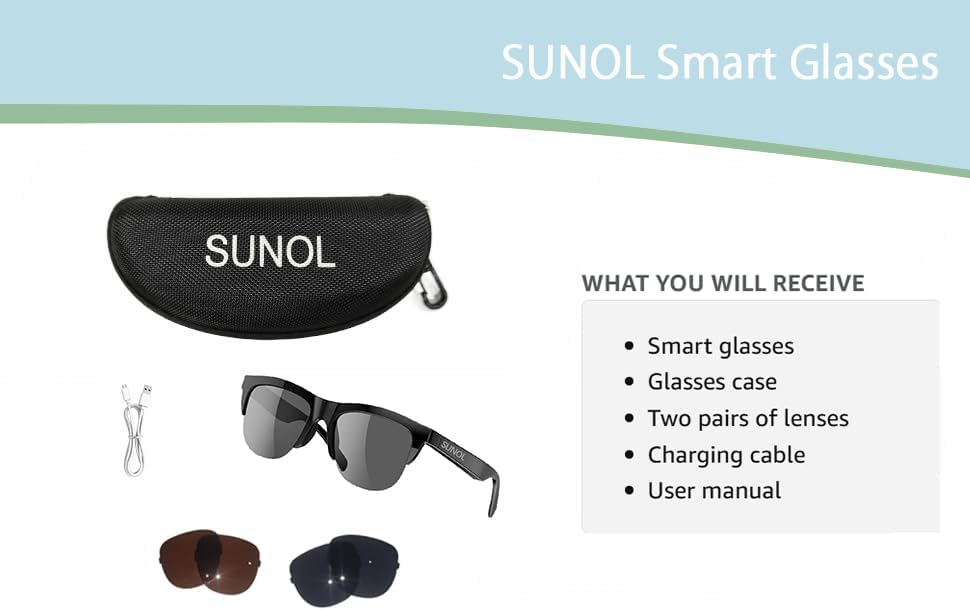
Image: Detailed diagram of touch control functions.
5.1 Елементи керування відтворенням музики
- Відтворення/пауза: In standby state or during playback, double-click the multi-function touch area to play or pause the audio.
- Next Song/Content: Triple-click the multi-function touch area.
- Previous Song/Content: Long press the multi-function touch area for 1.5 seconds.
5.2 Керування викликами
- Відповісти/покласти трубку: When an incoming call is received, double-click the multi-function touch area to answer. Double-click again to hang up.
- Відхилити виклик: Long press the multi-function touch area for 1.5 seconds to reject an incoming call.
6. Заміна лінз
The SUNOL F06 Smart Glasses come with interchangeable lenses, allowing you to switch between different colors or types as needed. Follow the instructions in the video below to safely replace the lenses.
Video: Demonstrating the process of replacing the lenses on the SUNOL F06 Smart Glasses.
Примітка: Handle lenses carefully to avoid scratches. Ensure they are securely seated in the frame after replacement.
7. Технічне обслуговування
Proper maintenance will extend the lifespan of your smart glasses:
- Очищення лінз: Use the provided lens cloth or a soft, clean microfiber cloth to wipe the lenses. Avoid using abrasive materials or harsh chemicals.
- Рамка для очищення: Протріть рамку м’якою серветкоюamp cloth. Do not submerge the glasses in water, despite their waterproof rating, to prevent damage to electronic components.
- Зберігання: When not in use, store the glasses in the provided storage case to protect them from dust, scratches, and impacts.
- Догляд за акумулятором: Avoid extreme temperatures. If storing for a long period, charge the battery to about 50% to maintain battery health.
8. Вирішення проблем
If you encounter issues with your SUNOL F06 Smart Glasses, refer to the following common solutions:
| проблема | Можлива причина | Рішення |
|---|---|---|
| Окуляри не вмикаються. | Низький заряд батареї; кнопка живлення натиснута неправильно. | Charge the glasses fully. Press and hold the touch area for 3 seconds until "Power on" is heard. |
| Не вдається з’єднати пристрій. | Bluetooth not enabled; glasses not in pairing mode; interference. | Ensure Bluetooth is enabled on your device. Power off and on the glasses to re-enter pairing mode. Move closer to your device. Forget previous pairings on your device. |
| Немає звуку або гучність низька. | Volume too low; not connected; audio source issue. | Increase volume on both glasses and connected device. Ensure glasses are properly paired. Check audio source on your device. |
| Якість дзвінків погана. | Weak Bluetooth signal; environmental noise. | Move closer to your connected device. Reduce background noise if possible. |
| Сенсорне керування не реагує. | Тимчасовий програмний збій; брудна сенсорна область. | Restart the glasses. Clean the touch control area with a soft, dry cloth. |
9. Технічні характеристики
| Особливість | Деталь |
|---|---|
| Номер моделі | F06 |
| Бренд | SUNOL |
| Версія Bluetooth | 5.3 |
| Тип батареї | Літій-полімерний (потрібен 1, в комплекті) |
| Рейтинг водонепроникності | XP4 Life Waterproof |
| Тип об'єктива | UV Filtered, Interchangeable (Brown and Black) |
| Спосіб контролю | Сенсорне керування |
| Аудіовихід | Open Ear HIFI Audio, Dual Speaker Design |
| Розміри | 7.4 x 2.91 x 2.56 дюймів (розміри упаковки) |
| вага | 1.06 унцій (вага упаковки) |
| Виробник | SUNOL |
| Країна походження | Китай |

Image: Physical dimensions of the smart glasses.
10. Гарантія та підтримка
Щоб отримати інформацію про гарантію та підтримку клієнтів, зверніться до документації, що додається до вашої покупки, або зверніться безпосередньо до виробника. Зберігайте чек про покупку для будь-яких гарантійних претензій.
Manufacturer: SUNOL
For further assistance, please visit the official SUNOL webсайту або зв’яжіться зі своїм відділом обслуговування клієнтів.


