1. Вступ
The ATTACK SHARK G6 Gaming Mouse is a versatile peripheral designed for both gaming and daily productivity. It offers three distinct connection modes: wired, 2.4G wireless, and Bluetooth, ensuring reliable and accurate transmission across various devices. Its ergonomic design, adjustable DPI settings, and customizable RGB lighting provide a tailored user experience.

Figure 1: The ATTACK SHARK G6 Gaming Mouse (Blue/White) with its USB receiver.
2. особливості
- Трирежимне підключення: Seamlessly switch between wired (USB-C), 2.4G wireless (via USB receiver), and Bluetooth connections for maximum flexibility.
- Регульований DPI: Features 5 adjustable DPI levels (1200/1600/2000/2400/4000) for precise control and responsiveness, suitable for various tasks from detailed work to fast-paced gaming.
- 11 Chroma RGB Lighting Modes: Customize your setup with 11 distinct RGB lighting effects, enhancing your gaming atmosphere.
- 10 програмованих кнопок: Equipped with 10 function buttons, strategically placed for easy access, allowing for quick actions like light changes, one-click web access, and navigation.
- Ергономічний дизайн: Specifically designed for right-hand users with a comfortable thumb rest, reducing fatigue during extended use.
- Кнопки безшумного натискання: Left and right buttons feature a silent click design, minimizing noise and preventing disturbance to others.
- Акумуляторна батарея: Built-in 500mAh lithium battery, rechargeable via Type-C, providing long-lasting use on a single charge (approx. 3-4 hours for full charge).
- Широка сумісність: Compatible with Windows, Mac, Android, and other operating systems, ensuring broad usability.

Малюнок 2: Закінченоview of the 10 programmable buttons and ergonomic finger rests.
3. Вміст упаковки
Будь ласка, перевірте вміст упаковки після розпакування, щоб переконатися в наявності всіх елементів:
- ATTACK SHARK G6 Gaming Mouse
- Бездротовий USB 2.4G приймач
- Зарядний кабель USB-C
- Посібник користувача (цей документ)
4. Налаштування
4.1. Заряджання миші
Before first use, it is recommended to fully charge the mouse. Connect the supplied USB-C charging cable to the mouse's Type-C port and the other end to a USB power source (e.g., computer USB port, USB wall adapter). The charging indicator will show status (refer to LED indicator section for details). A full charge typically takes 3-4 hours.

Figure 3: Charging the G6 Gaming Mouse via its Type-C port.
4.2. Режими підключення
The G6 mouse supports three connection methods:
- Бездротовий режим 2.4G:
- Locate the USB 2.4G wireless receiver, usually stored in a compartment on the underside of the mouse.
- Підключіть приймач до вільного порту USB на комп’ютері.
- Увімкніть мишу за допомогою вимикача живлення на її нижній стороні. Миша має підключитися автоматично.
- Режим Bluetooth:
- Turn on the mouse and switch it to Bluetooth mode (refer to the switch on the underside).
- На своєму пристрої (комп’ютері, планшеті, телефоні) перейдіть до налаштувань Bluetooth та знайдіть нові пристрої.
- Select "ATTACK SHARK G6" (or similar name) from the list to pair.
- Провідний режим:
- Connect the supplied USB-C cable to the mouse's Type-C port.
- Під’єднайте інший кінець кабелю до USB-порту комп’ютера.
- The mouse will function immediately in wired mode and will also charge simultaneously.
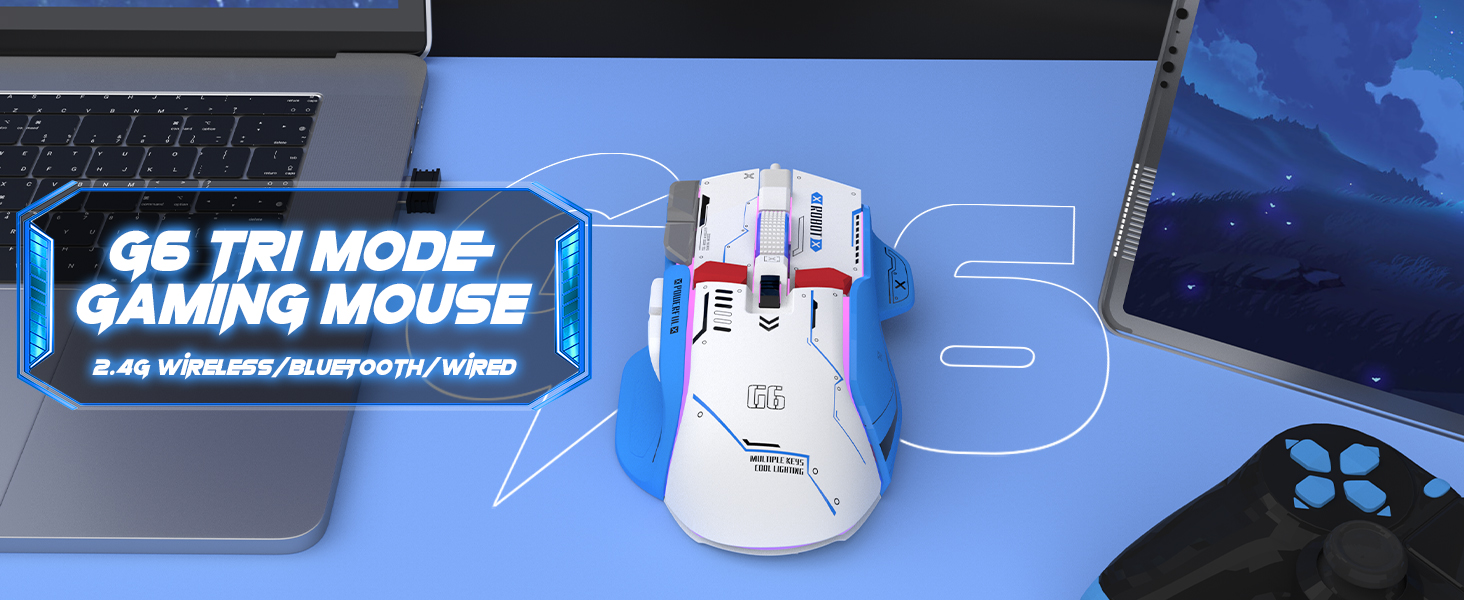
Figure 4: The G6 mouse supports 2.4G wireless, Bluetooth, and wired connections.
5. Інструкція з експлуатації
5.1. Налаштування роздільної здатності
The G6 mouse features a dedicated DPI button (refer to Figure 2 for location) to cycle through 5 adjustable DPI levels: 1200, 1600, 2000, 2400, and 4000. Press the DPI button to switch between sensitivity settings to match your preference or game requirements.
5.2. Керування RGB-підсвічуванням
The mouse offers 11 Chroma RGB lighting modes. Use the dedicated Light Control button (refer to Figure 2) to cycle through the different lighting effects. To turn off the RGB lighting, continue pressing the button until the lights are off, or refer to the software if available for more advanced control.

Figure 5: The G6 mouse features 11 kinds of RGB backlight modes.
5.3. Функції кнопок
The G6 mouse has 10 function buttons. Their default functions are:
- Клацніть лівою кнопкою миші: Стандартна ліва кнопка миші.
- Клацніть правою кнопкою миші: Standard right mouse button (silent click).
- Колесо прокрутки: Прокручування вгору/вниз, клацання середньою кнопкою миші.
- Кнопка DPI: Перемикає налаштування DPI.
- Кнопка керування світлом: Cycles through RGB lighting modes.
- Кнопка вперед: Переміщується вперед web браузери/папки.
- Кнопка "Назад": Переміщується назад web браузери/папки.
- Кнопка вогню: Rapid fire function (default, may be programmable).
- Кнопка на робочому столі: One-click access to desktop.
- Webpage Button: One-click access to web браузер.

Малюнок 6: Детально view of key features including finger rests and Type-C port.

Figure 7: The silent click feature ensures quiet operation, ideal for shared spaces.
6. Технічне обслуговування
To ensure the longevity and optimal performance of your ATTACK SHARK G6 Gaming Mouse, follow these maintenance guidelines:
- Прибирання: Використовуйте м’яку суху тканину для протирання поверхні миші. Для стійкого бруду злегкаamp cloth with mild soap can be used, but ensure no liquid enters the mouse. Do not use harsh chemicals or abrasive materials.
- Зберігання: Зберігайте мишу в прохолодному, сухому місці, подалі від прямих сонячних променів та екстремальних температур.
- Уникайте крапель: Захищайте мишу від падінь та ударів, які можуть пошкодити внутрішні компоненти.
- Догляд за кабелем: When using wired mode or charging, handle the USB-C cable carefully to prevent bending or fraying.
7. Вирішення проблем
If you encounter issues with your ATTACK SHARK G6 Gaming Mouse, please refer to the following common solutions:
| проблема | Можливе рішення |
|---|---|
| Mouse not responding (Wireless/Bluetooth) |
|
| Параметри DPI не змінюються |
|
| RGB-підсвічування не працює або зависає |
|
| Затримка або переривчасте з'єднання |
|
7.1. Відеогід з продукту
For a visual guide on the mouse's features and operation, please watch the official product video:
Video: G6 Wireless/wired/bluetooth gaming mouse. This video demonstrates the RGB lighting effects and general appearance of the G6 gaming mouse in different colors.
8. Технічні характеристики
| Особливість | Деталь |
|---|---|
| Бренд | АТАКА АКУЛИ |
| Номер моделі | G6 |
| Технологія підключення | Bluetooth, Wired, Wireless (2.4G) |
| Технологія виявлення руху | Оптичний |
| Регульований рівень DPI | 1200/1600/2000/2400/4000 |
| Режими RGB | 11 Chroma RGB modes |
| Кількість кнопок | 10 |
| Ємність акумулятора | Перезаряджуваний літієвий акумулятор 500 мАг |
| Порт зарядки | Тип-C |
| Вага товару | 7.4 унції (приблизно 210 грамів) |
| Розміри упаковки | 6.38 x 5.43 x 2.13 дюймів |
| Сумісність | Windows, Mac, Android, iOS |
9. Гарантія та підтримка
ATTACK SHARK products are designed and manufactured to the highest quality standards. This product is covered by a limited warranty from the date of purchase. For detailed warranty terms, technical support, or customer service inquiries, please contact your retailer or visit the official ATTACK SHARK webсайт.
Інтернет-підтримка: Visit the ATTACK SHARK Store on Amazon


