вступ
The Neumann MT 48 is a premium desktop USB-C audio interface designed for professional audio production. It features a high-resolution touchscreen, comprehensive MIDI, AES67, and ADAT/S/PDIF connectivity, offering exceptional audio quality and versatile control for studio and home recording environments. This manual provides essential information for setting up, operating, and maintaining your MT 48 interface.
Вміст упаковки
Будь ласка, переконайтеся, що всі предмети присутні у вашій упаковці:
- Neumann MT 48 Desktop USB-C Audio/MIDI Interface
- 1x кабель передачі даних USB-C
- 1x USB-A Data Cable
- 1x Power Supply with USB-C Cable
- 1x Soft Case
- 1x XLR-XLR Cable
- MDR-7506 Headphones (if part of bundle)
- 1x 1/4" Adapter (for headphones)

Image: Neumann MT 48 audio interface securely placed within its custom-fit soft case, ready for transport or storage.
Налаштування
1. Встановлення драйвера
Before connecting your MT 48, download and install the latest drivers and control software from the official Neumann website. This ensures optimal performance and compatibility with your operating system (Windows, macOS).
2. Потужність і підключення
Connect the MT 48 to your computer using the provided USB-C data cable. For stable operation and to power the unit, connect the included power supply to the dedicated USB-C power input and a wall outlet. The MT 48 features a power switch for easy on/off control.

Image: The rear panel of the Neumann MT 48, highlighting the diverse range of connectivity options including XLR/TRS combo inputs, line outputs, optical I/O, MIDI, and USB-C ports.
3. Підключення аудіопристроїв
- Мікрофонні/лінійні входи: Use the 2 x Combo XLR-1/4" Mic/Line Preamps on the rear panel for microphones or line-level instruments.
- Instrument/Line Inputs: Utilize the 2 x 1/4" Hi-Z Instrument/Line Inputs on the front panel for guitars, basses, or other high-impedance instruments.
- Навушники: Connect your headphones to the dual 1/4" headphone outputs on the front panel.
- Монітори: Connect your studio monitors to the main line outputs on the rear panel.
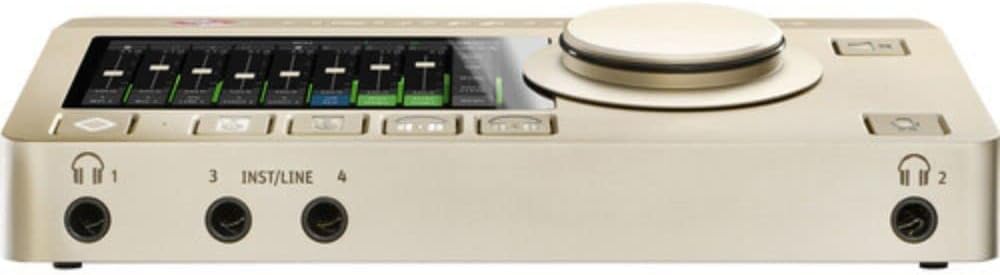
Image: The front of the Neumann MT 48, featuring two headphone jacks and two instrument/line inputs for easy access during recording sessions.
Operating the MT 48
1. Інтерфейс сенсорного екрана
The MT 48 features an intuitive touchscreen display for direct control over all settings. Navigate through menus, adjust levels, and configure DSP effects with ease. The large rotary encoder provides precise control for selected parameters.

Image: The Neumann MT 48's touchscreen displaying a multi-channel mixer interface, allowing for real-time adjustments of audio levels and routing.
2. DSP Processing
The MT 48 includes powerful onboard DSP (Digital Signal Processing) with four internal mixers. This allows for sophisticated EQ, dynamics processing (compression, gates), and reverb directly within the interface, reducing latency and offloading processing from your computer. You can record both raw and processed signals simultaneously to separate tracks in your DAW.
3. Monitor Control and Talkback
Utilize the dedicated monitor control features for precise listening levels. The integrated talkback function allows for clear communication with artists in a separate recording booth, enhancing workflow efficiency.
4. Виходи для навушників
The dual headphone outputs offer extremely low impedance, allowing them to drive virtually any set of headphones to high volumes with exceptional clarity. This is crucial for accurate monitoring during recording and mixing.
Технічне обслуговування
To ensure the longevity and optimal performance of your Neumann MT 48, follow these maintenance guidelines:
- Прибирання: Використовуйте м’яку суху тканину для очищення зовнішньої частини пристрою. Уникайте абразивних засобів для чищення або розчинників.
- Вентиляція: Ensure the ventilation openings on the sides of the unit are not obstructed to prevent overheating. The MT 48 features a built-in fan for thermal management.
- Зберігання: When not in use, store the MT 48 in its soft case to protect it from dust and physical damage.
- Оновлення програмного забезпечення: Регулярно перевіряйте Неймана website for firmware and software updates to benefit from new features and performance improvements.

Зображення: Side profile of the Neumann MT 48, highlighting the ventilation grilles designed to ensure proper airflow and prevent overheating during operation.
Усунення несправностей
If you encounter issues with your Neumann MT 48, consider the following steps:
- Немає живлення: Ensure the power supply is securely connected to both the MT 48 and a working power outlet. Check the power switch on the rear panel.
- Без звуку: Verify all audio cables are correctly connected. Check input/output routing in the MT 48's touchscreen interface and your DAW. Ensure volume levels are appropriately set.
- Проблеми з драйверами: Reinstall the latest drivers from the Neumann website. Try connecting the MT 48 to a different USB port on your computer.
- Програмні збої: Restart your computer and the MT 48. Close and reopen your DAW.
- Спотворений звук: Check input gain levels to prevent clipping. Ensure sample rates and buffer sizes are correctly configured in your DAW and the MT 48 settings.
For further assistance, refer to the comprehensive user manual available on the Neumann website or contact Neumann customer support.
Технічні характеристики
- Вага товару: 2.1 фунта
- Розміри упаковки: 15 x 7 x 4 дюймів
- Технологія підключення: USB-C
- Апаратний інтерфейс: USB
- Кількість каналів: 48 (internal mixing channels)
- Перетворення AD/DA: 24-біт / 192 кГц
- Мікрофон/лінія Preamps: 2 x Combo XLR-1/4"
- Instrument/Line Inputs: 2 x 1/4" Hi-Z
- Додаткові можливості підключення: MIDI I/O, ADAT / S/PDIF, AES67
- Особливості DSP: 4 Mixers, Talkback, Monitor Control, EQ, Dynamics, Reverb
- Сумісні пристрої: Персональний комп'ютер
- Підтримуване програмне забезпечення: Windows, USB-compatible DAWs and audio-related software
- Операційна система: Windows (and macOS with appropriate drivers)
Гарантія та підтримка
The Neumann MT 48 comes with a manufacturer's warranty. Please refer to the warranty card included in your package or visit the official Neumann website for detailed warranty terms and conditions. For technical support, product registration, or service inquiries, please visit the Neumann support page or contact their customer service team directly.
Інтернет-ресурси: For the most up-to-date information, drivers, and additional resources, please visit the official Neumann webсайт: www.neumann.com


