вступ
This manual provides comprehensive instructions for the installation, operation, and maintenance of your Natec Cabassu G2 Midi Tower PC Case. Please read this manual thoroughly before beginning installation to ensure proper setup and optimal performance.
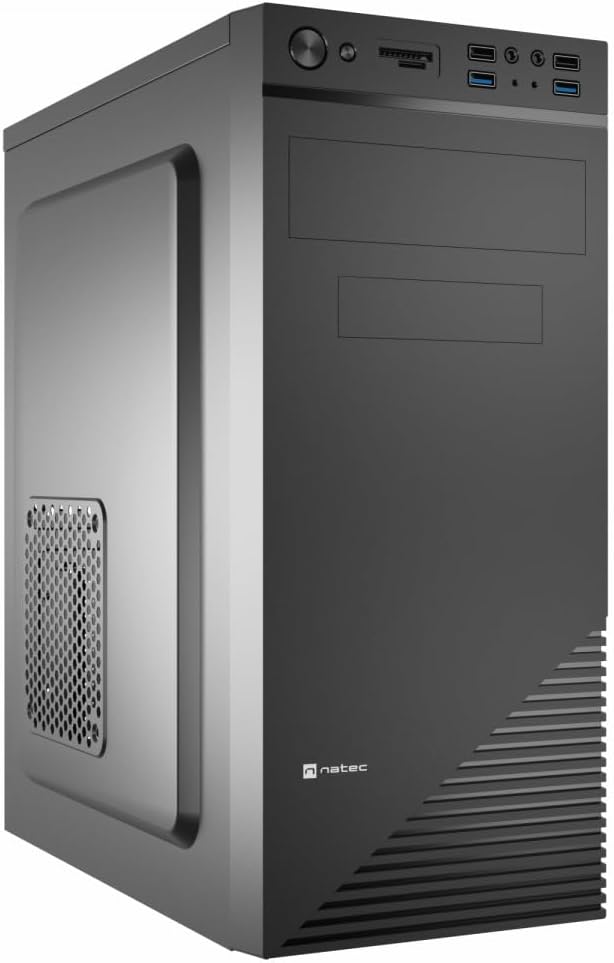
Figure 1: Natec Cabassu G2 Midi Tower PC Case. This image shows the front and left side of the black PC case, highlighting its sleek design and front panel layout.
Інформація про безпеку
- Завжди від’єднуйте блок живлення від розетки перед встановленням або видаленням будь-яких компонентів.
- Handle components with care to prevent damage from static electricity.
- Тримайте корпус подалі від води, вологи та екстремальних температур.
- Забезпечте належну вентиляцію, щоб запобігти перегріву.
- Do not attempt to open the power supply unit.
Вміст упаковки
Перевірте наявність усіх елементів в упаковці:
- Natec Cabassu G2 Midi Tower PC Case
- Комплект аксесуарів (гвинти, стійки, кабельні стяжки)
- Посібник користувача (цей документ)
Налаштування та встановлення компонентів
1. Підготовка справи
- Поставте корпус на рівну, стійку поверхню.
- Remove the side panels by unscrewing the thumbscrews at the rear and sliding the panels backward.

Рисунок 2: Інтер'єр view of the Natec Cabassu G2 case with the side panel removed, illustrating the internal layout for component installation.
2. Встановлення материнської плати
- Встановіть екран вводу/виводу в задній отвір корпусу.
- Align the motherboard with the pre-installed standoffs. The Cabassu G2 supports Mini ITX, Micro ATX, and ATX motherboards.
- Закріпіть материнську плату за допомогою наданих гвинтів.
3. Установка джерела живлення
- Блок живлення монтується в нижній частині корпусу.
- Slide the power supply into its designated bay from the rear of the case.
- Secure it with screws from the rear.
4. Встановлення накопичувача
- 2.5" Drives (SSDs/HDDs): The case features 3 x 2.5" drive bays. Mount drives using the provided screws in the designated locations.
- 3.5" Drives (HDDs): The case also supports 3.5" drives.
5. Встановлення плати розширення
- Remove the necessary expansion slot covers from the rear of the case (7 expansion slots available).
- Вставте відеокарту або інші карти розширення у слоти PCIe материнської плати.
- Закріпіть карти гвинтами.

Малюнок 3: Задня частина view of the Natec Cabassu G2 case, detailing the I/O shield cutout, power supply opening, and seven expansion slots.
6. Кабельний менеджмент
Route cables behind the motherboard tray where possible to improve airflow and aesthetics. Use the included cable ties to secure bundles.
7. Підключення кабелів передньої панелі
Connect the front panel cables (USB 2.0, USB 3.0, audio, power switch, reset switch, HDD LED, power LED) to the corresponding headers on your motherboard. Refer to your motherboard manual for exact pin assignments.

Figure 4: Close-up of the Natec Cabassu G2 front panel, showing 2x USB 2.0 ports, 2x USB 3.0 ports, audio jacks, and power/reset buttons.
Інструкція з експлуатації
Увімкнення/вимкнення
- Увімкнення: Натисніть кнопку живлення, розташовану на передній панелі.
- Вимкнення живлення: Initiate shutdown through your operating system. For a forced shutdown, press and hold the power button for several seconds.
- Скинути: Press the reset button on the front panel to restart the system.
Using Front Panel Ports
Передня панель забезпечує зручний доступ до:
- 2 порти USB 2.0
- 2 порти USB 3.0
- Audio input (microphone) and output (headphone) jacks
Connect compatible devices to these ports as needed.
Технічне обслуговування
прибирання
- Регулярно очищуйте зовнішню частину корпусу м’якою губкоюamp тканина. Уникайте абразивних очищувачів.
- Use compressed air to remove dust from fan filters and internal components. Ensure the system is powered off and unplugged before cleaning.
Пилові фільтри
The case may include removable dust filters. Periodically remove and clean these filters to maintain optimal airflow and cooling performance.
Усунення несправностей
| проблема | Можлива причина | Рішення |
|---|---|---|
| Система не вмикається. | Power cables not connected properly. Faulty power supply. | Check all power connections (motherboard, CPU, GPU, power supply to wall). Ensure power supply switch is ON. |
| USB-порти на передній панелі не працюють. | Front panel USB cables not connected to motherboard. | Verify that the USB 2.0 and USB 3.0 headers are correctly connected to the motherboard. |
| Надмірний шум вентилятора. | Dust accumulation. Loose fan. | Clean dust from fans and filters. Ensure all fans are securely mounted. |
Технічні характеристики
| Особливість | Деталь |
|---|---|
| Назва моделі | Cabassu G2 |
| Номер моделі товару | S5624687 |
| Тип корпусу | Міді Тауер |
| Розміри (ДxШxВ) | 19.69 x 19.69 x 11.02 дюйми (50 x 50 x 28 см) |
| вага | 7.04 фунта (3.19 кг) |
| матеріал | Акрилонітрилбутадієнстирол (АБС), легована сталь |
| Сумісність материнської плати | Міні-ITX, мікро-ATX, ATX |
| Відсіки для накопичувачів 2.5 дюйма | 3 |
| Слоти розширення | 7 |
| Передні порти вводу-виводу | 2 x USB 2.0, 2 x USB 3.0, Audio In/Out |
| Підтримка фанів | 120mm (rear, pre-installed if applicable) |
| Спосіб охолодження | повітря |
| Монтаж джерела живлення | Нижнє кріплення |
Інформація про гарантію
Natec products are covered by a manufacturer's warranty. Specific warranty terms and conditions may vary by region and retailer. Please refer to the warranty card included with your product or visit the official Natec website for detailed information regarding warranty coverage and claims.
Підтримка
For technical assistance, troubleshooting, or further inquiries, please visit the official Natec support webсайт або зверніться до відділу обслуговування клієнтів. Контактну інформацію зазвичай можна знайти на упаковці продукту або на офіційному сайті бренду webсайт.
Webсайт: www.natec-zone.com (Вихampпосилання, фактичне посилання може відрізнятися)


