1. Продукт закінчивсяview
The HP EliteDesk 800 G6 Mini Business Desktop is a compact and powerful computing solution designed for business environments. It features an Intel Core i5-10500T vPro Processor, 16GB of high-bandwidth RAM, and a 256GB PCIe NVMe M.2 Solid State Drive, ensuring efficient performance for demanding applications and multitasking. This mini PC comes pre-installed with Windows 11 Pro, offering enhanced productivity and security features.
Its small form factor allows for versatile placement, while comprehensive connectivity options, including Wi-Fi 6, multiple USB ports, and DisplayPort outputs, support a wide range of peripherals and display configurations.

Малюнок 1: Спереду view of the HP EliteDesk 800 G6 Mini Business Desktop.
2. Посібник із налаштування
2.1 Розпакування та розміщення
- Carefully remove the HP EliteDesk 800 G6 Mini PC and all accessories from the packaging.
- Place the mini PC on a stable, flat surface with adequate ventilation. Ensure no vents are obstructed.
2.2 Підключення периферійних пристроїв
Підключіть монітор(и), клавіатуру, мишу та інші необхідні периферійні пристрої до відповідних портів на міні-ПК.

Figure 2: Front panel ports and indicators. Includes a Type-C SuperSpeed USB 10Gbps signaling rate port, two Type-A SuperSpeed USB ports (one 10Gbps, one 5Gbps with Fast Charging), a Universal Audio Jack, a power button, and a hard drive activity light.
- Дисплей: Connect your monitor(s) to the DisplayPort outputs on the rear of the device. The system supports up to three DisplayPort connections.
- USB пристрої: Connect your keyboard, mouse, and other USB devices to the available USB Type-A or Type-C ports. The front panel includes one USB Type-C 3.2 port and two USB Type-A 3.2 ports. The rear panel provides additional USB Type-A 3.2 ports.
- Мережа: For wired network access, connect an Ethernet cable to the RJ45 port. For wireless connectivity, the system supports Intel Wi-Fi 6.
- Аудіо: Use the Universal Audio Jack (headphone/microphone combo) on the front panel for audio input/output.
2.3 Підключення живлення та перше завантаження
- Connect the HP 65W DM External Power Supply to the power input on the mini PC, then plug the power cable into a wall outlet.
- Натисніть кнопку живлення на передній панелі, щоб увімкнути пристрій.
- Дотримуйтесь інструкцій на екрані, щоб завершити початкове налаштування Windows 11 Pro.
3. Інструкція з експлуатації
3.1 Увімкнення/вимкнення та перезапуск
- Увімкнення: Натисніть кнопку живлення на передній панелі пристрою.
- Вимкнути: Натисніть кнопку «Пуск» у Windows 11, а потім виберіть «Живлення» > «Вимкнути систему».
- Перезапуск: Натисніть кнопку «Пуск» у Windows 11, а потім виберіть «Живлення» > «Перезавантажити».
3.2 Функції Windows 11 Pro
The HP EliteDesk 800 G6 comes with Windows 11 Pro, offering features designed to enhance productivity and collaboration:
- Snap Layouts: Organize open applications with pre-configured layouts for efficient multitasking.
- Інтеграція з Microsoft Teams: Collaborate effectively with integrated communication tools.
- Покращена безпека: Benefit from advanced security features inherent in Windows 11 Pro.
3.3 Підключення до мережі
- Wi-Fi 6: To connect to a wireless network, click the network icon in the taskbar, select your Wi-Fi network, and enter the password.
- Дротовий Ethernet: Ensure an Ethernet cable is connected to the RJ45 port for a stable wired connection.
4. Технічне обслуговування
4.1 Очищення пристрою
- Regularly clean the exterior of the mini PC with a soft, dry, lint-free cloth.
- Ensure vents are free from dust accumulation to maintain optimal airflow and prevent overheating. Use compressed air if necessary, holding the can upright.
- Не використовуйте рідкі засоби для чищення або аерозольні спреї безпосередньо на пристрої.
4.2 Оновлення програмного забезпечення
- Регулярно перевіряйте наявність оновлень у своїй операційній системі Windows 11 Pro через меню «Налаштування» > «Центр оновлення Windows».
- Ensure HP drivers and firmware are up-to-date. Visit the official HP support website for your model to download the latest updates.
4.3 Резервне копіювання даних
Регулярно створюйте резервні копії важливих даних на зовнішній диск або хмарне сховище, щоб запобігти їх втраті.
5. Вирішення проблем
У цьому розділі розглядаються поширені проблеми, які можуть виникнути під час використання міні-ПК HP EliteDesk 800 G6.
5.1 Проблеми з живленням
- Немає живлення: Ensure the power adapter is securely connected to both the mini PC and a working power outlet. Check the power adapter for any damage.
- Неочікувані вимкнення: Verify that the mini PC has adequate ventilation and is not overheating. Ensure all cables are securely connected. If the issue persists, contact HP Support.
5.2 Проблеми з дисплеєм
- Немає дисплея: Confirm that the monitor is powered on and the display cable (DisplayPort) is securely connected to both the mini PC and the monitor. Try a different display cable or monitor if available.
5.3 Проблеми з підключенням
- Без Wi-Fi: Check if Wi-Fi is enabled in Windows settings. Ensure your router is functioning correctly and the mini PC is within range.
- No Wired Network: Verify the Ethernet cable is properly connected and your network router/switch is operational. Check network adapter settings in Windows.
5.4 Проблеми з продуктивністю
- Повільна продуктивність: Закрийте непотрібні програми. Перевірте диспетчер завдань на наявність процесів, які споживають багато ресурсів процесора або оперативної пам’яті. Переконайтеся, що на SSD достатньо вільного місця.
6. Технічні характеристики
Detailed technical specifications for the HP EliteDesk 800 G6 Mini Business Desktop.
| Особливість | Специфікація |
|---|---|
| Процесор | Intel Core i5-10500T vPro (6 Cores, 12 Threads, 2.30GHz Base, up to 3.80GHz Max Turbo) |
| Графіка | Графіка Intel UHD 630 (інтегрована) |
| ОЗУ | 16 ГБ DDR4 SDRAM |
| Зберігання | Твердотільний накопичувач PCIe NVMe M.2 ємністю 256 ГБ |
| Операційна система | Windows 11 Pro |
| Передні порти | 1x USB Type-C 3.2, 2x USB Type-A 3.2 (one with Fast Charging), 1x Headphone/Microphone Combo |
| Задні порти | 4x USB Type-A 3.2, 1x RJ45, 3x DisplayPort, 1x Power Supply |
| Бездротове підключення | Intel Wi-Fi 6 2x2 (Gig+), Bluetooth 5.2 |
| Джерело живлення | Зовнішній блок живлення HP 65 Вт DM |
| Розміри (ШxГxВ) | 6.97 дюйма x 6.89 дюйма x 1.35 дюйма (17.7 см x 17.5 см x 3.4 см) |
| вага | 3.13 фунти (1.42 кг) |
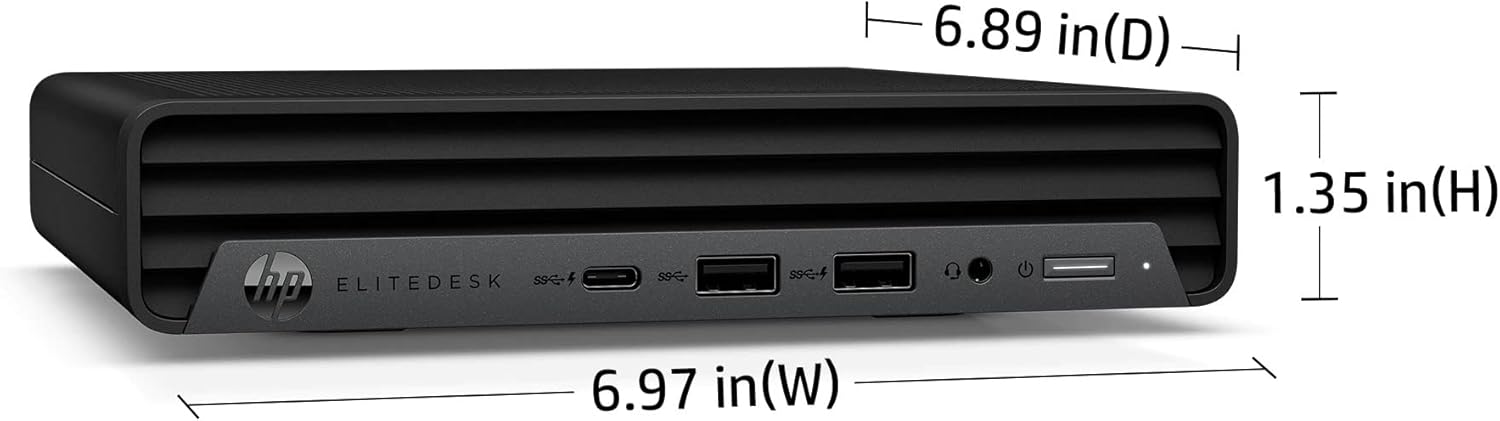
Figure 3: Dimensions of the HP EliteDesk 800 G6 Mini PC: 6.97 inches (W), 6.89 inches (D), 1.35 inches (H).
7. Гарантія та підтримка
7.1 Гарантія на виріб
This HP product is covered by a standard limited warranty. For specific terms and conditions, please refer to the warranty documentation included with your purchase or visit the official HP support webсайт. Гарантія зазвичай покриває дефекти матеріалів та виготовлення за умов нормального використання.
7.2 Технічна підтримка
For technical assistance, troubleshooting, or service requests, please contact HP Support. You can find contact information and online resources, including drivers, manuals, and FAQs, on the official HP webсайт: www.hp.com/support.