1. Вступ
This user manual provides essential information for the safe and efficient operation of your HYCHIKA 3.6V Cordless Electric Rechargeable Screwdriver Drill Set. Please read this manual thoroughly before first use and keep it for future reference.
The HYCHIKA 3.6V Cordless Electric Screwdriver is designed for various screwing and light drilling tasks around the home. It features a maximum torque of 6 N-m, a 6.35 mm quick-change chuck, and a versatile design that allows for both pistol and straight grip configurations.
2. Техніка безпеки
Завжди дотримуйтесь основних запобіжних заходів під час використання електроінструментів, щоб зменшити ризик пожежі, ураження електричним струмом та травмування.
- Безпека на робочому місці: Тримайте своє робоче місце чистим і добре освітленим. Захаращені або темні місця призводять до нещасних випадків. Не використовуйте електроінструменти у вибухонебезпечних середовищах, наприклад, у присутності легкозаймистих рідин, газів або пилу.
- Електрична безпека: Уникайте контакту тіла із заземленими поверхнями, такими як труби, радіатори, плити та холодильники. Не піддавайте електроінструменти впливу дощу або вологи.
- Особиста безпека: Always wear eye protection. Use safety glasses, goggles, or a face shield. Wear hearing protection when operating noisy tools. Dress properly; avoid loose clothing or jewelry.
- Використання та догляд за інструментом: Не застосовуйте силу до електроінструменту. Використовуйте правильний електроінструмент для вашого застосування. Від’єднайте штекер від джерела живлення та/або вийміть акумуляторний блок, перш ніж виконувати будь-які налаштування, змінювати аксесуари або зберігати електроінструменти.
- Використання та догляд за акумуляторною батареєю: Заряджайте лише зарядним пристроєм, зазначеним виробником. Не використовуйте акумуляторні блоки з іншими електроінструментами. Коли акумуляторний блок не використовується, тримайте його подалі від інших металевих предметів.
3. Вміст упаковки
Перевірте, чи всі перелічені нижче предмети входять до вашої упаковки. Якщо будь-які предмети відсутні або пошкоджені, зверніться до служби підтримки клієнтів.
- 1 x HYCHIKA 3.6V Cordless Screwdriver
- 19 біт для викрутки
- 1 х подовжувач
- 1 x зарядний адаптер
- 1 х посібник користувача

Figure 3.1: Contents of the HYCHIKA 3.6V Cordless Screwdriver package, including the screwdriver, various bits, and charging adapter.
4. Характеристики та компоненти продукту
Familiarize yourself with the different parts of your cordless screwdriver.

Figure 4.1: Key components of the screwdriver, including the magnetic chuck, PUSH button, front LED light, On/Off switch, LED charger indicator, 3.5mm charger port, and forward & reverse button.
- Magnetic Chuck: 1/4 inch (6.35mm) quick-change chuck for easy bit installation and removal.
- Переднє світлодіодне освітлення: Illuminates the work area for improved visibility in dark environments.
- Вмикання/вимкнення: Activates and deactivates the screwdriver.
- Forward & Reverse Button: Controls the rotation direction for screwing and unscrewing.
- LED Charger Indicator: Provides status of battery charging.
- 3.5mm Charger Port: Connection point for the charging adapter.
- Нажимна Кнопка: Used to adjust the grip configuration from pistol to straight.
5. Налаштування
5.1 Заряджання батареї
The screwdriver is powered by a 3.6V 2000 mAh Lithium-Ion battery. Before first use, fully charge the battery.
- Connect the charging adapter to the 3.5mm charger port on the screwdriver.
- Plug the charging adapter into a standard electrical outlet.
- The LED charger indicator will illuminate during charging. Once fully charged, the indicator may change color or turn off depending on the model.
- Від’єднайте зарядний пристрій після завершення заряджання.

Figure 5.1: The screwdriver connected to its charging adapter, indicating a full charge.
The screwdriver is designed to maintain full power output even when the battery is low, ensuring consistent performance until the battery is depleted.
5.2 Встановлення викруткових біт
The screwdriver features a 1/4 inch (6.35mm) magnetic quick-change chuck for easy bit installation.
- Виберіть відповідну насадку для викрутки для вашого завдання.
- Insert the bit into the magnetic chuck until it is securely seated. The magnetic chuck will hold the bit firmly in place.
- To remove a bit, simply pull it out of the chuck. Bits with grooves are designed for easier removal.

Figure 5.2: Visual guide for inserting a bit into the magnetic chuck and removing it.
6. Інструкція з експлуатації
6.1 Adjusting Grip Configuration
The screwdriver can be used in two grip configurations: pistol grip or straight grip, for enhanced versatility and comfort.
- To change the grip, press and hold the "PUSH" button located at the top of the screwdriver.
- While holding the button, rotate the handle ninety degrees to switch between pistol and straight configurations.
- Release the "PUSH" button once the desired configuration is achieved. The handle will lock into place.
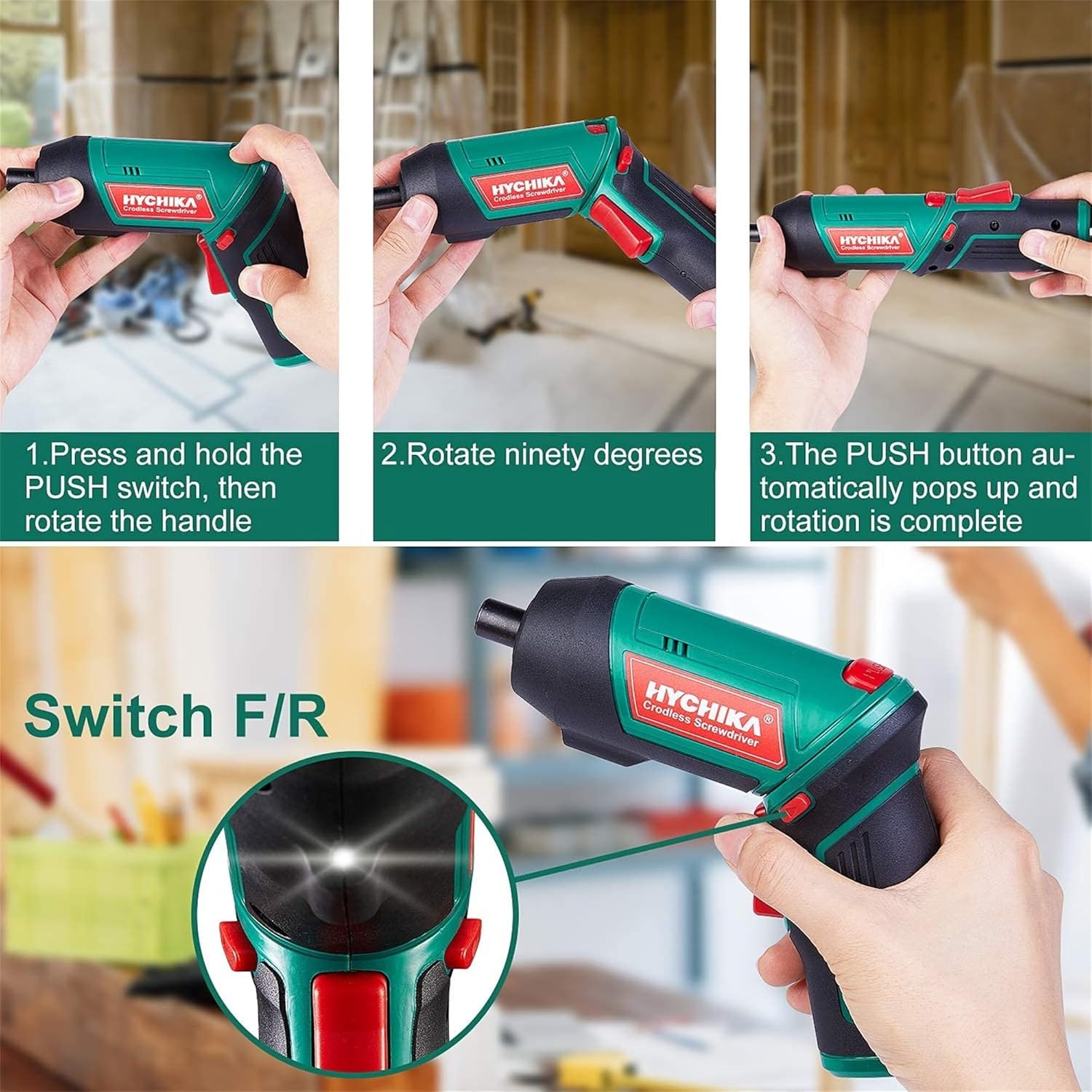
Figure 6.1: Demonstrates the process of transforming the screwdriver's grip by pressing the PUSH button and rotating the handle.
6.2 Робота вперед та назад
The forward/reverse button controls the direction of rotation for screwing and unscrewing.
- To drive screws (forward rotation), push the forward/reverse button to the left (when viewіз задньої частини інструменту).
- To remove screws (reverse rotation), push the forward/reverse button to the right.
- When the button is in the center position, the tool is locked, preventing accidental activation.
6.3 Використання світлодіодного робочого ліхтаря
The built-in LED light automatically illuminates when the screwdriver is in operation, providing visibility in dimly lit areas.

Figure 6.2: The integrated LED light provides clear illumination for working in dark environments.
7. Технічне обслуговування
Regular maintenance ensures the longevity and optimal performance of your screwdriver.
- Прибирання: Тримайте вентиляційні отвори чистими та без пилу. Використовуйте м’яку,amp тканина для очищення інструменту casing. Не використовуйте агресивні хімікати або абразивні засоби для чищення.
- Догляд за бітами: Clean screwdriver bits after use. Store them in the provided case to prevent loss and damage.
- Зберігання акумулятора: If storing the tool for an extended period, ensure the battery is partially charged (around 50%) and store it in a cool, dry place. Recharge the battery every 3-6 months to maintain its health.
- Загальний огляд: Periodically check for any loose screws, damaged cords, or worn parts. Do not use the tool if any damage is observed.
8. Вирішення проблем
This section addresses common issues you might encounter with your screwdriver.
| проблема | Можлива причина | Рішення |
|---|---|---|
| Викрутка не вмикається. | Акумулятор розрядився. Forward/Reverse switch is in the center (locked) position. | Повністю зарядіть акумулятор. Натисніть перемикач вперед/назад вліво або вправо. |
| Викрутка швидко втрачає потужність. | Акумулятор не повністю заряджений. Термін служби батареї знизився. | Перед використанням переконайтеся, що акумулятор повністю заряджений. If battery life is significantly reduced, contact customer support for replacement options. |
| Bits are not held securely in the chuck. | Bit is not fully inserted. Chuck is dirty or damaged. | Push the bit firmly into the chuck until it clicks into place. Clean the chuck area. If damage is visible, contact customer support. |
Якщо проблема не зникає після спроби цих рішень, зверніться до служби підтримки клієнтів.
9. Технічні характеристики
| Особливість | Специфікація |
|---|---|
| Бренд | Overstock (HYCHIKA) |
| Номер моделі | c131a012-0da9-4306-aeab-b1d9ff5cd4b7 |
| томtage | 3.6 вольт |
| Джерело живлення | Працює від батареї |
| швидкість | 180 об / хв |
| Пункт Крутний момент | 6 Newton Meters (6 N-m) |
| Тип батареї | Літій-іонний |
| Ємність акумулятора | 2000 мАг |
| Розмір патрона | 1/4 дюйма (6.35 мм) |
| матеріал | Пластик, Гума |
| Колір | Зелений |
| UPC | 616859793583 |
10. Гарантія та підтримка
Overstock offers lifetime after-sales service for this product. For any questions, concerns, or technical assistance, please contact our customer support team.
Please have your model number (c131a012-0da9-4306-aeab-b1d9ff5cd4b7) and purchase information ready when contacting support.


