вступ
This manual provides detailed instructions for the safe and effective operation of your ENEGON RGB Video Light. Please read this manual thoroughly before using the product and retain it for future reference.
Що в коробці
Під час розпакування переконайтеся, що всі наступні предмети присутні:
- 1 RGB Video Light
- 1 Portable Carrying Bag
- 1 1/4 гвинт
- 1 зарядний кабель Type-C
- 1 Посібник

Image: Contents of the ENEGON RGB Video Light package.
Продукт закінченийview і особливості
The ENEGON RGB Video Light is a versatile lighting solution designed for various photography and videography needs. Key features include:
- Кольорові світлові ефекти: Features 90 bi-color LED beads and 48 RGB color LED beads, providing up to 1500Lux at 0.5 meters. Offers 3 modes with 24 common lighting scene effects in RGB full color.
- Регульованість: Adjust hue (0-359 degrees), color saturation (0-100%), brightness (0-100%), and color temperature (2500K-9000K). All settings are displayed on the built-in LCD screen.
- Висока точність кольору: CRI of ≥95 and TLCI of ≥95 for accurate color rendering.
- Built-in Battery & Power Bank Function: Equipped with a 3.7V 4000mAh rechargeable battery. Features a USB Type-C charging port and a USB output port, allowing it to function as a power bank. Full charge in approximately 2.5 hours.
- Універсальний монтаж: Includes a cold shoe for mounting on DSLR cameras, camcorders, tripods, and lamp тримачі.
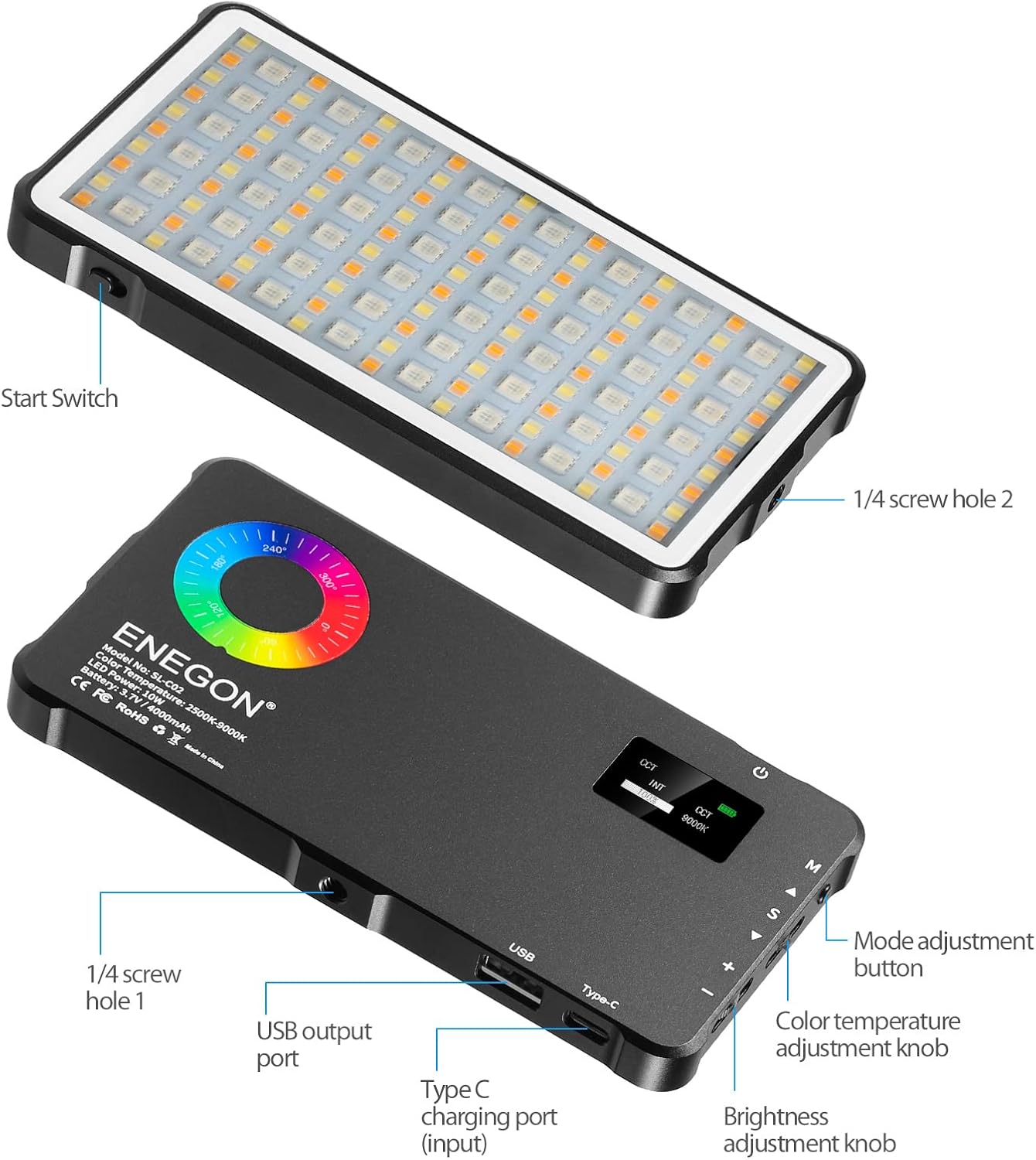
Зображення: Лицьова та зворотна сторони view of the ENEGON RGB Video Light, highlighting controls and ports.

Image: Visual representation of brightness, color temperature, and RGB color adjustments.

Image: Icons representing the 24 available light effects.
Налаштування
- Розпакувати: Акуратно вийміть усі компоненти з упаковки.
- Початкова оплата: Before first use, fully charge the RGB Video Light using the provided Type-C charging cable. Connect the cable to the Type-C charging port on the device and a suitable USB power source. The LCD screen will indicate charging status.
- Attach Mount (Optional): If using with a camera or tripod, screw the 1/4 screw adapter into one of the 1/4 screw holes on the light. Then attach it to your desired device.
Інструкція з експлуатації
Familiarize yourself with the controls located on the side of the light:
- Кнопка живлення: Press and hold to turn the light ON/OFF.
- Mode Adjustment Button (M): Press to cycle through different lighting modes (CCT, HSI, Scene Effects).
- Color Temperature Adjustment Knob (S): In CCT mode, rotate to adjust color temperature from 2500K to 9000K.
- Brightness Adjustment Knob (+/-): Rotate to adjust brightness from 0% to 100% in any mode.
- Hue Adjustment (A/V): In HSI mode, use the up/down buttons to adjust hue from 0 to 359 degrees.
- Saturation Adjustment (S): In HSI mode, use the S button to adjust color saturation from 0% to 100%.
Using Scene Effects:
In Scene Effects mode, use the mode button to cycle through the 24 pre-programmed lighting effects such as "Sun," "Candle," "Police," "Fire," etc. Adjust brightness as needed.
Зарядка та акумулятор
The ENEGON RGB Video Light features a built-in 4000mAh rechargeable Lithium Polymer battery. A full charge takes approximately 2.5 hours and provides up to 2 hours of continuous use at maximum brightness.
- Зарядка: Connect the provided Type-C USB cable to the Type-C input port on the light and a standard USB power adapter (not included).
- Функція Power Bank: The light also has a USB output port, allowing you to use its internal battery to charge other devices, such as smartphones, in an emergency.

Image: The ENEGON RGB Video Light demonstrating its charging and power bank capabilities.
Варіанти монтажу
The versatile design of the ENEGON RGB Video Light allows for multiple mounting configurations:
- Кріплення холодного башмака: Use the integrated cold shoe to attach the light directly to DSLR cameras, camcorders, or other compatible accessories.
- 1/4" Screw Holes: The light features 1/4" screw holes on multiple sides, enabling attachment to tripods, light stands, or other photographic equipment.

Зображення: Прamples of mounting the ENEGON RGB Video Light on various devices.
Технічні характеристики
| Особливість | Деталь |
|---|---|
| Розміри продукту | 5.94 дюймів Д x 3.15 дюйми Ш x 0.47 дюйми В (15.15 x 8.05 x 1.20 см) |
| Вага товару | 10.8 унцій (306 грам) |
| Номер моделі товару | ES-EN-SL-C02-KM-VD-NEW |
| Акумулятор | 1 Lithium Polymer battery (3.7V 4000mAh) |
| Термін служби батареї | Up to 2 hours (at max brightness) |
| Час зарядки | прибл. 2.5 години |
| Колірна температура | 2500K-9000K |
| CRI | ≥95 |
| TLCI | ≥95 |
| Технологія підключення | USB |
| Апаратний інтерфейс | USB типу C |
Технічне обслуговування
- Keep the device clean by wiping with a soft, dry cloth.
- Уникайте впливу на пристрій екстремальних температур, вологості або прямого сонячного світла.
- Не намагайтеся самостійно розібрати або відремонтувати пристрій. Зверніться по допомогу до служби підтримки клієнтів.
- Store the device in its portable carrying bag when not in use to protect it from dust and scratches.
Усунення несправностей
- Світло не вмикається: Переконайтеся, що акумулятор заряджений. Підключіть до джерела живлення за допомогою кабелю Type-C.
- Ліхтар не заряджається: Verify the Type-C cable is securely connected to both the light and the power source. Try a different USB power adapter.
- Нестабільний світловий потік: Check battery level. Ensure no obstructions are blocking the LED panel.
- Device not charging from light (power bank function): Ensure the light has sufficient charge. Connect the device to the USB output port securely.
Гарантія та підтримка
For warranty information, technical support, or service inquiries, please refer to the contact details provided in the product packaging or visit the official ENEGON webсайт. Зберігайте чек про покупку як підтвердження покупки для гарантійних претензій.
Офіційні відео про продукти
Watch these official videos for additional guidance and demonstrations of your ENEGON RGB Video Light.
Video: Full Color RGB Video Light demonstration by Creator Coyal.
Video: RGB Video Light features and usage by Virginia Grant.


