1. Вступ і даліview
Чорнийview BV5200Pro is a rugged smartphone designed for durability and performance in challenging environments. It features advanced protection against water, dust, and drops, combined with a powerful processor and versatile camera system. This manual provides essential information for setting up, operating, and maintaining your device.

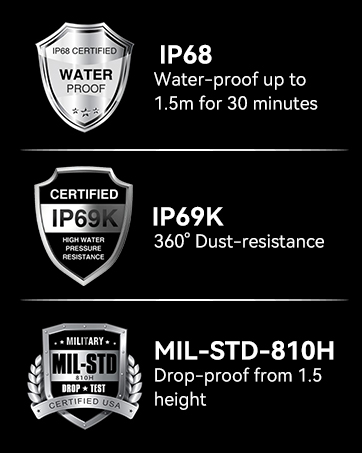
Зображення: Чорнийview BV5200Pro is built to withstand harsh conditions, meeting MIL-STD-810H military standards for drop resistance, IP68 for water immersion up to 1.5 meters for 30 minutes, and IP69K for protection against high-pressure, high-temperature water jets and 360° dust ingress.
2. Налаштування пристрою
2.1 Встановлення SIM-картки та пам'яті
The BV5200Pro supports dual 4G LTE SIM cards and a TF (microSD) card for expanded storage. It features three dedicated card slots.
- Знайдіть лоток для SIM-картки на бічній панелі телефону.
- Використайте наданий інструмент для викидання SIM-картки, щоб відкрити лоток.
- Carefully place your Nano-SIM cards and/or TF card into the designated slots. Ensure the gold contacts face downwards.
- Обережно вставте лоток назад у телефон, доки він не буде врівень з корпусом пристрою.

Image: The phone features three card slots, allowing for two 4G LTE SIM cards and one TF card for memory expansion up to 1TB simultaneously.
2.2 Початкове увімкнення та основні налаштування
To power on your device, press and hold the power button located on the side until the Blackview logo appears. Follow the on-screen prompts to complete the initial setup, including selecting your language, connecting to a Wi-Fi network, and setting up your Google account.
3. Керування пристроєм
3.1 Дисплей та інтерфейс користувача
The BV5200Pro features a 6.1-inch HD+ display with a resolution of 720x1560 pixels and 500 nits brightness, ensuring clear visuals even in bright conditions. It runs on Android 12 with Doke OS 3.0, offering an intuitive and customizable user experience.

Image: The 6.1-inch HD+ display provides a wide view and immersive experience with 720x1560 resolution, 83% screen-to-body ratio, and 500 cd/m² brightness.
3.2 Продуктивність та сховище
Powered by the MediaTek Helio G35 Octa-Core processor, the phone offers smooth performance for daily tasks and entertainment. It comes with 4GB of RAM, expandable to 7GB (with 3GB virtual RAM), and 64GB of internal storage, which can be further expanded up to 1TB using a TF card.

Image: Visual representation of the MediaTek Helio G35 processor, 7GB RAM (4GB physical + 3GB virtual), and 64GB ROM, with 1TB TF card expandability.
3.3 Акумулятор та зарядка
The device is equipped with a 5180mAh battery, providing extended usage times: up to 642 hours standby, 26.5 hours calling, 20 hours music playback, and 8.8 hours video playback. It supports 10W fast charging and OTG reverse charging, allowing you to use your phone as a power bank for other devices.

Зображення: Оверview of the 5180mAh battery, showing usage durations for various activities and the OTG reverse charging capability.
3.4 Функції камери
The BV5200Pro features a 13MP Sony IMX258 rear camera and an 8MP Samsung5K4H7 front camera. It utilizes ArcSoft technology for enhanced photography, offering various modes:
- 360° Panorama Capture: For wide scenic shots.
- Нічний режим: Покращує фотографування в умовах слабкого освітлення.
- Improved HDR: Balances exposure in high-contrast scenes.
- Портретний режим: Creates a bokeh effect for professional-looking portraits.
- Заливка обличчя світлом: Enhances selfies in dim lighting.
- Режим краси: Optimizes facial features for flattering photos.
The camera also boasts a 0.1s ultra-fast PDAF for quick and accurate focusing.

Image: Details of the 8MP front camera and 13MP+2MP+2MP rear camera with ArcSoft technology for enhanced photo quality.

Зображення: Прamples of various camera modes available on the BV5200Pro, including Beauty Mode, Night Mode, Portrait Mode, and Pro Mode.
3.5 Security and Convenience Features
The phone includes several features for security and user convenience:
- NFC: For contactless payments and quick data transfer.
- Ідентифікатор обличчя: Secure and convenient facial recognition for unlocking.
- Режим рукавички: Дозволяє працювати з сенсорним екраном у рукавичках.
- Customized Function Button: A programmable button for quick access to 5 essential functions or your favorite apps.
3.6 Navigation and Toolkit
Integrated GPS, GLONASS, Beidou, and Galileo systems provide accurate positioning. The device also comes with a useful toolkit of professional apps, including Compass, Gradienter, Barometer, Protractor, SoundMeter, and FM radio.

Зображення: Комплексний view of the phone's utility features, including the customizable shortcut button, Face Unlock, 3 card slots, Glove Mode, NFC, advanced GPS, and a suite of toolkit applications.
4. Технічне обслуговування та довговічність
Чорнийview BV5200Pro is engineered for extreme durability, making it suitable for rugged use. To ensure its longevity, follow these guidelines:
- Водонепроникність (IP68): The phone can withstand immersion in water up to 1.5 meters deep for 30 minutes. Ensure all port covers are securely closed before exposure to water.
- Пилонепроникний (IP69K): It offers 360° protection against dust and can resist high-pressure, high-temperature water jets.
- Dropproof (MIL-STD-810H): Certified to military standard MIL-STD-810H, the phone is drop-resistant from heights up to 1.5 meters.
- Прибирання: Використовуйте м'який, damp тканину для очищення пристрою. Уникайте використання агресивних хімікатів або абразивних матеріалів.
- температура: Operate the phone within its specified temperature range to prevent damage to the battery and internal components.
Зображення: Чорнийview BV5200Pro submerged in water, illustrating its IP68 waterproof rating.
5. Вирішення проблем
5.1 Сумісність з мережею
Чорнийview BV5200Pro is compatible with GSM network carriers such as T-Mobile, BTC, MetroPCS, H2O, Movistar, Telcel, Tigo, Claro, Vivacom, Ultra Mobile, Lycamobile, Tello Mobile, Bell Wireless, Rogers Wireless, Chatr, Luck Mobile, Virgin Mobile, Telus, Fido, FIZZ, and Shaw Mobile.
Важливо: This phone is НІ compatible with AT&T and Cricket Wireless SIM cards.

Image: A visual guide to the supported 2G, 3G, and 4G network bands and compatible US carriers for the Blackview BV5200Pro.
5.2 Загальні проблеми
- Пристрій не вмикається: Переконайтеся, що акумулятор заряджений. Підключіть телефон до зарядного пристрою та зачекайте кілька хвилин, перш ніж спробувати знову ввімкнути його.
- Поганий прийом сигналу: Check your SIM card installation. If the issue persists, contact your network provider.
- Збої в роботі програм: Clear the cache of the problematic app or reinstall it. Ensure your system software is up to date.
- Touchscreen unresponsiveness: Restart the device. If using Glove Mode, ensure it is enabled correctly.
6. Технічні характеристики
| Особливість | Специфікація |
|---|---|
| Назва моделі | BV5200Pro |
| Операційна система | Android 12.0 |
| Процесор | Восьмиядерний процесор MediaTek Helio G35 |
| ОЗУ | 4 ГБ (з можливістю розширення до 7 ГБ) |
| Внутрішня пам'ять | 64 ГБ |
| Розширюване сховище | До 1 ТБ через TF-карту |
| Розмір екрана | 6.1 дюймів HD+ |
| роздільна здатність | 720 х 1560 |
| Задня камера | 13MP Sony IMX258 |
| Фронтальна камера | 8MP Samsung5K4H7 |
| Ємність акумулятора | 5180 мАг |
| Зарядка | Швидка зарядка 10 Вт, зворотна зарядка OTG |
| Рейтинги довговічності | IP68 Waterproof, IP69K Dustproof, MIL-STD-810H Dropproof |
| Підключення | Dual 4G LTE, Wi-Fi (802.11 a/b/g/n/ac), Bluetooth 5.0, NFC |
| Навігація | GPS, ГЛОНАСС, Бейдою, Галілео |
| Розміри | 161.8 x 77.86 x 13.65 мм |
| вага | 268г |
7. Гарантія та підтримка
чорнийview offers a 2-year warranty on all Blackview cell phones purchased from authorized retailers. This includes a 24-month free repair warranty and lifetime technician support. For any issues or inquiries, please contact Blackview обслуговування клієнтів.

Image: Information regarding Blackview's two-year warranty support, emphasizing strict quality control and dedicated customer service.
8. Відео продуктуview
Відео: Посадовець надview Чорногоview BV5200Pro Rugged Cell Phone, highlighting its key features and durability.


