1. Вступ
Thank you for choosing the HIKMICRO HEIMDAL H4D Digital Night Vision Monocular. This device is designed for observation in low light and complete darkness, featuring a high-resolution sensor and AMOLED display for clear imaging.
Ключові характеристики:
- 1.39" AMOLED display with 454 x 454 resolution
- High-resolution 2560 x 1440 sensor
- Integrated 850 nm infrared illuminator with smart IR function
- Day/Night/Auto/Defog modes
- Електронна стабілізація зображення (EIS)
- Detection range up to 200 meters
- Replaceable and rechargeable battery with over 4 hours of use
- Compact and portable design, waterproof and dustproof (IP67)
- Integrated 32 GB EMMC for storing recorded videos and photos
- Wireless connection via HIKMICRO Sight app, local album function
Вміст упаковки:
- HIKMICRO HEIMDAL H4D Digital Night Vision Monocular
- Акумулятор
- Ганчірка для пилу
- Захисна сумка
- Ремінець на зап'ясті
- USB-C кабель
- Короткий посібник
2. Продукт закінчивсяview
Familiarize yourself with the components and controls of your HIKMICRO HEIMDAL H4D monocular.
Схема пристрою
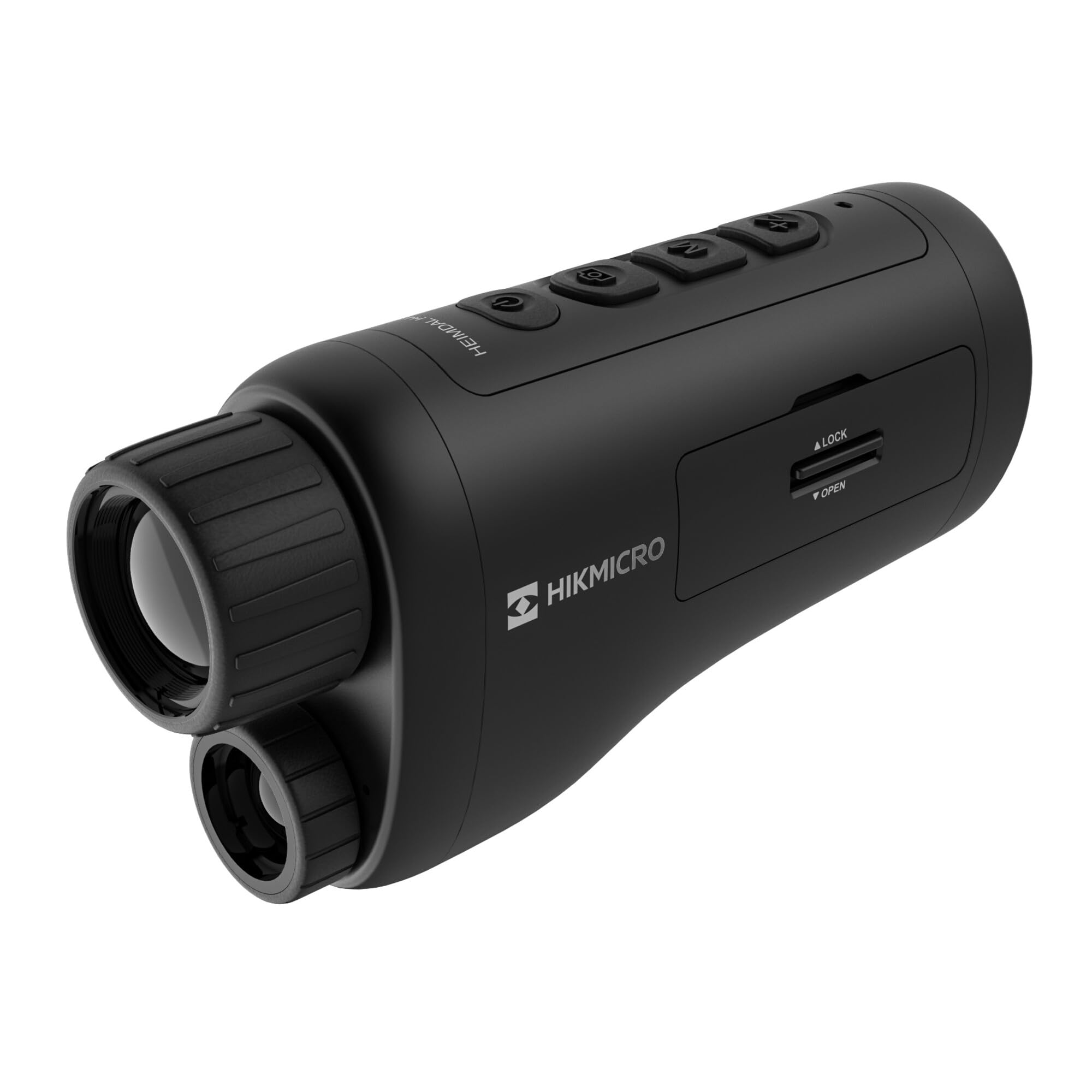
Кутовий view of the HIKMICRO HEIMDAL H4D monocular, showing its compact, ergonomic design and the main lens.
Елементи керування та кнопки

Топ view of the monocular showing the power button, photo/video record button, mode button, and zoom/IR adjustment buttons.
Lenses and Focus

Фронт view displaying the objective lens and the integrated infrared illuminator.
Батарейний відсік

сторона view showing the battery compartment with 'LOCK' and 'OPEN' indicators.
3. Налаштування
Установка батареї
- Знайдіть відсік для батареї на бічній панелі пристрою.
- Slide the lock mechanism to the 'OPEN' position.
- Вставте акумуляторну батарею, дотримуючись правильної полярності.
- Close the compartment and slide the lock mechanism to the 'LOCK' position.
Зарядка батареї
Connect the device to a power source using the provided USB-C cable. The charging indicator will show the charging status.
Початкове ввімкнення
Натисніть і утримуйте кнопку живлення (зазвичай позначену Ⓘ) until the HIKMICRO logo appears on the display.
4. Інструкція з експлуатації
Увімкнення/вимкнення живлення
- Увімкнення: Натисніть і утримуйте кнопку живлення приблизно 3 секунди.
- Вимкнення живлення: Press and hold the power button for approximately 3 seconds until the device shuts down.
Налаштування фокусу
Rotate the focus ring on the objective lens to achieve a clear image of your target.
Вибір режиму
Press the 'M' (Mode) button to cycle through observation modes: Day, Night, Auto, and Defog.
Zoom and IR Adjustment
Use the '+' and '-' buttons to adjust the digital zoom level. These buttons also control the intensity of the infrared illuminator in night mode.
Фото- та відеозапис
- Зробити фото: Press the photo/video button (usually marked with 📷) once to capture an image.
- Записати відео: Press and hold the photo/video button to start recording. Press again to stop.
Connecting to HIKMICRO Sight App
Download the HIKMICRO Sight app from your device's app store. Follow the in-app instructions to connect your monocular for live view, remote control, and media management.
5. Технічне обслуговування
прибирання
- Use the provided dust cloth or a soft, lint-free cloth to clean the lenses.
- For stubborn dirt, use a lens cleaning solution specifically designed for optics.
- Протріть корпус пристрою м’якою тканиноюamp тканина. Не використовуйте абразивні засоби чи розчинники.
Зберігання
- Store the monocular in its protective bag in a cool, dry place when not in use.
- Вийміть акумулятор, якщо пристрій не використовуватиметься протягом тривалого часу.
Догляд за акумулятором
- Charge the battery regularly, even if not in frequent use, to maintain its lifespan.
- Уникайте екстремальних температур під час заряджання та зберігання.
6. Вирішення проблем
Поширені проблеми та рішення
| проблема | Можлива причина | Рішення |
|---|---|---|
| Пристрій не включається. | Батарея розряджена або неправильно встановлена. | Зарядіть акумулятор. Переконайтеся, що акумулятор вставлено з дотриманням правильної полярності. |
| Зображення розмите. | Фокус не налаштовано. | Rotate the focus ring on the objective lens until the image is clear. |
| Poor image quality in darkness. | IR illuminator is off or set to low intensity. | Activate the IR illuminator or increase its intensity using the '+' button. Ensure you are in Night mode. |
| Cannot connect to HIKMICRO Sight app. | Bluetooth/Wi-Fi is off on device or phone, or app is not updated. | Ensure Bluetooth/Wi-Fi is enabled on both devices. Restart the app and monocular. Check for app updates. |
| Пристрій зависає або перестає реагувати. | Тимчасовий збій програмного забезпечення. | Perform a soft reset by holding the power button until the device restarts. If issue persists, contact support. |
7. Технічні характеристики
| Особливість | Деталь |
|---|---|
| дозвіл сенсора | 2560 х 1440 |
| Тип дисплея | AMOLED |
| Роздільна здатність дисплея | 454 х 454 |
| Розмір дисплея | 1.39 дюйма (3.5 см) |
| Інфрачервоний опромінювач | Integrated 850 nm |
| Дальність виявлення | До 200 метрів |
| Зберігання | 32 GB EMMC (internal) |
| Термін служби батареї | More than 4 hours (replaceable, rechargeable) |
| Рейтинг водонепроникності | IP67 |
| Розміри | 153 мм x 50 мм x 80 мм (6.02 дюйма x 1.97 дюйма x 3.15 дюйма) |
| вага | 375 грамів (0.83 фунта) |
| матеріал | пластик |
| Сумісні пристрої | Rifle, Compound Bow |
| Тип монтажу | Кріплення Пікатінні |
| Sport Use | Campінг, походи |
| Колір | Білий |
8. Гарантія та підтримка
HIKMICRO products are covered by a limited warranty. For detailed warranty information, please refer to the official HIKMICRO webабо зверніться до місцевого дилера.
For technical support, troubleshooting assistance, or service inquiries, please visit the official HIKMICRO support page or contact their customer service department.
Офіційний Webсайт: www.hikmicrotech.com


