1. Вступ
This manual provides essential instructions for the safe and efficient operation of your RONGTA SE4770 Rugged PDA Barcode Scanner. This device is a high-performance mobile handheld terminal designed for various applications including retail, warehouse management, logistics, and inventory control. It combines the functionality of an Android 11 smartphone with an integrated Zebra SE4770 barcode scanner, offering robust performance and durability.
Будь ласка, уважно прочитайте цей посібник перед використанням пристрою та збережіть його для подальшого використання.
2. Продукт закінчивсяview
2.1 Компоненти пристрою
The RONGTA SE4770 features a rugged design with a 6-inch HD touch screen and an integrated barcode scanner. Key components include:
- Фронтальний дисплей: 6-inch FHD+ 1080P HD screen for clear visual interaction.
- Задня панель: Integrated Zebra SE4770 barcode scanner, camera, and battery compartment.
- Бічні кнопки: Power button, volume controls, and dedicated scan buttons.
- Порти: Порт USB-C для заряджання та передачі даних.

Рисунок 2.1: Передня та задня частини view of the RONGTA SE4770 PDA Barcode Scanner, showing the display and rear scanner module.
2.2 Основні характеристики
- Операційна система: Android 11 for a familiar and versatile user experience.
- Процесор: Octa-core 2.0GHz CPU for high performance and stability.
- Пам'ять і зберігання: 4GB RAM + 64GB ROM, expandable via microSD card (not included).
- Дисплей: 6-inch FHD+ (1080P) HD touch screen, visible in strong outdoor light, supports multi-touch with gloves or wet hands.
- Сканер штрих-кодів: Integrated Zebra SE4770 for fast and accurate scanning of 1D, 2D, and QR barcodes, even if blurred, dirty, or worn.
- Довговічність: IP68 rated for water and dust resistance, and 1.5m drop resistance.
- Батарея: 5000mAh large capacity battery with QC3.0 18W fast charging. Features a SuperCap power change solution for seamless battery swaps without shutdown.
- Підключення: 2.4G/5G Dual-band Wi-Fi, 4G Full Network support, and Bluetooth 5.1.
- Камера: 1600W+500W Pixel Camera (details on usage in Operating Instructions).
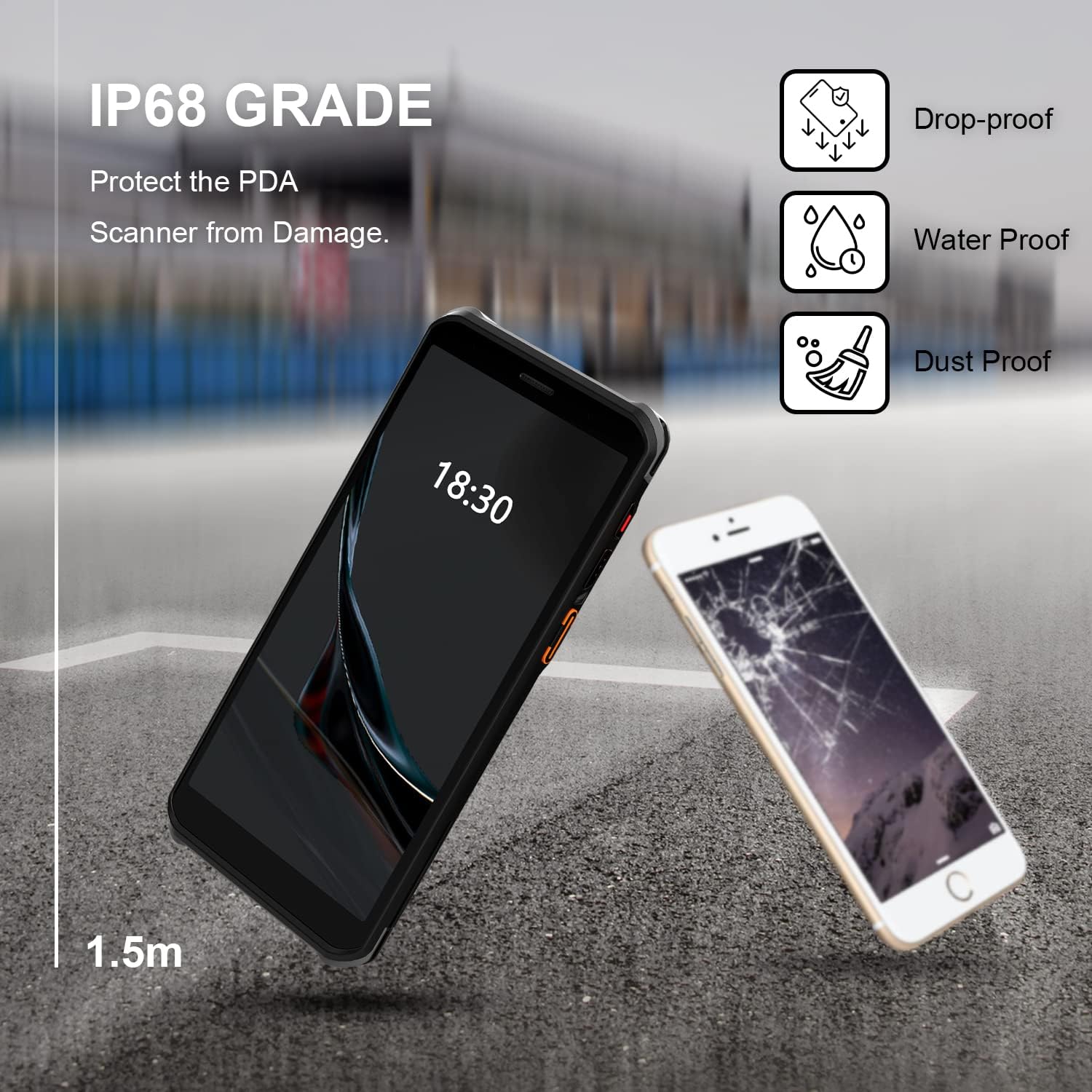
Figure 2.2: The RONGTA SE4770 PDA is designed with IP68 water and dust resistance and 1.5m drop protection, ensuring durability in demanding environments.

Figure 2.3: The device supports 2.4G/5G Dual-band WIFI and Bluetooth 5.1 for reliable wireless connectivity.
3. Налаштування
3.1 Розпакування та початковий огляд
Carefully remove all components from the packaging. Verify that all items are present and undamaged. The package should include the RONGTA SE4770 PDA, a USB-C cable, a power adapter, and a hand-strap belt.
3.2 Встановлення та заряджання акумулятора
- Знайдіть відсік для батареї на задній панелі пристрою.
- If the battery is not pre-installed, insert the 5000mAh Lithium-Ion battery, ensuring correct orientation.
- Надійно закрийте батарейний відсік.
- Connect the USB-C cable to the device's charging port and the other end to the power adapter. Plug the adapter into a power outlet.
- Allow the device to charge fully before first use. The 18W fast charging feature will expedite this process.

Figure 3.1: The device charging, indicating battery status.
3.3 Увімкнення/вимкнення
- Щоб увімкнути: Press and hold the Power button on the side of the device until the RONGTA logo appears on the screen.
- Щоб вимкнути: Press and hold the Power button until the power options menu appears. Select 'Power Off'.
- Щоб перезапустити: Press and hold the Power button until the power options menu appears. Select 'Restart'.
3.4 Початкове налаштування Android
Upon first power-on, follow the on-screen prompts to complete the initial Android 11 setup. This typically includes selecting your language, connecting to a Wi-Fi network, setting up a Google account (optional), and configuring security settings.
4. Інструкція з експлуатації
4.1 Використання сканера штрих-кодів
The RONGTA SE4770 is equipped with a high-performance Zebra SE4770 scanner capable of reading various 1D, 2D, and QR barcodes.
- Open an application that requires barcode input (e.g., inventory management software, POS application).
- Point the scanner window, located on the top rear of the device, towards the barcode.
- Press one of the dedicated scan buttons on the side of the device. A red aiming beam will appear.
- Align the aiming beam with the center of the barcode. The device will emit a beep or vibrate upon successful scan, and the data will be entered into the active field of your application.

Figure 4.1: A user scanning a package barcode using the RONGTA SE4770 PDA.

Figure 4.2: The SE4770 Zebra scanner in use, demonstrating fast and accurate scanning in a warehouse environment.
4.2 Навігація в Android 11
The device operates on Android 11, providing a familiar interface. Use touch gestures to navigate:
- Торкніться: Щоб вибрати елемент або відкрити програму.
- Проведіть пальцем: Щоб прокручувати списки або перемикатися між головними екранами.
- Масштабування за допомогою розведення пальців: Щоб збільшити або зменшити масштаб зображень і web сторінки.
- Сповіщення: Проведіть пальцем униз від верхньої частини екрана, щоб отримати доступ до сповіщень та швидких налаштувань.
4.3 Підключення
Пристрій підтримує різні варіанти підключення:
- Wi-Fi: Go to Settings > Network & internet > Wi-Fi to connect to available wireless networks. Supports 2.4GHz and 5GHz bands.
- Bluetooth: Go to Settings > Connected devices > Connection preferences > Bluetooth to pair with Bluetooth-enabled devices like headsets or printers.
- Мобільні дані (4G): If equipped with a SIM card slot (check device specifications), insert a compatible SIM card to access mobile data.
4.4 Використання камери
The device includes a camera for capturing images or videos. Open the Camera application from the home screen or app drawer. Tap the screen to focus and press the shutter button to take a photo or start/stop video recording.
5. Технічне обслуговування
5.1 Очищення пристрою
Для підтримки оптимальної продуктивності та зовнішнього вигляду:
- Wipe the screen and device body with a soft, lint-free cloth.
- Для стійких плям злегкаampПротріть тканину водою або засобом для чищення екранів. Уникайте агресивних хімікатів або абразивних матеріалів.
- Ensure the scanner window is clean and free of dust or debris for accurate scanning.
5.2 Догляд за акумулятором
Proper battery care extends the lifespan of your device:
- Charge the battery regularly using the provided charger.
- Уникайте частого повного розряджання акумулятора.
- Якщо пристрій зберігатиметься протягом тривалого часу, зарядіть акумулятор приблизно до 50% та зберігайте його в прохолодному сухому місці.
- The SuperCap power change solution allows for hot-swapping batteries without device shutdown, ensuring continuous operation.
5.3 Оновлення програмного забезпечення
Periodically check for software updates to ensure your device has the latest features and security patches. Go to Settings > System > System update.
6. Вирішення проблем
This section addresses common issues you might encounter with your RONGTA SE4770 PDA.
| проблема | Можлива причина | Рішення |
|---|---|---|
| Пристрій не включається | Низький або розряджений акумулятор; несправність пристрою. | Заряджайте пристрій щонайменше 30 хвилин. Якщо він все ще не вмикається, зверніться до служби підтримки. |
| Сканер не зчитує штрих-коди | Dirty scanner window; incorrect aiming; unsupported barcode type; application issue. | Clean the scanner window. Ensure the aiming beam covers the entire barcode. Verify the barcode type is supported. Restart the scanning application or the device. |
| Проблеми з підключенням Wi-Fi/Bluetooth | Out of range; incorrect password; interference. | Move closer to the Wi-Fi router or Bluetooth device. Re-enter the password. Restart Wi-Fi/Bluetooth on the device. |
| Пристрій працює повільно або не реагує | Занадто багато запущених програм; мало пам'яті; програмний збій. | Close unnecessary applications. Clear cache. Restart the device. Consider a factory reset if issues persist (backup data first). |
7. Технічні характеристики
Detailed technical specifications for the RONGTA SE4770 PDA Barcode Scanner:
- Розміри продукту: 3.03 x 0.51 x 6.41 дюймів
- Вага товару: 10.6 унції
- Акумулятори: Потрібен 1 літій-іонний акумулятор (у комплекті)
- Джерело живлення: Працює від батареї
- Виробник: RONGTA
- Сумісні пристрої: Desktop, Laptop, Smartphone (for data transfer/management)
- Технологія підключення: Bluetooth, Wi-Fi (2.4G/5G Dual-band), 4G
- Операційна система: Android 11
- Процесор: Восьмиядерний 2.0 ГГц
- Пам'ять: 4 ГБ оперативної пам'яті
- Зберігання: 64 ГБ ПЗУ
- Розмір екрана: 6 inches FHD+ (1080P) HD Touch Screen
- Сканер: Zebra SE4770 (1D, 2D, QR)
- Довговічність: IP68 Water and Dust Resistant, 1.5m Drop Protection
- Ємність батареї: 5000 мАг
- Зарядка: QC3.0 18W Fast Charge
8. Гарантія та підтримка
For warranty information and technical support, please refer to the documentation included with your purchase or visit the official RONGTA website. If you encounter any issues not covered in this manual, please contact RONGTA customer service for assistance.


