1. Вступ
This manual provides detailed instructions for the installation, operation, and maintenance of your VIMIN VM-GS1620 18-Port Gigabit Ethernet Switch. Please read this manual thoroughly before using the device to ensure proper setup and optimal performance. Keep this manual for future reference.
2. Продукт закінчивсяview
The VIMIN VM-GS1620 is an unmanaged 18-port Gigabit Ethernet switch designed for high-speed network expansion. It features 16 Gigabit Ethernet ports (10/100/1000 Mbps) and 2 dedicated 1000Mbps uplink ports. The switch supports IEEE802.3af/at standards and includes a One Key VLAN function for enhanced network security and bandwidth management. Its durable metal housing allows for versatile desktop or rack-mount installation.
2.1 Передня та задня панелі

малюнок 1: Front and Rear Panels of the VIMIN VM-GS1620 Switch. The front panel displays 16 Gigabit ports (1-16), 2 Uplink ports (17-18), LED indicators for Power and Data, and a VLAN switch. The rear panel shows the AC power input.
Характеристики передньої панелі:
- Порти 1-16: 10/100/1000 Mbps Gigabit Ethernet ports for connecting network devices.
- Ports 17-18 (Uplink): Dedicated 1000 Mbps Gigabit uplink ports for connecting to a router or main network.
- Світлодіод живлення: Вказує на стан живлення.
- Data/Link/Act LEDs: Indicate data activity and link status for each port.
- VLAN Switch: Toggles the One Key VLAN function on or off.
Характеристики задньої панелі:
- Вхід живлення змінного струму: Connects to the provided power cord (AC/IN 100-240V).
2.2 Основні характеристики
- Високошвидкісне підключення: 16 Gigabit Ethernet ports and 2 Gigabit uplink ports for fast data transfer.
- One Key VLAN: Enhances network security by isolating ports 1-16 while allowing communication with uplink ports.
- Надійний захист: Features 4KV lightning protection for device and network safety.
- Міцний дизайн: Sturdy metal housing ensures longevity and efficient heat dissipation.
- Робота без вентилятора: Provides quiet operation, suitable for various environments.
- Plug and Play: No complex configuration required for basic network setup.
малюнок 2: The VIMIN VM-GS1620 features a fanless, quiet design within a durable metal case for reliable performance.
3. Вміст упаковки
Please verify the contents of your package. If any items are missing or damaged, contact VIMIN support immediately.
- VIMIN VM-GS1620 18-Port Gigabit Ethernet Switch
- Шнур живлення змінного струму
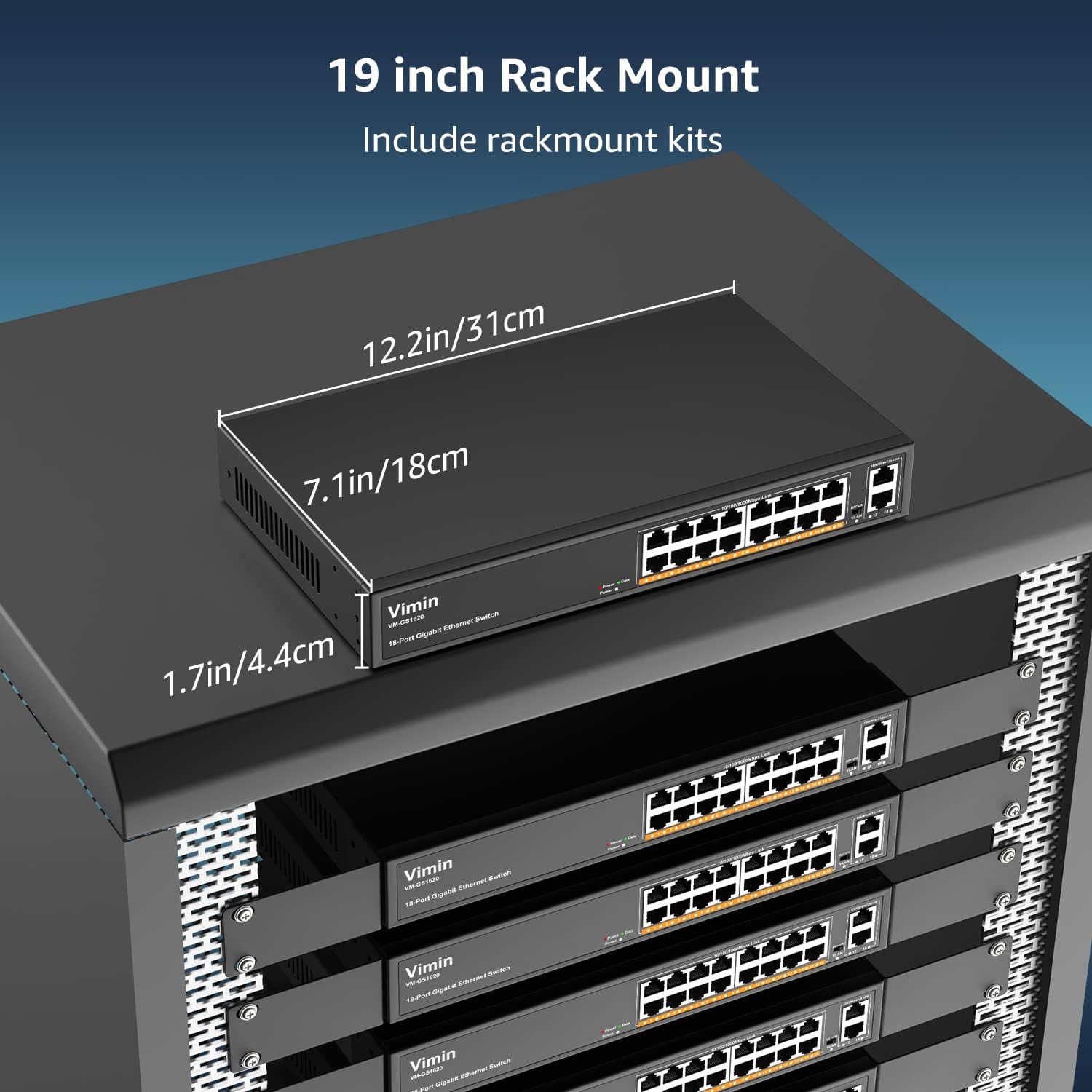
- Rack-Mount Kits (for 19-inch rack installation)
- Посібник користувача (цей документ)
4. Інструкції з налаштування
4.1 Фізичне встановлення
The VIMIN VM-GS1620 switch can be installed on a desktop or mounted in a 19-inch rack.
Розміщення на робочому столі:
- Помістіть перемикач на рівну стійку поверхню.
- Ensure adequate ventilation around the device. Do not block the ventilation holes.
- Keep the switch away from heat sources, direct sunlight, and excessive moisture.
Монтаж у стійку:
- Прикріпіть надані кронштейни для монтажу в стійку до боків комутатора за допомогою гвинтів, що входять до комплекту.
- Закріпіть комутатор у стандартній 19-дюймовій стійці для обладнання за допомогою відповідних гвинтів для стійки (не входять до комплекту).
- Ensure proper airflow within the rack to prevent overheating.

малюнок 3: The VIMIN VM-GS1620 switch can be installed in a 19-inch rack using the included rack-mount kits. Dimensions are approximately 12.2in (31cm) wide, 7.1in (18cm) deep, and 1.7in (4.4cm) high.
4.2 Підключення живлення
- Connect one end of the AC power cord to the power input on the rear panel of the switch.
- Plug the other end of the power cord into a standard electrical outlet (AC 100-240V).
- Світлодіодний індикатор живлення на передній панелі повинен світитися, що вказує на те, що комутатор отримує живлення.
4.3 Мережеві підключення
The VIMIN VM-GS1620 is a Plug and Play device, requiring no software configuration for basic operation.
- Connect your network devices (e.g., computers, printers, IP cameras, access points) to any of the Gigabit Ports 1-16 using standard Ethernet cables.
- Connect your router or main network backbone to one of the Uplink Ports 17-18.
- Once a device is connected and powered on, the corresponding Link/Act LED for that port will illuminate, indicating a successful connection and activity.

малюнок 4: Simple Plug and Play connection. Insert an Ethernet cable into any available port.

малюнок 5: Connection diagram illustrating power connection, device connections to the switch, and the resulting network functionality.
5. Інструкція з експлуатації
5.1 Основна операція
Once the switch is powered on and devices are connected, the VIMIN VM-GS1620 operates automatically. It functions as an unmanaged switch, forwarding data packets between connected devices at Gigabit speeds without requiring any user configuration.
5.2 One Key VLAN Mode
The switch features a physical VLAN switch on the front panel. This function allows you to quickly enable or disable VLAN isolation.
- VLAN OFF (Default): All ports (1-18) operate as a standard switch, allowing all connected devices to communicate with each other.
- VLAN ON: When the VLAN switch is set to ON, ports 1-16 are isolated from each other. Devices connected to ports 1-16 can only communicate with the uplink ports (17-18) and not directly with other devices on ports 1-16. This enhances network security and can improve bandwidth utilization by preventing broadcast storms within the isolated segments.

малюнок 6: The One Key VLAN switch isolates ports 1-16 from each other, allowing them to communicate only with the uplink ports (17-18). This setup is useful for segmenting a network for security or performance.
6. Технічне обслуговування
The VIMIN VM-GS1620 switch is designed for minimal maintenance. Follow these guidelines to ensure its longevity:
- Прибирання: Використовуйте м’яку суху тканину для очищення зовнішньої частини вимикача. Не використовуйте рідкі або аерозольні засоби для чищення.
- Вентиляція: Ensure that the ventilation holes are not obstructed to allow for proper heat dissipation.
- Середовище: Operate the switch within its specified environmental conditions (temperature, humidity).
- Управління кабелем: Тримайте мережеві кабелі в порядку та без перегинів або надмірних перегинів, щоб запобігти погіршенню сигналу.
7. Вирішення проблем
If you encounter issues with your VIMIN VM-GS1620 switch, refer to the following common troubleshooting steps:
- Немає живлення:
- Перевірте, чи шнур живлення надійно підключений як до вимикача, так і до електричної розетки.
- Перевірте, чи електрична розетка справна.
- Переконайтеся, що світлодіодний індикатор живлення на передній панелі світиться.
- Немає з'єднання/активності на порту:
- Переконайтеся, що кабель Ethernet надійно підключено як до порту комутатора, так і до підключеного пристрою.
- Спробуйте інший кабель Ethernet, щоб виключити несправність кабелю.
- Підключіть пристрій до іншого порту на комутаторі.
- Переконайтеся, що підключений пристрій увімкнено та працює належним чином.
- Низька швидкість мережі:
- Переконайтеся, що всі підключені пристрої та кабелі підтримують Gigabit Ethernet (Cat5e або вище).
- Перевірте наявність надмірного мережевого трафіку або програм, що ресурсомістко використовують пропускну здатність.
- Consider enabling VLAN mode if network segmentation is desired to reduce broadcast domains.
- Devices Cannot Communicate (VLAN ON):
- If the VLAN switch is ON, devices on ports 1-16 are isolated from each other and can only communicate with uplink ports. This is expected behavior.
- If you require direct communication between all devices, ensure the VLAN switch is set to OFF.
If the problem persists after trying these steps, please contact VIMIN technical support.
8. Технічні характеристики
| Особливість | опис |
|---|---|
| Модель | VM-GS1620 |
| Порти | 16 x 10/100/1000Mbps RJ45 Ports, 2 x 1000Mbps Uplink RJ45 Ports |
| Швидкість передачі даних | 1000 мегабіт за секунду (гігабіт) |
| Комутаційна здатність | 36 Гбіт/с |
| Стандарти | IEEE 802.3, IEEE 802.3u, IEEE 802.3ab, IEEE 802.3x, IEEE 802.3af/at |
| Підтримка VLAN | One Key VLAN (Port Isolation) |
| Блискавкозахист | 4KV |
| Вхідна потужність | Змінний струм 100-240 В |
| Матеріал корпусу | метал |
| монтаж | Desktop, 19-inch Rack-Mount |
| Розміри (пристрій) | прибл. 12.2 x 7.1 x 1.7 дюймів (31 x 18 x 4.4 см) |
| Вага товару | 3.85 фунта (1.75 кг) |
| Сумісні пристрої | Desktop, Gaming Console, Laptop, Printer, IP Camera, Access Point |
9. Гарантія та підтримка
VIMIN stands behind the quality and reliability of its products.
9.1 Інформація про гарантію
This VIMIN VM-GS1620 switch comes with a один рік гарантії з дати покупки. Ця гарантія поширюється на виробничі дефекти та несправності за умов нормального використання. Вона не поширюється на пошкодження, спричинені неправильним використанням, аваріями, несанкціонованими модифікаціями або стихійними лихами.
9.2 Технічна підтримка
VIMIN provides довічна технічна підтримка for this product. If you have any questions, require assistance with installation, or encounter any issues not covered in the troubleshooting section, please contact our professional technical team.

малюнок 7: VIMIN offers dedicated customer support.
Контактна інформація:
- Електронна пошта: support@vimintech.com
- Our support team is available to provide 24-hour high-quality service.


