1. Продукт закінчивсяview
Оurlife 4K Action Camera is designed for capturing high-quality video and photos in various environments, including underwater. It features 4K video recording, 16MP photos, Wi-Fi connectivity, and a durable waterproof casing.

Figure 1: Key Features of the Ourlife 4K Action Camera.
- Зйомка з високою роздільною здатністю: Records 4K/30FPS, 2.7K/30FPS, and 1080P/30FPS video, and captures 16MP still images.
- Регульована View Кут: Offers 170°, 140°, 110°, and 70° field of view параметри.
- Бездротове підключення: Built-in Wi-Fi for connecting to the XDV App on your smartphone or tablet, allowing for remote control and media sharing.
- Водонепроникність: Submersible up to 40 meters (131 feet) with the included waterproof case.
- 2-дюймовий IPS-екран: Provides a clear display for previewing footage and navigating menus.
- Універсальні функції: Includes 4X zoom, time-lapse, loop recording, slow motion, and anti-shake features.
2. Що в коробці
Your Ourlife 4K Action Camera package includes the following components:

Figure 2: Complete set of accessories.
- 1x Оurlife 4K Action Camera
- Водонепроникний чохол 1x
- 3 акумуляторні батареї ємністю 1350 мАг
- 1x Protective Door
- 1x Black Frame
- 2x Flat Adhesive Pads with Screw
- 1x велосипедне кріплення
- 1x J-hook Mount
- 1x підставка для зарядки
- 1x Increase Mount
- 1x Кліпса
- 1x Long Thumbscrew
- 1x Short Thumbscrew
- 1x Crowbar (for opening battery/SD card slot)
- 1x подовжувальне кріплення
- 1x поворотний гвинт на 360°
- 1x Micro USB кабель
- 1x Insurance Tether Strap
- 2x Release Buckles
- 1x Mirror Cloth
- 2x браслет
- 2x Бинт
- 1x пульт дистанційного керування
- 2x клейкі подушечки
3. Початок роботи
3.1 Встановлення та заряджання акумулятора
To install a battery, gently open the battery compartment cover, often located at the bottom or side of the camera. A small crowbar tool might be provided to assist in opening tight covers. Insert a charged battery with the correct orientation.

Figure 3: Opening the battery compartment.
Before first use, fully charge the included batteries. Insert the batteries into the charging stand and connect the stand to a USB power source using the Micro USB cable. The indicator light on the charger will show charging status.
3.2 Вставлення карти Micro SD
A Micro SD card (not included, Class 10 or higher recommended, up to 64GB) is required for recording. Locate the Micro SD card slot on the side of the camera. Gently insert the card with the gold contacts facing the back of the camera until it clicks into place.

Figure 4: Inserting the Micro SD Card.
Важливо: Format the Micro SD card in the camera's settings menu before initial use to ensure proper functionality and avoid data corruption.
3.3 Використання водонепроникного футляра
For underwater activities or protection against dust and impact, place the camera inside the waterproof case. Ensure the case is securely latched and the rubber seal is clean and free of debris before submerging.

Figure 5: Camera in waterproof case during underwater use.
4. Основна операція
4.1 Увімкнення/вимкнення
- To power on, press and hold the Power/Mode button on the front of the camera until the screen illuminates.
- To power off, press and hold the Power/Mode button again until the screen turns off.
4.2 Перемикання режимів
Press the Power/Mode button repeatedly to cycle through different modes: Video Recording, Photo Mode, Playback Mode, and Settings Mode. The current mode icon will be displayed on the screen.
4.3 Запис відео та фотографування
- In Video Recording mode, press the OK button (top button) to start recording. Press it again to stop.
- In Photo Mode, press the OK button to take a photo.
4.4 Wi-Fi Connection and XDV App
The camera features built-in Wi-Fi for remote control and file transfer via the XDV app. Download the XDV app from your smartphone's app store.
- Turn on the camera's Wi-Fi: In Video or Photo mode, press the Up button (side button) to activate Wi-Fi. The Wi-Fi icon will appear on the screen.
- On your smartphone, go to Wi-Fi settings and connect to the camera's Wi-Fi network (e.g., "Ourlife_XXXXXX"). The default password is "1234567890".
- Open the XDV app. You can now control the camera, preview фуtagе, та завантажте files до вашого пристрою.
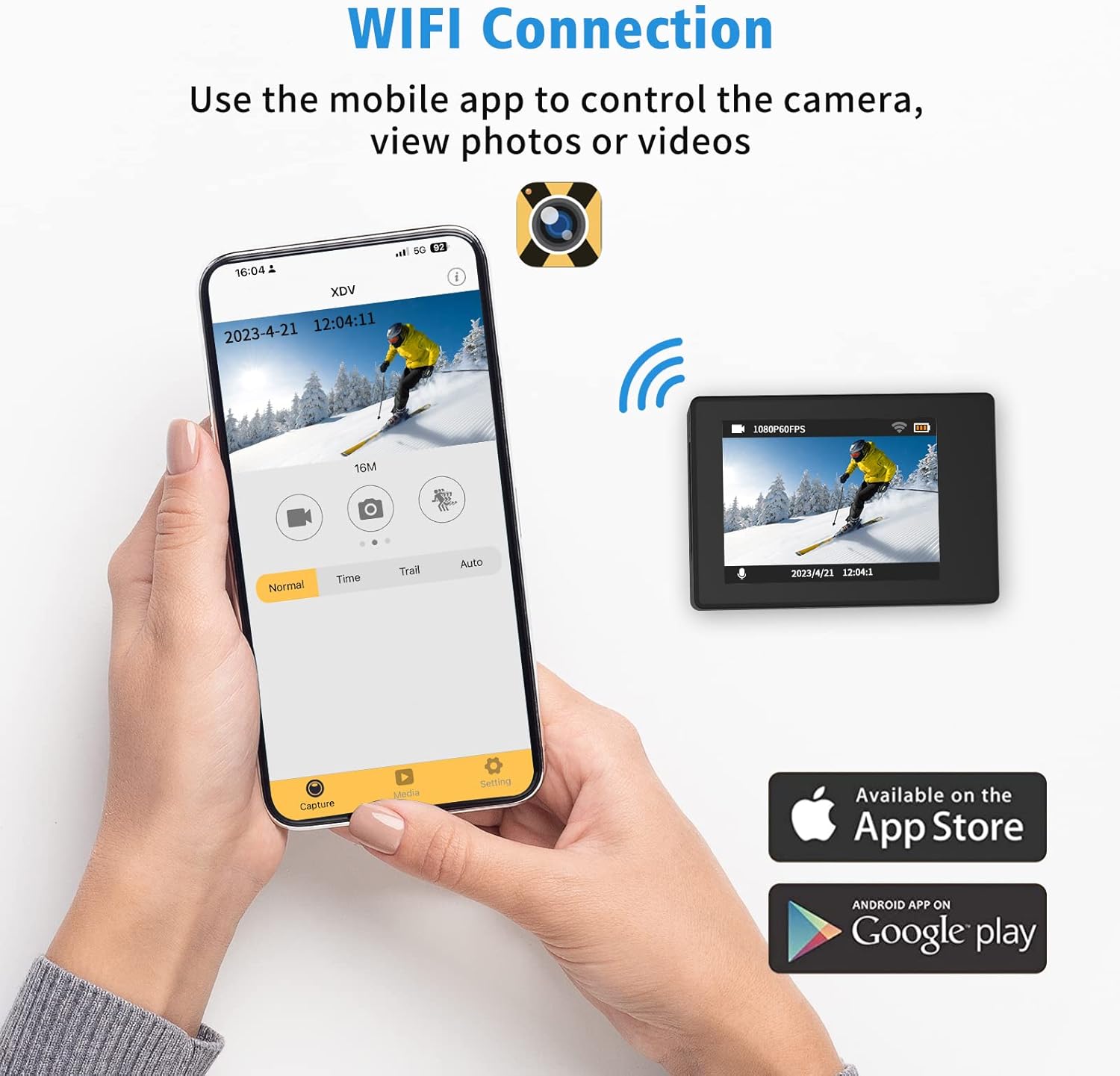
Figure 6: Connecting to the XDV App via Wi-Fi.
4.5 Використання пульта дистанційного керування
The included wrist remote control allows for convenient photo and video capture from a distance.
- Ensure the remote control battery is installed.
- Press the video button on the remote to start/stop video recording.
- Press the photo button on the remote to take a photo.
5. Технічне обслуговування та догляд
- Прибирання: Use the provided mirror cloth or a soft, lint-free cloth to clean the camera lens and screen. For the waterproof case, rinse with fresh water after saltwater use and allow to air dry.
- Догляд за акумулятором: Store batteries in a cool, dry place. Do not expose to extreme temperatures. Recharge regularly, even if not in use, to maintain battery health.
- Зберігання: When not in use, store the camera and accessories in a protective case to prevent damage.
- Waterproof Case Seal: Regularly inspect the rubber seal of the waterproof case for any dirt, hair, or damage. A compromised seal can lead to water leakage.
6. Вирішення проблем
| проблема | Можлива причина | Рішення |
|---|---|---|
| Камера не вмикається. | Низький заряд батареї або її відсутність. | Ensure batteries are fully charged. Try a different charged battery. |
| Не вдається записувати або фотографувати. | Немає карти Micro SD, карта переповнена або є помилка карти. | Insert a Micro SD card. Delete unnecessary files or replace the card. Format the card in camera settings. |
| Збій підключення до Wi-Fi. | Неправильний пароль, поза зоною дії або проблема з програмою. | Ensure correct password (1234567890). Move closer to the camera. Restart camera and app. |
| Погана якість зображення/відео. | Забруднений об'єктив, слабке освітлення або неправильні налаштування. | Clean the lens. Ensure adequate lighting. Check resolution settings (e.g., 4K, 16MP). |
| Протікання води у водонепроникному корпусі. | Seal compromised or case not properly closed. | Inspect the rubber seal for debris or damage. Ensure all latches are securely fastened. |
7. Технічні характеристики
| Особливість | Деталь |
|---|---|
| Бренд | Ourlякщо |
| Номер моделі | AT-30R |
| Роздільна здатність відео | 4K/30FPS, 2.7K/30FPS, 1080P/30FPS |
| Роздільна здатність фото | 16 МП |
| Водонепроникна глибина | Up to 40 meters (131 feet) with case |
| Розмір екрана | 2 дюйма IPS |
| View Кут | 170°, 140°, 110°, 70° (Adjustable) |
| Підключення | Wi-Fi |
| Зберігання | Micro SD (up to 64GB, Class 10+) |
| Акумулятори | 3 літій-іонні акумулятори 1350 мАг (в комплекті) |
| Особливості | 4X Zoom, Time-lapse, Loop Recording, Slow Motion, Anti-shake |
8. Гарантія та підтримка
Ourlife products are manufactured to high quality standards. For warranty information, technical support, or service inquiries, please refer to the contact information provided on the product packaging or visit the official Ourlякщо webсайт.
Будь ласка, збережіть чек про покупку для будь-яких гарантійних претензій.


