1. Вступ і даліview
This manual provides detailed instructions for the installation, operation, and maintenance of your Yansoo 3-Channel Dash Cam. Please read this manual thoroughly before using the device to ensure proper functionality and safety.
Особливості продукту:
- 3-канальний запис: Simultaneously captures video from the front (170° wide-angle), rear (165°), and inside (140°) of your vehicle.
- Відео високої чіткості: Supports 1080P Front video + AHD-720P Rear video + AHD-720P Inside video.
- Покращене нічне бачення: Features 4 unique infrared LED fill lights, F1.8 aperture, and WDR technology for optimal performance in low light.
- Аварійне блокування (G-сенсор): Automatically detects sudden shocks or collisions and locks the current video footage, щоб запобігти перезапису.
- Циклічний запис: Continuously records and automatically overwrites the oldest unlocked video files, коли карта пам'яті заповнена.
- Монітор паркування: Activates recording when motion or shocking is detected while parked (requires separate hardwire kit for 24/7 monitoring).
- Adjustable Interior Camera: The interior lens can be rotated 60° for flexible positioning.
Вміст упаковки:
- Yansoo 3-Channel Dash Cam Unit
- Задня камера з кабелем
- Кріплення присоски
- Автомобільний зарядний пристрій (Type-C)
- USB кабель для передачі даних
- Посібник користувача
- Mounting Hardware for Rear Camera
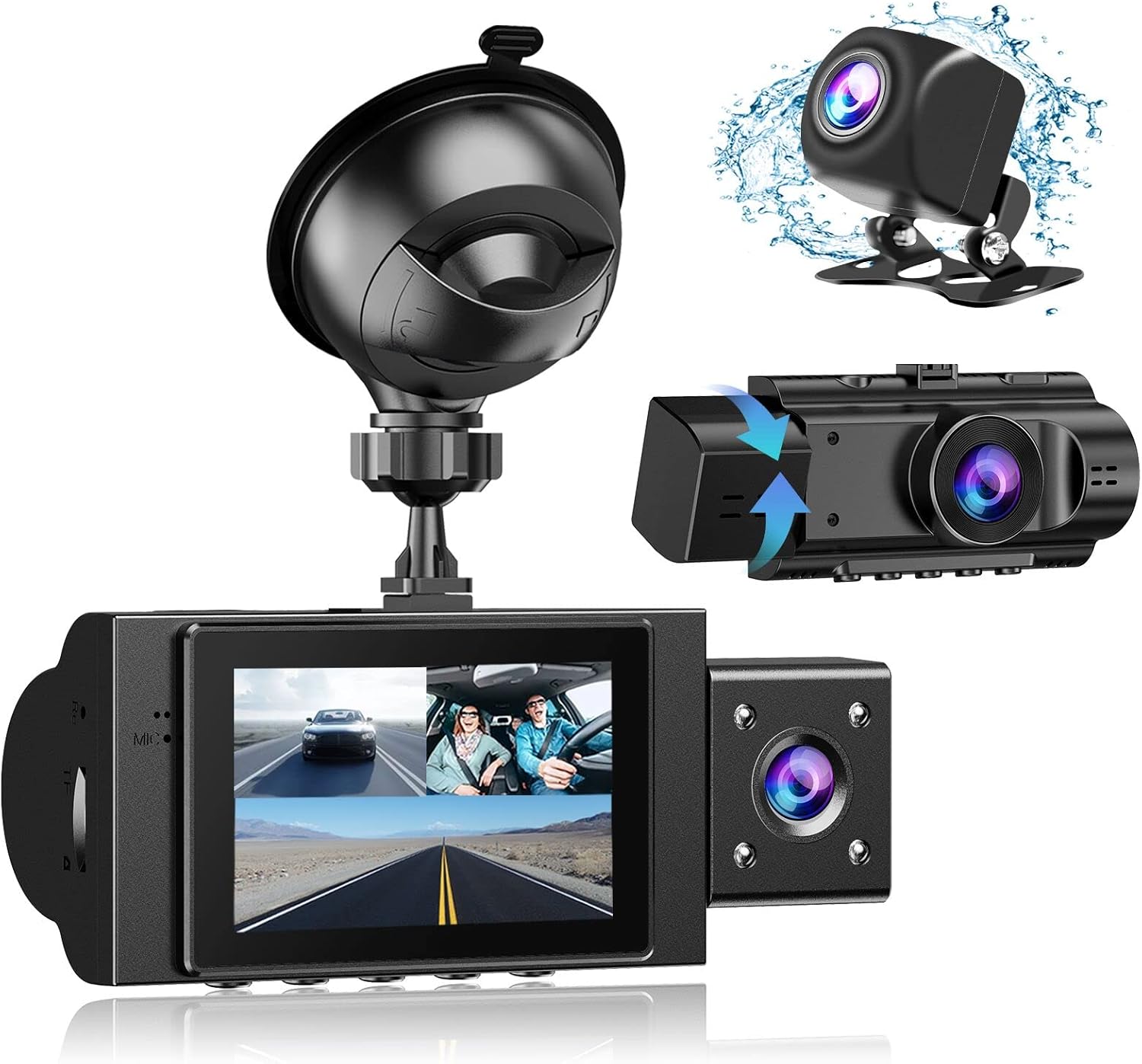
Image: The Yansoo 3-Channel Dash Cam unit with its suction cup mount and the separate rear camera, illustrating the complete package.
2. Налаштування
2.1 Встановлення картки пам'яті
The dash cam supports Micro Memory cards up to 64GB (Class 10 or above recommended, not included). Please format the card in the camera menu before first use.
- Знайдіть слот для карти пам'яті збоку відеореєстратора.
- Insert the Micro Memory card into the slot until it clicks into place.
- Щоб вийняти, обережно натисніть на карту, доки вона не вискочить.

Image: A four-panel illustration showing the steps to insert a Micro SD card into the dash cam's slot.
2.2 Монтаж відеореєстратора
Mount the main dash cam unit to your windshield using the provided suction cup mount. Choose a location that does not obstruct your view під час водіння.
- Clean the chosen area on your windshield thoroughly.
- Прикріпіть кріплення на присосці до блоку відеореєстратора.
- Міцно притисніть присоску до лобового скла та переверніть важіль, щоб закріпити її.
- Відрегулюйте кут камери, щоб забезпечити чітке зображення view дороги попереду.

Image: The Yansoo 3-Channel Dash Cam mounted on a car's windshield, showing its position relative to the driver's view.
2.3 Встановлення задньої камери
The rear camera provides a view of the vehicle's rear. It can be installed inside the rear window or externally above the license plate.
- Підключіть кабель задньої камери до головного блоку відеореєстратора.
- Route the cable neatly along the vehicle's interior trim to the rear.
- Mount the rear camera in the desired location, ensuring a clear view.

Image: A diagram illustrating the recommended cable routing path for the dash cam and rear camera within a car's interior.
2.4 Підключення живлення
Connect the dash cam to your vehicle's cigarette lighter socket using the provided car charger. The camera will automatically power on and begin recording when the vehicle starts.

Image: The Yansoo 3-Channel Dash Cam connected to a power source, indicating its readiness for operation.
3. Інструкція з експлуатації
3.1 Основна операція
- Увімкнення/вимкнення живлення: The camera powers on/off automatically with your vehicle's ignition. You can also manually power on/off by pressing and holding the power button.
- Почати/зупинити запис: Recording starts automatically when the camera powers on. Press the "OK" button to manually stop or start recording.
- Перемикач дисплея Views: Press the "Up" button to cycle through different display modes (Front, Inside, Rear, Picture-in-Picture combinations).
Video: Demonstration of the Yansoo X88 Dash Cam's recording capabilities, showcasing its ability to capture clear video footage.
Video: Footage from the Yansoo X88 Dash Cam demonstrating its clear day and night recording capabilities.
Video: A demonstration of the Yansoo X88 Dash Cam's 1080P Full HD recording quality.
3.2 Параметри меню
To access the menu settings, stop recording (if active) by pressing the "OK" button, then press the "M" button twice.
- роздільна здатність: Adjust video resolution for front, inside, and rear cameras.
- Циклічний запис: Встановіть тривалість відеосегментів (наприклад, 1, 3, 5 хвилин).
- Чутливість G-сенсора: Adjust the sensitivity of the emergency lock feature.
- Монітор паркування: Enable or disable the parking monitoring function.
- Дата/час: Встановіть правильну дату й час для точного часуamps на записах.
- мова: Виберіть бажану мову для меню.
Video: A step-by-step guide on how to set the date and time on the Yansoo Dash Cam.
4. Технічне обслуговування
- Звичайне форматування: Format the memory card regularly (e.g., once a month) to prevent data corruption and ensure optimal recording performance.
- Очищення лінз: Keep the camera lenses clean using a soft, lint-free cloth. Avoid abrasive materials that could scratch the lens.
- Оновлення прошивки: Check the official Yansoo webсайт для отримання будь-яких доступних оновлень прошивки для покращення продуктивності та додавання нових функцій.
- Температурні міркування: Уникайте тривалого впливу екстремальних температур на відеореєстратор.
5. Вирішення проблем
| проблема | Можлива причина | Рішення |
|---|---|---|
| Камера не вмикається. | Немає живлення від прикурювача; поганий контакт. | Check car charger connection; ensure vehicle ignition is on. |
| Запис несподівано зупиняється. | Memory card full or corrupted; G-Sensor triggered. | Format memory card; adjust G-Sensor sensitivity. |
| Відео footagе розмите. | Protective film on lens; dirty lens. | Remove protective film; clean lenses with a soft cloth. |
| Дата/час неправильні. | Date/Time not set or battery low. | Set Date/Time in menu; ensure continuous power supply. |
| Camera freezes or malfunctions. | Збій програмного забезпечення. | Use a needle to press the "RE" (Reset) button. |
6. Технічні характеристики
| Особливість | Деталь |
|---|---|
| Розміри продукту | 4.13 x 1.57 x 1.77 дюймів |
| Вага товару | 1.23 фунта |
| Роздільна здатність захоплення відео | 1080p (Front), 720p (Inside & Rear) |
| Поле оф View | 170° (Front), 140° (Inside), 165° (Rear) |
| Технологія підключення | USB |
| Особливість | G-Sensor, Loop Recording, Parking Monitor, Night Vision |
| Тип монтажу | Всмоктувальне кріплення |
| Виробник | Янсу |
7. Гарантія та підтримка
Yansoo offers comprehensive after-sales support for your dash cam.
- Гарантія: 1-YEAR warranty from the date of purchase.
- Технічна служба: 7*24 hours technical service is available.
- Контакти: For any questions or issues, please contact our customer service team via Amazon or the after-sales email provided in the original product packaging.
- Інструкція користувача (PDF): Цифрова версія посібника користувача доступна для завантаження тут.


