1. Вступ
This manual provides detailed instructions for the assembly, installation, operation, and maintenance of your AMANSON H07 ATX Mid Tower PC Case. Please read this manual thoroughly before beginning installation to ensure proper setup and safe operation. Keep this manual for future reference.

Figure 1.1: AMANSON H07 ATX Mid Tower PC Case with illuminated internal components.
2. Інформація про безпеку
- Завжди від’єднуйте блок живлення від розетки, перш ніж виконувати будь-яке встановлення або технічне обслуговування всередині корпусу ПК.
- Поводьтеся з усіма компонентами обережно, щоб запобігти пошкодженням.
- Одягайте антистатичний браслет, щоб запобігти пошкодженню чутливих електронних компонентів електростатичним розрядом (ESD).
- Зберігайте дрібні деталі та пакувальні матеріали подалі від дітей.
- Забезпечте належну вентиляцію навколо корпусу ПК, щоб запобігти перегріву.
3. Вміст упаковки
Перевірте наявність усіх елементів в упаковці:
- AMANSON H07 ATX Mid Tower PC Case
- Коробка з аксесуарами (гвинти, стійки, кабельні стяжки тощо)
- Посібник користувача (цей документ)
4. Компонент Завершеноview
The AMANSON H07 PC case features a panoramic design with tempered glass panels for full visibility of your internal components. It supports various motherboard sizes and extensive cooling configurations.

Figure 4.1: Top I/O Panel with power button, USB 3.0, USB 2.0, and audio ports.
The top I/O panel includes:
- Кнопка живлення
- Кнопка скидання
- 2 порти USB 2.0
- 1 порт USB 3.0
- Аудіороз'єми вхід/вихід
5. Налаштування та встановлення
5.1. Підготовка справи
The AMANSON H07 features tool-less hinged tempered glass side panels for easy access. Gently open the side panel by pulling it from the rear edge. The panels can also be removed by lifting them off their hinges for full access during installation.

Figure 5.1: Hinged tempered glass side panel for easy access.
5.2. Встановлення материнської плати
The H07 supports E-ATX, ATX, Micro-ATX, and ITX motherboards. Install the necessary standoffs for your motherboard form factor. Carefully align your motherboard with the standoffs and I/O shield, then secure it with screws.
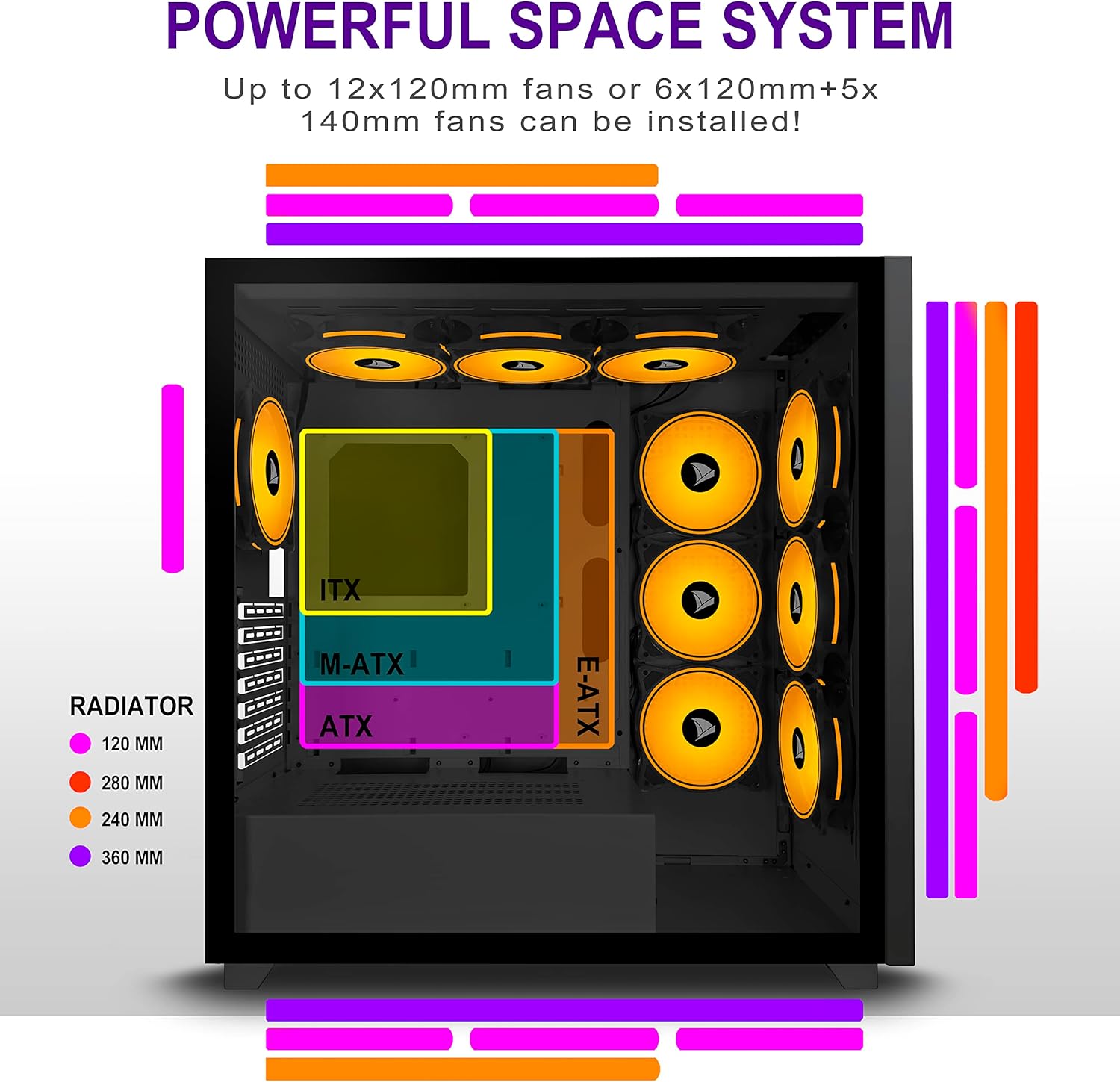
Figure 5.2: Motherboard and cooling component placement options.
5.3. Установка джерела живлення
Install your power supply unit (PSU) into the dedicated compartment at the bottom rear of the case. Secure it with screws from the rear of the case.
5.4. Встановлення пристрою зберігання даних
The case provides multiple mounting points for storage devices. Install your 3.5" HDDs and 2.5" SSDs into the designated trays and mounting locations. Refer to the case diagram for specific locations.

Figure 5.3: Storage drive mounting options for HDDs and SSDs.
5.5. Встановлення плати розширення (графічного процесора)
Remove the necessary PCI-E slot covers from the rear of the case. Insert your graphics card or other expansion cards into the motherboard's PCI-E slots and secure them with screws.
5.6. Кабельний менеджмент
Utilize the cable routing cutouts and tie-down points behind the motherboard tray to manage cables. This improves airflow and maintains a clean aesthetic.
6. Інструкція з експлуатації
6.1. Увімкнення/вимкнення живлення
Press the power button located on the top I/O panel to turn on your PC. To shut down, use the operating system's shutdown function or press and hold the power button for several seconds.
6.2. Using Front I/O Ports
Connect USB devices to the USB 2.0 or USB 3.0 ports. Use the audio jacks for headphones, microphones, or speakers.
7. Технічне обслуговування
7.1. прибирання
Регулярно очищуйте зовнішню частину корпусу м’якою губкоюamp cloth. For internal cleaning, use compressed air to remove dust from fans and components. Ensure the PC is powered off and unplugged before cleaning.
7.2. Пилові фільтри
The AMANSON H07 may include removable dust filters. Clean these filters periodically to maintain optimal airflow and cooling performance.
8. Вирішення проблем
- ПК не вмикається: Check all power connections, including the PSU to the wall, the PSU to the motherboard, and the front panel power switch cable to the motherboard.
- Overheating issues: Ensure all fans are properly installed and functioning. Verify that dust filters are clean and not obstructing airflow. Check thermal paste application on CPU cooler.
- Не працюють USB-порти: Confirm that the front panel USB cables are correctly connected to the motherboard headers.
- Audio jacks not working: Verify that the front panel audio cable is correctly connected to the motherboard's audio header.
9. Технічні характеристики
Below are the technical specifications for the AMANSON H07 PC Case:
| Особливість | Деталь |
|---|---|
| Модель | H07 |
| Тип корпусу | Середній вежі |
| Сумісність материнської плати | E-ATX, ATX, Micro ATX, ITX |
| матеріал | Загартоване скло |
| Розміри продукту (ДxШxВ) | 19.69 x 13.78 x 19.69 дюйма (500 x 350 x 500 мм) |
| Вага товару | 24.2 фунта |
| Кількість портів USB 2.0 | 2 |
| Кількість портів USB 3.0 | 1 |
| Кількість слотів розширення | 8 |
| Спосіб охолодження | повітря |
| Тип кріплення блоку живлення | Нижнє кріплення |

Figure 9.1: AMANSON H07 PC Case dimensions (520mm height, 510mm length, 250mm width).
10. Інформація про гарантію
Please refer to the product packaging or the official AMANSON webна сайті для отримання інформації про конкретні гарантійні умови. Зберігайте чек про покупку для гарантійних претензій.
11. Підтримка
For technical assistance or customer support, please visit the official AMANSON website or contact their customer service department. Contact details can typically be found on the product packaging or the brand's webсайт.


