1. Продукт закінчивсяview
The Kamon K1 wired earbuds are designed for audio playback and communication across various devices. They feature an in-ear design for sound isolation and include an in-line remote with an integrated microphone for convenient control.

Image 1.1: A user wearing Kamon K1 earbuds, demonstrating the product in use for audio listening.
Ключові характеристики:
- Вбудований мікрофон: Дозволяє здійснювати дзвінки в режимі hands-free.
- Multi-functional In-line Remote: Controls calls and music playback.
- Ергономічний дизайн внутрішньовушних навушників: Забезпечує надійну фіксацію та звукоізоляцію.
- High Fidelity Sound: Delivers clear audio with defined bass, mid-range, and treble.
- Широка сумісність: Connects to devices with a standard 3.5mm headphone jack.
- Кабель, що не заплутується: Designed to resist tangling for ease of use and storage.
2. Налаштування та підключення
The Kamon K1 earbuds utilize a standard 3.5mm audio jack for connection. No additional software or drivers are required for basic functionality.
Підключення навушників:
- Locate the 3.5mm audio port on your device (e.g., smartphone, tablet, laptop, MP3 player).
- Insert the 3.5mm jack of the Kamon K1 earbuds firmly into the device's audio port.
- Ensure the connection is secure. If experiencing sound issues, gently rotate the plug within the port to establish full contact.
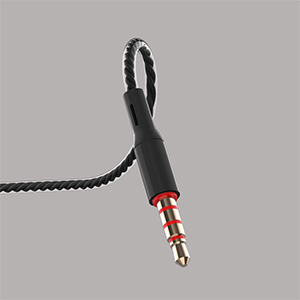
Image 2.1: A close-up of the 3.5mm audio jack, illustrating the connection interface.

Image 2.2: The 3.5mm audio jack of the Kamon K1 earbuds, shown with icons of compatible devices including PCs, Macbooks, iPads, iPhones, Android smartphones, and iPods.
3. Інструкція з експлуатації
The in-line remote control allows for easy management of calls and music playback without needing to access your connected device directly.
In-line Remote Control Functions:
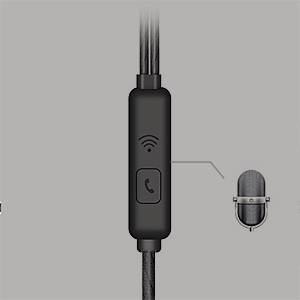
Image 3.1: A detailed image of the in-line remote control for Kamon K1 earbuds, featuring the multi-function button and microphone.
- Відповісти/закінчити виклик: Натисніть кнопку один раз.
- Відмовитися від дзвінка: Натисніть і утримуйте кнопку.
- Відтворення/пауза музики: Натисніть кнопку один раз.
- Next Music Track: Натисніть кнопку двічі.
- Previous Music Track: Натисніть кнопку три рази.
- Активуйте голосового помічника (наприклад, Siri): Press and hold the button (functionality may vary by device).
Video 3.1: Official product video demonstrating the features and usage of Kamon K1 wired earbuds, including design, sound quality, and in-line control functions.
4. Технічне обслуговування та догляд
Proper care helps extend the lifespan and maintain the performance of your Kamon K1 earbuds.
- Handling the Cord: Avoid pulling the earbud cord directly. Always hold the earphone plug part and the earbud housing when disconnecting from devices or removing from ears.
- Прибирання: Regularly clean the ear tips and earbud housing with a soft, dry cloth. Ensure no moisture enters the speaker components.
- Зберігання: Store earbuds in a clean, dry place. The tangle-free cable design assists in neat storage.
- захист: The outer layer of the cable is designed for protection against external shocks. However, avoid excessive force or sharp objects.
5. Вирішення проблем
If you encounter issues with your Kamon K1 earbuds, refer to the following common solutions:
- No Sound or Sound from One Side:
- Переконайтеся, що 3.5-мм роз'єм повністю вставлено в аудіопорт пристрою.
- Gently rotate the plug within the port to ensure proper contact.
- Перевірте навушники з іншим пристроєм, щоб виключити проблему, пов'язану з певним пристроєм.
- Перевірте налаштування гучності вашого пристрою.
- Мікрофон не працює:
- Переконайтеся, що навушники повністю підключені.
- Verify that your device's microphone input is set to the connected earbuds.
- Перевірте мікрофон за допомогою іншої програми або пристрою.
- Пульт дистанційного керування не відповідає:
- Confirm the earbuds are securely connected.
- Some older devices or specific operating systems may have limited compatibility with remote functions.
- Погана якість звуку (статичні перешкоди, спотворення):
- Check the audio source for quality.
- Переконайтеся, що 3.5-мм роз'єм чистий і не містить сміття.
- Test with another device to isolate the problem.
6. Технічні характеристики
Detailed technical specifications for the Kamon K1 wired earbuds.
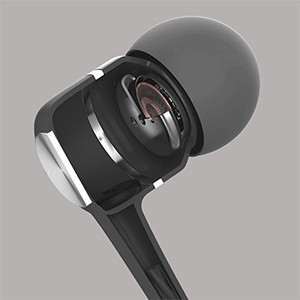
Image 6.1: A cutaway diagram of a Kamon K1 earbud, revealing its internal acoustic components for high-fidelity sound.
| Особливість | Специфікація |
|---|---|
| Назва моделі | KE |
| Технологія підключення | Провідний |
| Гніздо для навушників | 3.5 мм джек |
| Контроль шуму | Звукоізоляція |
| Тип управління | Пульт дистанційного керування (кнопка) |
| мікрофон | Інтегрований |
| Функція кабелю | Без заплутування |
| Імпеданс | 32 Ом ±15% на 1 кГц |
| Номінальна потужність | 3 мВт |
| Максимальна вхідна потужність | 5 мВт |
| Спотворення | 3% максимум (1 кГц/1 мВт) |
| АЧХ | 20~20,000 Гц |
| Довжина шнура | 120 см |
| Вага товару | 0.07 кілограма (приблизно 2.39 унцій) |
| матеріал | Plastic, Rubber, Silicone, Thermoplastic Elastomer (TPE) |
| Сумісні пристрої | iPhone devices, Android smartphones, iPod, iPad, MP3 players, music speakers |
7. Гарантія та підтримка
For warranty information or technical support regarding your Kamon K1 earbuds, please refer to the product packaging or contact Kamon customer service directly. Details for contacting support are typically provided with your purchase or on the official Kamon webсайт.


