1. Вступ і даліview
The Calix GigaCenter 844E-1 is a high-performance wireless router and modem designed to provide robust and reliable internet connectivity for home and small office environments. It supports dual-band Wi-Fi (2.4GHz and 5GHz) for optimal wireless performance and includes multiple Ethernet ports for wired connections. This manual provides detailed instructions for setting up, operating, maintaining, and troubleshooting your GigaCenter 844E-1 device.
2. Особливості продукту
- Дводіапазонний Wi-Fi: Supports 2.4GHz and 5GHz frequencies for flexible and high-speed wireless connections (802.11ac, 802.11n, 802.11a/g/b compatible).
- High LAN Data Rate: Capable of up to 1000 Mbps for fast wired connections.
- Кілька портів: Includes Ethernet (RJ-45) ports (4 LAN ports), USB 2.0, and RJ-11 ports for versatile connectivity.
- Integrated Modem: Functions as both a router and a modem, simplifying network setup.
- Компактний дизайн: Designed for efficient space utilization.
3. Вміст упаковки
Будь ласка, перевірте наявність усіх предметів у вашій упаковці:
- Calix GigaCenter 844E-1 Wireless Router Modem
- Джерело живлення від адаптера змінного струму
- (Optional: Ethernet Cable, Phone Cable - may vary by package)
4. Посібник із налаштування
Follow these steps to set up your Calix GigaCenter 844E-1:
- Розташування пристрою: Place the GigaCenter 844E-1 in a central location in your home, away from obstructions and sources of interference (e.g., microwaves, cordless phones). Ensure adequate ventilation.
- Підключіть живлення: Connect the provided AC Adapter Power Supply to the "POWER" port on the back of the GigaCenter 844E-1 and then plug the adapter into a standard electrical outlet. The Power indicator light on the front panel should illuminate.

Малюнок 4.1: Спереду view of the Calix GigaCenter 844E-1 showing indicator lights and the included power adapter.
- Підключення до Інтернет-джерела: Connect your internet service provider's (ISP) cable or fiber optic line to the appropriate WAN/Broadband port on the GigaCenter 844E-1. This port is typically labeled "ETH-WAN" or "Broadband". The Broadband indicator light should turn solid green once a connection is established.

Малюнок 4.2: Сторона view of the GigaCenter 844E-1 highlighting the ETH-WAN, Power, and Phone ports.
- Підключення дротових пристроїв (необов'язково): Use standard Ethernet cables to connect computers, gaming consoles, or other network devices to the "ETHERNET 1-4" ports on the back of the GigaCenter 844E-1. The corresponding Ethernet indicator light will illuminate when a device is connected and active.

Figure 4.3: Top/back view of the GigaCenter 844E-1 displaying the USB, Reset, Ethernet (LAN), and Phone ports.
- Connect Phone Devices (Optional): If your service includes voice, connect analog phones to the "PHONE 1" or "PHONE 2" ports using RJ-11 cables.
- Початкове підключення до Wi-Fi:
- Locate the Wi-Fi Network Name (SSID) and Password (WPA Key) on the label usually found on the bottom or back of your GigaCenter 844E-1.
- На вашому бездротовому пристрої (ноутбуці, смартфоні, планшеті) знайдіть доступні мережі Wi-Fi.
- Select your GigaCenter's SSID and enter the WPA Key when prompted.
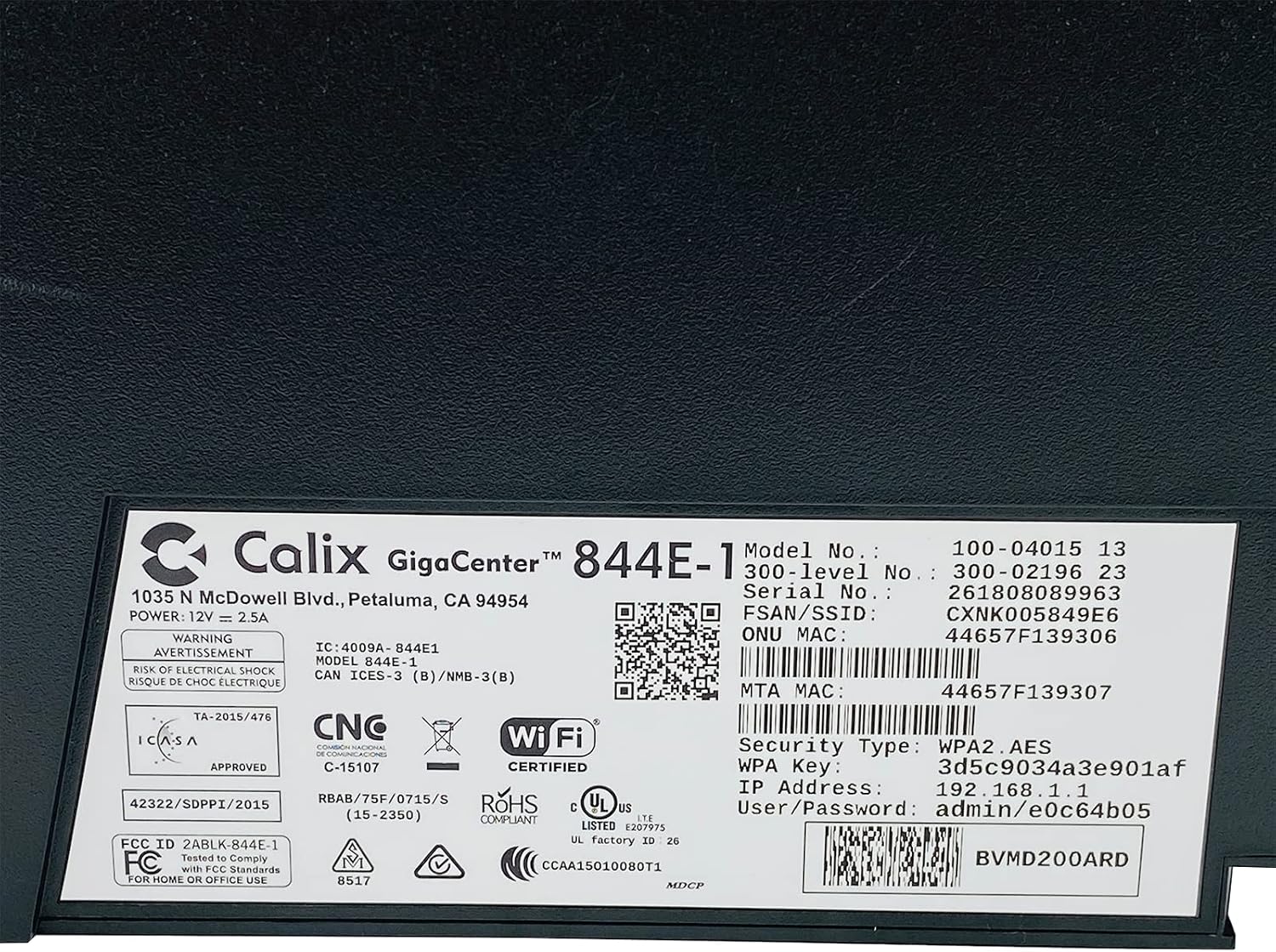
Малюнок 4.4: Детально view of the bottom label, providing essential information such as model number, serial number, Wi-Fi SSID, and WPA Key for network access.
- Перевірте підключення: Після підключення відкрийте a web browser and try to access a webсайт (наприклад, www.google.com). If successful, your GigaCenter 844E-1 is set up and ready for use.
5. Інструкція з експлуатації
5.1 Світлові індикатори
The front panel of the GigaCenter 844E-1 features several indicator lights that provide status information:
| світло | Статус | опис |
|---|---|---|
| ПОТУЖНІСТЬ | Світиться зеленим | Пристрій увімкнено. |
| ШИРОКОСМУГОВИЙ | Світиться зеленим | Internet connection is active. |
| СЕРВІС | Світиться зеленим | Service is active and provisioned. |
| WIFI 2.4 ГГц | Постійний зелений/Миготливий | 2.4 GHz Wi-Fi is active/data transfer. |
| WIFI 5 ГГц | Постійний зелений/Миготливий | 5 GHz Wi-Fi is active/data transfer. |
| ETHERNET 1-4 | Постійний зелений/Миготливий | Wired connection active/data transfer. |
| PHONE 1-2 | Постійний зелений/Миготливий | Phone service active/in use. |
| USB | Постійний зелений/Миготливий | USB device connected/data transfer. |
| WPS | Блимає | Виконується створення пари WPS. |
5.2 Доступ до Web Інтерфейс
To configure advanced settings, you can access the GigaCenter's web інтерфейс:
- Ensure your device is connected to the GigaCenter via Wi-Fi or Ethernet.
- Відкрийте a web browser and enter the IP Address (e.g., 192.168.1.1) found on the product label into the address bar.
- Enter the User/Password (e.g., admin/e0c64b05) from the product label when prompted.
- You can now configure settings such as Wi-Fi name, password, port forwarding, and parental controls.
6. Технічне обслуговування
- Прибирання: Використовуйте м’яку суху тканину для очищення зовнішньої частини пристрою. Не використовуйте рідкі засоби для чищення або аерозолі.
- Вентиляція: Ensure the device's ventilation slots are not blocked to prevent overheating.
- Оновлення прошивки: Periodically check with your Internet Service Provider (ISP) for available firmware updates to ensure optimal performance and security.
- Перезапуск: Якщо у вас виникли проблеми з підключенням, спробуйте перезавантажити пристрій, від’єднавши адаптер живлення на 10 секунд, а потім знову підключивши його.
7. Вирішення проблем
У цьому розділі розглядаються поширені проблеми, з якими ви можете зіткнутися:
7.1 Відсутнє підключення до Інтернету
- Перевірте кабелі: Ensure all cables (power, internet source, Ethernet) are securely connected.
- Світлові індикатори: Verify that the POWER, BROADBAND, and SERVICE lights are solid green. If not, refer to Section 5.1 or contact your ISP.
- Перезавантажте пристрій: Power cycle the GigaCenter 844E-1 by unplugging it for 10 seconds and plugging it back in.
- Інтернет-провайдер, нашtage: Зверніться до свого інтернет-провайдера щодо будь-яких послуг, якіtagу вашому регіоні.
7.2 Wi-Fi Not Working or Slow
- Wi-Fi Lights: Ensure the WIFI 2.4 GHz and/or WIFI 5 GHz lights are solid green.
- Пароль: Double-check that you are entering the correct Wi-Fi password (WPA Key).
- Потужність сигналу: Move closer to the GigaCenter 844E-1 to improve signal strength.
- Перешкоди: Зменште перешкоди від інших електронних пристроїв.
- Оптимізація каналу: Доступ до web interface to change Wi-Fi channels if experiencing congestion.
7.3 Немає доступу Web Інтерфейс
- IP-адреса: Confirm you are using the correct IP Address (e.g., 192.168.1.1).
- Підключення: Ensure your device is connected to the GigaCenter's network.
- облікові дані: Verify the User/Password from the product label.
- Брандмауер/Антивірус: Тимчасово вимкніть будь-який брандмауер або антивірусне програмне забезпечення на вашому комп’ютері, які можуть блокувати доступ.
7.4 Функціональність WPS
The WPS (Wi-Fi Protected Setup) button allows for easy connection of WPS-compatible devices without manually entering the password. Press the WPS button on the GigaCenter 844E-1 and then activate WPS on your client device within two minutes. The WPS light will flash during the pairing process.
8. Технічні характеристики
| Особливість | Деталь |
|---|---|
| Модель | GigaCenter 844E-1 (100-04015 13) |
| Бренд | Калікс |
| Технологія підключення | Wireless-Wi-Fi 802.11ac, Ethernet (RJ-45) Hub/Switch, 5G |
| Бездротові стандарти | 802.11ac, 802.11n, 802.11a/g/b |
| Клас діапазону частот | Дводіапазонний (2.4 ГГц, 5 ГГц) |
| Maximum LAN Data Rate | 1000 Мбіт/с |
| Порти | 4 x Ethernet (RJ-45), 1 x USB 2.0, 2 x RJ-11 (Phone) |
| Сумісні пристрої | Personal Computer, Network Devices |
| Рекомендоване використання | додому |
| Включені компоненти | Джерело живлення |
| Вага товару | 3 фунта |
9. Інформація про безпеку
- Не піддавайте пристрій впливу води або вологи.
- Не відкривайте пристрій casing. Звертайтеся до кваліфікованого персоналу з усіх питань технічного обслуговування.
- Використовуйте лише наданий адаптер живлення.
- Тримайте пристрій подалі від джерел тепла та прямих сонячних променів.
- Забезпечте належну вентиляцію, щоб запобігти перегріву.
10. Гарантія та підтримка
For warranty information and technical support, please contact your Internet Service Provider (ISP) or the vendor from whom you purchased this device. The Calix GigaCenter 844E-1 is typically provided and supported by your ISP as part of your internet service package.
For general inquiries or to find more information about Calix products, you may visit the official Calix website (if available, search online for "Calix official webсайт»).


