1. Вступ
Welcome to the Aonus A9 Pro Cordless Stick Vacuum Cleaner user manual. This guide provides essential information for the safe and efficient operation, maintenance, and troubleshooting of your new vacuum cleaner. Please read this manual thoroughly before first use and keep it for future reference.
2. Продукт закінчивсяview
2.1. Компоненти в комплекті
The Aonus A9 Pro package includes the following components:
- Main Motor Unit (with dustbin and LED display)
- Складна подовжувальна трубка
- Motorized Brush Head (with LED lights)
- Знімний акумулятор
- Док-станція для настінного кріплення
- Адаптер живлення/зарядний пристрій
- Щілинний інструмент
- Щітка для пилу 2-в-1
- Cleaning Tool (for brush head and filter)
- Запасний фільтр

Figure 2.1: Aonus A9 Pro Cordless Vacuum Cleaner and its included accessories.
3. Налаштування
3.1. Збірка
- Insert the foldable extension tube into the main motor unit until it clicks securely into place.
- Attach the motorized brush head to the other end of the extension tube, ensuring it clicks firmly.
- For handheld use, attach desired accessories (crevice tool, dusting brush) directly to the main motor unit.
3.2. Зарядка батареї
Перед першим використанням повністю зарядіть акумулятор. Акумулятор можна заряджати, підключений до пилососа або окремо.
- Connect the power adapter to the charging port on the main unit or directly to the battery pack.
- Вставте адаптер у розетку.
- Світлодіодний дисплей показуватиме стан заряджання. Повне заряджання зазвичай триває 4-5 годин.

Figure 3.2: The removable battery pack and its charging indicators.
4. Інструкція з експлуатації
4.1. Power On/Off and Suction Modes
Press the power button to turn the vacuum on or off. Use the mode button on the LED display to switch between suction modes:
- Низьке всмоктування: For light dust and extended runtime (up to 60 minutes).
- Середнє всмоктування: For general cleaning.
- High Suction: For deep cleaning and stubborn dirt (up to 42KPa / 500W).
- Автоматичний режим: The vacuum intelligently detects dust concentration and adjusts suction power accordingly.

Figure 4.1.1: Intelligent LED control screen displaying battery life and suction mode.

Figure 4.1.2: Automatic dust detection adjusts suction for efficient cleaning.

Figure 4.1.3: Demonstration of the vacuum's powerful 42KPa suction.
4.2. Special Features and Usage
- Складний дизайн: The extension tube can be folded 180 degrees, allowing easy access under low furniture like beds and sofas without bending over.
- Щітка проти заплутування: The motorized brush head is designed to prevent hair entanglement, ensuring smooth operation and effective cleaning on various floor types including carpets, wood, marble, and tile.
- Світлодіодні фари: The brush head features LED lights to illuminate dust and debris in dark areas, ensuring no spot is missed.
- Універсальні аксесуари: Use the crevice tool for narrow gaps and corners, and the 2-in-1 dusting brush for upholstery, keyboards, and delicate surfaces.
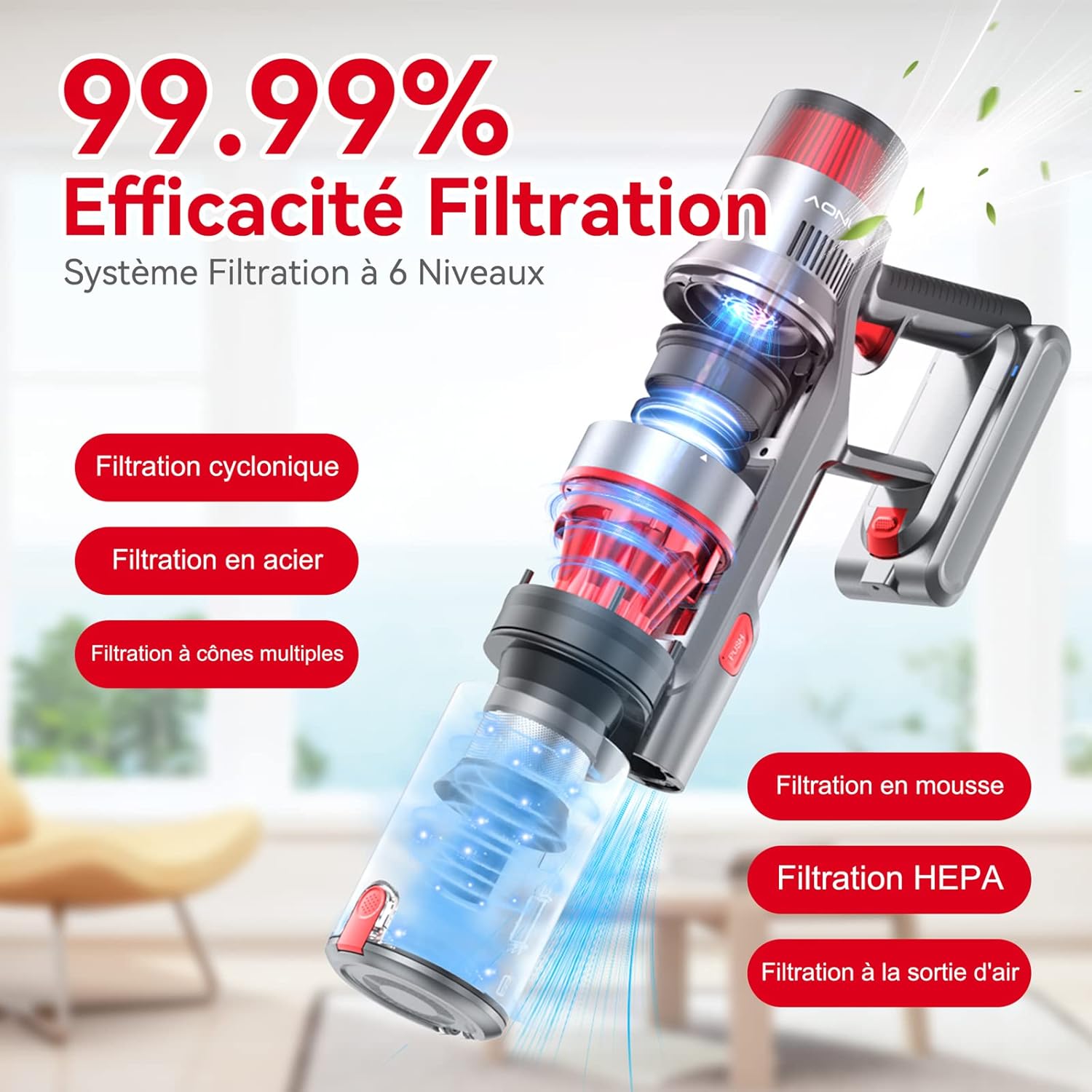
Figure 4.2.1: The 180-degree foldable design allows easy cleaning under low furniture.
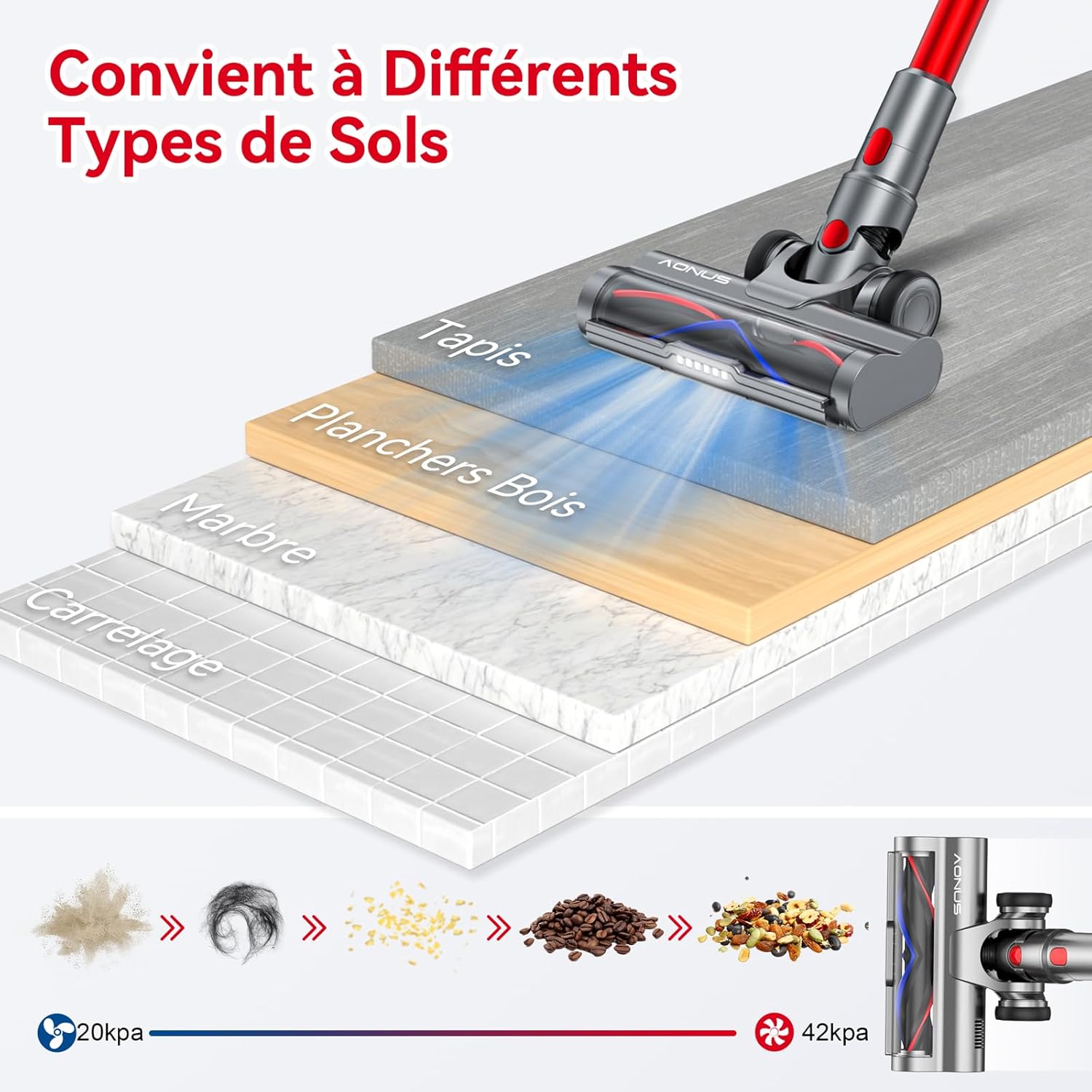
Figure 4.2.2: The vacuum is effective on various floor types including carpet, wood, marble, and tile.

Figure 4.2.3: The vacuum comes with multiple functional accessories for different cleaning scenarios.
5. Технічне обслуговування
Regular maintenance ensures optimal performance and extends the lifespan of your Aonus A9 Pro vacuum cleaner.
5.1. Спорожнення сміттєвого бака
Empty the dustbin after each use or when the MAX line is reached.
- Тримайте основний пристрій над сміттєвим баком.
- Press the dustbin release button (usually marked "PUSH" or with a trash can icon) to open the bottom flap and release debris.
- Щільно закрийте клапан після спорожнення.

Figure 5.1: One-click dust removal for quick and easy emptying.
5.2. Очищення фільтрів
The Aonus A9 Pro features a 6-level filtration system, including washable HEPA and metal filters. Clean filters regularly (e.g., monthly, depending on usage) to maintain suction power and prevent secondary pollution.
- Twist and pull to remove the dustbin and filter assembly from the main unit.
- Separate the HEPA filter, metal filter, and foam filter.
- Rinse all washable filter components under cold running water until the water runs clear.
- Allow all filter components to air dry completely for at least 24 hours before reassembling and placing back into the vacuum. Do not use a dryer or direct heat.

Figure 5.2: Diagram illustrating the 6-level filtration system, including cyclonic, steel, multi-cone, foam, and HEPA filters.
5.3. Очищення головки щітки
Periodically check the brush head for tangled hair or debris. While designed to be anti-tangle, some accumulation may occur.
- Вимкніть пилосос і зніміть головку щітки.
- Use the provided cleaning tool to cut and remove any tangled hair or fibers from the brush roller.
- Ensure the roller spins freely before reattaching.
6. Вирішення проблем
Зверніться до таблиці нижче, щоб дізнатися про поширені проблеми та їх вирішення.
| проблема | Можлива причина | Рішення |
|---|---|---|
| Пилосос не вмикається. | Батарея розряджена або неправильно встановлена. | Повністю зарядіть акумулятор. Переконайтеся, що акумуляторний блок надійно закріплений на місці. |
| Низька потужність всмоктування. | Dustbin is full, filters are clogged, or there's a blockage. | Empty the dustbin. Clean all filters thoroughly. Check the extension tube and brush head for blockages. |
| Brush head stops spinning. | Hair or debris tangled in the brush roller, or a blockage in the brush head. | Turn off the vacuum and remove any tangled hair or debris from the brush roller. Clear any blockages in the brush head assembly. |
| Короткий час роботи від батареї. | Operating in High Suction mode frequently, or battery degradation. | Use Automatic or Low Suction mode for longer runtime. Ensure battery is fully charged before use. If battery life significantly decreases over time, consider battery replacement. |
7. Технічні характеристики
| Особливість | Специфікація |
|---|---|
| Бренд | Aonus |
| Номер моделі | A9 Pro |
| Колір | Червоний |
| Розміри продукту (Д x Ш x В) | 12.7 х 7.62 х 12.7 см |
| Вага товару | 2.8 кілограма |
| Ємність смітника | 1 літрів |
| потужність | 500 Вт |
| Максимальне всмоктування | 33000 Па |
| матеріал | Алюміній, Пластик |
| Час виконання | До 60 хвилин |
| Рівень шуму | 60 дБ |
| Особливості | Washable Filter, HEPA, Portable, Cordless, Bagless, Foldable Design, LED Display, Automatic Dust Detection |
| Тип фільтра | Картридж (HEPA) |
| Рекомендоване використання | Car, Pet Hair, Floors |
8. Гарантія та підтримка
8.1. Інформація про гарантію
The Aonus A9 Pro Cordless Stick Vacuum Cleaner typically comes with a 2-year manufacturer's warranty. Please refer to the warranty card included in your product packaging for specific terms and conditions. Keep your proof of purchase for warranty claims.
8.2. Підтримка клієнтів
For any questions, technical assistance, or warranty claims, please contact Aonus customer support through the retailer where you purchased the product or visit the official Aonus webна сайті для отримання контактної інформації.


