1. Продукт закінчивсяview
The Fantech MAXFIT81 is a 75% form factor wireless mechanical keyboard designed for gaming and productivity. It features PBT Dye-Sub keycaps, a customizable OLED display, a programmable rotary encoder knob, and hot-swappable switches. The keyboard supports multiple connectivity options including wired, Bluetooth 5.0, and Fantech's STRIKESPEED wireless technology, ensuring a versatile and responsive user experience. Its transparent retro case and sound-proofing design contribute to both aesthetics and typing comfort.

2. Налаштування та підключення
2.1 Дротове підключення
To use the keyboard in wired mode, connect the provided USB-C cable from the keyboard's port to an available USB port on your computer. The keyboard will automatically be recognized and ready for use. This mode provides the most stable connection and charges the keyboard's internal battery.
2.2 Wireless Connection (Bluetooth & STRIKESPEED)
The MAXFIT81 supports both Bluetooth 5.0 and Fantech's 2.4GHz STRIKESPEED wireless technology, allowing connection to up to 5 devices. Use the switch on the keyboard to select your desired wireless mode.
- Парування Bluetooth:
- Перемкніть клавіатуру в режим Bluetooth.
- На вашому пристрої (ПК, ноутбуці, планшеті) увімкніть Bluetooth та почніть пошук нових пристроїв.
- Select 'Fantech MAXFIT81' from the list of available devices to pair.
- STRIKESPEED Wireless (2.4GHz):
- Вставте USB-приймач 2.4 ГГц у вільний USB-порт на вашому комп'ютері.
- Switch the keyboard to 2.4GHz wireless mode.
- Клавіатура повинна автоматично підключитися до приймача.

3. Основні характеристики та експлуатація
3.1 Customizable OLED Display
The 1-inch OLED display on the MAXFIT81 provides real-time information and customization options. Users can display custom GIFs, PNGs, and artwork. It also shows essential keyboard status, PC information, time, and battery status.

3.2 Programmable Encoder Knob
Beyond standard volume control, the rotary encoder knob is fully programmable. It can be assigned various macros, including scrolling, changing songs, adjusting productivity settings, or even acting as a weapon wheel in games.

3.3 Комутатори з можливістю гарячої заміни
The MAXFIT81 features hot-swappable south-facing sockets, allowing users to easily change mechanical switches without soldering. This enables customization of typing feel and sound to personal preference.

3.4 Dense-Gasket & Foam Design
The keyboard incorporates a Dense-Gasket design and multiple layers of foam (plate foam, PCB dampener, case foam). This construction provides a stable and durable typing experience, reduces hollow sounds, and enhances overall usability by absorbing shock from keystrokes.
3.5 Personalization Software
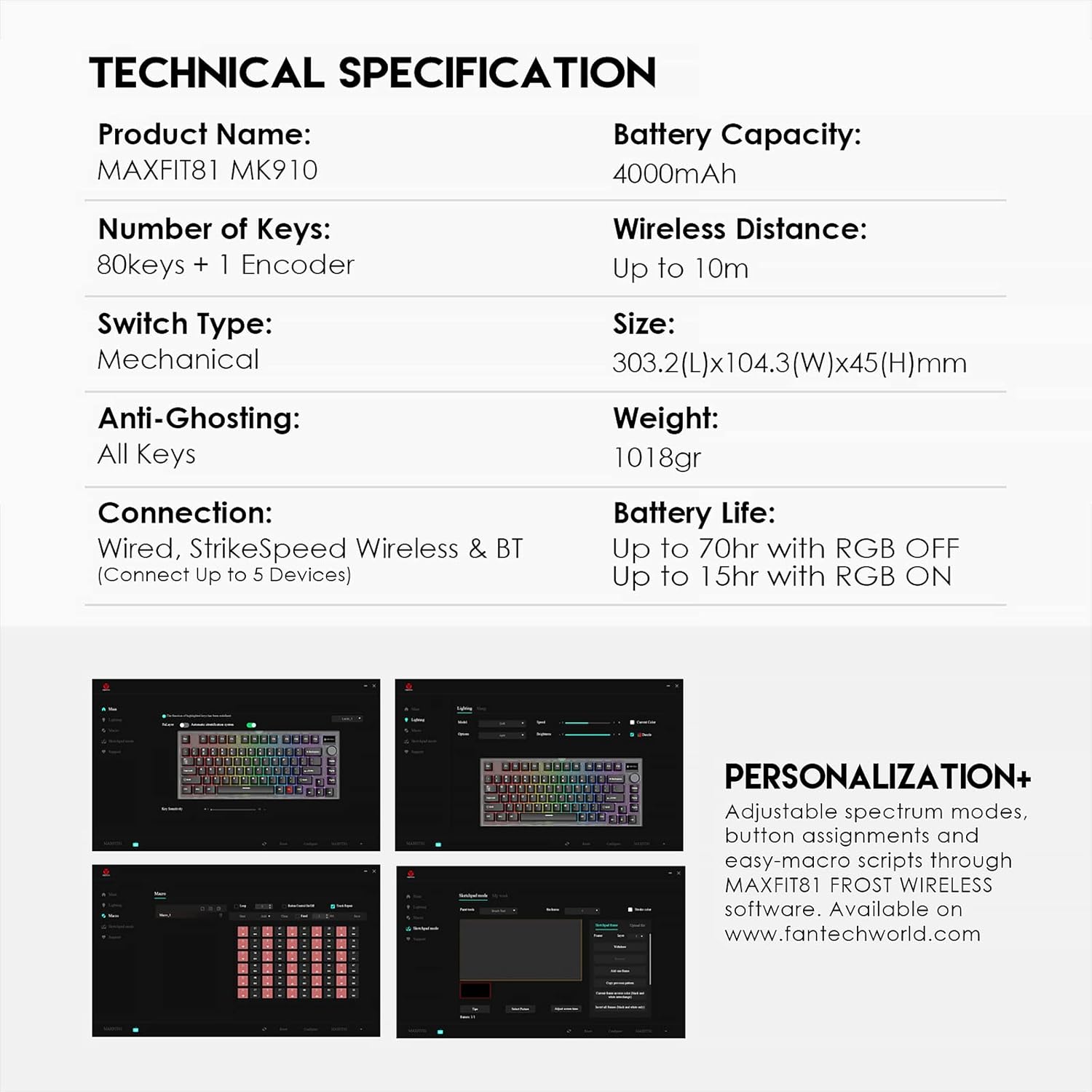
For advanced customization, the MAXFIT81 FROST WIRELESS software allows for adjustable spectrum modes, button assignments, and easy-macro scripts. This software is available for download from the official Fantech webсайт.
4. Технічне обслуговування
4.1 Очищення
Регулярне чищення допомагає підтримувати продуктивність та зовнішній вигляд клавіатури.
- Клавіатури: Use a soft brush or compressed air to remove dust and debris between keycaps. For deeper cleaning, keycaps can be carefully removed using a keycap puller and washed with mild soap and water. Ensure they are completely dry before reattaching.
- Справа: Протріть корпус клавіатури м’якою серветкоюamp тканина. Уникайте використання агресивних хімікатів або абразивних матеріалів.
4.2 Заміна перемикача
Due to the hot-swappable design, switches can be replaced without soldering. Use a switch puller tool to gently remove the existing switch. Align the pins of the new switch with the sockets on the PCB and press down firmly until it clicks into place. Ensure pins are not bent during insertion.
5. Вирішення проблем
If you encounter issues with your Fantech MAXFIT81 keyboard, refer to the following common solutions:
| проблема | Можлива причина | Рішення |
|---|---|---|
| Клавіатура не реагує (дротова) | Нещільне з'єднання кабелю, несправний USB-порт. | Ensure USB-C cable is securely connected. Try a different USB port on your computer. |
| Keyboard not responding (wireless) | Low battery, incorrect mode selected, pairing issue, receiver not connected. | Charge the keyboard. Ensure correct wireless mode (BT/2.4GHz) is selected. Re-pair Bluetooth or re-insert 2.4GHz receiver. |
| Певні клавіші не працюють | Loose or faulty switch, debris under keycap. | Remove keycap and check for debris. If hot-swappable, remove and re-insert the switch, or try a different switch. |
| OLED-дисплей не працює | Software issue, power saving mode. | Check keyboard settings via the Fantech software. Ensure keyboard is powered on. |
| Не працює RGB підсвічування | RGB mode off, software settings. | Check keyboard's RGB controls (usually Fn + keys) or adjust settings in the Fantech software. |
6. Технічні характеристики
| Особливість | Специфікація |
|---|---|
| Назва продукту | MAXFIT81 MK910 |
| Кількість клавіш | 80 keys + 1 Encoder |
| Тип перемикача | Mechanical (Hot-Swappable) |
| Anti-Ghosting | Всі ключі |
| Підключення | Wired (USB-C), StrikeSpeed Wireless (2.4GHz), Bluetooth (BT5.0) |
| Пристрої, що підключаються | До 5 пристроїв |
| Ємність акумулятора | 4000 мАг |
| Бездротова відстань | До 10м |
| Розміри (Д x Ш x В) | 303.2 x 104.3 x 45 мм |
| вага | 1018г |
| Термін служби батареї (RGB вимкнено) | До 70 годин |
| Battery Life (RGB ON) | До 15 годин |
| Сумісність операційної системи | Windows (7 or Newer), PC |
| Особливості | Customizable OLED Display, Rotary Encoder Knob, Retro Frosted Transparent Case, Hot-Swappable |
| Розмір екрана | 1 дюймів |
| Джерело живлення | Працює від батареї |
| матеріал | пластик |
7. Гарантія та підтримка
Fantech products are manufactured to high-quality standards. For information regarding warranty coverage, terms, and conditions, please refer to the warranty card included with your product or visit the official Fantech webсайт. Для отримання технічної підтримки, завантаження драйверів та отримання відповіді на поширені запитання відвідайте www.fantechworld.com.


