1. Вступ
This manual provides essential information for the safe and efficient operation of your KLIM K9000 Portable Air Conditioner. Please read it thoroughly before use and retain it for future reference. The KLIM K9000 is a versatile 3-in-1 unit offering cooling, dehumidification, and fan functions.
2. Техніка безпеки
To reduce the risk of fire, electrical shock, or injury, always follow these basic precautions:
- Перед використанням приладу прочитайте всі інструкції.
- Переконайтеся, що джерело живлення відповідає об’ємуtage, вказаний на табличці з рейтингом.
- Не використовуйте пристрій з пошкодженим шнуром або вилкою.
- Тримайте прилад подалі від джерел тепла та прямих сонячних променів.
- Не блокуйте отвори для входу або випуску повітря.
- Завжди від’єднуйте пристрій від мережі перед чищенням або обслуговуванням.
- Цей прилад не призначений для використання особами (включаючи дітей) з обмеженими фізичними, сенсорними чи розумовими здібностями, або з браком досвіду та знань, якщо вони не перебувають під наглядом або не отримали інструкції щодо використання приладу особою, відповідальною за їх безпеку.
- Не використовуйте прилад у вологих середовищах або поблизу води.
- Використовуйте лише аксесуари, рекомендовані виробником.
3. Вміст упаковки
Перевірте наявність усіх елементів в упаковці:
- KLIM K9000 Air Conditioner Unit
- Пульт дистанційного керування
- Витяжний шланг
- Випускний порт
- З'єднувач витяжного шланга
- Дренажний шланг
- Window Seal Fixing Plate
- Window Cover Extension
- 2 AAA Alkaline Batteries (for remote control, if included)
4. Продукт закінчивсяview
The KLIM K9000 is a compact and efficient portable air conditioner designed to provide comfort in various environments. It integrates three primary functions: cooling, dehumidification, and fan operation.

малюнок 4.1: KLIM K9000 Portable Air Conditioner unit with remote control, illustrating air circulation.
Its 3-in-1 functionality allows it to cool rooms, circulate air as a fan, and reduce humidity levels, making it suitable for various climate control needs.

малюнок 4.2: The KLIM K9000 offers 3-in-1 comfort: cooling, dehumidifying, and fan functions, with a 9000 BTU cooling capacity.
5. Налаштування та встановлення
Proper installation is crucial for optimal performance. Follow these steps for quick setup:
- Позиціонування: Place the unit on a flat, stable surface, ensuring at least 30 cm (12 inches) of space around it for proper airflow.
- Підключіть випускний шланг: Connect the exhaust hose to the unit's exhaust port. Extend the hose and connect the window seal fixing plate or window cover extension.
- Установка вікон: Secure the window seal fixing plate or extension in a compatible window opening (sliding windows). For tilt windows, a separate seal kit is required and sold separately. Ensure the hot air is expelled outdoors.
- Підключення живлення: Вставте шнур живлення в заземлену електричну розетку.
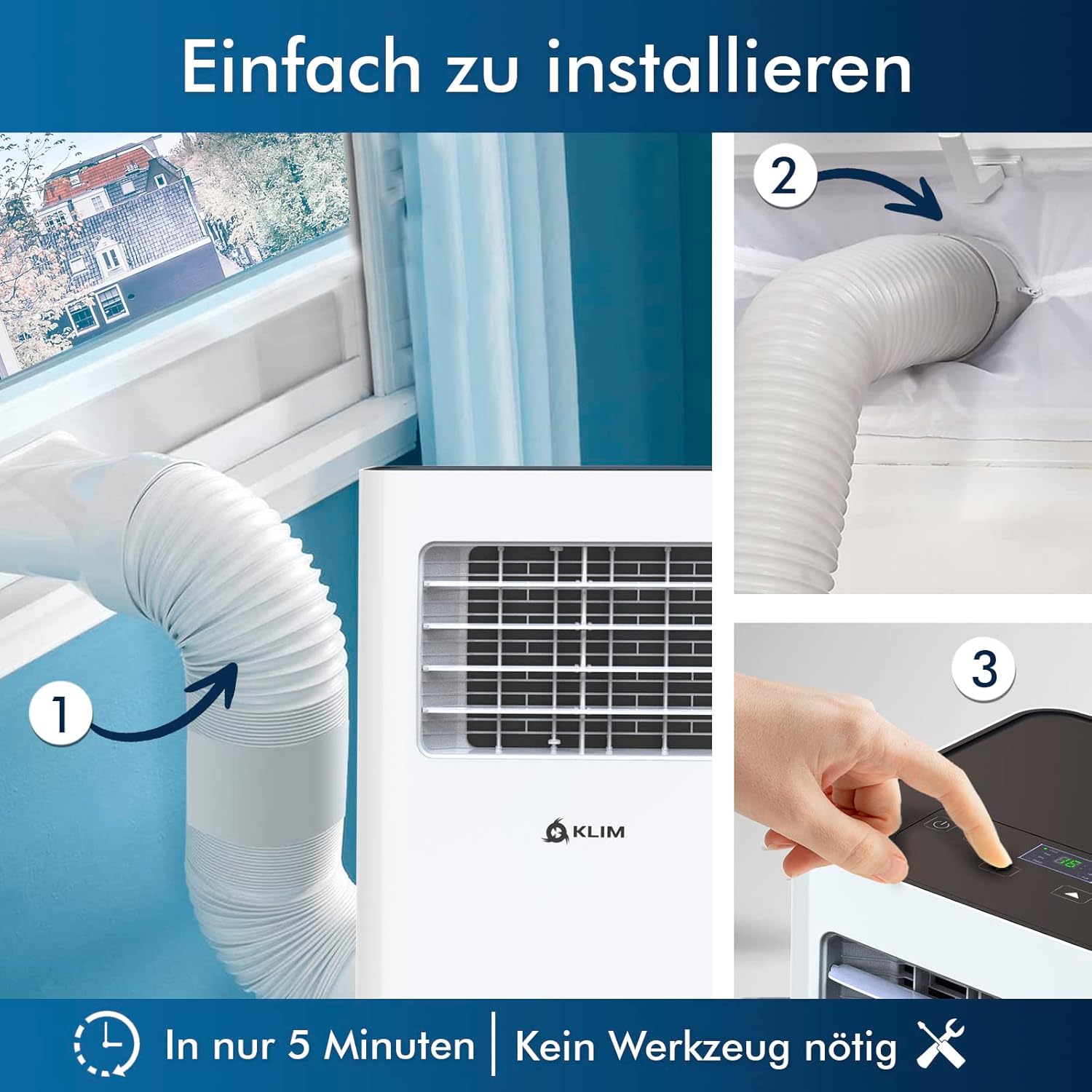
малюнок 5.1: Visual guide for quick installation, typically completed in 5 minutes without special tools.

малюнок 5.2: Illustration of window kit compatibility, showing options for sliding windows and mentioning a separate seal for tilt windows.
6. Інструкція з експлуатації
The KLIM K9000 can be operated via the control panel on the unit or the included remote control.
6.1. Панель керування та пульт дистанційного керування
The remote control allows convenient operation from a distance. Ensure AAA batteries are correctly inserted. The control panel on the unit provides direct access to all functions.
6.2. Режими роботи
- Режим охолодження: Activates the compressor to cool the room. Set your desired temperature (down to 16°C). This mode is effective for rooms up to 20 m² (80 m³).
- Режим вентилятора: Circulates air without cooling. Adjustable fan speeds are available.
- Режим осушувача: Removes excess moisture from the air. In this mode, the unit collects water, which will need to be drained.
- Режим сну: Designed for quiet operation during rest. The unit operates at a reduced noise level (approx. 65 dB) and may adjust temperature settings automatically for comfort.

малюнок 6.1: The sleep mode provides a cool and quiet environment for restful sleep, operating at approximately 65 dB.
To switch between modes, press the "Mode" button on the control panel or remote control.
7. Технічне обслуговування
Regular maintenance ensures the longevity and efficiency of your KLIM K9000.
7.1. Очищення повітряного фільтра
Повітряний фільтр слід чистити кожні два тижні або частіше, залежно від використання. Забруднений фільтр може знизити ефективність охолодження та потік повітря.
- Від’єднайте кондиціонер від розетки.
- Знайдіть та зніміть повітряний фільтр (зазвичай він знаходиться на задній або бічній панелі пристрою).
- Вимийте фільтр теплою мильною водою. Ретельно промийте та дайте йому повністю висохнути на повітрі, перш ніж вставляти його назад.
- Встановіть сухий фільтр назад і підключіть пристрій до мережі.
7.2. Відведення води
The unit features an auto-evaporation system in cooling mode, reducing the need for frequent drainage. However, in high humidity or dehumidifier mode, water will accumulate and needs to be drained.
- Безперервний дренаж: For continuous dehumidification, attach the drainage hose to the drain outlet and direct it to a suitable container or floor drain.
- Ручний дренаж: When the internal water tank is full, the unit may stop operating and display an indicator. To drain manually, unplug the unit, place a shallow pan or tray under the drain plug, and remove the plug. Be aware that the internal water container can be cumbersome to empty, and it may require two people to safely tilt the unit for complete drainage if using the bottom drain.
8. Вирішення проблем
Зверніться до цього розділу, щоб дізнатися про поширені проблеми та їх вирішення.
| проблема | Можлива причина | Рішення |
|---|---|---|
| Пристрій не включається. | Немає електроенергії, спрацював автоматичний вимикач, повний бак для води. | Перевірте шнур живлення, скиньте автоматичний вимикач, злийте воду з резервуара. |
| Недостатнє охолодження. | Dirty air filter, blocked air intake/outlet, open windows/doors, room too large, exhaust hose not properly installed. | Clean filter, clear obstructions, close windows/doors, ensure proper exhaust hose installation. |
| Пристрій шумить. | Normal operation sound (compressor/fan), unit not on a level surface. | The unit operates at approximately 65 dB, which is normal. Ensure it is on a flat surface. |
| Витік води. | Drain plug not securely closed, drainage hose improperly connected. | Check drain plug, ensure drainage hose is securely attached and not kinked. |
Якщо проблема не зникає після спроби цих рішень, зверніться до служби підтримки клієнтів.
9. Технічні характеристики
| Бренд | КЛІМ |
| Номер моделі | K9000WH |
| Потужність охолодження | 9000 BTU |
| Рекомендований розмір кімнати | До 20 м² (80 м³) |
| Функції | Охолодження, осушувач повітря, вентилятор |
| Клас енергоефективності | A |
| Річне споживання електроенергії | 960 Вт |
| Рівень шуму | 65 децибели |
| Холодоагент | R-290 (Natural Refrigerant) |
| Розміри (Д x Ш x В) | 29.5 х 32.5 х 70.4 см |
| вага | 25.58 кг |
| матеріал | ABS |
| Джерело живлення | Електричний кабель |

малюнок 9.1: The KLIM K9000's high energy efficiency (Class A) contributes to cost savings and environmental protection.
10. Гарантія та підтримка
The KLIM K9000 Portable Air Conditioner comes with a Гарантія 5 рік, що гарантує душевний спокій щодо його якості та продуктивності.
For technical assistance, warranty claims, or any questions not covered in this manual, please contact KLIM customer support through their official website or the retailer where the product was purchased. Please have your model number (K9000WH) and purchase date ready.


