1. Вступ
This manual provides detailed instructions for the assembly, operation, and maintenance of your Sharkoon SHA-VS4-WBK Mid-Tower PC Case. Please read this manual thoroughly before beginning installation to ensure proper setup and to maximize the lifespan of your components.
2. Продукт закінчивсяview
The Sharkoon SHA-VS4-WBK is a mid-tower PC case designed for ATX and Micro-ATX motherboards, featuring a full black aesthetic and an acrylic side window panel. It offers ample space for various components and efficient cable management.
Ключові характеристики:
- Acrylic side window panel for component visibility.
- Three 5.25-inch drive bays (two with tool-less mounting).
- Three 3.5-inch drive bays.
- Four 2.5-inch drive bays.
- Two external USB 3.0 ports on the front panel.
- Expansion card clearance up to 385mm (with 2.5-inch drive cage removed).
- Підтримка висоти кулера процесора до 160 мм.
- Convex side panel design for improved cable management space.
Візуальна довідка:

Рисунок 2.1: Передня сторона view of the Sharkoon SHA-VS4-WBK Mid-Tower PC Case, showcasing the acrylic side panel and front I/O ports.
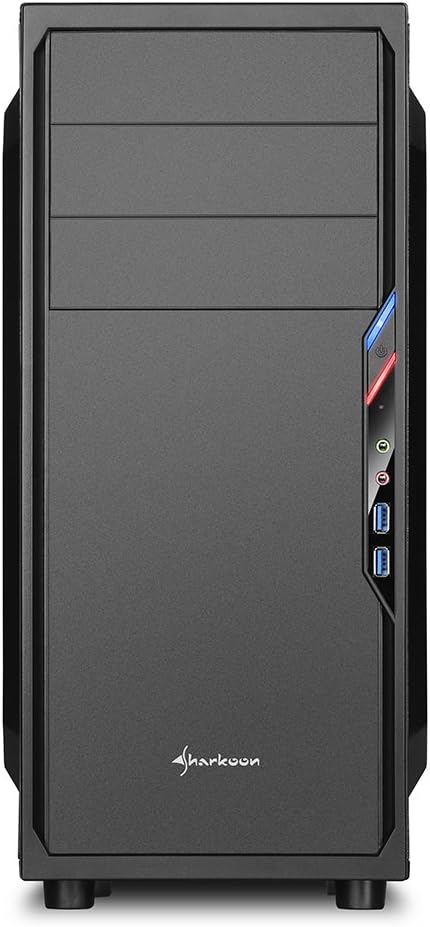
Малюнок 2.2: Спереду view of the PC case, highlighting the drive bays and front panel design.

Малюнок 2.3: Сторона view of the PC case, clearly showing the acrylic window panel.

Малюнок 2.4: Задня частина view of the PC case, showing expansion slots and power supply mounting area.

Рисунок 2.5: Інтер'єр view of the PC case, illustrating the motherboard tray, drive bays, and cable routing options.
3. Налаштування та встановлення
Follow these steps for proper installation of your PC components into the SHA-VS4-WBK case.
3.1 Підготовка справи
- Carefully unpack the case and remove all packaging materials.
- Зніміть бічні панелі, відкрутивши гвинти з накатною головкою на задній панелі корпусу.
3.2 Встановлення материнської плати
- Install the necessary standoffs onto the motherboard tray according to your motherboard's form factor (ATX or Micro-ATX).
- Вставте екран вводу/виводу в задній отвір корпусу.
- Carefully align your motherboard with the standoffs and I/O shield, then secure it with screws.
3.3 Встановлення приводу
- 5.25-дюймові накопичувачі: For the two tool-less bays, simply slide the drive in until it clicks into place. For the third bay, secure with screws.
- 3.5-дюймові накопичувачі: Mount 3.5-inch HDDs into the designated drive cages.
- 2.5-дюймові накопичувачі: Mount 2.5-inch SSDs/HDDs into the designated drive cages. The 2.5-inch drive cage can be removed to accommodate longer expansion cards.
3.4 Встановлення плати розширення
- Зніміть необхідні кришки слотів розширення із задньої частини корпусу.
- Insert your expansion card (e.g., graphics card) into the appropriate PCIe slot on your motherboard.
- Secure the expansion card with the provided screws. Note the maximum clearance of 310mm, or 385mm if the 2.5-inch drive cage is removed.
3.5 Встановлення блоку живлення
- Install your power supply unit into the rear-mount power supply bay at the bottom of the case.
- Secure it with screws from the outside of the case. Ensure the power supply's fan faces the correct direction for optimal airflow.
3.6 Організація кабелів
Utilize the space behind the motherboard tray and the convex design of the side panel to route cables neatly. This improves airflow and the overall aesthetic of your build.
3.7 Connecting Front I/O Ports
Connect the front panel cables (USB 3.0, audio, power, reset, LED indicators) to the corresponding headers on your motherboard. Refer to your motherboard manual for specific header locations.
4. Експлуатаційні міркування
Once all components are installed, ensure all cables are securely connected and the side panels are reattached. Power on your system and verify all components are functioning correctly. Monitor temperatures to ensure adequate cooling.
5. Технічне обслуговування
Регулярне технічне обслуговування допомагає забезпечити оптимальну продуктивність та довговічність компонентів вашого ПК.
- Очищення від пилу: Periodically clean dust from the interior of the case, especially from fans and heatsinks, using compressed air or a soft brush.
- Зовнішнє очищення: Протріть зовнішні поверхні м’якою, damp тканина. Уникайте абразивних очищувачів.
- Acrylic Panel Care: Clean the acrylic side panel with a soft, lint-free cloth and a mild plastic cleaner to prevent scratches.
6. Вирішення проблем
Якщо у вас виникли проблеми, розгляньте такі поширені кроки усунення несправностей:
- Немає живлення: Check all power connections, including the power supply to the wall outlet, the 24-pin ATX connector, and the 8-pin CPU power connector on the motherboard. Ensure the power button cable is correctly connected to the motherboard.
- Компоненти, що не підходять: Double-check component dimensions against the case specifications. For long graphics cards, ensure the 2.5-inch drive cage is removed if necessary.
- Поганий потік повітря/Перегрів: Verify all fans are spinning correctly and are oriented for optimal airflow. Ensure cables are neatly managed to avoid obstructing airflow.
- Проблеми з введенням/виведенням на передній панелі: Confirm that all front panel connectors (USB, audio) are correctly plugged into the motherboard headers.
7. Технічні характеристики
| Особливість | Специфікація |
|---|---|
| Бренд | Шаркун |
| Номер моделі | SHA-VS4-WBK |
| Тип корпусу | Середній вежі |
| Сумісність материнської плати | ATX, Micro-ATX |
| Розміри (Д x Ш x В) | 44.5 х 20 х 43 см |
| вага | 3.5 кг |
| матеріал | Acrylic (Side Panel) |
| 5.25-дюймові відсіки для дисків | 3 (2 tool-less) |
| 3.5-дюймові відсіки для дисків | 3 |
| 2.5-дюймові відсіки для дисків | 4 |
| Передні порти вводу-виводу | 2 x USB 3.0 |
| Expansion Card Clearance | Max 310mm (385mm with 2.5-inch drive cage removed) |
| Максимальна висота охолоджувача процесора | 160mm (Note: May be 155mm depending on motherboard/cooler) |
| Power Supply Max Depth | 250 мм |
| Спосіб охолодження | Повітряне охолодження |
8. Гарантія та підтримка
Щоб отримати інформацію про гарантію та технічну підтримку, зверніться до офіційного сайту Sharkoon. webсайт або зверніться до місцевого дистриб'ютора. Зберігайте чек про покупку для гарантійних випадків.


