1. Вступ
The TP-Link Archer AX80/A is a high-performance AX6000 WiFi 6 router designed to deliver ultra-fast wireless speeds and enhanced network capacity. Featuring advanced technologies like OFDMA, MU-MIMO, and 8-stream connectivity, it ensures a stable and efficient network experience for numerous connected devices, including smartphones, tablets, and IoT devices. This manual provides detailed instructions for setting up, operating, and maintaining your Archer AX80/A router.


2. Вміст упаковки
Переконайтеся, що ваш пакет містить такі елементи:
- TP-Link Archer AX80/A AX6000 WiFi 6 Router
- Адаптер живлення
- Кабель Ethernet
- Посібник із швидкого встановлення
3. Фізичний overview
3.1 Порти та кнопки
The Archer AX80/A router features various ports and buttons for connectivity and control.

- 2.5Gbps WAN/LAN Port: One port for high-speed internet connection or LAN device.
- Гігабітний порт WAN/LAN: One port for standard internet connection or LAN device.
- Гігабітні порти локальної мережі: Three ports for connecting wired devices.
- Порт USB 3.0: One port for connecting external storage devices for network sharing.
- Кнопка ввімкнення/вимкнення живлення: To power the router on or off.
- Кнопка скидання: To restore factory default settings (use a pin to press and hold).

3.2 Варіанти розміщення
The Archer AX80/A offers flexible placement options to suit your environment.

4. Посібник із налаштування
4.1 Підключення обладнання
- Power off your modem and remove the backup battery if it has one.
- Connect the modem to the router's WAN port (usually the 2.5Gbps port) using an Ethernet cable.
- Power on the modem, then power on the router.
- Wait for the router's LED indicators to stabilize, indicating a successful connection.
4.2 Easy Setup via TP-Link Tether App
The TP-Link Tether app provides an intuitive way to set up and manage your router from your smartphone or tablet.
- Завантажте застосунок TP-Link Tether з App Store або Google Play.
- Connect your mobile device to the router's default Wi-Fi network (SSID and password are on the router's label).
- Open the Tether app and follow the on-screen instructions to complete the initial setup, including creating a TP-Link ID, setting up your Wi-Fi name and password, and configuring internet settings.

5. Інструкція з експлуатації
5.1 Підключення пристроїв
- Бездротове підключення: шукати Введіть назву мережі Wi-Fi (SSID) на своєму пристрої та пароль, який ви встановили під час налаштування.
- Дротове підключення: Connect your computer or other wired devices to the router's LAN ports using Ethernet cables.

5.2 Керування мережею
You can manage your router settings through the TP-Link Tether app or by accessing the web management interface via a web browser (typically at http://tplinkwifi.net or http://192.168.0.1).
- Зміна налаштувань Wi-Fi (SSID, пароль, тип безпеки).
- Моніторинг підключених пристроїв.
- Налаштуйте розширені параметри мережі.
6. Розширені функції
6.1 OneMesh™ Support
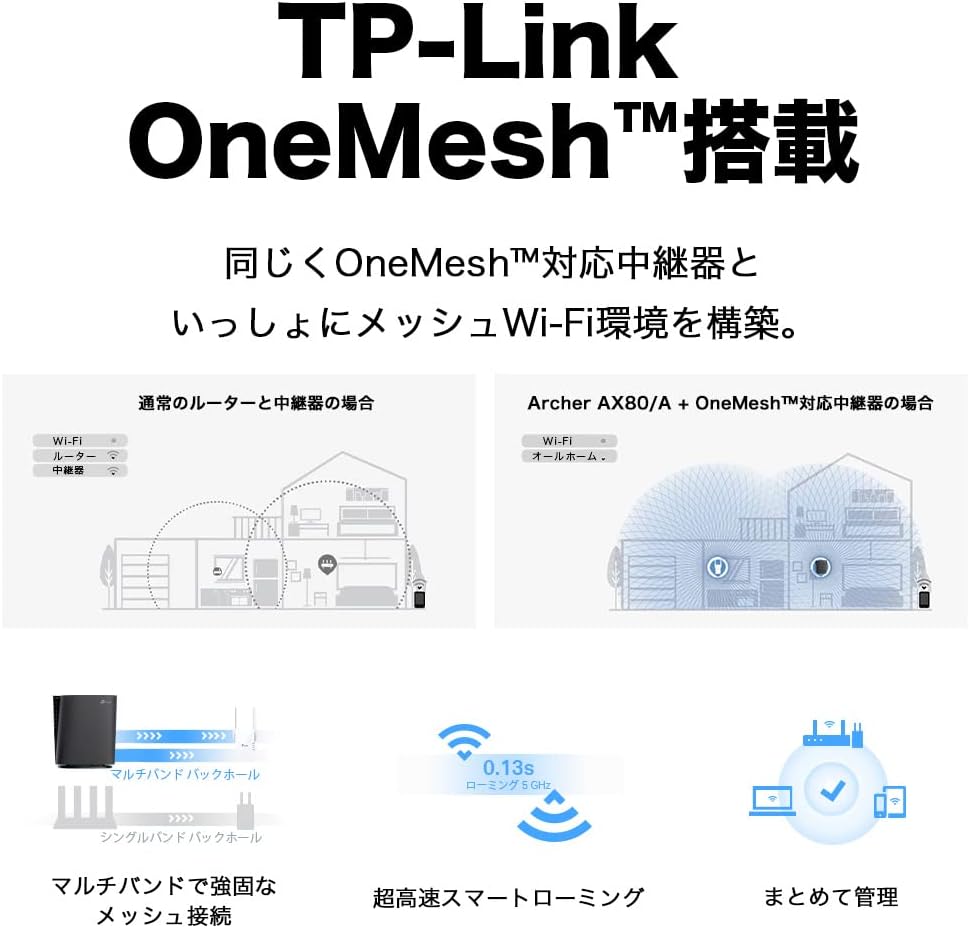
The Archer AX80/A supports TP-Link OneMesh™, allowing you to create a seamless whole-home Wi-Fi network by connecting to OneMesh-compatible range extenders. This eliminates Wi-Fi dead zones and provides uninterrupted roaming.
6.2 VPN Client Functionality
The router includes VPN client functionality, enabling you to establish a secure VPN connection without needing additional VPN software on each device. It supports OpenVPN, PPTP VPN, and L2TP VPN protocols.

6.3 IPv6 IPoE Support
The Archer AX80/A supports IPv6 IPoE (IPv4 over IPv6), including v6 Plus, OCN Virtual Connect, and DS-Lite, ensuring compatibility with modern internet service provider configurations for optimal performance.
6.4 Батьківський контроль
Manage and control internet access for family members with robust parental control features available through the Tether app. Set time limits, block inappropriate content, and monitor usage.

6.5 WPA3 Security
The router supports WPA3, the latest Wi-Fi security protocol, providing enhanced encryption and protection against cyber threats for a more secure home network.

6.6 US-Based Security Standards
TP-Link adheres to US government cybersecurity and infrastructure security agency (CISA) promoted "Secure-by-Design" principles, ensuring high-level security throughout design, development, and maintenance.

7. Технічне обслуговування
7.1 оновлень мікропрограми
Regularly update your router's firmware to ensure optimal performance, security, and access to new features. Firmware updates can be performed via the Tether app or the web інтерфейс управління.
- Open the Tether app or log in to the web інтерфейс управління.
- Перейдіть до розділу «Системні інструменти» > «Оновлення прошивки».
- Follow the instructions to check for and install available updates.
7.2 Перезавантаження маршрутизатора
If you experience network issues, a simple reboot can often resolve them. You can reboot the router through the Tether app, web management interface, or by unplugging and replugging the power adapter.
8. Вирішення проблем
8.1 Немає доступу до Інтернету
- Перевірте, чи ваш модем працює належним чином.
- Ensure all cables are securely connected to the correct ports.
- Перезавантажте і модем, і роутер.
- Verify your internet settings in the router's management interface.
8.2 Слабкий сигнал Wi-Fi
- Relocate the router to a central location, away from obstructions and interference sources.
- Consider adding a TP-Link OneMesh™ compatible range extender to expand coverage.
- Adjust Wi-Fi channel settings in the router's management interface to avoid interference.
8.3 Forgotten Wi-Fi Password or Login Password
- Пароль Wi-Fi за замовчуванням надруковано на етикетці в нижній частині маршрутизатора.
- If you changed it and forgot, you can retrieve or reset it via the Tether app or web інтерфейс управління.
- If you forgot the router's login password, you may need to perform a factory reset (see Section 3.1) and reconfigure the router.
9. Технічні характеристики
| Особливість | опис |
|---|---|
| Бренд | TP-Link |
| Назва моделі | Archer AX80/A |
| Бездротовий стандарт | 802.11ax (Wi-Fi 6) |
| Клас діапазону частот | Дводіапазонний |
| Швидкість передачі даних | AX6000 (4804 Mbps on 5GHz + 1148 Mbps on 2.4GHz) |
| Порти | 1x 2.5Gbps WAN/LAN, 1x Gigabit WAN/LAN, 3x Gigabit LAN, 1x USB 3.0 |
| Тип антени | внутрішній |
| Протокол безпеки | WPA3 |
| Метод управління | Додаток Tether, Web UI |
| Сумісні пристрої | Смартфони, планшети, ноутбуки |
| Розміри (Д x Ш x В) | 18.9 см х 5.9 см х 20 см |
10. Гарантія та підтримка
10.1 Інформація про гарантію
The TP-Link Archer AX80/A router comes with a 3-річна гарантія виробникаБудь ласка, збережіть чек про покупку для гарантійного обслуговування. Гарантія поширюється на дефекти матеріалів та виготовлення за умов нормального використання.
10.2 Технічна підтримка
For technical support, firmware updates, and additional resources, please visit the official TP-Link website or contact TP-Link customer support. You can find contact information and FAQs on the TP-Link support page: