MOUNTUP MU2005 Gas Spring Single Monitor Wall Mount
Інструкція з експлуатації
1. Вступ
This manual provides instructions for the installation, operation, and maintenance of your MOUNTUP MU2005 Gas Spring Single Monitor Wall Mount. This mount is designed to securely hold computer screens and televisions, offering adjustable positioning for an ergonomic viewing experience. Please read these instructions carefully before installation to ensure safe and correct usage.
2. Інформація про безпеку
УВАГА: Improper installation may result in serious personal injury and property damage. If you do not understand these instructions or have doubts about the safety of the installation, please contact a qualified installer.
- Do not install on drywall alone. This mount is designed for installation on wood studs, solid concrete walls, or brick walls.
- Переконайтеся, що монтажна поверхня може безпечно витримати сумарну вагу кріплення та дисплея.
- Не перевищуйте максимальну вантажопідйомність 12 кг (26.5 фунтів).
- Use only the provided hardware. If any parts are missing or defective, contact MOUNTUP customer service.
- Тримайте дітей і домашніх тварин подалі під час встановлення.
- Періодично перевіряйте надійність кріплення та щільність затягування всіх кріплень.
3. Вміст упаковки
Перш ніж продовжувати встановлення, переконайтеся, що всі компоненти є в наявності та не пошкоджені.
- Monitor Wall Mount Arm (MU2005)
- Пластина VESA
- VESA Extension Kit (for larger VESA patterns)
- Кріпильні елементи (гвинти, анкера, шайби)
- Hex Keys for Adjustment
- Інструкція з експлуатації

Image: Main components of the MOUNTUP MU2005 monitor wall mount, including the gas spring arm, VESA mounting plate, and VESA extension brackets.
4. Технічні характеристики
| Особливість | Специфікація |
|---|---|
| Номер моделі | MU2005 |
| Сумісність розміру екрана | 22-35 дюймів |
| Вага | 4.4 - 26.5 фунти (2 - 12 кг) |
| Сумісність VESA | 75x75mm, 100x100mm, 100x200mm, 200x100mm, 200x200mm |
| Тип монтажу | Wall Mount (Wood Stud, Concrete Wall, Brick Wall) |
| Тип руху | Tilt, Rotate, Swivel, Height Adjust, Full Motion |
| Кут нахилу | Up 90° / Down 45° |
| Кут повороту | 180° (at wall plate), 360° (at arm joint), 180° (at VESA plate) |
| Обертання | 360° (Портрет/Пейзаж) |
| Регулювання висоти | До 11 дюйма |
| Мінімальна відстань до стіни | 3.9 дюйма (9.9 см) |
| Максимальне висування від стіни | 20.5 дюймів |
| матеріал | Алюміній, Метал |

Image: Detailed diagram illustrating the mount's dimensions, VESA compatibility (75x75, 100x100, 100x200, 200x100, 200x200), weight capacity (4.4-26.5 lbs), and supported screen sizes (22-35 inches).
5. Налаштування та встановлення
Before beginning, ensure you have all necessary tools and that your wall type is compatible. This mount is suitable for wood studs, concrete walls, and brick walls. It is NOT for drywall alone.
5.1 Перевірка сумісності
Confirm your monitor meets the following criteria:
- Розмір монітора: 22-35 дюймів
- Вага монітора: 4.4-26.5 фунтів
- Шаблон VESA: 75x75mm, 100x100mm, 100x200mm, 200x100mm, 200x200mm
- Тип стіни: Wood Stud, Brick Wall, or Concrete Wall

Image: A visual guide to checking monitor compatibility with the mount, covering screen size, weight, VESA pattern, and suitable wall types.
5.2 Етапи встановлення
- Install the Arm to the Wall: Securely attach the wall plate of the monitor arm to a wood stud, concrete wall, or brick wall using the appropriate hardware. Ensure it is level and firmly anchored.
- Attach VESA Plate to Monitor Back: Fasten the VESA plate to the back of your monitor using the screws that fit your monitor's VESA holes. Use the VESA extension kit if your monitor requires a larger VESA pattern.
- Attach Monitor onto the Arm: Carefully slide the monitor (with the attached VESA plate) onto the arm's mounting head. Ensure it clicks into place securely.
- Adjust Gas Spring to Proper Tension: This is crucial for the arm to hold your monitor at the desired height. Refer to the 'Operating' section for detailed adjustment instructions.

Image: Illustration of mounting the arm's wall plate to the wall.

Image: Illustration of attaching the VESA plate to the monitor's rear.
Image: Illustration of sliding the monitor onto the arm's VESA head.

Image: Illustration of adjusting the gas spring tension on the arm.
5.3 Організація кабелів
Route your cables through the integrated cable management channels on the arm to maintain a clean and organized workspace.
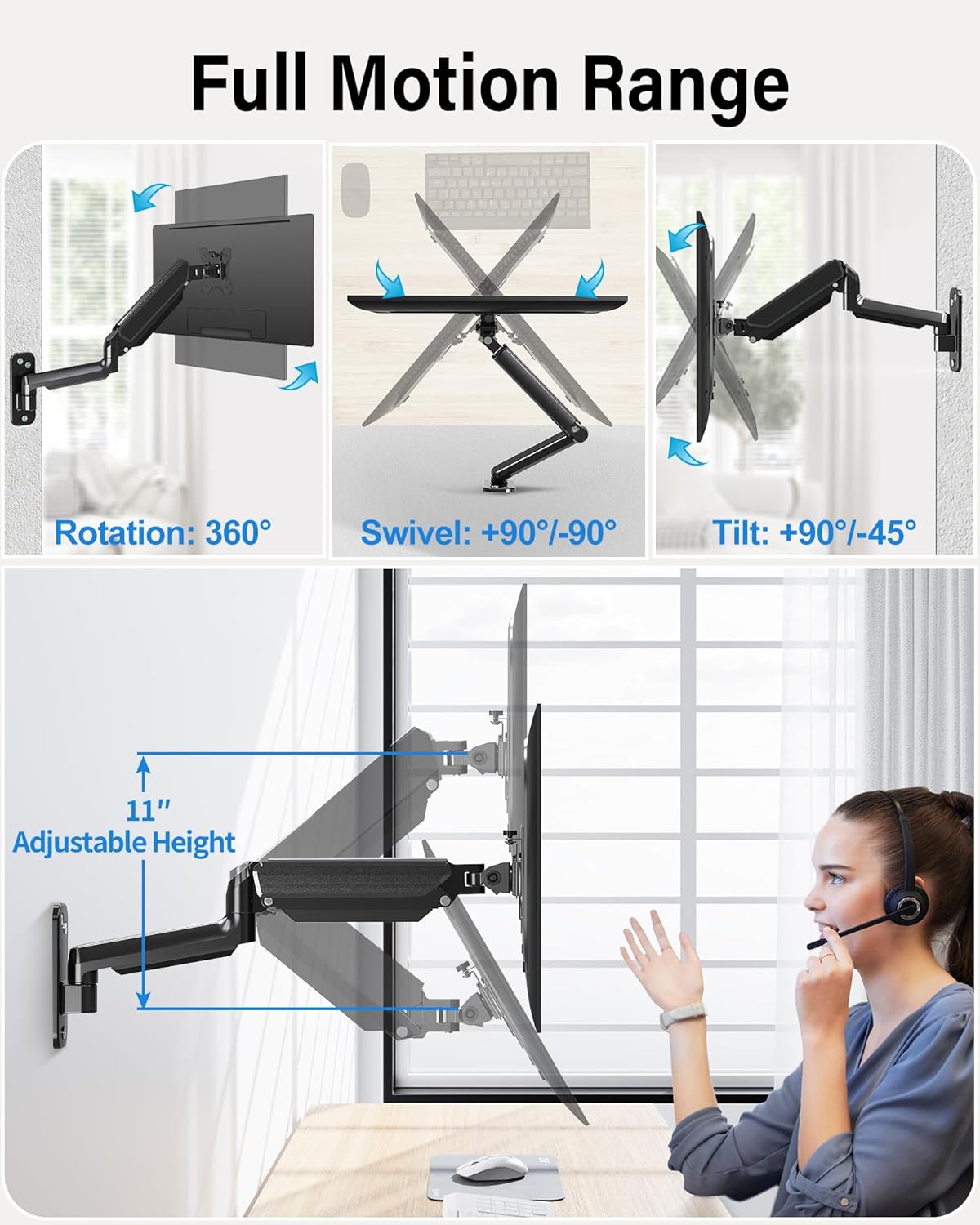
Image: The monitor arm demonstrating its full range of motion, including 360° rotation, 90°/-90° swivel, 90°/-45° tilt, and 11 inches of adjustable height.
6. Керування кронштейном монітора
The MOUNTUP MU2005 offers extensive adjustability to achieve optimal viewкути розташування та ергономічне розташування.
6.1 Gas Spring Adjustment (Monitor Height)
The gas spring allows for effortless height adjustment. If your monitor does not stay at the desired height, adjust the tension:
- Monitor raises up (too light): Turn the screw clockwise ("-" direction) to reduce tension.
- Monitor drops down (too heavy): Turn the screw counter-clockwise ("+" direction) to increase tension.
Примітка: Hold the arm in a horizontal position during adjustment. Refer to the table below for approximate turns based on monitor weight.
| Монітор ваги | Кола (МІНІМУМ) |
|---|---|
| 4.4 фунти (2 кг) | Хв |
| 6.6 фунти (3 кг) | 2 |
| 11 фунти (5 кг) | 6 |
| 17.6 фунти (8 кг) | 10 |
| 19.8 фунти (9 кг) | 11 |
| 22 фунти (10 кг) | 12 |
| 26.4 фунти (12 кг) | Макс |

Image: Comprehensive guide for adjusting gas spring tension and tilt angle, including a table correlating monitor weight with the number of turns for adjustment.
6.2 Tilt Angle Adjustment
If your monitor faces down or up unintentionally, adjust the tilt tension:
- Loosen the tilting bolt (Turn to "-" direction).
- Adjust the monitor to your desired angle.
- Retighten the tilting bolt (Turn to "+" direction).

Image: Visual instructions for adjusting the gas spring tension and the monitor's tilt angle using a hex key.
6.3 Поворот та обертання
- The arm can swivel 180° at the wall plate and 360° at the arm joint.
- The VESA plate allows for 180° swivel and 360° rotation, enabling easy switching between portrait and landscape orientations.
Image: The monitor arm demonstrating its full range of motion, including 360° rotation, 90°/-90° swivel, 90°/-45° tilt, and 11 inches of adjustable height.
Video: This video demonstrates the various movements and space-saving capabilities of the MOUNTUP Ultrawide Single Monitor Wall Mount, showcasing its full motion range and how it can optimize your workspace.
7. Технічне обслуговування
Регулярне технічне обслуговування забезпечує довговічність та безпечну роботу вашого кріплення для монітора.
- Прибирання: Протріть кріплення м’якою серветкоюamp тканина. Уникайте абразивних очищувачів.
- Перевірте підключення: Періодично перевіряйте всі гвинти та болти, щоб переконатися, що вони затягнуті. За потреби підтягуйте.
- Gas Spring Function: If the gas spring's performance changes over time, re-adjust the tension as described in the 'Operating' section.
8. Вирішення проблем
If you encounter issues with your MOUNTUP monitor arm, refer to the following common problems and solutions:
8.1 Arm Does Not Stay at Desired Height
- проблема: Monitor arm falls down.
- рішення: The gas spring tension is too low for the monitor's weight. Increase tension by turning the adjustment screw counter-clockwise ("+" direction).
- проблема: Monitor arm rises up.
- рішення: The gas spring tension is too high for the monitor's weight. Decrease tension by turning the adjustment screw clockwise ("-" direction).
Refer to the 'Gas Spring Adjustment' section for detailed instructions and the weight-to-turns table.
8.2 Monitor Tilts Down Unintentionally
- проблема: The monitor head cannot maintain its tilt angle.
- рішення: The tilting bolt is loose. Loosen the tilting bolt, adjust the monitor to the desired angle, and then retighten the tilting bolt firmly.
Video: This video provides troubleshooting steps for common issues with MOUNTUP monitor wall mounts, such as adjusting the gas spring tension if the arm falls or rises, and tightening the tilt mechanism if the monitor sags.
9. Гарантія та підтримка
MOUNTUP provides a 3-year support for this product. If you have any questions regarding pre-purchase compatibility, installation, or require assistance with any issues, please do not hesitate to contact MOUNTUP customer service. Our team is available to provide friendly and helpful support.


