вступ
This manual provides detailed instructions for the setup, operation, and maintenance of your LFF Atomic Clock Model LWC204. This digital clock features a large, easy-to-read display, atomic time synchronization, and a wireless sensor for indoor and outdoor temperature readings. Please read this manual thoroughly before use to ensure proper functionality and longevity of your device.
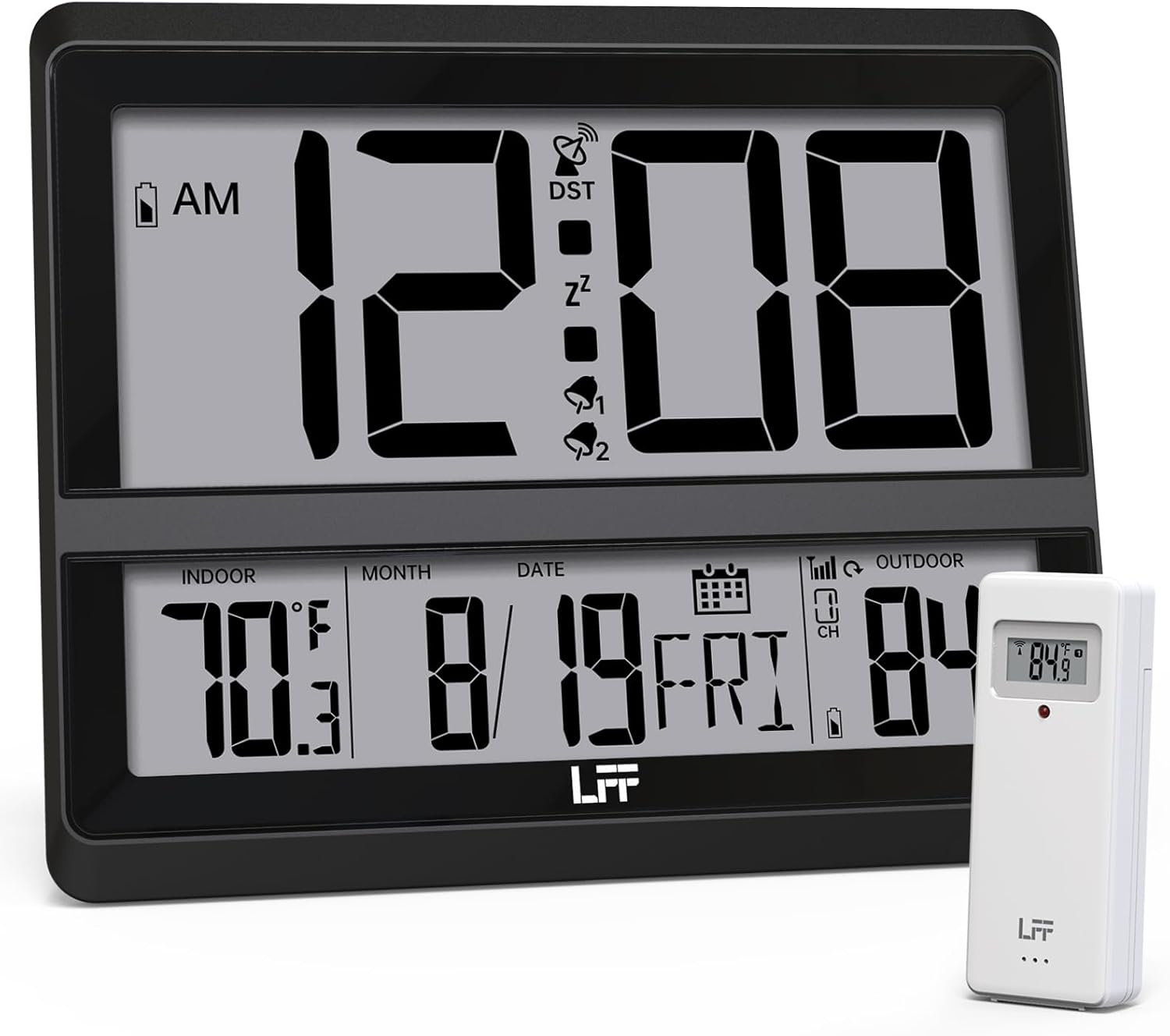
Image: The LFF Atomic Clock main unit with its wireless outdoor temperature sensor.
Вміст упаковки
- LFF Atomic Clock Main Unit
- Бездротовий датчик зовнішньої температури
- Інструкція з експлуатації (цей документ)
- Bracket for table standing
Note: Batteries are not included. The main clock unit requires 3x AA batteries, and the outdoor sensor requires 2x AAA batteries.
Продукт закінченийview
Familiarize yourself with the main components and controls of your LFF Atomic Clock.

Image: Front display and rear button layout of the LFF Atomic Clock.
Особливості дисплея:
- Відображення часу: Large digits for current time (12/24 Hour format).
- Індикатор AM/PM: For 12-hour format.
- DST Symbol: Вказує на активний перехід на літній час.
- RCC Reception Icon: Shows status of atomic time signal reception.
- Alarm Icons (Zz, 1, 2): Indicate active alarms and snooze function.
- Температура в приміщенні: Current temperature inside (°C/°F).
- Зовнішня температура: Current temperature from wireless sensor (°C/°F).
- Date & Weekday: Month, Day, and Day of the Week.
- Індикатор низького заряду батареї: For both main unit and outdoor sensor.
Задні кнопки:
- Кнопка SET: Входить у режим налаштування.
- Кнопка ALARM: Доступ до налаштувань будильника.
- Кнопка КАНАЛУ: Cycles through outdoor sensor channels (if multiple sensors are used).
- DOWN/WAVE/°C/°F Button: Decreases values in setting mode, manually initiates atomic signal search (WAVE), or switches temperature units.
- UP/ALARM Button: Increases values in setting mode, or activates/deactivates alarm.
Налаштування
1. Встановлення батареї
- Зовнішній датчик:
- Відкрийте батарейний відсік на задній панелі бездротового зовнішнього датчика.
- Вставте 2 батарейки типу AAA, дотримуючись правильної полярності (+/-).
- Надійно закрийте батарейний відсік.
- Note: For temperatures below -4°F (-20°C), Lithium batteries are recommended for the outdoor sensor.
- Main Clock Unit:
- Відкрийте батарейний відсік на задній панелі головного годинника.
- Insert 3x AA batteries, observing the correct polarity (+/-).
- Надійно закрийте батарейний відсік.

Image: Battery compartments for the main clock and outdoor sensor.
2. Initial Synchronization and Settings
Upon battery installation, the clock will automatically begin searching for the WWVB atomic time signal and attempt to connect with the outdoor sensor.
- The RCC Reception Icon will flash during the atomic signal search. This process may take several minutes or up to 24 hours depending on signal strength.
- The outdoor temperature should appear on the display within a few minutes after the sensor batteries are installed. If not, press the КАНАЛ button on the main unit to cycle through channels or press the reset button on the outdoor sensor.
3. Manual Settings (if needed)
If the atomic signal is not received or you wish to adjust settings manually:
- Налаштування часового поясу:
- Натисніть і утримуйте НАБІР button for 3 seconds to enter time zone setting.
- Використовуйте UP/ALARM or DOWN/WAVE/°C/°F buttons to select your time zone (e.g., PST, MST, CST, EST).
- Прес НАБІР для підтвердження та переходу до наступного налаштування.
- 12/24-годинний формат:
- After time zone, the hour format will flash. Use UP/ALARM or DOWN/WAVE/°C/°F to select 12-hour or 24-hour format.
- Прес НАБІР для підтвердження.
- Ручне налаштування часу та дати:
- Продовжуйте натискати НАБІР to cycle through Year, Month, Day, Hour, Minute settings.
- використання UP/ALARM or DOWN/WAVE/°C/°F щоб налаштувати кожне значення.
- Прес НАБІР для підтвердження кожного налаштування.
- Перехід на літній час (DST):
- After setting the time, the DST setting will flash. Use UP/ALARM or DOWN/WAVE/°C/°F to enable or disable DST.
- Прес НАБІР щоб вийти з режиму налаштування.

Image: The clock automatically corrects time daily via WWVB signal.
4. Розміщення зовнішніх датчиків
- Place the wireless outdoor sensor within 330 feet (100 meters) of the main unit.
- Choose a shaded location to avoid direct sunlight, which can affect temperature accuracy.
- Ensure the sensor is protected from direct rain and snow.
- Уникайте розміщення датчика поблизу великих металевих предметів або електроприладів, які можуть перешкоджати бездротовому сигналу.

Image: Wireless range of 330 feet for the outdoor sensor.
Інструкція з експлуатації
1. Режими відображення
- The clock continuously displays time, indoor temperature, outdoor temperature, date, and day of the week.
- Натисніть DOWN/WAVE/°C/°F button to switch between Celsius (°C) and Fahrenheit (°F) for temperature display.
2. Функція сигналізації
- Встановлення будильника:
- Натисніть ТРИВОГА button once to display Alarm 1 time. Press again for Alarm 2.
- While an alarm time is displayed, press and hold the ТРИВОГА button for 3 seconds to enter alarm setting mode. The hour will flash.
- використання UP/ALARM or DOWN/WAVE/°C/°F для налаштування години. Натисніть ТРИВОГА для підтвердження.
- Хвилина блиматиме. Використовуйте UP/ALARM or DOWN/WAVE/°C/°F щоб налаштувати хвилину. Натисніть ТРИВОГА щоб підтвердити та вийти з налаштування будильника.
- Увімкнення/вимкнення будильника:
- Натисніть ТРИВОГА button to display Alarm 1 or Alarm 2.
- Натисніть UP/ALARM button to toggle the alarm ON or OFF. The corresponding alarm icon (1 or 2) will appear/disappear on the display.
- Функція затримки:
- Коли пролунає будильник, натисніть кнопку СНОЙЗ button (usually located on top or a dedicated button) to activate snooze. The alarm will sound again after approximately 5-10 minutes.
- To stop the alarm completely, press any other button (e.g., ТРИВОГА, НАБІР).
3. Manual Atomic Signal Search
If you wish to manually initiate a search for the WWVB atomic time signal, press and hold the DOWN/WAVE/°C/°F button for 3 seconds. The RCC Reception Icon will flash, indicating the search is in progress.
Технічне обслуговування
- Прибирання: Wipe the clock and sensor with a soft, dry cloth. Do not use abrasive cleaners or solvents.
- Заміна батареї: When the low battery indicator appears on the display for either the main unit or the outdoor sensor, replace the batteries promptly to ensure continuous operation and accurate readings. Refer to the "Battery Installation" section for details.
- Зберігання: Якщо пристрій зберігатиметься протягом тривалого часу, вийміть усі батарейки, щоб запобігти витіканню.
Усунення несправностей
| проблема | Можлива причина | Рішення |
|---|---|---|
| Немає дисплея на головному пристрої. | Батареї розряджені або встановлені неправильно. | Перевірте полярність батарейок та замініть їх новими батарейками типу АА. |
| Зовнішня температура не відображається або відображається неправильно. |
|
|
| Atomic time signal not received (RCC icon flashing or not displayed). |
|
|
| Time is incorrect after atomic synchronization. | Неправильне налаштування часового поясу. | Adjust the time zone setting as described in the "Manual Settings" section. |
Технічні характеристики
| Особливість | Деталь |
|---|---|
| Номер моделі | LWC204 |
| Тип дисплея | Цифровий РК-дисплей |
| Джерело живлення (головний блок) | 3 батареї типу АА (не входять в комплект) |
| Джерело живлення (зовнішній датчик) | 2 батареї AAA (не входять в комплект) |
| Діапазон температур у приміщенні | 32°F до 122°F (0°C до 50°C) |
| Діапазон зовнішніх температур | Від -58°F до 158°F (від -50°C до 70°C) |
| Дальність бездротового зв'язку | До 100 метрів (330 футів) на відкритому повітрі |
| Формат часу | 12/24 години на вибір |
| Розміри (основний блок) | 7.48" W x 8.66" H (approx.) |
| Варіанти монтажу | Wall Mount or Tabletop (bracket included) |
Гарантія та підтримка
LFF products are designed for reliability and performance. For specific warranty information, please refer to the warranty card included with your purchase or contact LFF customer support.
For technical assistance or further inquiries, please visit the official LFF website or contact their customer service department. Contact details are typically available on the product packaging or the brand's official online presence.


