вступ
This manual provides comprehensive instructions for the installation, operation, and maintenance of your STRONG SRT 3030 Digital HD Cable Receiver. The SRT 3030 is designed to deliver high-quality digital cable television directly to your home, offering superior image and sound. It features a convenient front USB port for file playback and software updates, an electronic program guide, 32 favorite lists for personalized channel sorting, multilingual audio tracks, and subtitle support. Please read this manual carefully before using the device to ensure optimal performance and safety.
Вміст упаковки
Будь ласка, уважно перевірте вміст упаковки. Якщо будь-які елементи відсутні або пошкоджені, негайно зверніться до свого дилера.
- 1x STRONG SRT 3030 HD Cable Receiver
- 1x пульт дистанційного керування
- 2 батареї AAA
- 1x Power Adapter (PSU 12V/1A/12W)
Особливості продукту
- Receives free digital SD and HD channels on all cable networks.
- Exceptional image and sound quality.
- Front USB port for media playback, channel list backup, and software updates.
- Electronic Program Guide (EPG) for program information.
- 32 customizable favorite lists for TV and radio stations.
- Supports Dolby Digital Plus audio.
- Parental control features.
- Multilingual menu support.
- 8 event timers with 3 modes.
- 800 program memory capacity.
Продукт закінченийview
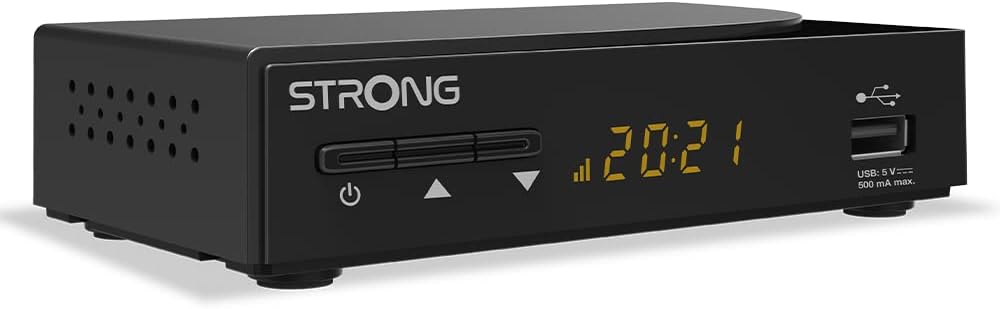
малюнок 1: Загалом view of the STRONG SRT 3030 Digital HD Cable Receiver. This image shows the compact black unit with its front panel display and USB port.

малюнок 2: Фронт view of the receiver, highlighting the power button, channel navigation buttons, digital display, and the accessible USB port.

малюнок 3: Задня view of the receiver, showing the "CABLE IN" port, HDMI output, TV SCART connector, and the power input.

малюнок 4: сторона view of the receiver, illustrating the ventilation holes designed for heat dissipation.
Налаштування
- Підключення до телевізора: Use an HDMI cable to connect the HDMI OUT port on the receiver to an HDMI IN port on your television. Alternatively, use a SCART cable if your TV does not have an HDMI port.
- Connect to Cable Network: Connect your cable network's coaxial cable to the "CABLE IN" port on the back of the receiver.
- Підключіть живлення: Plug the provided power adapter into the DC IN port on the receiver and then into a wall outlet.
- Увімкнення: Press the power button on the front panel of the receiver or on the remote control.
- Майстер початкового налаштування: Follow the on-screen instructions for the initial setup, which typically includes language selection, country, and automatic channel scanning. Allow the receiver to complete the channel scan to find all available digital channels.
Інструкція з експлуатації
Основні функції
- Увімкнення/вимкнення живлення: Натисніть ПОТУЖНІСТЬ на пульті дистанційного керування або на передній панелі.
- Вибір каналу: Використовуйте CH +/- кнопки для послідовного перемикання каналів або введіть номер каналу безпосередньо за допомогою цифрової клавіатури.
- Регулювання гучності: Використовуйте VOL +/- кнопки для регулювання гучності.
- Вимкнути звук: Натисніть ВИМКНЕНО кнопку, щоб тимчасово вимкнути звук.
- Електронний телегід (EPG): Натисніть EPG кнопку до view program information and schedule recordings.
Навігація по меню
Натисніть МЕНЮ button on the remote control to access the main menu. Use the arrow keys (ВГОРУ/ВНИЗ/ВЛІВО/ВПРАВО) для навігації між опціями та OK щоб підтвердити вибір. Натисніть EXIT щоб повернутися до прямого телебачення.
Керування каналом
- Channel Sorting: In the menu, navigate to "Channel Management" to sort channels by name, LCN, or other criteria.
- Списки улюблених: Create and manage up to 32 favorite lists to quickly access your preferred TV and radio stations.
Функції USB
Вставте USB-накопичувач у передній USB-порт. Ви можете використовувати його для:
- Відтворення мультимедіа: Play back various media files (e.g., photos, music, videos) stored on the USB device.
- Оновлення програмного забезпечення: Update the receiver's firmware by placing the update file on a USB drive and following the instructions in the system settings menu.
- Channel List Backup: Save your customized channel list to the USB device.
Технічне обслуговування
To ensure the longevity and optimal performance of your STRONG SRT 3030 receiver, follow these maintenance guidelines:
- Прибирання: Disconnect the power before cleaning. Use a soft, dry cloth to wipe the exterior of the receiver. Do not use liquid cleaners, aerosols, or abrasive materials.
- Вентиляція: Ensure that the ventilation openings on the receiver are not blocked. Do not place the receiver on soft surfaces like carpets or blankets that may obstruct airflow.
- Розміщення: Place the receiver in a well-ventilated area, away from direct sunlight, heat sources, and excessive moisture.
Усунення несправностей
If you encounter issues with your receiver, refer to the table below for common problems and their solutions.
| проблема | Можлива причина | Рішення |
|---|---|---|
| Немає зображення чи звуку |
|
|
| Повідомлення «Немає сигналу» |
|
|
| Пульт не працює |
|
|
| Cannot play USB media |
|
|
Технічні характеристики
| Особливість | Специфікація |
|---|---|
| Бренд | Сильний |
| Номер моделі | SRT3030 |
| Колір | чорний |
| Технологія підключення | HDMI |
| Інтерфейс | HDMI, USB 2.0 |
| Загальна кількість портів HDMI | 1 |
| Режим аудіовиходу | Стерео |
| Конфігурація каналу об’ємного звуку | 2.0 |
| Кодування відео | H.264, H.265/HEVC, VP9, AV1, MPEG-4 |
| Сумісні пристрої | TV, personal computer, tablet, smartphone, game console, amplifier, speaker |
| Склад батареї (пульт дистанційного керування) | лужні |
| Виробник | СИЛЬНИЙ |
| Країна походження | Китай |
Гарантія та підтримка
For warranty information and technical support, please refer to the documentation included with your product or visit the official Strong webсайт. Зберігайте чек про покупку як підтвердження покупки для гарантійних претензій.
Інтернет-підтримка: For further assistance, FAQs, and software updates, please visit the official Strong support page.


