вступ
This manual provides essential information for setting up, operating, maintaining, and troubleshooting your HP 17.3-inch laptop. This device is designed for business and educational use, offering robust performance and connectivity.

Figure 1: HP 17.3-inch Laptop Overview. This image displays the laptop open, revealing the large screen and full-size keyboard with a numeric keypad.
Що в коробці
Перевірте наявність усіх елементів в упаковці:
- HP 17.3-inch Laptop
- Адаптер живлення та кабель
- Короткий посібник (може бути включений окремо)
Налаштування
- Підключіть живлення: Plug the power adapter into the laptop's power port and then into a wall outlet. Allow the battery to charge for at least 30 minutes before first use.
- Увімкнення: Відкрийте кришку ноутбука та натисніть кнопку живлення, яка зазвичай розташована на клавіатурі.
- Початкове налаштування Windows: Дотримуйтесь підказок на екрані, щоб завершити налаштування Windows 10 Pro, включаючи мову, регіон, мережеве підключення та створення облікового запису користувача.
- Підключіться до Wi-Fi: During setup or afterward, select your Wi-Fi network from the available list and enter the password. The laptop supports Wi-Fi 5 (802.11ac).
- Налаштування зчитувача відбитків пальців: If desired, configure the fingerprint reader for secure login through Windows Settings.
- Підключення периферійних пристроїв: Use the available ports to connect external devices such as a mouse, keyboard, external display, or USB storage.

Figure 2: Left Side Ports. This image shows the left side of the laptop, featuring a USB 3.0 Type-A port, an HDMI port, a USB 3.0 Type-C port, and a headphone/microphone combo jack.

Figure 3: Right Side Ports. This image displays the right side of the laptop, including a USB 3.0 Type-A port, the power input, and various status indicator LEDs.
Керування ноутбуком
Управління живленням
- Увімкнення/вимкнення живлення: Press the power button to turn the laptop on. To turn off, go to the Start Menu in Windows and select Power > Shut down.
- Режим сну: Close the lid or select Power > Sleep from the Start Menu to put the laptop into a low-power state.
- Перезапуск: Select Power > Restart from the Start Menu to reboot the system.
Клавіатура і тачпад
- The laptop features a full-size keyboard with a numeric keypad.
- The touchpad supports multi-touch gestures for navigation. Refer to Windows settings for customization.
Дисплей і графіка
- The 17.3-inch Full HD (1920 x 1080) IPS anti-glare display provides wide viewкути.
- Adjust display settings (brightness, resolution) through Windows Display Settings.
- The integrated AMD Radeon graphics handle visual processing.
Підключення
- Wi-Fi: Connect to wireless networks via Wi-Fi 5 (802.11ac). Manage connections through the network icon in the taskbar.
- Bluetooth: Pair Bluetooth devices (e.g., headphones, mouse) via Windows Bluetooth settings.
- Порти USB: Utilize the USB 3.0 Type-C and Type-A ports for data transfer and connecting peripherals.
- HDMI: Connect an external monitor or projector using the HDMI port.
- Аудіороз'єм: Use the headphone/microphone combo jack for audio output and input.
Webкамера та аудіо
- The TrueVision HD Camera is suitable for video calls and online meetings.
- Tuned stereo speakers provide audio output. Adjust volume via the taskbar icon or keyboard function keys.
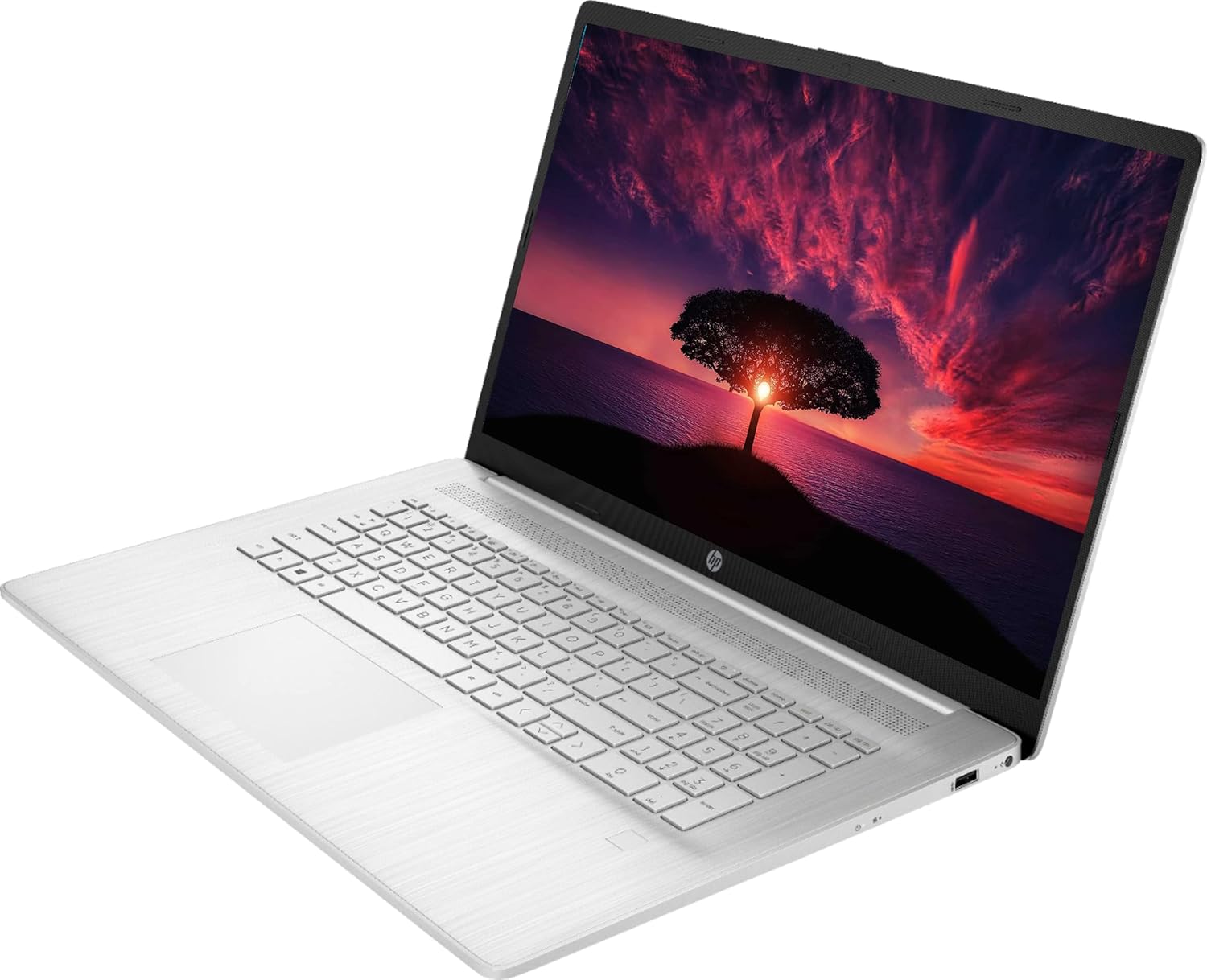
Figure 4: Laptop in Use. This image shows the HP laptop open at an angle, highlighting the display and the keyboard layout during operation.
Технічне обслуговування
прибирання
- екран: Злегка протріть м’якою тканиною без ворсу dampводою або засобом для чищення екранів. Не розпилюйте рідину безпосередньо на екран.
- Клавіатура та корпус: Використовуйте м’яку, суху тканину. Для стійкого бруду злегкаamp можна використовувати тканину, змочену м’яким мильним розчином, переконавшись, що рідина не потрапила в отвори.
- Уникайте абразивних очищувачів або розчинників.
Догляд за акумулятором
- Щоб продовжити термін служби батареї, уникайте екстремальних температур.
- Do not leave the laptop constantly plugged in at 100% charge for extended periods.
- Періодично розряджайте акумулятор приблизно до 20% перед повторною зарядкою.
Оновлення програмного забезпечення
- Regularly check for and install Windows updates via Windows Settings > Update & Security.
- Ensure drivers are up-to-date. HP provides driver updates through its support website or pre-installed utility software.
Управління зберіганням
- Періодично прибирайте зайве files and applications to maintain optimal performance of the 1TB SSD.
- Consider external storage for large backups.
Усунення несправностей
| Випуск | Можливе рішення |
|---|---|
| Ноутбук не вмикається. | Ensure the power adapter is securely connected to both the laptop and a working power outlet. Check if the power outlet is functional. Try a different outlet. |
| Немає відображення на екрані. | Check if the laptop is powered on. Adjust screen brightness using function keys. If an external monitor is connected, ensure it's properly connected and selected as the output. |
| Проблеми з підключенням до Wi-Fi. | Verify Wi-Fi is enabled in Windows settings. Restart your router and modem. Ensure you are within range of the Wi-Fi signal. Re-enter the Wi-Fi password. |
| Аудіо не працює. | Check volume levels in Windows and on any connected external speakers/headphones. Ensure correct audio output device is selected in Sound settings. Update audio drivers. |
| Laptop is slow or unresponsive. | Close unnecessary applications. Check Task Manager for high CPU/RAM usage. Ensure Windows and drivers are up to date. Run a system scan for malware. Consider restarting the laptop. |
| Зчитувач відбитків пальців не працює. | Ensure your finger is clean and dry. Re-enroll your fingerprint in Windows Settings > Accounts > Sign-in options. Update fingerprint reader drivers. |
Технічні характеристики
| Назва моделі | HP 17 |
| Процесор | AMD Ryzen 5 5500U (4 ГГц, 6 ядер) |
| ОЗУ | 32 ГБ DDR4 |
| Зберігання | 1 ТБ SSD |
| Дисплей | 17.3-inch FHD (1920 x 1080) IPS Anti-Glare |
| Графіка | Інтегрована графіка AMD Radeon |
| Операційна система | Windows 10 Pro |
| Бездротове підключення | Wi-Fi 5 (802.11ac), Bluetooth 4.2 |
| Порти | 2 x USB 3.0 Type-C, 1 x USB 3.0 Type-A, 1 x HDMI, 1 x Headphone/Microphone Combo Jack |
| Webкулачок | TrueVision HD Camera |
| Особливості | Зчитувач відбитків пальців |
| Термін служби батареї (середній) | До 8.13 годин |
| Розміри (ДxШxВ) | 15.78 x 0.78 x 10.15 дюймів |
| вага | 7.58 фунта |
Гарантія та підтримка
Your HP 17.3-inch laptop comes with a Гарантія від виробника 1 рік. For warranty claims, technical assistance, or additional support, please visit the official HP support webсайт або зверніться до служби підтримки клієнтів HP.
Підтримка HP Webсайт: support.hp.com
Please have your product's serial number ready when contacting support. The serial number is typically located on a sticker on the bottom of the laptop or can be found in the system information within Windows.