1. Вступ
The BSIDE X1A is a compact and intelligent digital multimeter pen designed for efficient and safe electronic parameter detection. This device offers multiple measurement functions including DC/AC voltage, resistance, and frequency, making it an essential tool for electricians, hobbyists, and DIY enthusiasts. Its pen-type design ensures portability and ease of use in various working environments.
2. Інформація про безпеку
Please read and understand all safety warnings and operating instructions before using this instrument. Failure to follow these instructions could result in electric shock, fire, or serious injury.
- Always select the correct function and measurement range for your task.
- Do not exceed the maximum input value specified for each measurement range.
- When the meter is connected to a circuit, avoid touching the metallic parts of the test leads.
- При вимірюванні обtages above 60V DC or 30V AC (RMS), always keep your fingers behind the finger guards on the test probes.
- Не намагайтеся виміряти обtage if the terminal voltagперевищує 500 В постійного струму або 500 В змінного струму.
- Before changing measurement functions, ensure the test leads are disconnected from the circuit under test.
- Never measure resistance or continuity on live circuits. Ensure the circuit is de-energized to prevent damage to the meter or injury.
- Do not operate the instrument near explosive gases, vapors, or dust.
- Discontinue use immediately if any abnormality or malfunction is observed.
- Ensure the bottom case and battery cover are securely fastened before operating the meter.
- Avoid storing or using the meter in direct sunlight, high temperatures, or high humidity.
3. Вміст упаковки
Перевірте, чи всі перелічені нижче предмети входять до вашої упаковки. Якщо будь-які предмети відсутні або пошкоджені, зверніться до продавця.
- 1 x BSIDE X1A Digital Multimeter Pen
- 1 x Набір вимірювальних проводів (червоний та чорний)
- 1 х посібник користувача
- 1 x викрутка (для батарейного відсіку)
- 1 х сумка для зберігання
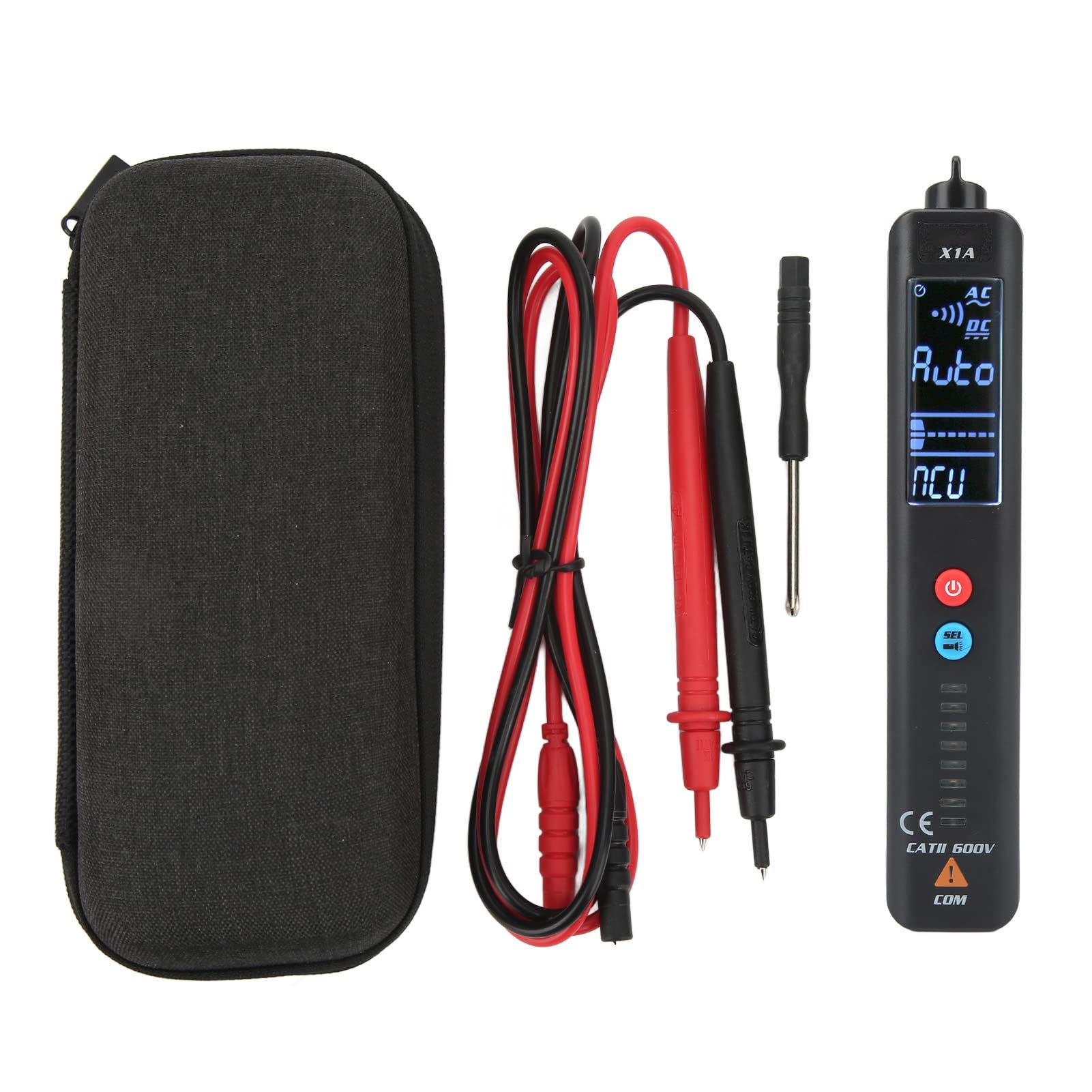
Image 3.1: Complete package contents of the BSIDE X1A Digital Multimeter Pen, including the pen meter, test leads, screwdriver, and storage bag.
4. Продукт закінчивсяview
The BSIDE X1A features a clear digital display and intuitive controls for various electrical measurements.
- Аварійний ліхтарик: Equipped with a built-in flashlight for improved visibility in low-light conditions, enhancing safety during night work.
- Multi-function Measurement: Supports various measurements including voltage, resistance, and frequency to meet diverse testing needs.
- Портативний і компактний: Its pen-type design makes it easy to carry and suitable for most work environments.
- Міцна конструкція: Made from high-quality ABS material, providing impact resistance, scratch resistance, and environmental friendliness.

Зображення 4.1: спереду view of the BSIDE X1A Digital Multimeter Pen, highlighting the display, power button, and mode selection button.
5. Налаштування
5.1 Встановлення батареї
The BSIDE X1A requires two 1.5V AAA batteries for operation.
- Locate the battery compartment cover on the back of the multimeter pen.
- Use the provided screwdriver to loosen the screw securing the battery cover.
- Зніміть кришку акумулятора.
- Вставте дві батарейки типу AAA 1.5 В, дотримуючись правильної полярності (+ та -).
- Встановіть на місце кришку батареї та надійно затягніть гвинт.
6. Інструкція з експлуатації
6.1 Увімкнення/вимкнення живлення
Натисніть і утримуйте червону кнопку живлення (U), щоб увімкнути або вимкнути пристрій.
6.2 Вибір режиму
The BSIDE X1A operates in two main modes. Press the blue 'SET' button to cycle through available measurement functions (e.g., Voltage, Resistance, Frequency, NCV).
6.3 Measuring DC/AC Voltage
- Увімкніть мультиметр.
- Виберіть відповідний томtage measurement mode (DC V or AC V) using the 'SET' button. The display will indicate the selected mode.
- Connect the red test lead to the positive (+) terminal of the circuit and the black test lead to the negative (-) terminal or ground.
- Прочитайте томtage значення, що відображається на екрані.
6.4 Вимірювання опору
- Перед вимірюванням опору переконайтеся, що коло знеструмлене.
- Turn on the multimeter and select the resistance measurement mode (Ω).
- Connect the test leads across the component or circuit section where resistance is to be measured.
- Прочитайте значення опору, яке відображається на екрані.
6.5 Вимірювання частоти
- Turn on the multimeter and select the frequency measurement mode (Hz).
- Підключіть вимірювальні щупи до кола, де потрібно виміряти частоту.
- Read the frequency value displayed on the screen.
6.6 Безконтактний Voltage (NCV) Виявлення
Функція NCV дозволяє виявляти об'єм змінного струмуtage without direct contact. Select NCV mode and bring the tip of the multimeter close to the conductor. The device will indicate the presence of AC voltagе. за допомогою візуальних та/або звукових сповіщень.
7. Технічне обслуговування
- Прибирання: Використовуйте м'який, damp cloth to clean the meter's casing. Не використовуйте абразивні засоби для чищення або розчинники.
- Заміна батареї: Replace batteries when the low battery indicator appears on the display to ensure accurate readings. Refer to Section 5.1 for battery installation instructions.
- Зберігання: Якщо глюкометр не використовується протягом тривалого часу, виймайте батарейки, щоб запобігти витіканню. Зберігайте його в прохолодному, сухому місці, подалі від прямих сонячних променів та екстремальних температур.
8. Вирішення проблем
If you encounter issues with your BSIDE X1A, refer to the following common troubleshooting steps:
- Без дисплея/живлення: Перевірте, чи правильно встановлено батарейки та чи достатньо вони заряджені. За потреби замініть батарейки.
- Неточні показання: Ensure the correct measurement function and range are selected. Check test lead connections for proper contact. Verify that the circuit is de-energized for resistance/continuity tests.
- Відсутність виявлення NCV: Ensure the NCV mode is active and the tip of the meter is brought sufficiently close to the AC voltagе джерело.
- Meter Not Responding: Спробуйте вимкнути та знову ввімкнути глюкометр. Якщо проблема не зникає, замініть батарейки.
Якщо ці кроки не вирішують проблеми, зверніться до служби підтримки клієнтів.
9. Технічні характеристики
| Параметр | Значення |
|---|---|
| Модель | X1A |
| матеріал | ABS |
| DC Voltage Дальність | До 500В |
| AC Voltage Дальність | До 500В |
| Діапазон опору | від 0 Ом до 20 МОм |
| Діапазон частот | До 1000 Гц |
| Джерело живлення | 2 батарейки типу AAA 1.5 В (не входять до комплекту) |
10. Гарантія
This product is covered by a standard manufacturer's warranty against defects in materials and workmanship. The warranty period typically begins from the date of purchase. Please retain your proof of purchase for warranty claims. For specific warranty terms and conditions, refer to the documentation provided with your purchase or contact the retailer.
11. Підтримка
For technical assistance, product inquiries, or service requests, please contact the retailer or manufacturer's customer support. Contact information can usually be found on the product packaging or the retailer's website. When contacting support, please have your product model (X1A) and purchase details ready.


