вступ
The One For All URC4810 is a dedicated replacement remote control designed specifically for Samsung televisions. This remote offers 100% compatibility with all Samsung TV models, providing a seamless and intuitive user experience. It features a quick setup process called SimpleSet and a learning function to transfer commands from your original remote, ensuring you retain all necessary functionalities.
Інформація про безпеку
- Тримайте батареї в недоступному для дітей місці.
- Не змішуйте старі та нові батареї або різні типи батарейок.
- Remove batteries if the remote control is not used for an extended period.
- Avoid exposing the remote control to direct sunlight, heat sources, or excessive moisture.
- Не намагайтеся розбирати або модифікувати пульт дистанційного керування.
Вміст упаковки
Будь ласка, перевірте упаковку на наявність наступних предметів:
- One For All Samsung TV Replacement Remote Control (URC4810)
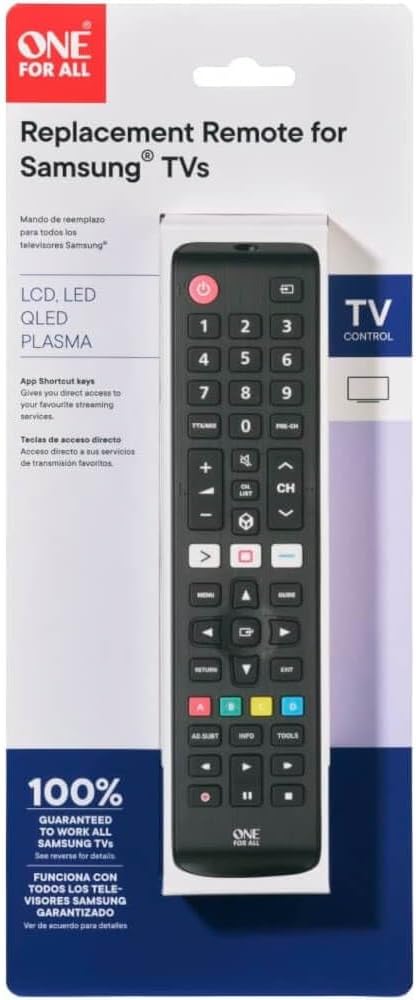
Image: The One For All URC4810 remote control displayed within its retail packaging, showing the product name and key features.
Налаштування
1. Встановлення батареї
The URC4810 remote control requires 2x AAA batteries (not included). Follow these steps to install them:
- Відкрийте кришку відсіку для батарей на задній панелі пульта дистанційного керування.
- Вставте дві батарейки типу AAA, переконавшись, що позитивний (+) та негативний (-) полюси збігаються з позначками всередині відсіку.
- Надійно закрийте кришку батарейного відсіку.

Зображення: Побічний професіоналfile view of the One For All URC4810 remote control, illustrating its ergonomic design and the location of the battery compartment seam.
2. SimpleSet Setup
The URC4810 remote features SimpleSet, allowing for quick setup in under 30 seconds. No codes are needed.
- Переконайтеся, що ваш телевізор Samsung увімкнено.
- Point the One For All remote at your Samsung TV.
- Натисніть і утримуйте потужність button on the One For All remote until your TV turns off. This may take a few seconds.
- Once the TV turns off, release the потужність button immediately. The remote is now set up.
- Test other functions like Volume Up/Down and Channel Up/Down to confirm full functionality.

Зображення: Прямий фронт view of the One For All URC4810 remote control, showcasing its full button layout, including the power button at the top.
3. Learning Feature (Optional)
The learning feature allows you to copy functions from your original Samsung TV remote to the URC4810. This is useful for any specific buttons not covered by the default setup.
- Place the One For All remote and your original Samsung remote on a flat surface, facing each other, about 1-2 inches apart.
- On the One For All remote, press and hold the НАЛАШТУВАННЯ button (if available, otherwise refer to the specific manual for learning mode entry, typically a combination of buttons like SHIFT + НАВЧАЙТЕСЯ or similar) until the LED blinks twice and then stays lit.
- Press the button on the One For All remote that you wish to program (e.g., a specific app button). The LED will blink rapidly.
- On your original Samsung remote, press the corresponding button you want to copy. The LED on the One For All remote will blink twice to confirm successful learning.
- Repeat steps 3 and 4 for any other buttons you wish to learn.
- Щоб вийти з режиму навчання, натисніть кнопку НАЛАШТУВАННЯ button again (or the button used to enter learning mode). The LED will turn off.

Зображення: Кутовий view of the One For All URC4810 remote control, showcasing its comfortable grip and button placement.
Інструкція з експлуатації
Once set up, the URC4810 remote functions like your original Samsung TV remote. Here are some common button functions:
- Живлення (червона кнопка): Вмикає або вимикає телевізор.
- Цифрові кнопки (0-9): Безпосередній вибір каналу.
- Збільшення/зменшення гучності (+/-): Регулює гучність телевізора.
- Канал вгору/вниз (CH +/-): Змінює телеканали.
- Вимкнути звук: Вмикає або вимкнення звуку телевізора.
- Меню: Доступ до головного меню телевізора.
- Navigation (Arrow Buttons): Навігація в меню та параметрах.
- OK/Enter: Підтверджує вибір.
- Повернення/Назад: Повернення до попереднього екрана або меню.
- Вихід: Вихід з поточного меню або програми.
- Кольорові кнопки (червона, зелена, жовта, синя): Функціональність залежить від моделі телевізора та програми.
- Smart Hub/Home: Accesses the TV's Smart Hub or Home screen.
Технічне обслуговування
прибирання
To clean your remote control, use a soft, dry cloth. Do not use abrasive cleaners, waxes, or solvents. Avoid spraying liquids directly onto the remote.
Заміна батареї
If the remote control's range decreases or buttons become unresponsive, it may be time to replace the batteries. Follow the "Battery Installation" steps in the Setup section to replace the old batteries with new AAA alkaline batteries.
Усунення несправностей
| проблема |
Можлива причина |
Рішення |
| Remote does not work after setup. |
Incorrect setup or dead batteries. |
Ensure batteries are correctly inserted and charged. Repeat the SimpleSet process carefully. |
| Деякі кнопки не працюють. |
Button not recognized by SimpleSet or not learned. |
Use the Learning Feature to copy the function from your original remote. Ensure the remote is pointed directly at the TV. |
| Дистанційний радіус дії поганий. |
Low batteries or obstruction. |
Replace batteries. Ensure there are no obstructions between the remote and the TV's IR receiver. |
| Світлодіод на пульті дистанційного керування не світиться. |
No batteries or incorrect battery insertion. |
Check battery orientation and ensure they are new and correctly inserted. |
Технічні характеристики
| Бренд |
Один за всіх |
| Номер моделі |
URC4810 |
| Сумісні пристрої |
Samsung Televisions |
| Джерело живлення |
Живлення від батарейок (2x AAA, не входять до комплекту) |
| Колір |
White (Note: Product images show black, but specification states white. Please refer to product packaging for exact color.) |
| Вага товару |
3.52 унції (приблизно 100 грамів) |
| Розміри продукту (Д x Ш x В) |
Approx. 4"D x 3"W x 1"H (Note: Dimensions may refer to packaging or a specific part. Actual remote dimensions are typically longer and narrower.) |
| UPC |
810209030940 |
Гарантія та підтримка
One For All products are designed and manufactured to the highest standards. For information regarding warranty, technical support, or frequently asked questions, please visit the official One For All webсайт або зверніться безпосередньо до служби підтримки клієнтів.
For the most up-to-date support information, please refer to the manufacturer's official channels:
- Один за всіх Webсайт: www.oneforall.com
- Обслуговування клієнтів: Зверніться до webсайт для отримання регіональної контактної інформації.
вступ
The One For All URC4810 is a dedicated replacement remote control designed specifically for Samsung televisions. This remote offers 100% compatibility with all Samsung TV models, providing a seamless and intuitive user experience. It features a quick setup process called SimpleSet and a learning function to transfer commands from your original remote, ensuring you retain all necessary functionalities.
Інформація про безпеку
- Тримайте батареї в недоступному для дітей місці.
- Не змішуйте старі та нові батареї або різні типи батарейок.
- Remove batteries if the remote control is not used for an extended period.
- Avoid exposing the remote control to direct sunlight, heat sources, or excessive moisture.
- Не намагайтеся розбирати або модифікувати пульт дистанційного керування.
Вміст упаковки
Будь ласка, перевірте упаковку на наявність наступних предметів:
- One For All Samsung TV Replacement Remote Control (URC4810)
Image: The One For All URC4810 remote control displayed within its retail packaging, showing the product name and key features.
Налаштування
1. Встановлення батареї
The URC4810 remote control requires 2x AAA batteries (not included). Follow these steps to install them:
- Відкрийте кришку відсіку для батарей на задній панелі пульта дистанційного керування.
- Вставте дві батарейки типу AAA, переконавшись, що позитивний (+) та негативний (-) полюси збігаються з позначками всередині відсіку.
- Надійно закрийте кришку батарейного відсіку.
Зображення: Побічний професіоналfile view of the One For All URC4810 remote control, illustrating its ergonomic design and the location of the battery compartment seam.
2. SimpleSet Setup
The URC4810 remote features SimpleSet, allowing for quick setup in under 30 seconds. No codes are needed.
- Переконайтеся, що ваш телевізор Samsung увімкнено.
- Point the One For All remote at your Samsung TV.
- Натисніть і утримуйте потужність button on the One For All remote until your TV turns off. This may take a few seconds.
- Once the TV turns off, release the потужність button immediately. The remote is now set up.
- Test other functions like Volume Up/Down and Channel Up/Down to confirm full functionality.
Зображення: Прямий фронт view of the One For All URC4810 remote control, showcasing its full button layout, including the power button at the top.
3. Learning Feature (Optional)
The learning feature allows you to copy functions from your original Samsung TV remote to the URC4810. This is useful for any specific buttons not covered by the default setup.
- Place the One For All remote and your original Samsung remote on a flat surface, facing each other, about 1-2 inches apart.
- On the One For All remote, press and hold the НАЛАШТУВАННЯ button (if available, otherwise refer to the specific manual for learning mode entry, typically a combination of buttons like SHIFT + НАВЧАЙТЕСЯ or similar) until the LED blinks twice and then stays lit.
- Press the button on the One For All remote that you wish to program (e.g., a specific app button). The LED will blink rapidly.
- On your original Samsung remote, press the corresponding button you want to copy. The LED on the One For All remote will blink twice to confirm successful learning.
- Repeat steps 3 and 4 for any other buttons you wish to learn.
- Щоб вийти з режиму навчання, натисніть кнопку НАЛАШТУВАННЯ button again (or the button used to enter learning mode). The LED will turn off.
Зображення: Кутовий view of the One For All URC4810 remote control, showcasing its comfortable grip and button placement.
Інструкція з експлуатації
Once set up, the URC4810 remote functions like your original Samsung TV remote. Here are some common button functions:
- Живлення (червона кнопка): Вмикає або вимикає телевізор.
- Цифрові кнопки (0-9): Безпосередній вибір каналу.
- Збільшення/зменшення гучності (+/-): Регулює гучність телевізора.
- Канал вгору/вниз (CH +/-): Змінює телеканали.
- Вимкнути звук: Вмикає або вимкнення звуку телевізора.
- Меню: Доступ до головного меню телевізора.
- Navigation (Arrow Buttons): Навігація в меню та параметрах.
- OK/Enter: Підтверджує вибір.
- Повернення/Назад: Повернення до попереднього екрана або меню.
- Вихід: Вихід з поточного меню або програми.
- Кольорові кнопки (червона, зелена, жовта, синя): Функціональність залежить від моделі телевізора та програми.
- Smart Hub/Home: Accesses the TV's Smart Hub or Home screen.
Технічне обслуговування
прибирання
To clean your remote control, use a soft, dry cloth. Do not use abrasive cleaners, waxes, or solvents. Avoid spraying liquids directly onto the remote.
Заміна батареї
If the remote control's range decreases or buttons become unresponsive, it may be time to replace the batteries. Follow the "Battery Installation" steps in the Setup section to replace the old batteries with new AAA alkaline batteries.
Усунення несправностей
| проблема |
Можлива причина |
Рішення |
| Remote does not work after setup. |
Incorrect setup or dead batteries. |
Ensure batteries are correctly inserted and charged. Repeat the SimpleSet process carefully. |
| Деякі кнопки не працюють. |
Button not recognized by SimpleSet or not learned. |
Use the Learning Feature to copy the function from your original remote. Ensure the remote is pointed directly at the TV. |
| Дистанційний радіус дії поганий. |
Low batteries or obstruction. |
Replace batteries. Ensure there are no obstructions between the remote and the TV's IR receiver. |
| Світлодіод на пульті дистанційного керування не світиться. |
No batteries or incorrect battery insertion. |
Check battery orientation and ensure they are new and correctly inserted. |
Технічні характеристики
| Бренд |
Один за всіх |
| Номер моделі |
URC4810 |
| Сумісні пристрої |
Samsung Televisions |
| Джерело живлення |
Живлення від батарейок (2x AAA, не входять до комплекту) |
| Колір |
White (Note: Product images show black, but specification states white. Please refer to product packaging for exact color.) |
| Вага товару |
3.52 унції (приблизно 100 грамів) |
| Розміри продукту (Д x Ш x В) |
Approx. 4"D x 3"W x 1"H (Note: Dimensions may refer to packaging or a specific part. Actual remote dimensions are typically longer and narrower.) |
| UPC |
810209030940 |
Гарантія та підтримка
One For All products are designed and manufactured to the highest standards. For information regarding warranty, technical support, or frequently asked questions, please visit the official One For All webсайт або зверніться безпосередньо до служби підтримки клієнтів.
For the most up-to-date support information, please refer to the manufacturer's official channels:
- Один за всіх Webсайт: www.oneforall.com
- Обслуговування клієнтів: Зверніться до webсайт для отримання регіональної контактної інформації.
вступ
The One For All URC4810 is a dedicated replacement remote control designed specifically for Samsung televisions. This remote offers 100% compatibility with all Samsung TV models, providing a seamless and intuitive user experience. It features a quick setup process called SimpleSet and a learning function to transfer commands from your original remote, ensuring you retain all necessary functionalities.
Інформація про безпеку
- Тримайте батареї в недоступному для дітей місці.
- Не змішуйте старі та нові батареї або різні типи батарейок.
- Remove batteries if the remote control is not used for an extended period.
- Avoid exposing the remote control to direct sunlight, heat sources, or excessive moisture.
- Не намагайтеся розбирати або модифікувати пульт дистанційного керування.
Вміст упаковки
Будь ласка, перевірте упаковку на наявність наступних предметів:
- One For All Samsung TV Replacement Remote Control (URC4810)
Image: The One For All URC4810 remote control displayed within its retail packaging, showing the product name and key features.
Налаштування
1. Встановлення батареї
The URC4810 remote control requires 2x AAA batteries (not included). Follow these steps to install them:
- Відкрийте кришку відсіку для батарей на задній панелі пульта дистанційного керування.
- Вставте дві батарейки типу AAA, переконавшись, що позитивний (+) та негативний (-) полюси збігаються з позначками всередині відсіку.
- Надійно закрийте кришку батарейного відсіку.
Зображення: Побічний професіоналfile view of the One For All URC4810 remote control, illustrating its ergonomic design and the location of the battery compartment seam.
2. SimpleSet Setup
The URC4810 remote features SimpleSet, allowing for quick setup in under 30 seconds. No codes are needed.
- Переконайтеся, що ваш телевізор Samsung увімкнено.
- Point the One For All remote at your Samsung TV.
- Натисніть і утримуйте потужність button on the One For All remote until your TV turns off. This may take a few seconds.
- Once the TV turns off, release the потужність button immediately. The remote is now set up.
- Test other functions like Volume Up/Down and Channel Up/Down to confirm full functionality.
Зображення: Прямий фронт view of the One For All URC4810 remote control, showcasing its full button layout, including the power button at the top.
3. Learning Feature (Optional)
The learning feature allows you to copy functions from your original Samsung TV remote to the URC4810. This is useful for any specific buttons not covered by the default setup.
- Place the One For All remote and your original Samsung remote on a flat surface, facing each other, about 1-2 inches apart.
- On the One For All remote, press and hold the НАЛАШТУВАННЯ button (if available, otherwise refer to the specific manual for learning mode entry, typically a combination of buttons like SHIFT + НАВЧАЙТЕСЯ or similar) until the LED blinks twice and then stays lit.
- Press the button on the One For All remote that you wish to program (e.g., a specific app button). The LED will blink rapidly.
- On your original Samsung remote, press the corresponding button you want to copy. The LED on the One For All remote will blink twice to confirm successful learning.
- Repeat steps 3 and 4 for any other buttons you wish to learn.
- Щоб вийти з режиму навчання, натисніть кнопку НАЛАШТУВАННЯ button again (or the button used to enter learning mode). The LED will turn off.
Зображення: Кутовий view of the One For All URC4810 remote control, showcasing its comfortable grip and button placement.
Інструкція з експлуатації
Once set up, the URC4810 remote functions like your original Samsung TV remote. Here are some common button functions:
- Живлення (червона кнопка): Вмикає або вимикає телевізор.
- Цифрові кнопки (0-9): Безпосередній вибір каналу.
- Збільшення/зменшення гучності (+/-): Регулює гучність телевізора.
- Канал вгору/вниз (CH +/-): Змінює телеканали.
- Вимкнути звук: Вмикає або вимкнення звуку телевізора.
- Меню: Доступ до головного меню телевізора.
- Navigation (Arrow Buttons): Навігація в меню та параметрах.
- OK/Enter: Підтверджує вибір.
- Повернення/Назад: Повернення до попереднього екрана або меню.
- Вихід: Вихід з поточного меню або програми.
- Кольорові кнопки (червона, зелена, жовта, синя): Функціональність залежить від моделі телевізора та програми.
- Smart Hub/Home: Accesses the TV's Smart Hub or Home screen.
Технічне обслуговування
прибирання
To clean your remote control, use a soft, dry cloth. Do not use abrasive cleaners, waxes, or solvents. Avoid spraying liquids directly onto the remote.
Заміна батареї
If the remote control's range decreases or buttons become unresponsive, it may be time to replace the batteries. Follow the "Battery Installation" steps in the Setup section to replace the old batteries with new AAA alkaline batteries.
Усунення несправностей
| проблема |
Можлива причина |
Рішення |
| Remote does not work after setup. |
Incorrect setup or dead batteries. |
Ensure batteries are correctly inserted and charged. Repeat the SimpleSet process carefully. |
| Деякі кнопки не працюють. |
Button not recognized by SimpleSet or not learned. |
Use the Learning Feature to copy the function from your original remote. Ensure the remote is pointed directly at the TV. |
| Дистанційний радіус дії поганий. |
Low batteries or obstruction. |
Replace batteries. Ensure there are no obstructions between the remote and the TV's IR receiver. |
| Світлодіод на пульті дистанційного керування не світиться. |
No batteries or incorrect battery insertion. |
Check battery orientation and ensure they are new and correctly inserted. |
Технічні характеристики
| Бренд |
Один за всіх |
| Номер моделі |
URC4810 |
| Сумісні пристрої |
Samsung Televisions |
| Джерело живлення |
Живлення від батарейок (2x AAA, не входять до комплекту) |
| Колір |
White (Note: Product images show black, but specification states white. Please refer to product packaging for exact color.) |
| Вага товару |
3.52 унції (приблизно 100 грамів) |
| Розміри продукту (Д x Ш x В) |
Approx. 4"D x 3"W x 1"H (Note: Dimensions may refer to packaging or a specific part. Actual remote dimensions are typically longer and narrower.) |
| UPC |
810209030940 |
Гарантія та підтримка
One For All products are designed and manufactured to the highest standards. For information regarding warranty, technical support, or frequently asked questions, please visit the official One For All webсайт або зверніться безпосередньо до служби підтримки клієнтів.
For the most up-to-date support information, please refer to the manufacturer's official channels:
- Один за всіх Webсайт: www.oneforall.com
- Обслуговування клієнтів: Зверніться до webсайт для отримання регіональної контактної інформації.


