1. Продукт закінчивсяview
The UNV NVR302-16E2 is a high-performance Network Video Recorder (NVR) designed for advanced surveillance systems. It supports 4K resolution recording and playback, offering robust video management capabilities for up to 32 channels. This NVR is compatible with various camera protocols, including ONVIF, and features Ultra H.265 compression for efficient storage.
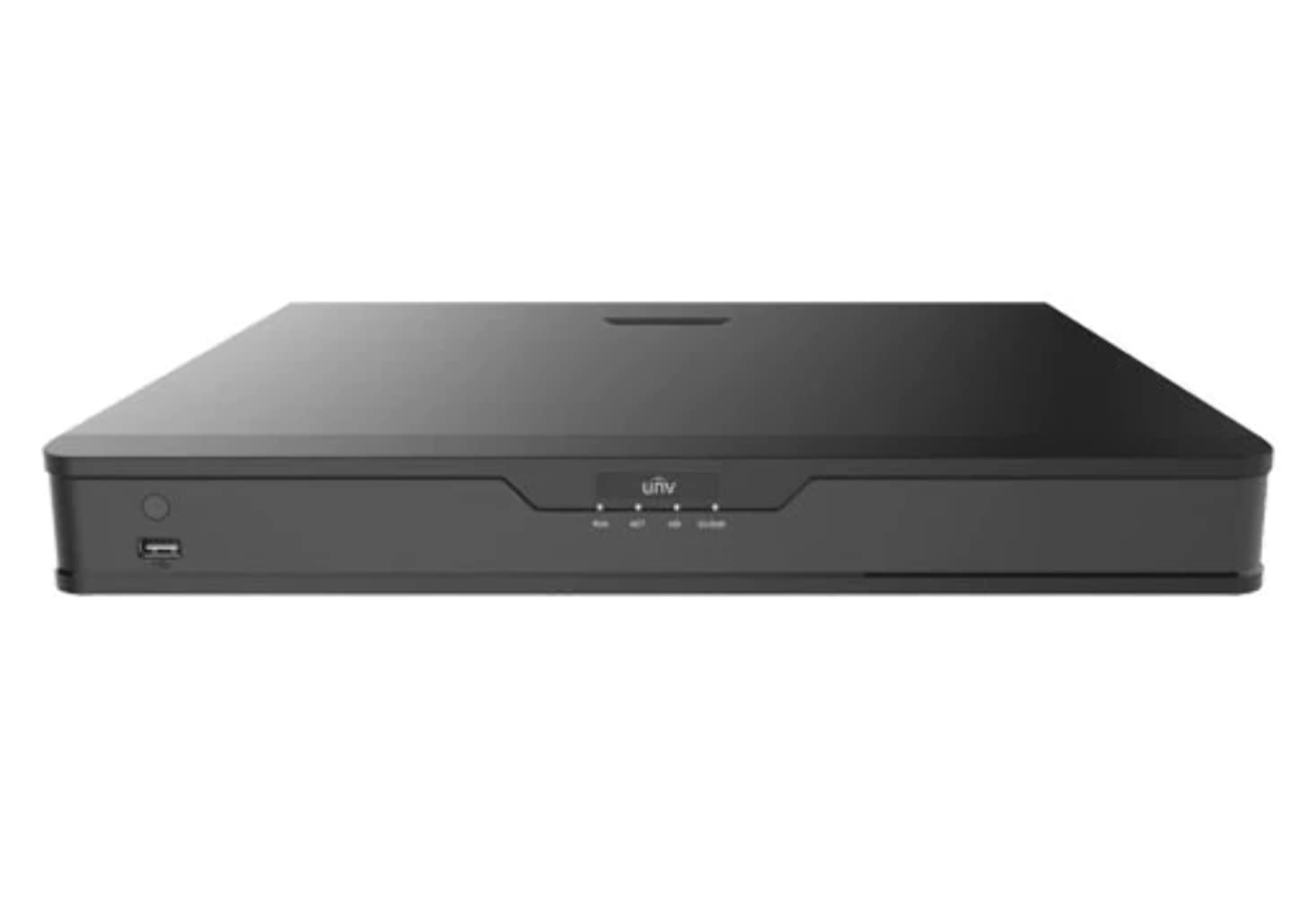
Малюнок 1: Спереду view of the UNV NVR302-16E2 4K NVR. The front panel includes a power button, a USB port, and indicator lights for power, HDD activity, network status, and alarm.
2. Ключові характеристики
- Supports Ultra H.265/H.265/H.264 video formats for efficient compression.
- 8/16-channel input with Plug & Play functionality via independent PoE network interfaces.
- Compatibility with mainstream cameras supporting ONVIF conformance (Profile S, професіоналfile G, професіоналfile T) and RTSP protocols.
- Equipped with 1-channel HDMI and 1-channel VGA outputs, with HDMI supporting up to 4K (3840x2160) resolution.
- Independent HDMI and VGA outputs for flexible display options.
- Supports recording resolutions up to 12 Megapixels.
- Accommodates 2 SATA HDDs, with support for up to 10TB per HDD.
- Features various fisheye dewarping modes for live view and playback, accessible via both web interface and GUI.
- Incorporates ANR (Automatic Network Replenishment) technology to enhance storage reliability during network disconnections.
- Supports cloud upgrade for convenient firmware updates.
3. Вміст упаковки
Будь ласка, перевірте вміст упаковки після розпакування. Якщо будь-які елементи відсутні або пошкоджені, негайно зверніться до продавця.
- UNV NVR302-16E2 NVR Unit
- Адаптер живлення
- USB миша
- SATA Data Cables (for HDD installation)
- HDD Mounting Screws
- Короткий посібник
4. Налаштування
4.1 Фізичне встановлення
- Установка HDD:
Unscrew and remove the NVR cover. Securely mount the SATA hard disk drives (HDDs) into the designated bays using the provided screws. Connect the SATA data and power cables from the NVR motherboard to the HDDs. Replace the NVR cover and secure it with screws.
- Підключення дисплея:
Connect a monitor to the NVR's HDMI or VGA output port using a compatible cable.
- Підключення миші:
Підключіть USB-мишу до одного з USB-портів відеореєстратора.
- Підключити мережу:
Підключіть кабель Ethernet від порту LAN відеореєстратора до мережевого маршрутизатора або комутатора.
- Підключення камер:
For PoE cameras, connect them directly to the NVR's independent PoE ports. For non-PoE cameras, ensure they are connected to the same network as the NVR and powered separately.
- Підключіть живлення:
Підключіть адаптер живлення до входу живлення відеореєстратора, а потім підключіть його до розетки. Відеореєстратор увімкнеться автоматично.
4.2 Початкова конфігурація
Upon the first boot, the NVR will guide you through an initial setup wizard. Follow the on-screen prompts to configure essential settings.
- Встановити пароль адміністратора: Create a strong password for the 'admin' user. This is crucial for security.
- Налаштування мережі: Configure the NVR's IP address (DHCP or Static IP). Ensure it is on the same network as your cameras for proper communication.
- Дата і час: Встановіть правильну дату, час і часовий пояс.
- Ініціалізація жорсткого диска: The NVR will prompt you to initialize (format) the newly installed HDDs. This step is necessary before recording can begin.
- Camera Search and Add: The NVR will automatically search for connected cameras. Select and add the cameras you wish to manage.
5. Експлуатація відеореєстратора
5.1 Живий View
Після налаштування відеореєстратор відображатиме прямий ефір view підключених камер. Ви можете перемикатися між режимами з однією камерою view, багатокамерна сітка view, and customize the display layout.
- Вибір каналу: Click on a channel window to select it.
- Контроль PTZ: If using PTZ cameras, use the on-screen controls or joystick (if connected) to pan, tilt, and zoom.
- Миттєве відтворення: Right-click on a channel and select "Instant Playback" to view нещодавні записи.
5.2 Керування записами
The NVR supports various recording modes.
- Запланований запис: Configure recording schedules based on time, day, and event (e.g., motion detection).
- Запис виявлення руху: Set up motion detection zones and sensitivity for each camera to trigger recording only when movement is detected.
- Ручний запис: Start or stop recording manually from the live view інтерфейс.
5.3 Відтворення
Доступ до записаного footagе для повторногоview.
- Перейдіть до меню «Відтворення».
- Select the camera(s) and date/time range for playback.
- Use the timeline to navigate through recordings.
- Options include fast forward, rewind, pause, and frame-by-frame playback.
НІКОЛИ не резервне копіювання
Export recorded video clips to an external USB drive.
- Insert a USB flash drive into the NVR's USB port.
- Go to the "Backup" menu.
- Select the camera, time range, and desired video format for export.
- Start the backup process.
5.5 Віддалений доступ
Access your NVR remotely via a web браузер або мобільний додаток.
- Web Браузер: Enter the NVR's IP address into a web browser on a computer connected to the same network. Log in with your credentials.
- Мобільний додаток: Download the official Uniview mobile application (e.g., EZView). Register an account, add your NVR by scanning the QR code or entering its serial number, and view live feeds or playback remotely.
6. Технічне обслуговування
6.1 оновлень мікропрограми
Regularly check for and install firmware updates to ensure optimal performance, security, and access to new features. Updates can typically be performed via the NVR's web interface or local GUI, often with cloud upgrade support.
6.2 Керування жорсткими дисками
Monitor the health and status of your hard drives. The NVR provides tools to check HDD status, format drives, and configure overwrite settings when storage is full.
6.3 Системні журнали
Review system logs for any errors, warnings, or important events. This can assist in troubleshooting and system monitoring.
7. Вирішення проблем
| проблема | Можлива причина | Рішення |
|---|---|---|
| Немає відеовиходу на монітор. | Loose cable connection; incorrect display resolution; NVR not powered on. | Check HDMI/VGA cable connections. Ensure NVR is powered. Try a different monitor or cable. Adjust NVR output resolution if possible. |
| Камери не відображають зображення. | Network issue; incorrect camera IP; camera not powered; camera not added to NVR. | Verify network connectivity. Ensure cameras are powered. Check camera IP addresses and add them to the NVR if not already done. |
| Немає віддаленого доступу до NVR. | Network configuration issue (port forwarding, DDNS); NVR offline; incorrect credentials. | Verify NVR's network settings. Ensure necessary ports are forwarded on your router. Check internet connection. Confirm login credentials. |
| Немає запису. | HDD not initialized or full; recording schedule not set; camera not recording. | Initialize the HDD. Check recording schedules and ensure they are active. Verify camera status and ensure it's configured to record. |
8. Технічні характеристики
| Особливість | Деталь |
|---|---|
| Номер моделі | NVR302-16E2 |
| Підтримувані формати відео | Ultra H.265 / H.265 / H.264 |
| Вхід каналу | 8/16-channel (with independent PoE interfaces) |
| Вихід HDMI | 1-channel, up to 4K (3840x2160) resolution |
| Вихід VGA | 1-канальний |
| Максимальна роздільна здатність запису | До 12 мегапікселів |
| Підтримка жорстких дисків | 2 SATA HDDs, up to 10TB each (20TB total) |
| Технологія підключення | HDMI, VGA, Ethernet, USB |
| Сумісні пристрої | IP Cameras (ONVIF Profile S, G, T; RTSP) |
| Розміри продукту | 18 x 14 x 4 дюйми (45.72 x 35.56 x 10.16 см) |
| Вага товару | 3.97 фунта (1.8 кг) |
| Виробник | Uniview |
9. Гарантія та підтримка
Uniview products typically come with a limited manufacturer's warranty. For specific warranty terms and conditions, please refer to the warranty card included with your product or visit the official Uniview webсайт.
For technical support, troubleshooting assistance, or service inquiries, please contact Uniview customer support through their official channels. You can usually find contact information, FAQs, and support resources on the Uniview webсайт (www.uniview.com).
Пов'язані документи - NVR302-16E2
 |
Troubleshoot Uniview NVR Two-Way Audio Issues | Uniview Підтримка Comprehensive guide to troubleshoot and resolve two-way audio problems on Uniview NVRs and cameras. Includes steps for web interface, mobile app, and NVR GUI. |
 |
Uniview Network Video Recorder Quick Guide A quick guide for Uniview Network Video Recorders (NVRs), covering device indicators, interface ports, disk installation for various HDD configurations (1, 2, 4, 8, 9, 16-bay), startup and shutdown procedures, local operations like adding IP devices and playback, UNV-Link mobile app usage, web login, and essential safety warnings, disclaimers, and regulatory compliance information. |
 |
Як змінити університетview Налаштування часу відеореєстратора Покрокова інструкція щодо налаштування часу та дати для Uniview Мережеві відеореєстратори (NVR) використовують різні методи, зокрема web інтерфейс, прямий доступ до монітора, програмне забезпечення EZTools та мобільні додатки, такі як EZView та UNV-Link. |
 |
Uniview Цифровий відеореєстратор серії XVR301-G3: технічні характеристики, що відповідають вимогам NDAA Вичерпний технічний опис для Університетуview Цифровий відеореєстратор серії XVR301-G3, включаючи моделі XVR301-04G3, XVR301-08G3 та XVR301-16G3. Детальна інформація про функції, технічні характеристики, підключення та відповідність стандартам. |
 |
Uniview 2021 Product Guide: Network Cameras, NVRs, VMS & Security Solutions Відкрийте для себе всебічний університетview 2021 Product Guide, detailing a wide array of professional video surveillance solutions. This guide covers Network Cameras, NVRs, VMS, Professional Storage, Display & Control systems, and Accessories, featuring advanced technologies like LightHunter and PixelSense. Find detailed specifications and model information for Easy, Prime, and Pro series products, suitable for various applications from residential security to large-scale enterprise deployments. |
 |
NVR-B3601.33.45.221212 Примітки до випуску - Zhejiang Uniview Технології Офіційні нотатки до випуску для Університету Чжецзянview Програмне забезпечення для мережевого відеореєстратора NVR-B3601.33.45.221212 від Technologies, детальна інформація про версію, нові функції, зміни та процедури оновлення. |