1. Вступ
The NETUM NT-2050 is a high-performance 2D/QR omnidirectional barcode scanner designed for efficient and accurate data capture. This device can read various 1D and 2D barcodes from labels, paper, and digital displays such as mobile phones or computer screens. Its plug-and-play design ensures easy integration into existing systems, making it suitable for retail, inventory management, and other applications requiring fast and reliable barcode scanning.

Фронт view of the NETUM NT-2050 2D/QR Omnidirectional Barcode Scanner, showing its compact design and scanning window.
2. Компоненти продукту
Familiarize yourself with the main components of your NT-2050 scanner:

A detailed diagram of the NETUM NT-2050 barcode scanner, highlighting its key components such as the indicator light, scanning window, button, brand logo, USB interface, and buzzer, along with its physical dimensions (145mm height, 85mm width, 105mm depth).
- Світловий індикатор: Provides status feedback (e.g., power, scan successful).
- Вікно сканування: Зона, де зчитуються штрих-коди.
- кнопка: For specific functions or manual trigger (if applicable).
- Логотип бренду: NETUM branding.
- Інтерфейс USB: Для підключення до хост-пристрою.
- Зуммер: Provides audible feedback for scanning actions.
3. Налаштування та підключення
The NT-2050 scanner is designed for simple plug-and-play operation.
3.1. Підключення сканера
- Locate an available USB port on your computer (Windows, Linux, Mac).
- Insert the scanner's USB cable into the USB port.
- The scanner will automatically install necessary drivers (no manual driver installation required).
- The scanner is ready for use once the indicator light confirms power and readiness.
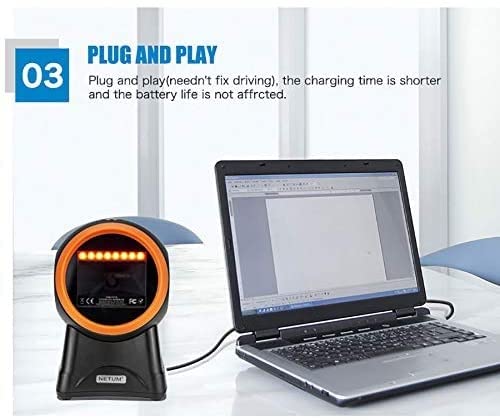
The NETUM NT-2050 barcode scanner connected to a laptop, illustrating its plug-and-play functionality via a USB port, requiring no additional driver installation.
3.2. Сумісність системи
The NT-2050 is compatible with various operating systems:
- Windows (7, 8, 10)
- Linux
- Mac OS

An image illustrating the NETUM NT-2050 barcode scanner's compatibility with different operating systems, including Windows 7, Windows 8, Windows 10, and Mac OS.
4. Операція
The NT-2050 scanner offers efficient and versatile scanning capabilities.
4.1. Базове сканування
Розташуйте штрих-код у полі сканера view. The omnidirectional design allows for scanning from various angles without precise alignment. A successful scan is typically indicated by an audible beep and/or a change in the indicator light.

An illustration showing the NETUM NT-2050 scanner's strong recognition ability and fast decoding speed across a variety of 1D and 2D barcode types, including those found on products and labels.
4.2. Multi-Function Scanning
The NT-2050 supports scanning from various sources, including:
- Physical labels on products and packaging.
- Documents such as courier receipts and express lists.
- Digital displays, including smartphone screens, even in low backlight conditions.
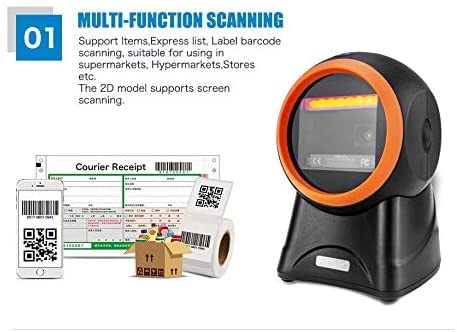
The NETUM NT-2050 scanner shown in a multi-function scanning scenario, capable of reading barcodes from items, express lists, labels, and smartphone screens, suitable for various retail and inventory environments.
4.3. Language and Sound Settings
The scanner supports automatic recognition of various keyboard languages (e.g., UK, US, French, German, Italian, Japanese, Spanish, Russian, Turkish). It also allows for beep volume adjustment and setting of prefixes or suffixes to scanned data. Refer to the included configuration guide (if separate) for specific barcode commands to modify these settings.
5. Barcode Symbologies
The NETUM NT-2050 scanner is capable of decoding a wide range of 1D and 2D barcode symbologies:
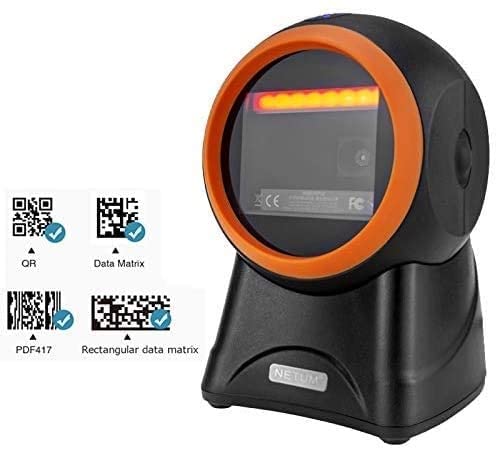
The NETUM NT-2050 barcode scanner positioned next to examples of QR Code, Data Matrix, and PDF417 barcodes, indicating its ability to read these formats.
5.1. 1D штрих-коди
- UPC, EAN, JAN, UPC-A, UPC-E, EAN-8, EAN-13, JAN-8, JAN-13
- ISBN, ISSN
- Code 39 (with full ASCII)
- Codabar (NW7)
- Code 128, EAN 128, Code 93
- Interleaved 2 of 5 (ITF), Addendum 2 of 5
- IATA Code, MSI/Plessy
- China Postal Code, Code 32 (Italian Pharmacode)
- RSS 14, RSS Limited, RSS Expanded
5.2. 2D штрих-коди
- Матриця даних
- QR-код, мікро QR-код
- Код ацтеків
- MaxiCode
6. Технічне обслуговування
To ensure optimal performance and longevity of your NETUM NT-2050 scanner, follow these maintenance guidelines:
- Прибирання: Regularly clean the scanning window with a soft, lint-free cloth. For stubborn dirt, use a mild glass cleaner applied to the cloth (not directly to the scanner).
- Зберігання: Зберігайте сканер у прохолодному, сухому місці, подалі від прямих сонячних променів та екстремальних температур.
- Обробка: Уникайте падіння сканера та сильних ударів.
- Догляд за кабелем: Не згинайте та не скручуйте USB-кабель надмірно.
7. Вирішення проблем
If you encounter issues with your NT-2050 scanner, consider the following common solutions:
- Сканер не відповідає: Переконайтеся, що USB-кабель надійно підключено як до сканера, так і до комп’ютера. Спробуйте інший USB-порт.
- No Scan Output: Verify that the scanner is powered on (check indicator light). Ensure the barcode is clean, undamaged, and within the scanning window.
- Неправильний вихід даних: Check the keyboard language settings on your computer and ensure they match the scanner's configuration.
- Повільне сканування: Ensure the scanning window is clean. Try scanning in different lighting conditions.
- Пристрій не розпізнано: Restart your computer. If the issue persists, try connecting the scanner to another computer to rule out a computer-specific problem.
Якщо проблеми не зникають, зверніться до розділу підтримки або зверніться до служби підтримки клієнтів.
8. Технічні характеристики
| Особливість | Специфікація |
|---|---|
| Бренд | NETUM |
| Модель | NETUM 2050 |
| Розміри продукту | 20 х 10 х 5 см |
| Вага товару | 300 г |
| Сумісність операційної системи | Linux, Mac, Windows |
| Сумісні пристрої | Персональний комп'ютер |
| Джерело живлення | Провідний електричний |
| Тип роз'єму | USB |
| Технологія виявлення руху | Оптичний |
| Decode Capability (1D) | UPC, EAN, JAN, Code 39, Codabar, Code 128, Code 93, Interleaved 2 of 5, RSS, etc. |
| Decode Capability (2D) | Data Matrix, QR Code, Micro QR Code, Aztec Code, MaxiCode |
9. Гарантія та підтримка
9.1. Інформація про гарантію
Цей продукт поставляється з a ГАРАНТІЯ 3 МІСЯЦІВ з дати покупки. Будь ласка, збережіть чек про покупку для гарантійного обслуговування.
9.2. Підтримка клієнтів
For technical assistance, troubleshooting, or warranty inquiries, please contact Megaa Electronics:
- Електронна пошта: megaaelectronics@gmail.com
- Електронна пошта: Support@megaaelectronics.com