1. Вступ
The FINGERS Lil’Clicks is a versatile mini keyboard designed for seamless connectivity across multiple devices and operating systems. It offers dual connectivity options: Bluetooth and 2.4 GHz Wireless, allowing you to switch between your laptop, tablet, or smartphone effortlessly. This manual provides detailed instructions for setup, operation, maintenance, and troubleshooting to ensure optimal use of your keyboard.

Image 1.1: The FINGERS Lil’Clicks Bluetooth Wireless Mini Keyboard, showcasinйого компактний дизайн.
2. Вміст упаковки
Будь ласка, поставте позначку у відповідному полі для наступних пунктів:
- 1 x FINGERS Lil’Clicks Bluetooth Wireless Mini Keyboard
- 1 x Wireless USB Receiver (for 2.4 GHz connection)
- 1 кабель для зарядки Micro USB
- 1 x Короткий посібник із використання
- 1 примітка бренду

Image 2.1: Contents included in the FINGERS Lil’Clicks keyboard package.
3. Налаштування та підключення
The Lil’Clicks keyboard offers two primary connection methods: Bluetooth and 2.4 GHz Wireless.
3.1. Заряджання клавіатури
Before initial use, ensure the keyboard is fully charged. Connect the provided Micro USB charging cable to the keyboard's charging port and the other end to a USB power source (e.g., computer USB port, USB wall adapter). The charging indicator light will show the charging status.
3.2. Бездротове з'єднання 2.4 ГГц
- Locate the USB Wireless Receiver in the keyboard package.
- Підключіть USB-приймач до вільного USB-порту на вашому комп’ютері або пристрої.
- Увімкніть клавіатуру за допомогою вимикача живлення, який зазвичай розташований збоку або ззаду.
- The keyboard should automatically connect to your device. No additional drivers are typically required.
3.3. Підключення Bluetooth (до 3 пристроїв)
The Lil’Clicks keyboard can connect to up to three Bluetooth devices simultaneously.
- Увімкніть клавіатуру за допомогою вимикача живлення.
- Натисніть і утримуйте Fn key and one of the Bluetooth keys (BT1, BT2, або BT3) for 3-5 seconds until the corresponding Bluetooth indicator light starts blinking. This indicates the keyboard is in pairing mode.
- На вашому пристрої (ноутбуці, планшеті, смартфоні) перейдіть до налаштувань Bluetooth та увімкніть Bluetooth.
- шукати available devices. You should see "FINGERS Lil’Clicks" or a similar name appear in the list.
- Select the keyboard to pair. If prompted, enter the displayed code on the keyboard and press Введіть.
- Після сполучення індикатор перестане блимати та світитиметься постійно кілька секунд, перш ніж вимкнеться.
- To connect another device, repeat steps 2-5 using a different Bluetooth key (BT2 or BT3).
3.4. Перемикання між підключеними пристроями
To switch between paired Bluetooth devices or the 2.4 GHz wireless connection:
- For Bluetooth devices: Briefly press the Fn key along with the desired Bluetooth key (BT1, BT2, або BT3).
- For 2.4 GHz Wireless: Briefly press the Fn ключ разом із 2.4G key (if available, otherwise ensure the USB receiver is plugged in and no Bluetooth connection is active).

Image 3.1: The Lil’Clicks keyboard demonstrating multi-device connectivity with a laptop, monitor, phone, and tablet.
4. Робота з клавіатурою
4.1. Базове введення тексту
The keyboard features a standard QWERTY layout. Simply type as you would on any other keyboard.
4.2. Media Controls
The Lil’Clicks keyboard includes 12 soft-touch media control keys. These functions are typically accessed by pressing the Fn key simultaneously with the corresponding function key (F1-F12 or dedicated media keys).
- Fn+F1-F12: Access various media functions such as play/pause, volume control, track skipping, and more. Refer to the quick usage guide for specific key mappings.

Зображення 4.1: Крупний план view of the keyboard layout, highlighting the media control keys and function row.
4.3. Using the Built-in Cradle
The keyboard features a built-in cradle designed to hold most phones and tablets up to 10 mm thick and 265 mm wide. This allows you to position your device at an optimal viewing angle for comfortable typing.
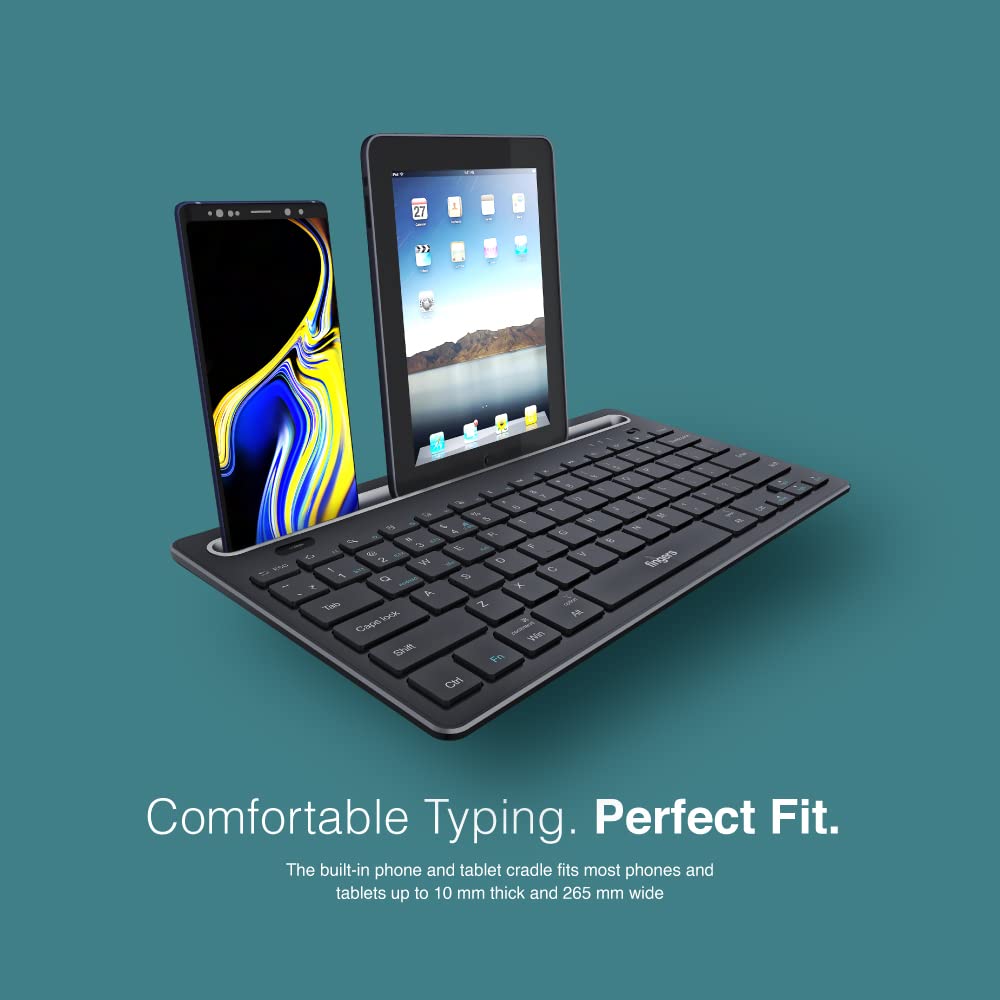
Image 4.2: The keyboard's integrated cradle holding a smartphone and a tablet for ergonomic viewінж.
4.4. Сумісність операційної системи
The Lil’Clicks keyboard is compatible with a wide range of operating systems:
- вікна
- macOS
- Android
- Linux
- ОС Chrome
The keyboard automatically adapts to the connected operating system for optimal functionality. Some function key behaviors may vary slightly depending on the OS.
5. Технічне обслуговування
5.1. прибирання
Щоб очистити клавіатуру, обережно протріть її поверхню м’якою губкоюamp, lint-free cloth. Avoid using harsh chemicals, abrasive cleaners, or excessive moisture, as these can damage the keyboard. The membrane-coated sheet beneath the keys helps protect against dust and minor spills.
5.2. Догляд за акумулятором
The keyboard features a long-lasting battery, providing up to 45 days of usage on a single charge. To prolong battery life:
- Повністю зарядіть клавіатуру перед першим використанням.
- Уникайте частої повної розрядки акумулятора.
- Якщо клавіатуру зберігатимете протягом тривалого часу, зарядіть її приблизно до 50% та зберігайте у прохолодному сухому місці.
5.3. Зберігання
When not in use, store the keyboard in a clean, dry environment away from extreme temperatures and direct sunlight. Its compact and lightweight design makes it easy to carry and store.

Image 5.1: The Lil’Clicks keyboard's portability, shown being carried and used in a cafe setting.
6. Вирішення проблем
If you encounter issues with your FINGERS Lil’Clicks keyboard, please refer to the following troubleshooting steps:
6.1. Клавіатура не підключається/не сполучається
- Перевірте живлення: Переконайтеся, що клавіатура увімкнена та має достатній заряд батареї.
- Повторний увійти в режим сполучення: For Bluetooth, press and hold Fn + BT1/BT2/BT3 until the indicator blinks. For 2.4 GHz, ensure the USB receiver is securely plugged in.
- Bluetooth пристрою: Make sure Bluetooth is enabled on your device and it's discoverable.
- Forget Device (Bluetooth): If previously paired, try removing/forgetting the keyboard from your device's Bluetooth list and then re-pairing.
- USB-приймач: Try plugging the 2.4 GHz USB receiver into a different USB port on your device.
- Перешкоди: Перемістіть клавіатуру ближче до свого пристрою та подалі від інших бездротових пристроїв, які можуть створювати перешкоди.
6.2. Keys Not Responding or Typing Incorrectly
- Рівень заряду батареї: A low battery can affect key responsiveness. Charge the keyboard fully.
- Стабільність з'єднання: Ensure a stable connection. If using Bluetooth, try switching to a different Bluetooth channel (BT1, BT2, BT3) or re-pairing. If using 2.4 GHz, ensure the receiver is firmly connected.
- Перешкоди: Wireless interference can sometimes cause missed keystrokes. Try moving to a different location or reducing other wireless activity.
- Чисті ключі: Check for any debris or foreign objects under the keys that might be obstructing their movement.
- Режим операційної системи: Ensure the keyboard is in the correct operating system mode if there are specific key combinations for OS switching (e.g., Fn + Android/Win/Mac keys).
6.3. Акумулятор не заряджається
- Перевірте кабель: Ensure the Micro USB charging cable is securely connected to both the keyboard and the power source.
- Джерело живлення: Спробуйте інше джерело живлення USB (наприклад, інший порт USB на вашому комп’ютері, інший адаптер живлення).
- Цілісність кабелю: Inspect the charging cable for any signs of damage. Try using a different Micro USB cable if available.
7. Технічні характеристики
| Бренд | ПАЛЬЦІ |
| Модель | Lil’Clicks |
| Підключення | Bluetooth, 2.4 GHz Wireless |
| Сумісність | Windows, macOS, Android, Linux, Chrome OS |
| Колір | чорний |
| Розміри (ДxШxВ) | 29 х 16 х 2 см |
| Вага товару | 400 г |
| Термін служби батареї | До 45 днів (на одному заряді) |
| Життя клавіш | 5 мільйонів натискань клавіш |
| Cradle Dimensions | Fits devices up to 10 mm thick and 265 mm wide |
| Джерело живлення | Працює від батареї |
8. Гарантія та підтримка
8.1. Інформація про гарантію
The FINGERS Lil’Clicks Bluetooth Wireless Mini Keyboard comes with a 1 роки гарантії from the date of purchase. This warranty covers manufacturing defects under normal use. Please retain your purchase receipt as proof of purchase for warranty claims.
Гарантія не поширюється на пошкодження, спричинені:
- Accidental damage, misuse, abuse, or negligence.
- Несанкціонований ремонт або модифікація.
- Нормальний знос.
8.2. Manufacturer and Importer Details
Виробник: Dynamic Conglomerate Pvt. Ltd., 329/330, GIDC Phase II, Near Sardar Chowk, Vapi, Dist. Valsad, Gujarat - 396195.
Імпортер: Dynamic Conglomerate Pvt. Ltd. 4th Floor, Simba Tower, Vishveshwar Nagar, Goregaon (E), Mumbai - 400063, Maharashtra
8.3. Підтримка клієнтів
For technical assistance, warranty claims, or any other inquiries, please contact FINGERS customer support through their official website or the contact information provided in your Quick Usage Guide.


