1. Вступ
The Keysight 4395A is a high-performance instrument integrating network, spectrum, and impedance analysis capabilities into a single unit. Designed for laboratory and manufacturing applications, it provides advanced measurement functions for evaluating components and circuits across a wide frequency range.
This manual provides essential information for the safe and effective operation of your Keysight 4395A analyzer. Please read it thoroughly before using the instrument.
Ключові характеристики:
- Integrated high-performance network, spectrum, and impedance analysis.
- Built-in IBASIC for automated control.
- GPIB port and Digital I/O port for external connectivity.
- Network Analyzer: Frequency range 10 Hz to 500 MHz, 115 dB dynamic range (at 10 Hz IFBW), ±0.05 dB, ±0.3° dynamic accuracy.
- Аналізатор спектру: Frequency range 10 Hz to 500 MHz, -145 dBm/Hz sensitivity (at 10 MHz), Time-gated spectrum analysis option (4395A-1D6).
- Impedance Analyzer (Option 4395A-010): Frequency range 100 kHz to 500 MHz, equivalent circuit analysis function, ±40 V or ±100 mA DC bias (Option 4395A-001).
2. Продукт закінчивсяview
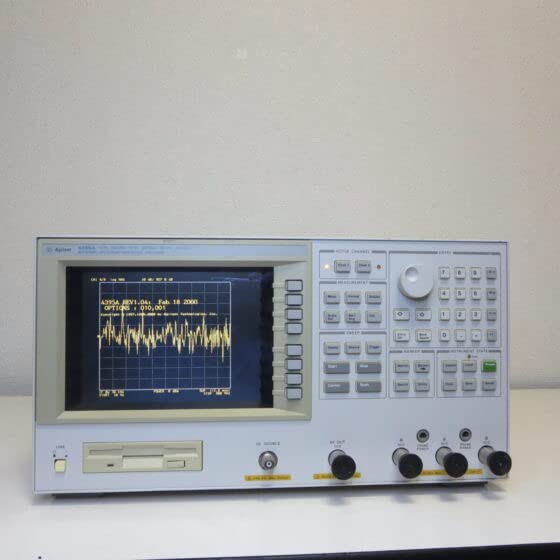
The Keysight 4395A is a versatile measurement device. Below is an image illustrating the front panel of the analyzer, highlighting its display and control interface.
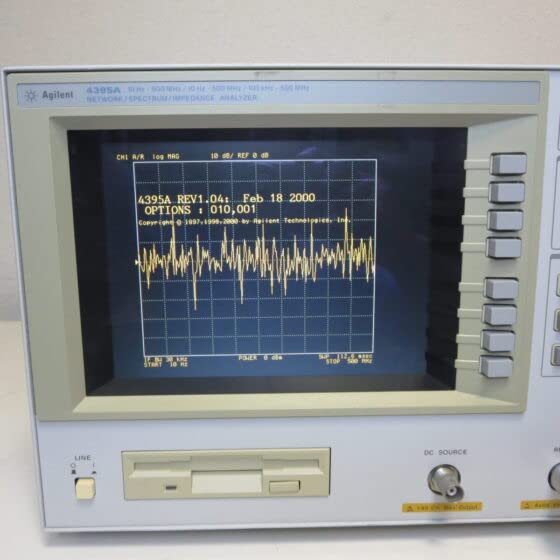
A closer look at the display reveals the measurement interface, where various analysis results are presented.
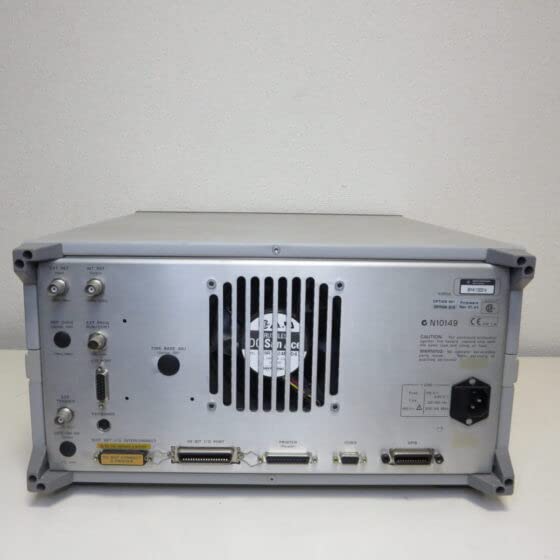
The rear panel provides various input/output ports for connecting to external devices and power.
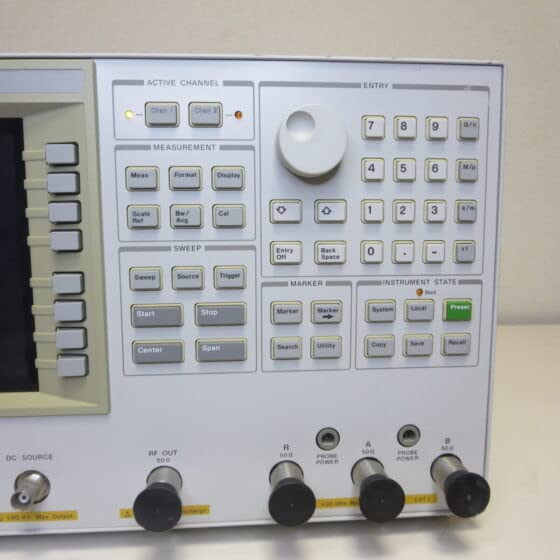
The control panel features a rotary knob and various buttons for navigating menus, setting parameters, and initiating measurements.
3. Налаштування
3.1 Розпакування та перевірка
- Carefully remove the 4395A from its packaging.
- Inspect the instrument for any signs of physical damage. If damage is found, contact your supplier immediately.
- Verify that all accessories listed in the packing list are present.
3.2 Підключення живлення
- Переконайтеся, що вимикач живлення на задній панелі знаходиться в положенні ВИМК.
- Connect the supplied power cord to the AC inlet on the rear panel of the 4395A.
- Plug the other end of the power cord into a grounded AC power outlet. The instrument supports standard line voltages (e.g., 100-240V AC, 50/60 Hz).
3.3 Початкове ввімкнення
- Press the power switch on the front panel to turn on the instrument.
- Observe the display for the boot-up sequence. The instrument will perform self-tests.
- Once the boot sequence is complete, the main measurement screen should appear.
3.4 Connecting Test Devices
Depending on the type of analysis (network, spectrum, or impedance), connect your device under test (DUT) to the appropriate RF input/output ports on the front panel. Use high-quality coaxial cables and adapters to ensure accurate measurements.
4. Інструкція з експлуатації
The Keysight 4395A offers three primary analysis modes: Network, Spectrum, and Impedance. Each mode has specific setup and measurement procedures.
4.1 Загальні операції
- Використовуйте ACTIVE CHANNEL buttons to select the desired measurement channel.
- The rotary knob is used for fine adjustment of parameters and cursor positioning.
- The numeric keypad allows direct entry of values.
- Натисніть Попереднє налаштування button to return the instrument to its default settings.
4.2 Network Analysis Mode
To perform network analysis (e.g., S-parameter, gain, phase, group delay measurements):
- Натисніть ВИМІРЮВАННЯ і виберіть Мережа.
- Set the desired frequency range using the старт і СТІЙ frequency buttons under the ЗМІТАТИ розділ.
- Select the measurement parameter (e.g., S21, S11) using the Мери кнопку.
- Perform a calibration using a suitable calibration kit to ensure measurement accuracy. Access calibration functions via the кал кнопку.
- Connect the DUT to the appropriate RF ports (e.g., RF OUT and RF IN).
- Прес старт під ЗМІТАТИ щоб почати вимірювання.
4.3 Spectrum Analysis Mode
To perform spectrum analysis (e.g., signal power, distortion, noise measurements):
- Натисніть ВИМІРЮВАННЯ і виберіть Спектр.
- Set the center frequency and span using the corresponding buttons.
- Adjust the Resolution Bandwidth (RBW) and Video Bandwidth (VBW) using the Bw/Avg кнопку.
- Connect the signal source to the RF input port.
- Прес старт під ЗМІТАТИ to acquire the spectrum.
4.4 Impedance Analysis Mode (with Option 4395A-010)
To perform impedance analysis (e.g., equivalent circuit analysis):
- Ensure the Impedance Analysis Option (4395A-010) is installed.
- Натисніть ВИМІРЮВАННЯ і виберіть Імпеданс.
- Set the frequency range and other parameters as required.
- Connect the DUT to the impedance test fixture.
- Initiate the measurement to display impedance characteristics.
5. Технічне обслуговування
5.1 Очищення
- Regularly clean the exterior of the instrument with a soft, damp тканина.
- Do not use abrasive cleaners or solvents that could damage the finish or display.
- Переконайтеся, що вентиляційні отвори чисті від пилу та сміття, щоб запобігти перегріву.
5.2 Зберігання
- Store the instrument in a clean, dry environment within the specified operating temperature and humidity ranges.
- Protect the display from direct sunlight and physical impact.
5.3 Калібрування
For optimal measurement accuracy, periodic calibration by qualified personnel is recommended. Refer to the Keysight service manual or contact Keysight support for calibration services and schedules.
6. Вирішення проблем
This section provides solutions to common issues you might encounter with the Keysight 4395A.
| проблема | Можлива причина | Рішення |
|---|---|---|
| Прилад не вмикається. | Power cord not connected, power switch off, faulty power outlet. | Check power cord connection. Ensure power switch is ON. Test power outlet with another device. |
| Немає сигналу на дисплеї. | DUT not connected correctly, incorrect measurement settings, signal source issue. | Verify DUT connections. Check frequency range, amplitude, and measurement parameters. Ensure signal source is active. |
| Неточні вимірювання. | No calibration performed, incorrect calibration, faulty cables/connectors. | Perform a fresh calibration. Check the integrity of all cables and connectors. Ensure proper test setup. |
| Повідомлення про помилку на дисплеї. | Internal fault, parameter out of range. | Note the error code/message. Refer to the detailed service manual for specific error codes. Try restarting the instrument. |
If you encounter persistent issues not covered here, please contact Keysight technical support.
7. Технічні характеристики
The following table outlines the key specifications for the Keysight 4395A Network/Spectrum/Impedance Analyzer.
| Параметр | Значення |
|---|---|
| Виробник | Keysight |
| Номер моделі | 4395А |
| Network Analyzer Frequency Range | від 10 Гц до 500 МГц |
| Spectrum Analyzer Frequency Range | від 10 Гц до 500 МГц |
| Impedance Analyzer Frequency Range (Option 4395A-010) | від 100 кГц до 500 МГц |
| Network Analyzer Dynamic Range | 115 dB (at 10 Hz IFBW) |
| Spectrum Analyzer Sensitivity | -145 dBm/Hz (at 10 MHz) |
| Вбудовані функції | IBASIC, GPIB Port, Digital I/O Port |
| ASIN | B0B7RK35FG |
| Перша доступна дата (Amazon.co.jp) | 2022 |
8. Гарантія та підтримка
8.1 Інформація про гарантію
This Keysight 4395A instrument is covered by Keysight's standard product warranty. For detailed terms and conditions, including warranty period and coverage, please refer to the warranty documentation provided with your purchase or visit the official Keysight webсайт.
8.2 Технічна підтримка
For technical assistance, service, or further inquiries regarding the Keysight 4395A, please contact Keysight Technologies directly. Support resources, including FAQs, drivers, software updates, and contact information, are available on the official Keysight webсайт: www.keysight.com.