вступ
Thank you for choosing the Varmilo MA Series V2 Summit R2 Mechanical Keyboard. This manual provides essential information for setting up, operating, maintaining, and troubleshooting your new keyboard. Please read this manual thoroughly to ensure optimal performance and longevity of your device.
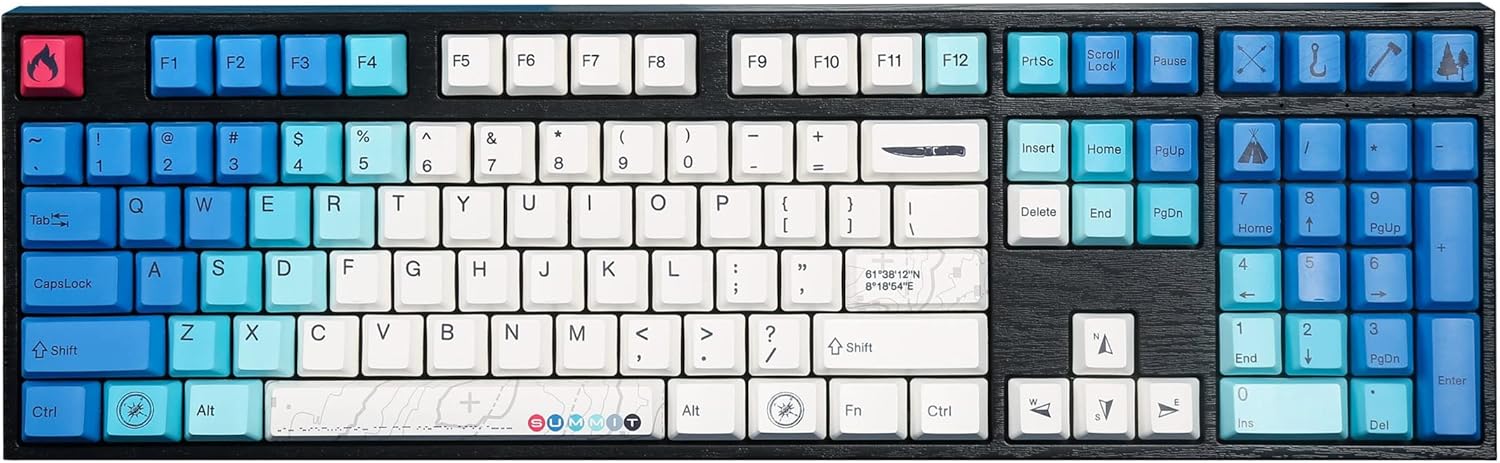
Image: The Varmilo MA Series V2 Summit R2 Mechanical Keyboard, showcasing its full layout and unique keycap design.
Налаштування
1. Розпакування
Carefully remove the keyboard and all accessories from the packaging. Ensure the following items are present:
- Varmilo MA Series V2 Summit R2 Mechanical Keyboard
- Кабель USB-C
- Знімач ковпачків клавіш (якщо входить до комплекту)
- Посібник користувача (цей документ)
2. Підключення клавіатури
- Знайдіть порт USB-C на задній панелі клавіатури.
- Підключіть один кінець наданого кабелю USB-C до клавіатури.
- Підключіть інший кінець кабелю USB-C до вільного USB-порту на вашому комп’ютері.
- Клавіатура є plug-and-play і повинна автоматично розпізнаватися вашою операційною системою.
3. Adjusting Keyboard Angle
The Varmilo MA Series V2 features a double-section kickstand, allowing for two different typing angles. Gently flip out the desired sections of the kickstand located on the underside of the keyboard to adjust its height and angle for ergonomic comfort.

Зображення: Side profile of the Varmilo keyboard, illustrating the adjustable kickstand in an extended position.
Інструкція з експлуатації
1. Основні функції клавіш
The keyboard features a standard full-size (104-key) layout. All alphanumeric and standard function keys operate as expected. The Varmilo EC Ivy V2 switches provide a smooth and responsive typing experience.
2. Function (Fn) Key Combinations
The Fn key (typically located near the right Alt key) allows access to secondary functions printed on certain keycaps. Hold down the Fn key and press the desired function key simultaneously.
- Fn + F1-F12: Multimedia controls (e.g., volume, play/pause, stop).
- Fn + клавіші зі стрілками: LED brightness or effect control (refer to specific keycap legends).
- Fn + Win: Клавіша блокування/розблокування Windows.

Зображення: Крупний план view of the right side of the Varmilo keyboard, highlighting the special function keys and their legends.
3. LED Backlighting Control
The keyboard features White LED backlighting. Use the Fn key combinations to adjust the brightness and switch between various lighting effects. Specific key legends will indicate the corresponding functions for LED control.
Технічне обслуговування
1. Очищення клавіатури
Щоб зберегти зовнішній вигляд та функціональність клавіатури:
- Від’єднайте клавіатуру від комп’ютера перед чищенням.
- Злегка протріть м’якою тканиною без ворсу dampводою або м’яким миючим розчином, щоб протерти ковпачки клавіш таasing.
- Для видалення пилу та сміття між клавішами використовуйте стиснене повітря.
- Avoid using harsh chemicals, abrasives, or solvents, as these can damage the PBT keycaps and finish.
2. Keycap Removal and Replacement
The keyboard features durable Dye Sub PBT keycaps. If you need to remove keycaps for deep cleaning or customization:
- Use the provided keycap puller (if applicable) or a similar tool.
- Gently attach the keycap puller to the keycap and pull straight up to remove it. Avoid twisting or excessive force.
- Щоб встановити на місце, вирівняйте ковпачок клавіші зі штоком перемикача та міцно натисніть, доки він не зафіксується почутим клацання.

Image: A collection of individual Varmilo keycaps, including special design keycaps, demonstrating their PBT material and dye-sublimated legends.
Усунення несправностей
If you encounter issues with your Varmilo keyboard, please refer to the following common solutions:
- Клавіатура не реагує:
- Переконайтеся, що кабель USB-C надійно підключено як до клавіатури, так і до комп’ютера.
- Спробуйте підключити клавіатуру до іншого USB-порту на комп'ютері.
- Перевірте клавіатуру на іншому комп'ютері, щоб виключити проблеми, пов'язані з системою.
- Перезавантажте комп'ютер.
- LEDs Not Working or Incorrect:
- Ensure the LED brightness is not set to the lowest level using Fn key combinations.
- Check if any specific lighting modes are active that might turn off certain LEDs.
- Ключі не реєструються:
- Remove the keycap and inspect the switch for any obstructions.
- Clean around the switch stem with compressed air.
Скидання до заводських налаштувань
If issues persist, a factory reset may resolve them. Consult the Varmilo official website or support for specific reset procedures for your model, as these can vary.
Технічні характеристики
The following are the technical specifications for the Varmilo MA Series V2 Summit R2 Mechanical Keyboard:
| Особливість | Деталь |
|---|---|
| Бренд | Варміло |
| Модель | MA Series V2 Summit R2 |
| Макет | Full-size (104 + 4 keys) |
| Тип перемикача | Varmilo EC Ivy V2 Mechanical Switches |
| Матеріал кепки | Dye Sub PBT |
| Підключення | USB-C |
| Підсвічування | Білий світлодіод |
| матеріал | Полібутилентерефталат, силікон |
| Джерело живлення | Харчування від порту USB |
| Сумісні пристрої | Комп'ютер (через USB-C) |
Гарантія та підтримка
Varmilo products are manufactured to high-quality standards. For information regarding warranty coverage, technical support, or service inquiries, please visit the official Varmilo webсайт або зверніться безпосередньо до служби підтримки клієнтів. Зберігайте чек про покупку як підтвердження покупки для гарантійних претензій.
Official Varmilo Store: Varmilo Store on Amazon


