1. Вступ
This manual provides detailed instructions for the safe and efficient installation, operation, and maintenance of your Link2Home Extend & Tilt TV Wall Mount. Designed for televisions ranging from 42 to 90 inches and supporting up to 154 pounds, this mount offers versatile viewing options with its extendable, swivel, and tilt features. Please read all instructions carefully before beginning installation.
Ключові характеристики:
- Universal TV Wall Mount for 42" to 90" screen sizes.
- Витримує до 154 фунтів.
- Compatible with Flat and Curved Screen TVs & Monitors.
- Profile extends 3.1" to 5.3" from the wall.
- Open architecture for increased ventilation and easy access to wires.
- Adjustable tilt range: +5° to -12°.
- Adjustable swivel range: +5° to -5°.
- Screen level adjustment: +-0.98".
- Easy-grip knobs for quick, toolless tilt and lock.
- Anti-theft locking hole (padlock not included).
- Automatic click-in spring lock for secure hold.
- VESA compatibility: 200x200 mm to 600x400mm.
- Includes all necessary hardware and a built-in level.
- Mounts on wood studs, brick, concrete, and sheetrock/plasterboard walls.
2. Інформація про безпеку
- Вага: Do not exceed the maximum weight capacity of 154 lbs (70 kg). This mount is designed for use with specified maximum weights. Use with products heavier than the maximum weights indicated may result in instability causing possible injury.
- Розмір екрана: This mount is suitable for TVs between 42" and 90".
- Монтажна поверхня: Переконайтеся, що монтажна поверхня може безпечно витримати сумарну вагу обладнання та всього прикріпленого обладнання.
- Професійна установка: Якщо ви не впевнені щодо процесу встановлення або придатності вашої стіни, зверніться до кваліфікованого фахівця.
- Сумісність з VESA: Verify your TV's VESA mounting pattern (distance between screw holes on the back of the TV) is within the supported range of 200x200mm to 600x400mm.
- інструменти: Використовуйте відповідні інструменти для встановлення. Завжди одягайте захисні окуляри.
- діти: Тримайте дітей подалі від місця встановлення.
3. Вміст упаковки
Your Link2Home Extend & Tilt TV Wall Mount package includes the following components and hardware:
- Збірка настінної пластини
- TV Brackets (Left and Right)
- Різноманітні гвинти, шайби та проставки для телевізорів
- Lag Bolts and Wall Anchors (for various wall types)
- Вбудований рівень
- Cable Ties (for cord management)
- Інструкція з експлуатації

4. Налаштування та встановлення
Follow these steps carefully to install your TV wall mount:
Крок 1: Прикріпіть кронштейни для телевізора до телевізора
- Обережно покладіть телевізор екраном донизу на м’яку, чисту поверхню, щоб запобігти подряпинам.
- Визначте монтажні отвори VESA на задній панелі телевізора.
- Select the appropriate screws, washers, and spacers from the provided hardware kit that fit your TV's VESA pattern.
- Attach the left and right TV brackets to the back of your TV, ensuring they are securely fastened. The hooks on the brackets should face upwards.

Step 2: Locate Mounting Position on Wall
- Визначте бажану висоту для вашого телевізора.
- Use a stud finder to locate wood studs in your wall. Mark the edges and center of the studs. For brick or concrete walls, ensure you have the correct anchors.
- Hold the wall plate against the wall at your desired height and use the built-in level to ensure it is perfectly horizontal. Mark the pilot hole locations.
Крок 3: Монтуйте настінну пластину до стіни
- Drill pilot holes at the marked locations. The size of the drill bit will depend on your wall type (wood, brick, concrete).
- If installing into concrete or brick, insert the appropriate wall anchors into the pilot holes.
- Align the wall plate with the pilot holes and secure it to the wall using the provided lag bolts. Tighten all bolts firmly.

Крок 4: Повісьте телевізор на настінну пластину
- With assistance, carefully lift the TV and hook the attached TV brackets onto the wall plate.
- Ensure both TV brackets are properly seated and engaged with the wall plate. The automatic click-in spring lock will snap into place for a secure hold.
Відео про встановлення:
5. Інструкція з експлуатації
Your Link2Home Extend & Tilt TV Wall Mount offers flexible viewкути нахилу:
Регулювання нахилу:
- To adjust the vertical tilt angle (+5° to -12°), loosen the easy-grip knobs on the TV brackets.
- Adjust the TV to your desired tilt angle.
- Tighten the easy-grip knobs to lock the TV in place.
Регулювання поворотного механізму:
- The mount allows for a swivel range of +5° to -5°. Gently push or pull the side of the TV to achieve the desired horizontal viewкут.
Розгортання/складання:
- The mount can extend from 3.1" to 5.3" from the wall. Gently pull the TV forward or push it back towards the wall.

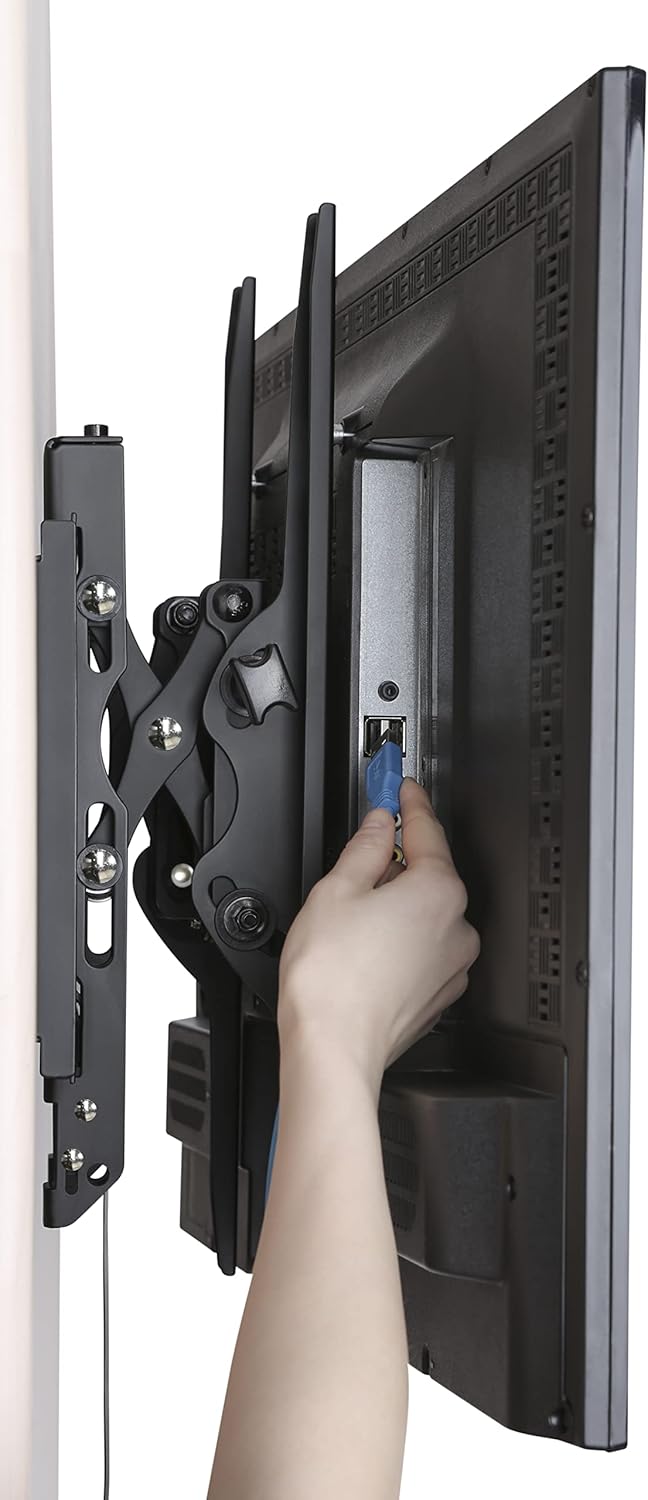
Accessing Wires:
- The extendable profile and open architecture provide easy access to cables and ports on the back of your TV.
6. Технічне обслуговування
- Регулярна перевірка: Periodically check that all screws and bolts are securely tightened.
- Прибирання: Протирайте кріплення м’якою сухою тканиною. Уникайте використання абразивних засобів для чищення або розчинників.
- Змащення: No lubrication is required for the moving parts.
7. Вирішення проблем
- Телевізор не вирівняний: Use the screen level adjustment feature by twisting the screws on the arms for micro-adjustment. Ensure the wall plate was installed level using the built-in level.
- Складність регулювання нахилу/повороту: Ensure the easy-grip knobs are sufficiently loosened before attempting to adjust the tilt. For swivel, apply gentle, even pressure.
- TV Feels Loose: Double-check that all mounting bolts on the wall plate and TV brackets are securely tightened. Ensure the automatic click-in spring lock is engaged.
- Cannot Remove TV from Mount: Pull the release strings located at the bottom of the TV brackets to disengage the locking mechanism.
8. Технічні характеристики
| Специфікація | Деталь |
|---|---|
| Бренд | Link2Home |
| Модель | B0B72CCPY4 |
| Сумісність розміру екрана | 42" - 90" |
| Вага | До 154 фунтів (70 кг) |
| Сумісність VESA | Від 200x200 мм до 600x400 мм |
| Кут нахилу | від +5° до -12° |
| Кут повороту | від +5° до -5° |
| Розширення Profile | від 3.1 до 5.3 дюймів |
| матеріал | метал |
| Колір | чорний |
| Тип монтажу | Настінне кріплення |
| Розміри продукту | 28.15 x 8.54 x 3.62 дюймів |
| Вага товару | 10.38 фунта |
9. Гарантія та підтримка
The Link2Home Extend & Tilt TV Wall Mount comes with a Довічна гарантія. For any questions, technical support, or warranty claims, please refer to the contact information provided in your product packaging or visit the official Link2Home webсайт.


