1. Вступ
This manual provides detailed instructions for the proper setup, operation, and maintenance of your SHEHDS DMX384 DJ Controller. Please read this manual thoroughly before operating the device to ensure safe and efficient use. Retain this manual for future reference.
2. Інформація про безпеку
- Завжди підключайте пристрій до заземленої розетки.
- Переконайтеся, що блок живлення обtage відповідає вимогам пристрою.
- Не піддавайте пристрій впливу дощу або вологи.
- Уникайте експлуатації пристрою за екстремальних температур або високої вологості.
- Не відкривайте casing; звертайтеся до кваліфікованого персоналу з усіма видами обслуговування.
- Тримайте пристрій подалі від легкозаймистих матеріалів.
3. Продукт закінчивсяview
The SHEHDS DMX384 is an intelligent lighting controller designed for managing DMX-compatible stage lighting equipment. It features 384 control channels, allowing for comprehensive control over multiple fixtures.
3.1 Елементи керування передньої панелі
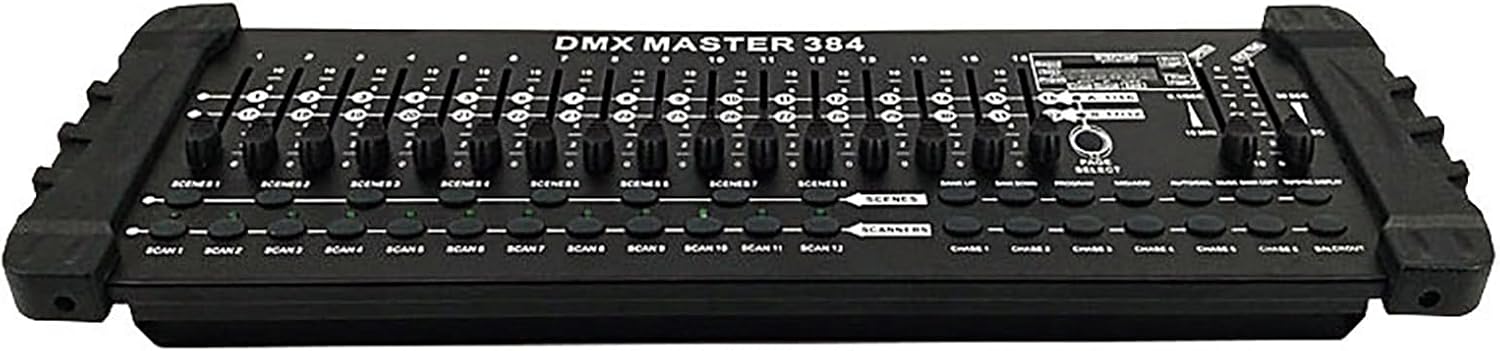
Малюнок 1: Спереду view of the SHEHDS DMX384 DJ Controller, displaying the array of faders and control buttons for various functions.
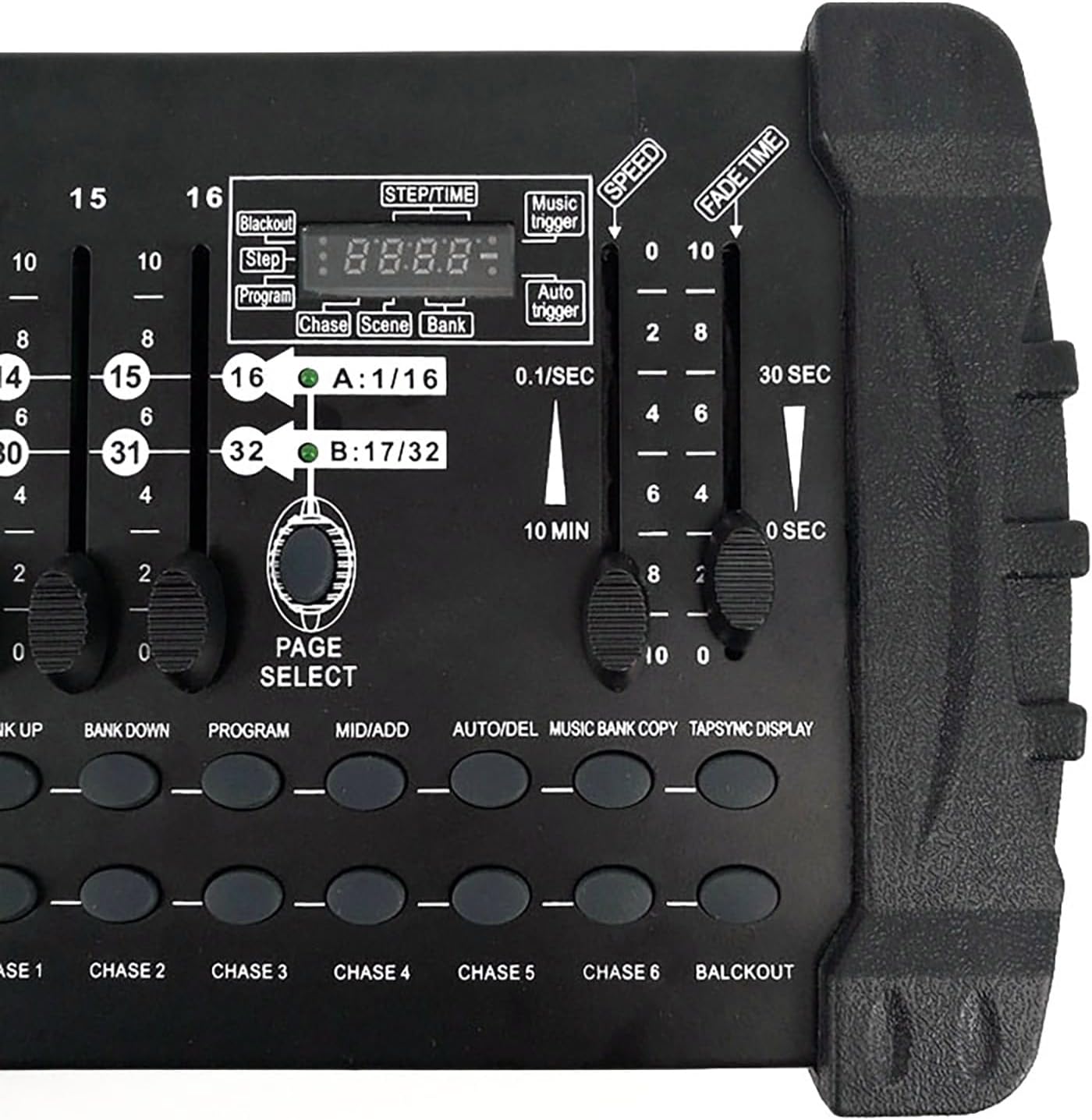
Figure 2: Close-up of the control panel, highlighting the LED digital display, channel faders, and function buttons for scene and program selection.
Передня панель містить:
- Область освітлення: Controls for individual light fixtures.
- Channel Faders (1-16): Adjust DMX channel values.
- Time Speed Faders: Control fade time and speed for scenes and chases.
- Functional Area: Buttons for program, scene, and bank selection.
- Ключі сцени: Activate stored scenes.
- Page Change Area: Navigate between different pages of channels (A/B).
- РК-дисплей: Shows current settings and values.
3.2 Підключення задньої панелі

Figure 3: Rear panel of the DMX384 Controller, showing all connection ports.
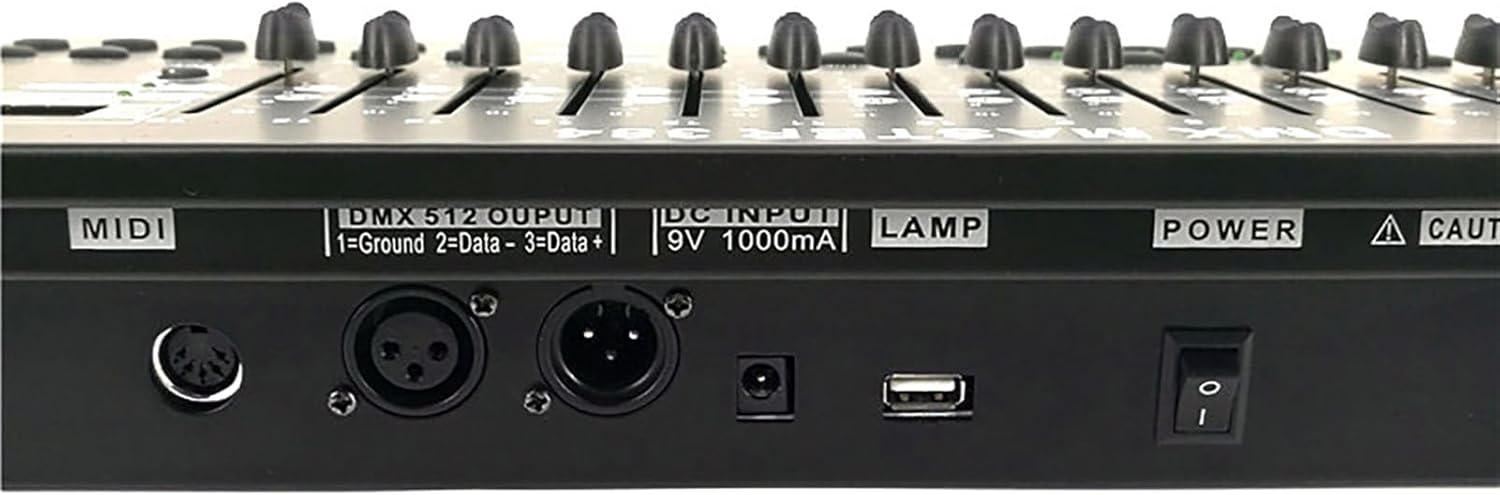
Малюнок 4: Детально view of the DMX 512 output, DC input, and USB port on the rear panel.
Задня панель містить:
- MIDI вхід/вихід: For MIDI control (if applicable).
- DMX 512 Output: Standard 3-pin XLR connector for DMX signal output.
- DC Input (9V 1000mA): Power input for the controller.
- Порт USB: For potential firmware updates or data transfer (refer to specific software instructions).
- Вимикач живлення: On/Off control for the device.
4. Налаштування
4.1 Розпакування

Figure 5: Contents of the SHEHDS DMX384 Controller package.
Обережно вийміть усі компоненти з упаковки. Перевірте наявність усіх елементів:
- SHEHDS DMX384 Controller
- Адаптер живлення (9 В 1000 мА)
- Посібник користувача
4.2 Підключення живлення
- Connect the provided power adapter to the DC Input port on the rear panel of the DMX384 controller.
- Plug the power adapter into a suitable electrical outlet (9V 1000mA).
- Ensure the power switch on the rear panel is in the 'OFF' position before connecting.
4.3 Підключення DMX
- Use a standard 3-pin DMX cable to connect the DMX 512 Output of the controller to the DMX Input of your first lighting fixture.
- For multiple fixtures, daisy-chain them by connecting the DMX Output of the first fixture to the DMX Input of the second, and so on.
- Ensure the last fixture in the chain has a DMX terminator connected to its DMX Output to prevent signal reflection.
5. Інструкція з експлуатації
The DMX384 controller provides 384 DMX channels, capable of controlling up to 12 intelligent computer lights, each with 32 channels. It supports 30 bar stacks with 8 scenes each, and 6 slots with up to 240 scenes. Scenes can be recorded with fading and sensitivity settings. The 16 sliders allow direct control of channels, and a built-in amplifier supports music mode operation.
5.1 Увімкнення та ініціалізація
- Перемкніть перемикач живлення на задній панелі в положення «УВІМК.».
- The LCD display will illuminate, indicating the controller is ready for operation.
5.2 Setting DMX Addresses
Before controlling your lighting fixtures, ensure each fixture has a unique DMX address set. Refer to your fixture's manual for specific instructions on setting its DMX address.
Note: After setting the DMX address on the controller, press the 'OK' key. The original DMX address will be retained even after shutting down and restarting the unit.
5.3 Basic Channel Control
- Select the desired scanner (fixture) using the 'SCANNER' buttons (SCAN 1-12).
- Use the 16 channel faders to adjust the DMX values for the selected fixture's channels. The LCD display will show the current channel values.
- Use the 'PAGE SELECT' button to switch between channel pages A (1-16) and B (17-32) if your fixture uses more than 16 channels.
5.4 Scene Programming
The controller allows you to program and store multiple scenes.
- Press the 'PROGRAM' button to enter programming mode.
- Select the desired scanner(s) and adjust their channels using the faders to create your desired lighting state.
- Press the 'MIDI/ADD' button to save the current lighting state.
- Select a 'SCENE' button (SCENE 1-8) to store the scene.
- Repeat for additional scenes.
- Exit programming mode by pressing the 'PROGRAM' button again.
5.5 Scene Playback
- Ensure the controller is not in programming mode.
- Press the desired 'SCENE' button to activate a stored scene.
- Use the 'FADE TIME' fader to adjust the transition speed between scenes.
- Use the 'SPEED' fader to adjust the speed of dynamic effects within a scene.
5.6 Chase Programming and Playback
Chases are sequences of scenes that play automatically.
- Press the 'PROGRAM' button.
- Press the 'CHASE' button (CHASE 1-6) to select a chase to program.
- Select and activate scenes in the desired order. Each activated scene will be added to the chase.
- Press 'MIDI/ADD' after each scene to add it to the chase.
- Exit programming mode by pressing the 'PROGRAM' button.
- To play a chase, select the desired 'CHASE' button.
5.7 Музичний режим
The DMX384 features a built-in amplifier for music mode, allowing lighting to react to audio input.
- Connect an audio source to the controller's audio input (if available, refer to specific model features).
- Activate 'MUSIC TRIGGER' mode (refer to LCD display and function buttons).
- The lighting will now respond to the rhythm and intensity of the music.
6. Технічне обслуговування
- Прибирання: Use a soft, dry cloth to clean the exterior of the controller. Do not use abrasive cleaners or solvents.
- Зберігання: When not in use, store the controller in a dry, dust-free environment.
- Огляд: Періодично перевіряйте всі кабелі та з'єднання на наявність зносу або пошкоджень.
7. Вирішення проблем
| проблема | Можлива причина | Рішення |
|---|---|---|
| Контролер не включається. | No power, faulty power adapter, power switch off. | Check power connection, ensure adapter is working, turn power switch ON. |
| Світло не реагує на керування. | Incorrect DMX addressing, faulty DMX cable, DMX terminator missing. | Verify DMX addresses on fixtures, check DMX cable integrity, ensure terminator is used on the last fixture. |
| Intermittent light flickering. | DMX signal interference, loose connections, faulty fixture. | Ensure DMX cables are properly shielded, check all connections, test fixtures individually. |
| Scenes/Chases not saving. | Not in programming mode, incorrect save procedure. | Ensure 'PROGRAM' button is active, follow scene/chase programming steps carefully. |
8. Технічні характеристики
- модель: DMX384
- Канали управління: 384 каналів DMX
- Controllable Fixtures: 12 intelligent computer lights (up to 32 channels each)
- Сцени: 30 banks of 8 programmable scenes (240 total)
- Погоні: 6 programmable chases (up to 240 steps each)
- Фейдери: 16 channel faders, 2 time speed faders
- Дисплей: Світлодіодний цифровий дисплей
- Підключення: 3-pin DMX output, DC power input, USB port
- Споживана потужність: DC 9V 1000mA (Corded Electric)
- матеріал: Plastic (housing), Aluminum (internal components/heat sinks)
- Розміри (Д x Ш x В): 24.4 дюйма x 8.8 дюйма x 5.7 дюйма (61.98 см x 22.35 см x 14.48 см)
- вага: 6.19 фунта (2.81 кг)
- Тип монтажу: Rack Mount (Note: Some users report non-standard 19" rack compatibility, verify before rack installation)
9. Гарантія та підтримка
SHEHDS is committed to providing quality products and customer satisfaction.
- Політика заміни: 1-Month Replacement for manufacturing defects.
- Гарантія: 1-Year Limited Warranty from the date of purchase.
- Обслуговування клієнтів: For technical support, warranty claims, or general inquiries, please contact SHEHDS customer service through your retailer or the official SHEHDS webсайт.


