Welcome to Your VTech Genio Kids Laptop
The VTech Genio is an educational laptop designed for children aged 5 to 12 years. It provides a safe and engaging platform for learning, creativity, and developing essential computer skills. This manual will guide you through the setup, operation, and maintenance of your new device, ensuring a positive and educational experience.
Посібник із налаштування
Розпакування та початкова оплата
Carefully remove the VTech Genio laptop and its accessories from the packaging. Before first use, ensure the device is fully charged. Connect the included power adapter to the laptop and a power outlet. The charging indicator will show the charging status.

The VTech Genio Kids Laptop is shown in its closed state, with the wired mouse neatly integrated into the design, ready for storage or transport.
Увімкнення та початкова конфігурація
Press and hold the power button to turn on the laptop. Follow the on-screen prompts to select your preferred language and set up initial user profiles. It is recommended to configure parental controls during this stage, including approved websites and screen time limits, as guided by the system. The laptop features an AZERTY keyboard and a wired mouse for navigation.

This image shows the VTech Genio Kids Laptop in its open position, displaying its screen and keyboard. A child is visible in the background, demonstrating the product in use.
Operating Your VTech Genio
Основна навігація
Use the wired mouse to navigate the graphical user interface on the 5-inch color screen. The AZERTY keyboard allows for typing, interacting with applications, and performing various functions.
Activities and Applications
The VTech Genio comes pre-loaded with over 50 activities and applications designed for educational engagement. These include:
- A word processing software for homework, creative writing, and document creation.
- 20 revision sheets covering various subjects such as mathematics, French, science, and history.
- Educational games that promote learning through play.
- Practical applications like a clock, calculator, and reminder functions to aid daily organization.
Additional content, including more games and learning activities, can be downloaded from the secure VTech Explora Park. Please note that some additional content may require purchase.
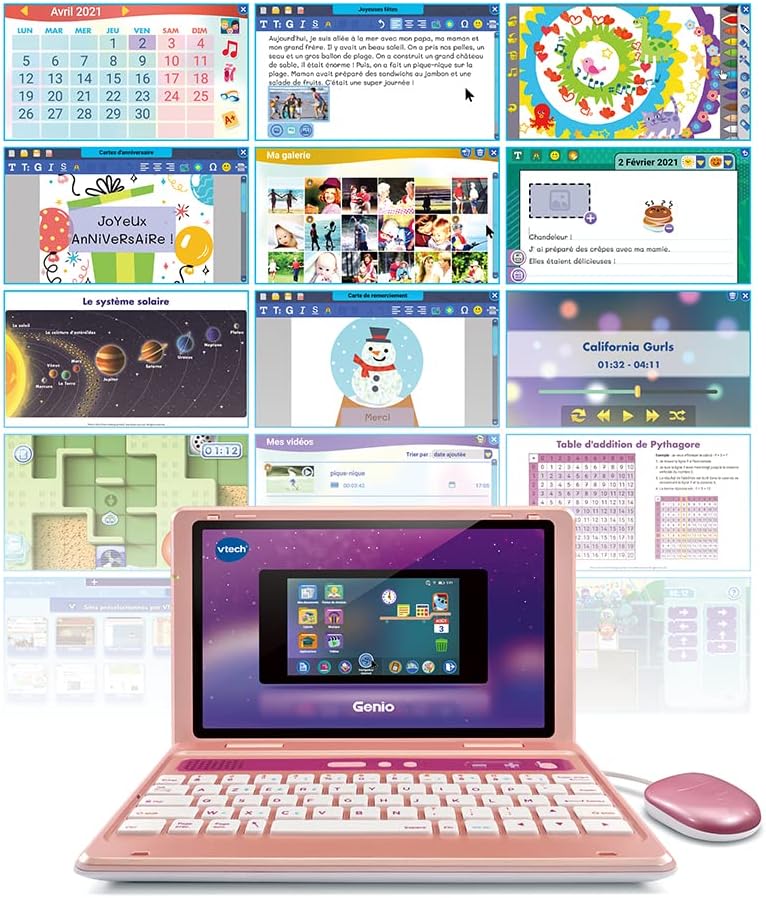
A collage of screenshots from the VTech Genio Kids Laptop, illustrating the diverse range of educational activities, games, and utility applications available on the device.
Internet Browser and Parental Controls
The integrated internet browser operates with a whitelist system, ensuring that children can only access websites approved by VTech and their parents. Enhanced parental controls allow for scheduled shutdowns and limits on game time, promoting healthy screen habits. The device also includes informative videos to raise awareness about personal data, screen time management, and safe internet use.
Зберігання
The VTech Genio has 8GB of internal memory. Documents and creations can be saved internally or on a microSD card (not included) for expanded storage and later printing.
Технічне обслуговування та догляд
To ensure the longevity and optimal performance of your VTech Genio, follow these maintenance guidelines:
- Прибирання: Keep the laptop clean by wiping it with a soft, dry cloth. Avoid using abrasive cleaners, solvents, or excessive moisture, as these can damage the device.
- Захист екрану: Protect the screen from scratches and impacts. Avoid placing heavy objects on the laptop or using sharp objects near the screen.
- Зберігання: Зберігайте пристрій у прохолодному, сухому місці, подалі від прямих сонячних променів, екстремальних температур та високої вологості.
- Догляд за акумулятором: The device contains a rechargeable Lithium-ion battery. Do not attempt to replace the battery yourself. Follow proper charging procedures as outlined in the setup guide.
- Слот MicroSD: Ensure the microSD card slot cover is properly closed when not in use to prevent dust and debris from entering the device.
Усунення поширених проблем
Пристрій не вмикається
- Ensure the battery is fully charged. Connect the power adapter and wait a few minutes before attempting to power on again.
- If the issue persists, perform a soft reset by holding the power button for 10-15 seconds.
Екран не відповідає
- Якщо екран не реагує, спробуйте перезавантажити пристрій.
- Ensure the screen is clean and free of debris or obstructions.
Applications Not Loading or Crashing
- Check for available system updates and install them if prompted.
- Ensure sufficient internal storage space is available. Delete unnecessary files or install a microSD card to expand storage.
Проблеми з підключенням до Інтернету
- Verify that the Wi-Fi connection is active and correctly configured in the device settings.
- Check parental control settings to ensure internet access is not restricted or limited.
Технічні характеристики продукту
| Особливість | Деталь |
|---|---|
| Номер моделі | 541055 |
| Бренд | VTech |
| Рекомендований вік | 5 - 12 років |
| Розмір екрана | 5 дюймів (12.5 см по діагоналі) |
| Розкладка клавіатури | АЗЕРТИ |
| Внутрішня пам'ять | 8 ГБ |
| Розширювана пам'ять | Yes, via microSD card (not included) |
| Тип батареї | Акумуляторна літій-іонна |
| Розміри продукту (Д x Ш x В) | 26.2 х 6.2 х 17 см |
| Вага продукту | 850 грами |
| Основний матеріал | пластик |
| Керівник SAR | 0.148 Вт/кг |
| SAR Trunk | 0.265 Вт/кг |
| SAR Limbs | 0.735 Вт/кг |
| Потрібна збірка | немає |
| Наявність запасних частин | Недоступний |
Note: SAR (Specific Absorption Rate) values are provided for informational purposes.

This image displays two VTech Genio Kids Laptops side-by-side, showcasing the different color variations available for the product.
Інформація про гарантію
VTech products typically come with a standard manufacturer's warranty. Please refer to the warranty card included in your product packaging or visit the official VTech website for detailed warranty terms and conditions specific to your region. Keep your proof of purchase for any warranty claims.
Важливе попередження про безпеку:
This product is not suitable for children under 36 months due to small parts that may present a choking hazard.
Підтримка клієнтів
For technical assistance, product inquiries, or to download additional content and updates, please visit the official VTech webсайту або зв’яжіться зі своїм відділом обслуговування клієнтів.
- Official VTech Webсайт: www.vtech.com
- Explora Park (for content downloads): www.explorapark.com


