вступ
This manual provides instructions for the proper use and maintenance of your Alecto AK-20 Alarm Clock with Thermometer. Please read these instructions carefully before operating the device and retain them for future reference. The AK-20 is designed to display time, date, day, and indoor temperature, featuring multiple alarms, a snooze function, and radio-controlled time synchronization.
Інформація про безпеку
- Не піддавайте пристрій впливу екстремальних температур, прямих сонячних променів або високої вологості.
- Не кидайте пристрій і не піддавайте його сильним ударам.
- Не намагайтеся розбирати або ремонтувати пристрій самостійно. Звертайтеся до кваліфікованого персоналу для проведення будь-яких робіт з обслуговування.
- Утилізуйте використані батареї відповідально відповідно до місцевих правил.
Вміст упаковки
Переконайтеся, що всі предмети присутні та знаходяться у належному стані після розпакування:
- Alecto AK-20 Alarm Clock
- User Manual (NL/EN/DE/FR)
Продукт закінченийview
The Alecto AK-20 features a clear digital display and intuitive controls for easy operation.

Малюнок 1: Спереду view of the Alecto AK-20 Alarm Clock, showing the large digital display with time, date, day, and temperature, along with control buttons at the bottom.

Рисунок 2: Кутовий view of the Alecto AK-20, highlighting the main display and the alarm ON/OFF switches on the right side.
Controls and Display Elements:
- Великий цифровий дисплей: Shows time (AM/PM indicator), date, day of the week, and indoor temperature.
- Кнопка ВСТАНОВЛЕННЯ ЧАСУ: Використовується для входу в режим налаштування часу.
- Кнопки - / +: Used to adjust values (decrease/increase).
- Кнопка ALARM SET: Використовується для входу в режим налаштування будильника.
- ALARM 1-4 ON/OFF Switches: Located on the side for individual alarm activation.
- Кнопка SNOOZE / LIGHT: Located on top, activates backlight and snooze function.
- AUTO LIGHT Switch: Located on the back, controls automatic backlight.
- Кнопка скидання: Located on the back, for factory reset.

Малюнок 3: Права сторона view of the alarm clock, showing the physical ON/OFF switches for Alarm 3 and Alarm 4.

Малюнок 4: Задня частина view of the alarm clock, showing the battery compartment, RESET button, and AUTO LIGHT switch.
Налаштування
1. Встановлення батареї
- Locate the battery compartment on the back of the alarm clock (refer to Figure 4).
- Відкрийте кришку батарейного відсіку.
- Вставте дві батарейки типу АА, дотримуючись правильної полярності (+ та -).
- Надійно закрийте кришку батарейного відсіку.
The display will light up, and the clock will begin searching for the DCF radio signal for automatic time synchronization.
2. Initial Time and Date Synchronization (DCF)
The AK-20 is a radio-controlled clock. Upon battery installation, it will automatically attempt to synchronize with the DCF signal. This process may take several minutes. A signal icon on the display indicates successful reception.
- Place the clock near a window for better signal reception.
- Уникайте розміщення його поблизу електронних пристроїв, які можуть створювати перешкоди.
3. Manual Time and Date Setting (Optional)
If DCF synchronization is not desired or unsuccessful, you can set the time and date manually:
- Натисніть і утримуйте ВСТАНОВИТИ ЧАС кнопку, доки цифри годин не почнуть блимати.
- Використовуйте - or + кнопки для налаштування години.
- Прес ВСТАНОВИТИ ЧАС ще раз, щоб підтвердити годину та перейти до хвилин.
- Repeat the process for minutes, year, month, and day.
- Прес ВСТАНОВИТИ ЧАС востаннє, щоб вийти з режиму налаштування.
4. Вибір мови
The device supports multiple languages for day display. To change the language:
- У звичайному режимі відображення часу натисніть кнопку - кнопку кілька разів.
- The day of the week will cycle through available languages (Dutch, French, German, English, Spanish, Italian, Danish, Russian).
- Stop when your desired language is displayed.
Інструкція з експлуатації
1. Встановлення будильників
The AK-20 allows setting up to four independent alarms.
- Натисніть і утримуйте НАБОР ТРИВОГИ button until the alarm time (e.g., ALARM-1) starts flashing.
- Використовуйте - or + buttons to adjust the desired alarm hour.
- Прес НАБОР ТРИВОГИ ще раз, щоб підтвердити годину та перейти до хвилин.
- Використовуйте - or + buttons to adjust the desired alarm minutes.
- Прес НАБОР ТРИВОГИ to confirm and move to the next alarm (ALARM-2, ALARM-3, ALARM-4).
- Repeat steps 2-4 for each alarm you wish to set.
- After setting all desired alarms, press НАБОР ТРИВОГИ щоб вийти з режиму налаштування будильника.
2. Activating/Deactivating Alarms
Each alarm has a dedicated ON/OFF switch on the side of the unit (refer to Figure 3).
- Slide the corresponding switch to ON to activate an alarm. An alarm icon will appear on the display.
- Пересуньте перемикач у положення ВИМКНЕНО to deactivate an alarm. The alarm icon will disappear.
3. Функція повтору будильника
Коли лунає будильник, натисніть кнопку ЧИПАТИ / СВІТЛО button on top of the clock. The alarm will temporarily stop and sound again after a few minutes (typically 5-10 minutes, depending on the model's default setting).
4. Функція підсвічування
Дисплей оснащений підсвічуванням для покращення видимості в умовах низької освітленості.
- Ручне підсвічування: Коротко натисніть ЧИПАТИ / СВІТЛО кнопку, щоб активувати підсвічування на кілька секунд.
- Автоматичне підсвічування: On the back of the unit, slide the АВТОМАТИЧНЕ СВІТЛО перейти на ON. The backlight will automatically illuminate in dark environments. Slide to ВИМКНЕНО to disable this feature.
5. Індикація температури
The integrated thermometer displays the indoor temperature.
- Щоб перемикатися між градусами Цельсія (°C) та Фаренгейта (°F), натисніть кнопку + button while in normal time display mode.
Технічне обслуговування
- Протирайте пристрій м’якою сухою тканиною. Не використовуйте абразивні засоби для чищення або розчинники.
- Якщо пристрій не використовуватиметься протягом тривалого часу, вийміть батарейки, щоб запобігти їх витіканню.
Усунення несправностей
| проблема | Можлива причина | Рішення |
|---|---|---|
| Дисплей порожній або тьмяний. | Батарейки низький заряд або неправильно вставлені. | Замініть батарейки новими батарейками типу АА, дотримуючись правильної полярності. |
| Час неправильний. | DCF signal not received or manual time not set. | Ensure the clock is in an area with good signal reception. Manually set the time if necessary. |
| Сигналізація не звучить. | Сигналізація не активована або налаштована неправильно. | Check the alarm ON/OFF switch on the side. Verify alarm time settings. |
| Не працює підсвічування. | AUTO LIGHT switch is OFF or batteries are low. | Check the AUTO LIGHT switch on the back. Replace batteries if needed. |
Якщо проблема не зникає після спроби цих рішень, зверніться до служби підтримки клієнтів.
Технічні характеристики
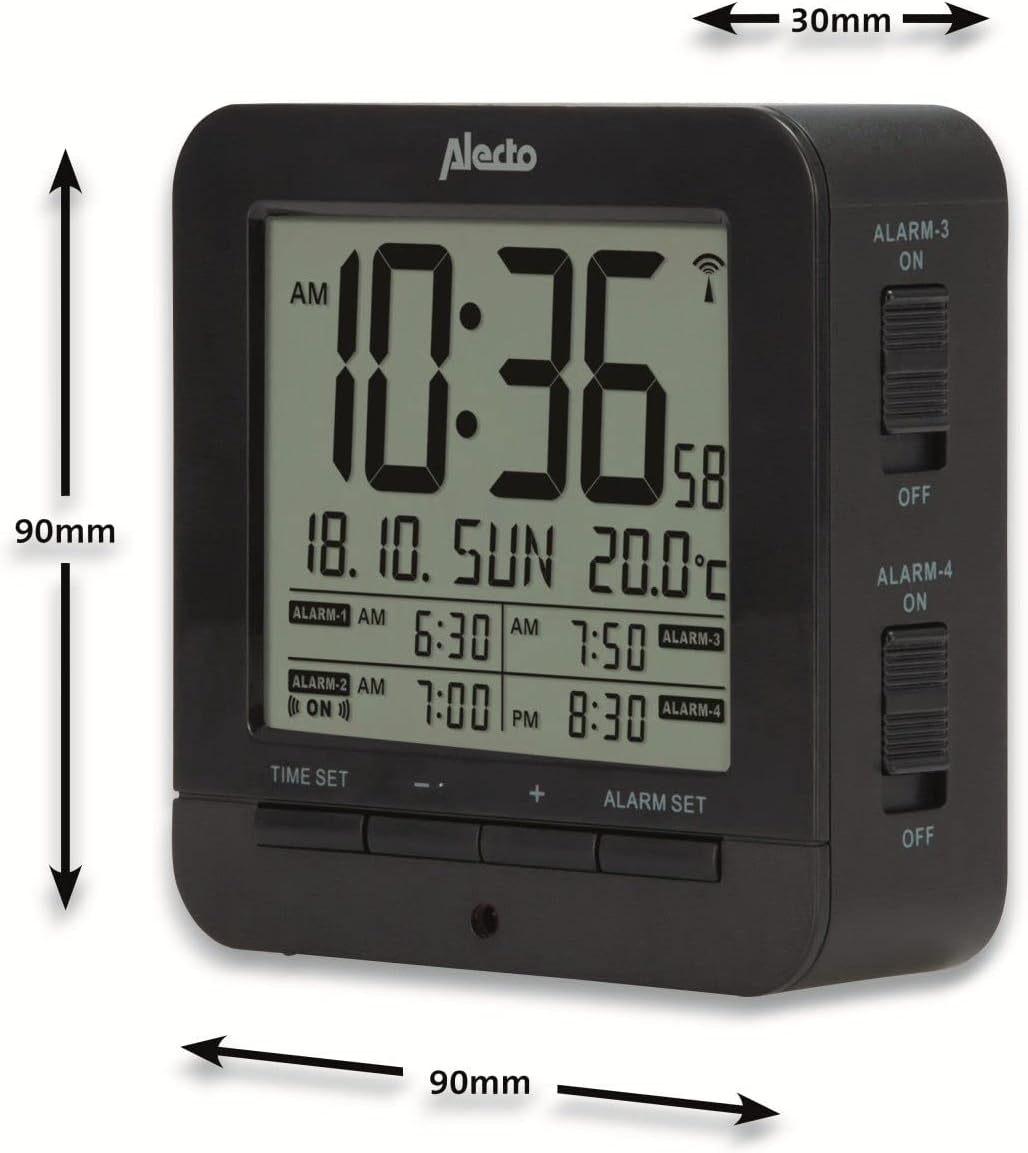
Figure 5: Alecto AK-20 Alarm Clock showing its approximate dimensions: 90mm height, 90mm width, and 30mm depth.
| Особливість | Деталь |
|---|---|
| Номер моделі | AK-20 (A003319) |
| Бренд | Алекто |
| Колір | чорний |
| матеріал | Акрилонітрилбутадієнстирол (АБС) |
| Розміри (В x Ш x Г) | 9 x 9 x 3 см (приблизно 3.54 x 3.54 x 1.18 дюймів) |
| розміри екрану | 6.4 x 5.4 см (приблизно 2.52 x 2.13 дюйма) |
| вага | 231 г (приблизно 0.51 фунта) |
| Джерело живлення | 2 батарейки типу АА (не входять в комплект) |
| Тип дисплея | цифровий |
| Особливості | Temperature Display, 4 Alarms, Snooze Function, Backlight, DCF Radio Control |
| Одиниці вимірювання температури | °C / °F вибір |
| Підтримувані мови | Dutch, French, German, English, Spanish, Italian, Danish, Russian |
Гарантія та підтримка
Alecto products are manufactured to high quality standards. For information regarding warranty terms and conditions, please refer to the documentation provided with your purchase or visit the official Alecto website. For technical support or service inquiries, please contact your retailer or the Alecto customer service department.


