1. Introduction to Your Google Pixel 6a
The Google Pixel 6a is a 5G Android smartphone designed for speed, security, and an exceptional user experience. Powered by the Google Tensor chip, it offers advanced features including a high-quality camera, long-lasting battery, and real-time translation capabilities. This manual provides essential information for setting up, operating, maintaining, and troubleshooting your device.
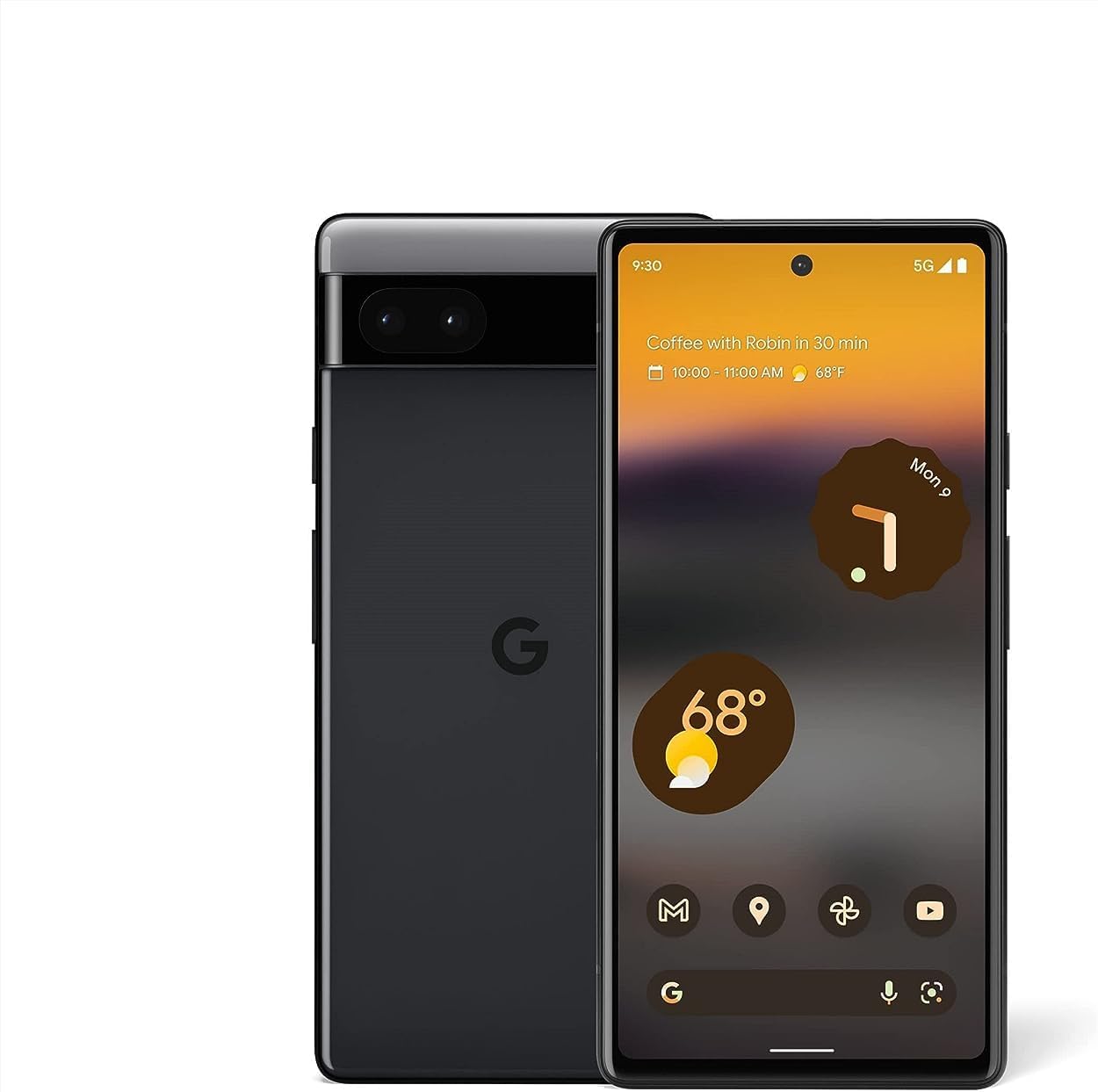
Зображення: Лицьова та зворотна сторони view смартфона Google Pixel 6a, демонстраціяasinйого елегантний дизайн та панель камери.
2. Початкове налаштування
2.1. Що в коробці
Перш ніж почати, переконайтеся, що всі компоненти присутні:
- Мобільний телефон Google Pixel 6a
- Кабель USB-C – USB-C довжиною 1 м (USB 2.0)
- Інструмент SIM
- Адаптер швидкого перемикання
- Короткий посібник (не показано на зображенні)

Image: The contents of the Google Pixel 6a box, including the phone, USB-C cable, SIM tool, and Quick Switch Adapter.
2.2. Встановлення SIM-картки
- Знайдіть лоток для SIM-картки збоку вашого Pixel 6a.
- Insert the SIM tool into the small hole on the tray and press gently until the tray ejects.
- Вставте свою Nano-SIM-картку в лоток золотими контактами вниз.
- Обережно вставте лоток назад у телефон.
2.3. Увімкнення та початкове налаштування
Press and hold the Power button until the Google logo appears. Follow the on-screen prompts to:
- Виберіть свою мову та регіон.
- Підключіться до мережі Wi-Fi.
- Увійдіть, використовуючи свій обліковий запис Google, або створіть новий.
- Set up your fingerprint for secure unlocking.
- Transfer data from your old device using the Quick Switch Adapter or wirelessly.

Image: A visual representation of transferring data, including messages, contacts, and photos, from an old device to the new Google Pixel 6a.
The Pixel 6a is an unlocked Android 5G phone, providing flexibility to choose your preferred carrier and data plan. It is compatible with major carriers such as Google Fi, Verizon, T-Mobile, and AT&T.

Image: A man holding the Google Pixel 6a to his ear, demonstrating its use as an unlocked smartphone with carrier flexibility.
3. Operating Your Google Pixel 6a
3.1. Google Tensor Chip Performance
Your Pixel 6a is powered by the Google Tensor chip, designed specifically for Pixel devices. This chip ensures fast app launches, quick loading of pages and images, and overall smooth performance for all your tasks.

Image: An illustration highlighting the Google Tensor chip, emphasizing its role in making the Pixel 6a smart, secure, and fast.
3.2. Керування акумулятором та його заряджання
The Pixel 6a features an adaptive all-day battery that learns your usage patterns to save power for your most used applications. It supports fast wired charging up to 18W. A few minutes of charging can provide hours of power. Adapters are sold separately and compatible with USB PD 3.0 PPS adapters.

Image: A Google Pixel 6a phone connected to a charger, illustrating its adaptive battery and fast charging capabilities.
3.3. Функції камери
Capture amazing photos with the Pixel 6a's 12-megapixel camera. Key features include:
- Чарівна гумка: Easily remove unwanted objects from your photos in Google Photos.
- Режим руху: Capture dynamic shots with artistic blurs.
- Портретний режим: Створюйте професійні фотографії з розмитим фоном.
- Face Unblur: Make blurry faces look sharper.
- Справжній тон: Ensures beautifully authentic photos of diverse skin tones.

Image: A collage demonstrating the Google Pixel 6a's camera features, including Face Unblur, Real Tone, and Magic Eraser.
3.4. Живий переклад
The Live Translate feature allows you to translate live video captions, private chats, messages, and even signs in up to 55 languages directly on your phone. This feature enhances communication across language barriers.

Image: A person using the Google Pixel 6a to translate a conversation in real-time, demonstrating the Live Translate feature.
3.5. Безпека та конфіденційність
Privacy and security are integral to the Pixel 6a. It incorporates the Titan M2 chip and the Google Tensor security core, providing an additional layer of hardware security to protect your device against attacks.

Image: A visual representation of the Pixel 6a's security features, including the Titan M2 chip, IP67 protection, and fingerprint unlock.
3.6. Customizable Interface and Feature Drops
The Pixel 6a offers a highly customizable Android interface, allowing you to personalize your phone's appearance and functionality. Google regularly provides "Feature Drops," delivering new features, tricks, and apps directly to your phone to enhance your experience over time.

Image: Multiple Pixel 6a screens displaying various customizable interface options and color themes.

Image: A notification on a Pixel phone screen indicating a "Feature Drop" update, highlighting continuous improvements.
4. Технічне обслуговування та догляд
4.1. Водо- та пилонепроникність
The Pixel 6a is designed with IP67 protection, meaning it can withstand a certain degree of water and dust exposure. While it is resistant, it is not waterproof or dustproof. Avoid intentional submersion or exposure to high-pressure water jets. Water and dust resistance may diminish over time due to normal wear and tear or physical damage.
4.2. Очищення пристрою
To clean your Pixel 6a, use a soft, lint-free cloth. Avoid abrasive materials, solvents, or aerosol sprays. For stubborn smudges, slightly dampтканину водою. Перед заряджанням переконайтеся, що всі порти сухі.
5. Усунення поширених проблем
This section addresses some common issues you might encounter with your Google Pixel 6a.
5.1. Fingerprint Sensor Issues
If the in-display fingerprint sensor is inconsistent or slow:
- Переконайтеся, що ваш палець чистий і сухий.
- Re-register your fingerprints, trying different angles and pressures.
- Clean the screen area where the sensor is located.
- If using a screen protector, ensure it is compatible with in-display fingerprint sensors and properly installed. Some screen protectors may interfere with functionality.
5.2. Battery Draining Quickly / Slow Charging
If your battery drains faster than expected or charges slowly:
- Check for background apps consuming excessive power and close them.
- Зменште яскравість екрана або увімкніть адаптивну яскравість.
- Disable features like always-on display or unnecessary connectivity (Bluetooth, GPS) when not in use.
- Ensure you are using a compatible USB-C charger and cable (preferably the one included or a Google-approved adapter).
- Avoid using the phone heavily while charging.
5.3. Перегрів пристрою
It is normal for the device to warm up during intensive use (e.g., gaming, video streaming, prolonged camera use, or fast charging). If it becomes excessively hot:
- Закрийте всі запущені програми.
- Disconnect from the charger if it's charging.
- Move to a cooler environment.
- Уникайте впливу прямих сонячних променів.
- If the issue persists, consider restarting the device.
5.4. Проблеми з підключенням до мережі (Wi-Fi/мобільні дані)
If you experience problems with Wi-Fi or mobile data connectivity:
- Вмикайте та вимикайте Wi-Fi або мобільні дані.
- Перезавантажте телефон.
- For Wi-Fi, forget the network and reconnect. Ensure your router is working correctly.
- For mobile data, check your SIM card is properly inserted and your data plan is active. Contact your carrier if issues persist.
6. Технічні характеристики
| Особливість | Деталь |
|---|---|
| Назва моделі | Pixel 6a (GX7AS) |
| Бренд | |
| Операційна система | Android |
| Швидкість ЦП | 2.8 ГГц |
| Розмір екрана | 6.13 дюймів |
| роздільна здатність | 1080 х 2400 |
| Частота оновлення | 60 Гц |
| ОЗУ | 6 ГБ |
| Ємність пам'яті | 128 ГБ |
| Ємність акумулятора | 4410 міліamp години |
| Час зарядки | 2 години (приблизно) |
| Час розмови по телефону | 15 години |
| Технології підключення | Bluetooth, Wi-Fi, NFC |
| Особливості камери | Rear, Front (12 Megapixel main) |
| Аудіороз'єм | USB-C |
| Колір | Деревне вугілля |
| Розміри продукту | 6 x 2.8 x 0.35 дюймів |
| Вага товару | 6.3 унції (178 грама) |
| Дата першої доступності | 18 липня 2022 р |

Image: A comparison chart detailing specifications between the Pixel 6 and Pixel 6a, including display, camera, memory, battery, and security features.
7. Гарантія та підтримка
7.1. Гарантія на продукт
Your Google Pixel 6a comes with a limited manufacturer's warranty. Please refer to the warranty card included with your purchase or visit the official Google support website for detailed terms and conditions, including coverage period and what is covered.
7.2. Підтримка клієнтів
For further assistance, technical support, or service inquiries, please visit the official Google Pixel Support page. You can find FAQs, troubleshooting guides, and contact options for direct support.
Офіційна служба підтримки Google: support.google.com/pixelphone


