вступ
The Phanteks Eclipse G360A is a high-performance mid-tower gaming chassis designed for optimal airflow and component compatibility. It features an ultra-fine performance mesh front panel for superior cooling and dust filtration, integrated Digital-RGB lighting, and extensive support for modern gaming hardware including large GPUs and advanced liquid cooling solutions. This manual provides detailed instructions for setting up, operating, and maintaining your Eclipse G360A chassis.
Налаштування та встановлення
1. Розпакування та вміст
Carefully remove the chassis from its packaging. Verify that all components and accessories are present. The package should include the Eclipse G360A chassis, pre-installed 120mm D-RGB fans, and an accessory box containing screws, zip ties, and the user manual.
2. Сумісність компонентів
- Підтримка материнської плати: ATX, micro-ATX, mini-ITX, E-ATX (up to 280mm wide).
- Довжина GPU: Up to 400 mm (15.7 in).
- Висота процесорного кулера: Up to 162 mm (6.3 in).
- Довжина блоку живлення: Up to 220 mm (280 mm depending on HDD cage location).
- Зберігання: 2x 3.5" internal (included), 3x 2.5" internal (2 included).

Малюнок 1: Внутрішній view highlighting 400mm GPU clearance, supporting high-end graphics cards.

Figure 2: Multiple storage options for 2.5" and 3.5" drives, with flexible mounting points.
3. Етапи встановлення
- Підготовка шасі: Remove the tempered glass side panel by unscrewing the thumb screws. The front panel can be detached for easier fan/radiator installation.
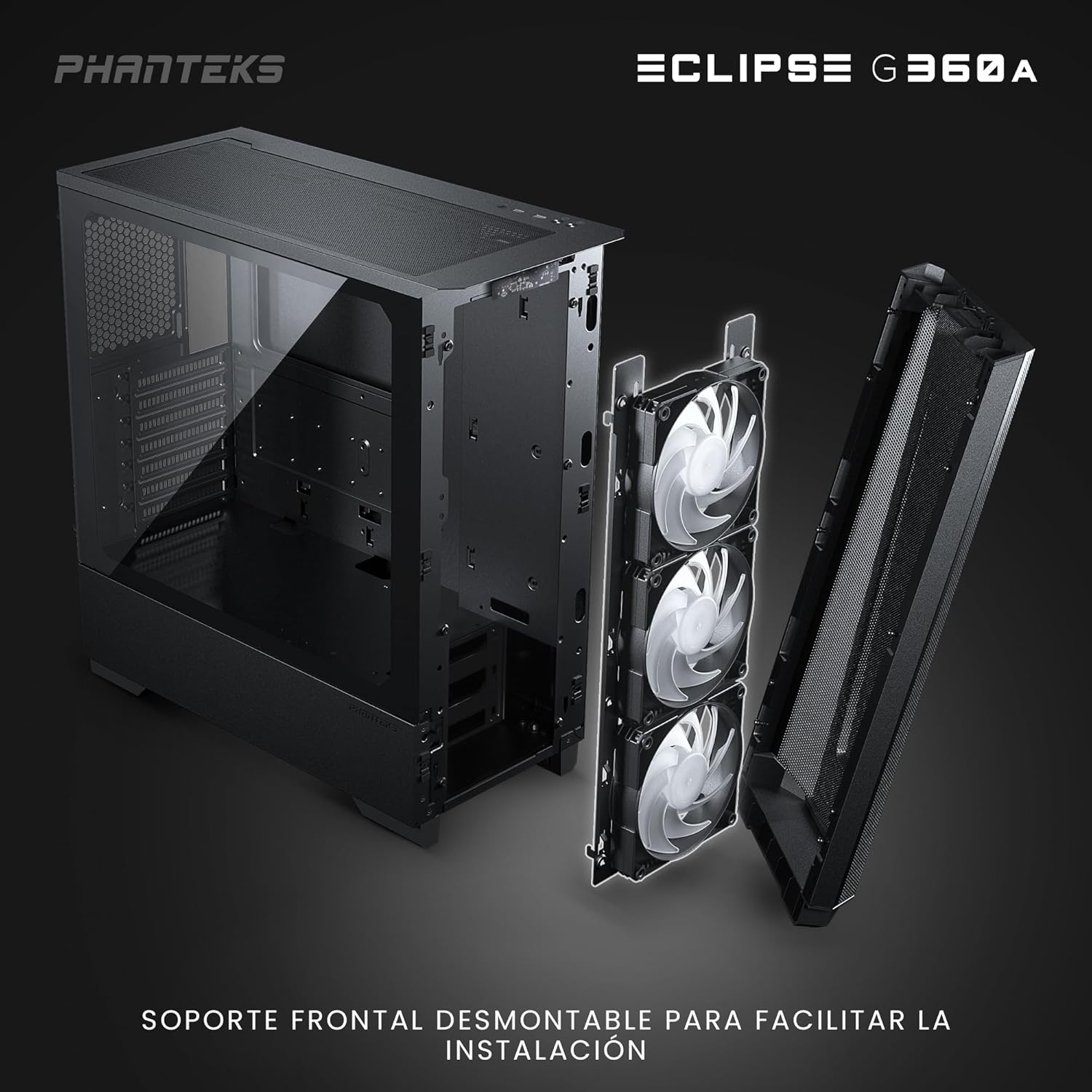
Figure 3: Detachable front panel and fan bracket for simplified installation.
- Встановити материнську плату: Secure your motherboard to the standoffs using the provided screws.
- Встановлення накопичувачів: Mount 2.5" SSDs to the dedicated locations behind the motherboard tray or on the PSU shroud. Install 3.5" HDDs into the drive cages located under the PSU shroud.
- Встановлення блоку живлення (БЖ): Slide the PSU into its designated compartment at the bottom rear of the chassis and secure it with screws.
- Встановлення відеокарти (GPU): Insert your graphics card into the PCIe slot on the motherboard. The chassis supports vertical GPU mounting with an optional bracket (PH-VGPUKT4.0_03).
- Встановлення компонентів охолодження: The G360A supports various fan and radiator configurations.
- Підтримка вентиляторів: Front: 3x 120mm (3 pre-installed) or 2x 140mm; Top: 3x 120mm or 2x 140mm; Rear: 1x 120mm.
- Підтримка радіатора: Front: Up to 360mm or 280mm; Top: Up to 360mm; Rear: 120mm. Note: Front and top 360mm radiators cannot be installed simultaneously.

Figure 4: Detailed fan and radiator placement options for optimal cooling.
- Управління кабелем: Utilize the 36mm (1.4 in) cable management space behind the motherboard tray to route and secure cables for a clean build and improved airflow.
Інструкція з експлуатації
1. Front I/O Panel Functions
Передня панель вводу/виводу забезпечує зручний доступ до основних елементів керування та портів:
- Кнопка живлення: Вмикає або вимикає систему.
- 2 порти USB 3.0: Для підключення USB-пристроїв.
- Комбінований роз'єм для мікрофона/навушників: Для аудіовходу та виходу.
- D-RGB Mode Button: Cycles through pre-programmed lighting effects.
- D-RGB Color Button: Changes the color of the D-RGB lighting.

Figure 5: Front I/O panel with easy-access controls for power, USB, audio, and D-RGB lighting.
2. Digital-RGB Lighting Control
The Eclipse G360A features integrated D-RGB lighting with pre-installed 120mm D-RGB fans and an LED strip along the tempered glass panel. The lighting can be controlled in two ways:
- Ручне управління: Use the D-RGB Mode and Color buttons on the front I/O panel to cycle through various effects and colors without software.
- Синхронізація материнської плати: The D-RGB controller can be connected to a compatible motherboard's D-RGB header (e.g., ASUS Aura Sync, MSI Mystic Light Sync, GIGABYTE RGB Fusion, ASRock Polychrome Sync, Razer Chroma). This allows for software control and synchronization with other D-RGB components in your system. Refer to your motherboard manual for D-RGB header location and software instructions.
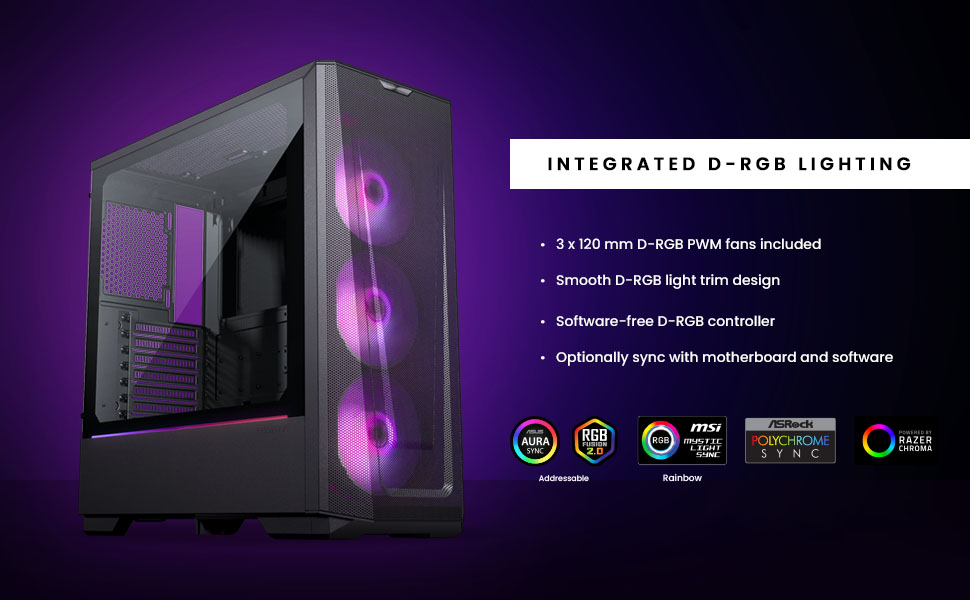
Figure 6: Integrated D-RGB lighting and compatibility with major motherboard synchronization software.
Технічне обслуговування
1. Cleaning the Ultra-fine Performance Mesh
The front panel's ultra-fine mesh acts as a dust filter. To maintain optimal airflow and prevent dust buildup, regularly clean the mesh:
- Gently detach the front panel.
- Use a soft brush or compressed air to remove accumulated dust from the mesh.
- Wipe the mesh with a slightly damp тканиною, якщо необхідно, переконавшись, що вона повністю висохла, перш ніж знову прикріплювати.

Figure 7: The ultra-fine performance mesh design, crucial for airflow and dust filtration.
2. General Chassis Cleaning
For general cleaning of the chassis exterior and interior:
- Переконайтеся, що систему вимкнено та від’єднано від мережі.
- Use a microfiber cloth to wipe down exterior surfaces.
- For interior dust, use compressed air to blow dust out of components and the chassis.
- Clean the tempered glass panel with a glass cleaner and a soft cloth.
Усунення несправностей
Поширені проблеми та рішення
| Випуск | Можлива причина | Рішення |
|---|---|---|
| Система не вмикається. | Loose power connections, faulty PSU, incorrect front panel header connection. | Check all power cables (24-pin, 8-pin CPU, GPU). Verify front panel power switch connection to motherboard. Test PSU if possible. |
| D-RGB lighting not working or incorrect. | Loose D-RGB cable connection, incorrect D-RGB header, software conflict. | Ensure D-RGB cables are securely connected. If using motherboard sync, verify connection to a 3-pin 5V D-RGB header (not 4-pin 12V RGB). Try manual control via case buttons. Reinstall or update motherboard RGB software. |
| Поганий потік повітря або висока температура. | Dust buildup, incorrect fan orientation, obstructed airflow. | Clean front mesh and other dust filters. Ensure fans are oriented correctly (intake/exhaust). Check for cable obstructions inside the case. |
| Передні USB-порти не працюють. | Loose USB 3.0 header cable connection to motherboard. | Переконайтеся, що кабель USB 3.0 з передньої панелі надійно підключений до роз'єму USB 3.0 материнської плати. |
Технічні характеристики
| Особливість | Деталь |
|---|---|
| Назва моделі | Eclipse G360A |
| Номер моделі | PH-EC360ATG_DBK02 |
| Форм-фактор | Середній вежі |
| Розміри (ШxГxВ) | 455 x 200 x 465 мм / 17.9 x 7.87 x 18.3 дюймів |
| Матеріал(и) | Steel Chassis, Tempered Glass |
| Підтримка материнської плати | ATX, micro-ATX, mini-ITX, E-ATX (шириною до 280 мм) |
| Передній вхід/вихід | 2x USB 3.0, Microphone/Headphone Combo, Power Button, D-RGB Mode, D-RGB Color |
| Слоти розширення | 7 |
| Внутрішні відсіки для 3.5-дюймових накопичувачів | 2 (2x included) |
| Внутрішні відсіки для 2.5-дюймових накопичувачів | 3 (2x included) |
| Попередньо встановлені вентилятори | 3x 120mm D-RGB (Front) |
| Підтримка вентилятора (120 мм) | Front: 3x; Top: 3x; Rear: 1x |
| Підтримка вентилятора (140 мм) | Front: 2x; Top: 2x |
| Radiator Support (120mm) | Спереду: до 360 мм; Зверху: до 360 мм; Заду: 120 мм |
| Radiator Support (140mm) | Front: Up to 280mm; Top: Up to 360mm |
| Максимальна довжина GPU | 400 мм / 15.7 дюйма |
| Максимальна висота процесорного кулера | 162 мм / 6.3 дюйма |
| Простір для організації кабелів | 36 мм / 1.4 дюйма |
| Максимальна довжина блоку живлення | 220 mm / 280 mm (depends on HDD Cage location) |
Гарантія та підтримка
Інформація про гарантію
Phanteks products are manufactured to the highest quality standards. For detailed warranty terms and conditions, please refer to the warranty card included with your product or visit the official Phanteks webсайт. Гарантія зазвичай покриває дефекти матеріалів та виготовлення за умов нормального використання.
Підтримка клієнтів
Should you encounter any issues or have questions regarding your Phanteks Eclipse G360A chassis, please contact Phanteks customer support. You can find contact information, FAQs, and additional resources on the official Phanteks webсайт:


