1. Вступ
This manual provides comprehensive instructions for the Naxa NDS-6501 Portable Dual 6.5-inch Bluetooth Speaker. Please read this manual thoroughly before operating the device to ensure proper use and to maximize your experience. Keep this manual for future reference.
2. Вміст упаковки
Перевірте, чи всі перелічені нижче предмети входять до вашої упаковки:
- Naxa NDS-6501 Portable Bluetooth Speaker
- Дротовий мікрофон
- USB-кабель для зарядки
- Посібник користувача (цей документ)
3. Особливості продукту
The Naxa NDS-6501 speaker offers a range of functionalities designed for portable audio entertainment:
- Dual 6.5-inch full-frequency speakers for clear audio output.
- Підключення Bluetooth для бездротової потокової передачі аудіо із сумісних пристроїв.
- Integrated multi-color flame lights with various lighting effects.
- True Wireless Stereo (TWS) function for connecting two NDS-6501 speakers wirelessly.
- Wired microphone input for vocal use.
- Built-in FM radio tuner for local station access.
- USB port and MicroSD/TF card slot for playing audio files from external storage.
- Auxiliary (3.5mm) input for wired audio connections.
- Rechargeable battery providing up to 2 hours of playback time.
4. Елементи керування та порти
The speaker features various controls and input/output ports. A typical layout includes a power button, volume controls, mode selection, playback controls (play/pause, skip tracks), microphone input, USB port, MicroSD card slot, auxiliary input, and a charging port. Refer to the diagram below for specific locations.
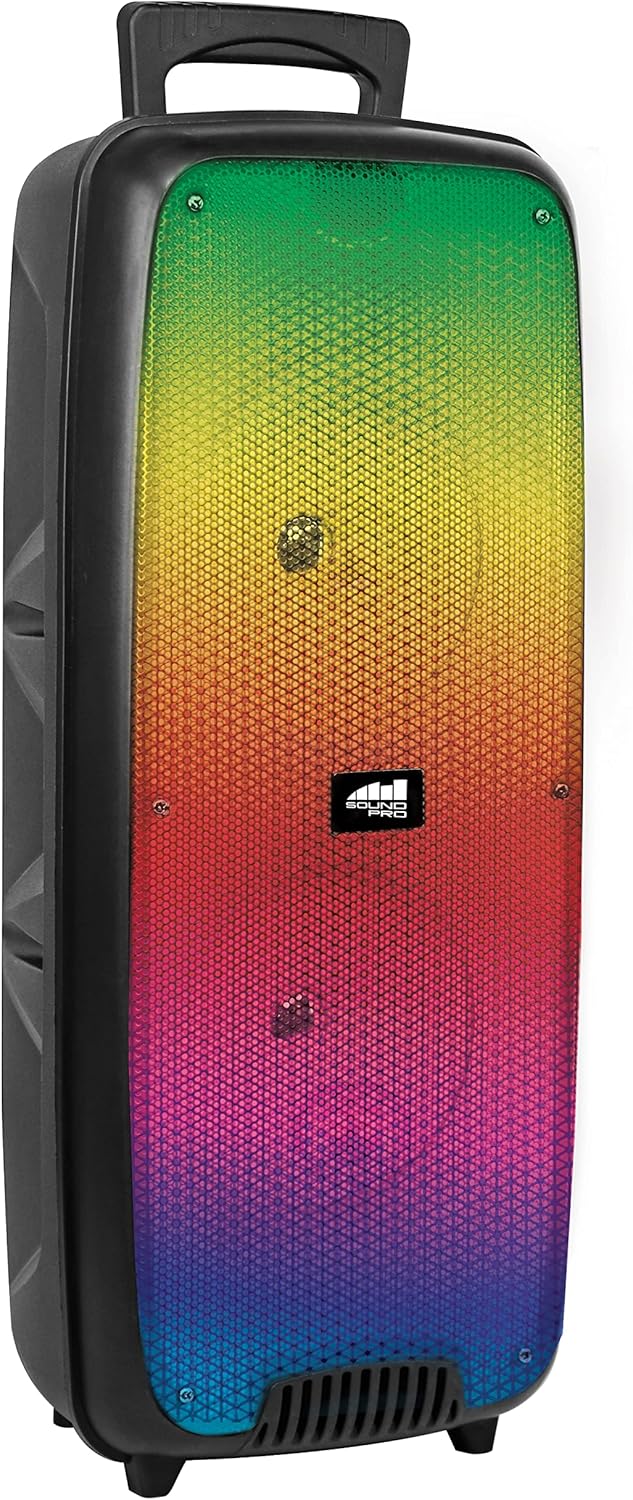
малюнок 4.1: Фронт view of the Naxa NDS-6501 speaker, showcasing the dual 6.5-inch drivers and multi-color flame lights.

малюнок 4.2: сторона view of the Naxa NDS-6501 speaker, illustrating its portable design with an integrated handle.
5. Налаштування
5.1 Заряджання динаміка
- Підключіть зарядний USB-кабель, що постачається в комплекті, до зарядного порту динаміка.
- Підключіть інший кінець USB-кабелю до сумісного USB-адаптера живлення (не входить до комплекту) або USB-порту комп’ютера.
- Індикатор заряджання світитиметься, зазвичай червоним, під час заряджання.
- Once fully charged, the indicator light will change color or turn off (refer to specific LED behavior in your product). A full charge provides approximately 2 hours of playback.
5.2 Увімкнення/вимкнення
- To power on: Press and hold the Power button for a few seconds until the speaker activates.
- To power off: Press and hold the Power button again until the speaker shuts down.
6. Інструкція з експлуатації
6.1 Створення пари Bluetooth
- Ensure the speaker is powered on and in Bluetooth mode. If not, press the Mode button to switch to Bluetooth. The speaker will indicate it is ready for pairing (e.g., a flashing LED or an audible prompt).
- На вашому пристрої з підтримкою Bluetooth (смартфоні, планшеті тощо) перейдіть до налаштувань Bluetooth.
- шукати available devices. You should see "NDS-6501" or a similar name in the list.
- Select "NDS-6501" to initiate pairing.
- Після успішного сполучення динамік надасть звукове підтвердження, а індикатор Bluetooth почне світитися постійно.
6.2 Сполучення справжнього бездротового стерео (TWS)
The TWS function allows you to connect two NDS-6501 speakers for a stereo sound experience.

малюнок 6.1: Illustration of the True Wireless Stereo (TWS) function, enabling two speakers to connect wirelessly from a single Bluetooth source.
- Ensure both NDS-6501 speakers are powered on and in Bluetooth mode, but not yet paired to any device.
- On one of the speakers (this will be the primary speaker), press and hold the TWS button (or a designated pairing button) for a few seconds.
- Основний динамік шукатиме додатковий динамік. Після підключення обидва динаміки нададуть звукове підтвердження.
- Now, pair your Bluetooth device to the primary speaker as described in Section 6.1. Audio will play through both speakers in stereo.
6.3 Робота FM-радіо
- Натисніть кнопку Mode, щоб переключитися в режим FM-радіо.
- Натисніть кнопку відтворення/паузи, щоб автоматично сканувати та зберігати доступні FM-станції.
- Використовуйте кнопки «Попередній/Наступний трек» для навігації між збереженими станціями.
6.4 Відтворення з USB/MicroSD
- Insert a USB flash drive or a MicroSD/TF card (with audio files) у відповідний порт.
- The speaker should automatically switch to USB or MicroSD mode and begin playing audio. If not, press the Mode button to select the correct input.
- Використовуйте елементи керування відтворенням (Відтворення/Пауза, Попередній/Наступний) для керування музикою.
6.5 Використання мікрофона
- Connect the wired microphone to the microphone input jack on the speaker.
- Adjust the microphone volume control (if available) on the speaker to your desired level.
- The microphone audio will be mixed with any music playing through the speaker.
6.6 світлових ефектів
- The speaker features integrated multi-color flame lights.
- Press the Light button (if available) to cycle through different lighting modes or to turn the lights on/off.
- The lights may synchronize with the music playback.
7. Технічне обслуговування
- Прибирання: Використовуйте м’яку суху тканину для очищення зовнішньої поверхні динаміка. Не використовуйте абразивні засоби для чищення, віск або розчинники.
- Зберігання: Якщо динамік не використовується протягом тривалого часу, зберігайте його в прохолодному, сухому місці, подалі від прямих сонячних променів та екстремальних температур.
- Догляд за акумулятором: Щоб подовжити термін служби акумулятора, уникайте частого повного розряджання акумулятора. Регулярно заряджайте динамік, навіть якщо він не використовується.
- Вплив води: Цей динамік не є водонепроникним. Уникайте потрапляння на нього води або надмірної вологи.
8. Вирішення проблем
| проблема | Можлива причина | Рішення |
|---|---|---|
| Динамік не вмикається. | Акумулятор розрядився. | Зарядіть динамік за допомогою USB-кабелю, що входить до комплекту. |
| Немає звуку з динаміка. | Volume is too low; incorrect input mode; device not paired. | Increase volume; press Mode button to select correct input; re-pair Bluetooth device. |
| Пристрій Bluetooth не може знайти динамік. | Динамік не в режимі сполучення; пристрій занадто далеко; перешкоди. | Ensure speaker is in Bluetooth pairing mode; move device closer; avoid obstacles. |
| Не вдалося підключити TWS. | Speakers already paired to a device; too far apart. | Ensure both speakers are unpaired from other devices; place speakers within 33 feet of each other. |
| Мікрофон не працює. | Microphone not fully plugged in; microphone volume low. | Ensure microphone is securely connected; adjust microphone volume. |
9. Технічні характеристики
| Особливість | Специфікація |
|---|---|
| Номер моделі | НДС-6501 |
| Розмір динаміка | Подвійний 6.5 дюйми |
| Технологія підключення | Bluetooth, USB, MicroSD, Aux (3.5mm) |
| Аудіо вхід | Дротовий мікрофон |
| Режим аудіовиходу | Стерео |
| Максимальна вихідна потужність | 3 Вт |
| Спікер Ampтип ліфікації | Активний |
| Тип батареї | Lithium Ion (rechargeable, included) |
| Середній термін служби батареї | До 2 годин |
| Розміри продукту (Д x Ш x В) | 24.13 x 19.05 x 57.91 см (9.5 x 7.5 x 22.8 дюйма) |
| Вага товару | 2.81 кг (6.2 фунта) |
| Колір | чорний |
| UPC | 840005017555 |
10. Гарантія та підтримка
For warranty information or technical support, please refer to the warranty card included with your product or visit the official Naxa Electronics webсайт. Зберігайте чек про покупку як підтвердження покупки для будь-яких гарантійних претензій.


