вступ
This manual provides detailed instructions for the BEITONG BAT 2 Wired USB Gaming Controller. It covers setup, operation, maintenance, and troubleshooting to ensure optimal performance and longevity of your device. The BEITONG BAT 2 is designed for a responsive and immersive gaming experience on compatible platforms.
Особливості продукту
- 8th Generation Upgraded Chip: Features ultra-low latency (≤ 0.008 s) for smooth and responsive gameplay.
- Дротове USB-з'єднання: Ensures stable and reliable connectivity.
- Мультиплатформна сумісність: Supports PC (Windows 7/8/10/11), Laptops, Android TV, and Tesla Model 3/Y (before 11/2021). Note: Does not support Xbox, PS4/5, or Switch.
- High Precision Joysticks: Designed for 360° flexible positioning and fine-tuning, enhancing control in various game genres.
- Dual Vibrating Motors: Built-in asymmetrical motors provide varied vibration feedback based on in-game events, increasinг занурення. (Vibration effect is active only when supported by the game.)
- Турбофункція: A dedicated turbo button simplifies complex combo inputs, offering an advantagе у швидких іграх.
Вміст упаковки
- BEITONG BAT 2 Wired USB Gaming Controller
- Посібник користувача (цей документ)
Інструкції з налаштування
- Підключіть контролер: Insert the USB connector of the BEITONG BAT 2 controller into an available USB port on your PC, Laptop, Android TV, or compatible Tesla vehicle.

Image: The BEITONG BAT 2 controller connected via USB to a laptop, desktop PC, Steam Deck (with OTG adapter), Android TV, and Tesla car screen. This illustrates the multi-platform compatibility.
- Встановлення драйвера: For Windows operating systems (7/8/10/11), the necessary drivers should install automatically upon first connection. Allow a few moments for the system to recognize the device.
- Перевірте підключення: Once connected, the controller's indicator light should illuminate, signifying a successful connection. You can test the controller's functionality through your operating system's game controller settings.
- Tesla Compatibility Note: For Tesla Model 3 and Model Y, ensure your vehicle was manufactured before November 2021 for compatibility. An OTG adapter may be required for some devices, such as the Steam Deck.
Інструкція з експлуатації
Схема та функції контролера
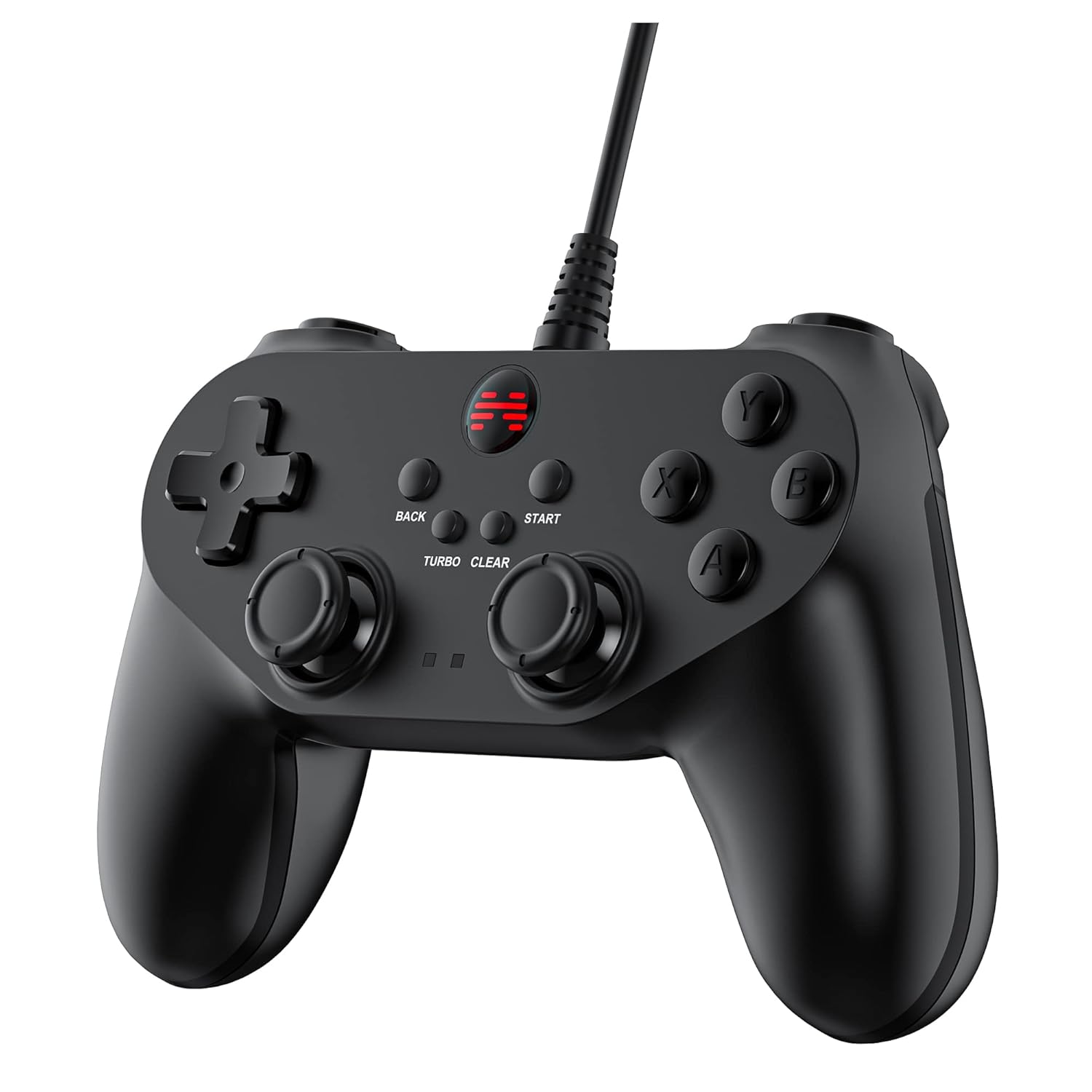
Зображення: Детальний фронт view of the BEITONG BAT 2 controller, highlighting the ergonomic design, dual analog sticks, D-pad, action buttons (A, B, X, Y), and central function buttons (Back, Start, Turbo, Clear).
- Аналогові джойстики: Use for precise 360° movement and camera control in games. The joysticks are designed for high precision and flexible positioning.
- D-Pad: Used for directional input, often for menu navigation or specific game actions.
- Кнопки дій (A, B, X, Y): Primary input buttons for in-game actions.
- Плечові кнопки (L1, R1) та тригери (L2, R2): Located on the top of the controller for additional actions. Note that L2 and R2 are digital buttons, not analog triggers.
- BACK and START Buttons: Standard function buttons for pausing games, accessing menus, or other in-game commands.
- Кнопка TURBO: Activates the turbo function.
- Кнопка CLEAR: Deactivates the turbo function.
Використання функції Turbo
- Активувати Турбо: Натисніть і утримуйте ТУРБО button, then press the action button (e.g., A, B, X, Y, L1, R1, L2, R2) you wish to apply turbo to. The selected button will now repeatedly register input as long as it is held down.
- Вимкнути Турбо: Натисніть і утримуйте ЯСНО button, then press the action button that has turbo enabled. The turbo function for that specific button will be deactivated.
- Global Turbo Clear: To clear all active turbo settings, press and hold the ЯСНО приблизно 3 секунди.

Зображення: Крупний план view of the central part of the controller, highlighting the "TURBO" and "CLEAR" buttons, indicating their function for rapid input.
Відгук про вібрацію
The controller features dual asymmetrical vibrating motors that provide haptic feedback during gameplay. The intensity and pattern of vibration vary based on in-game events, such as impacts, explosions, or specific actions. This feature is active only when supported by the game being played.
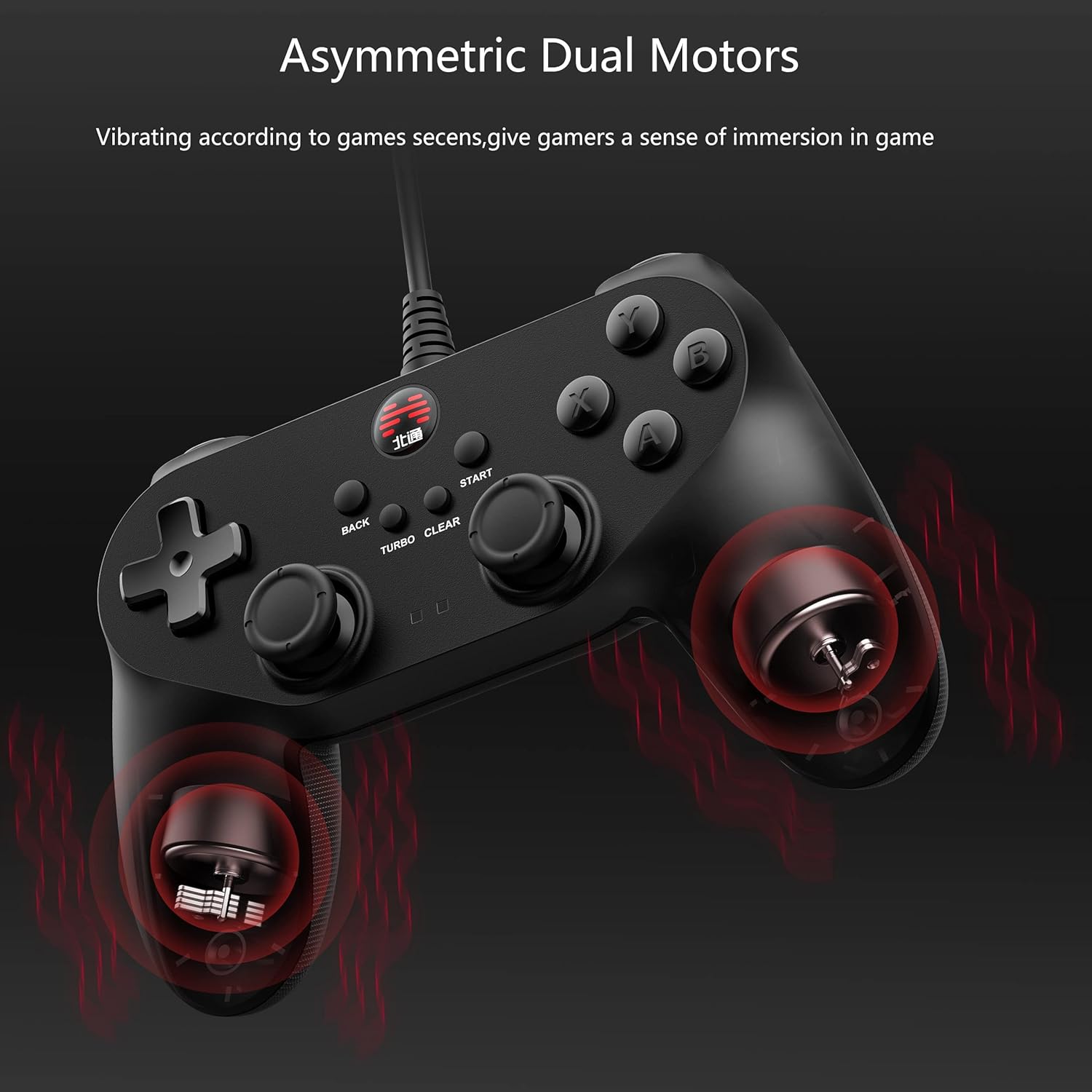
Image: An X-ray style diagram of the BEITONG BAT 2 controller, illustrating the placement of the two asymmetrical vibrating motors within the grips, with red waves indicating vibration.
Технічне обслуговування та догляд
- Прибирання: Використовуйте м’яку суху тканину для очищення контролера. Для стійкого бруду злегкаamp Можна використовувати тканину, але переконайтеся, що волога не потрапляє всередину пристрою. Уникайте використання агресивних хімікатів або абразивних засобів для чищення.
- Зберігання: Зберігайте контролер у прохолодному, сухому місці, подалі від прямих сонячних променів та екстремальних температур. Уникайте розміщення важких предметів на контролері.
- Догляд за кабелем: Do not sharply bend or pull the USB cable. Always grasp the plug when disconnecting, not the cable itself, to prevent damage.
- Уникайте крапель: Protect the controller from drops and impacts, as these can damage internal components.
Усунення несправностей
- Controller not recognized by PC/device:
- Переконайтеся, що USB-кабель надійно підключено як до контролера, так і до пристрою.
- Try a different USB port on your computer or device.
- Перезавантажте комп’ютер або пристрій.
- Check your operating system's device manager or game controller settings to see if the controller is listed. If there's an error, try updating or reinstalling drivers.
- Verify compatibility: The controller does not support Xbox, PS4/5, or Switch consoles.
- Вібрація не працює:
- Переконайтеся, що гра, в яку ви граєте, підтримує вібраційний зворотний зв'язок.
- Перевірте налаштування гри, щоб переконатися, що вібрація ввімкнена.
- Some games may require specific drivers or software updates for full functionality.
- Buttons or joysticks unresponsive/inaccurate:
- Переконайтеся, що контролер правильно підключено та розпізнано.
- Calibrate the controller through your operating system's game controller settings.
- Clean around the buttons and joysticks to remove any debris that might be causing sticking.
- If the issue persists, contact BEITONG customer support.
- Функція турбо не працює:
- Follow the operating instructions carefully to activate and deactivate turbo for specific buttons.
- Ensure you are pressing the correct combination of TURBO/CLEAR and action buttons.
Технічні характеристики
| Особливість | Деталь |
|---|---|
| Номер моделі | BTP-BD2E |
| Підключення | Провідний USB |
| Сумісність | PC (Windows 7/8/10/11), Laptop, Android TV, Tesla Model 3/Y (before 11/2021) |
| Затримка | ≤ 0.008 секунд |
| вібрація | Подвійні асиметричні двигуни |
| Розміри | 5.91 x 4.33 x 1.97 дюймів |
| вага | 9.6 унції |
| Виробник | BEITONG |
Гарантія та підтримка
BEITONG is committed to providing quality products and customer satisfaction. While specific warranty details are not provided in this manual, the BEITONG technology team is available to provide support for any issues encountered with your controller.
For technical assistance, troubleshooting, or inquiries regarding your BEITONG BAT 2 controller, please refer to the official BEITONG website or contact their customer service channels. Contact information can typically be found on the product packaging or the manufacturer's official webсайт.


