1. Вступ
The Guardo Fit Coach Explore is an advanced activity tracker designed to monitor various aspects of your health and fitness. This manual provides essential information for setting up, operating, and maintaining your device to ensure optimal performance and longevity.
2. Вміст упаковки
Будь ласка, перевірте наявність усіх предметів у вашій упаковці:
- Guardo Fit Coach Explore Activity Tracker
- Зарядний кабель
- Посібник користувача (цей документ)
3. Налаштування
3.1 Зарядка пристрою
Before first use, fully charge your Guardo Fit Coach Explore. Connect the charging cable to the charging port on the back of the device and plug the other end into a USB power source (e.g., computer, USB wall adapter). The device will display a charging indicator.

Зображення: Задня частина view of the activity tracker highlighting the charging contacts and sensors, alongside a display showing blood pressure readings.
3.2 Встановлення та сполучення програм
- Download the official Guardo Fit Coach app from your smartphone's app store (compatible with Android operating systems).
- Переконайтеся, що Bluetooth увімкнено на вашому смартфоні.
- Відкрийте програму та дотримуйтеся вказівок на екрані, щоб створити обліковий запис або увійти.
- Виберіть «Додати пристрій» або «Підключити новий пристрій» у застосунку.
- The app will search for your Guardo Fit Coach Explore. Select your device from the list to initiate pairing.
- Confirm the pairing request on both your smartphone and the activity tracker if prompted.

Image: The activity tracker worn on a wrist, showing a watch face with icons for different applications, indicating smartphone connectivity.
4. Інструкція з експлуатації
4.1 Основна навігація
The Guardo Fit Coach Explore features a touchscreen display for interaction. Swipe left, right, up, or down to navigate through menus and features. Tap to select an option or confirm an action. The device may also have physical buttons for specific functions like power on/off or returning to the home screen.

Image: The activity tracker's display showing a customizable watch face with a unique spiral graphic.
4.2 Receiving Notifications
Once paired with your smartphone, the activity tracker can display notifications for incoming calls, messages, and app alerts. Ensure notification permissions are granted in your smartphone's settings and within the Guardo Fit Coach app.

Image: The activity tracker's screen showing an incoming call notification with the caller's number and options to answer or reject the call.
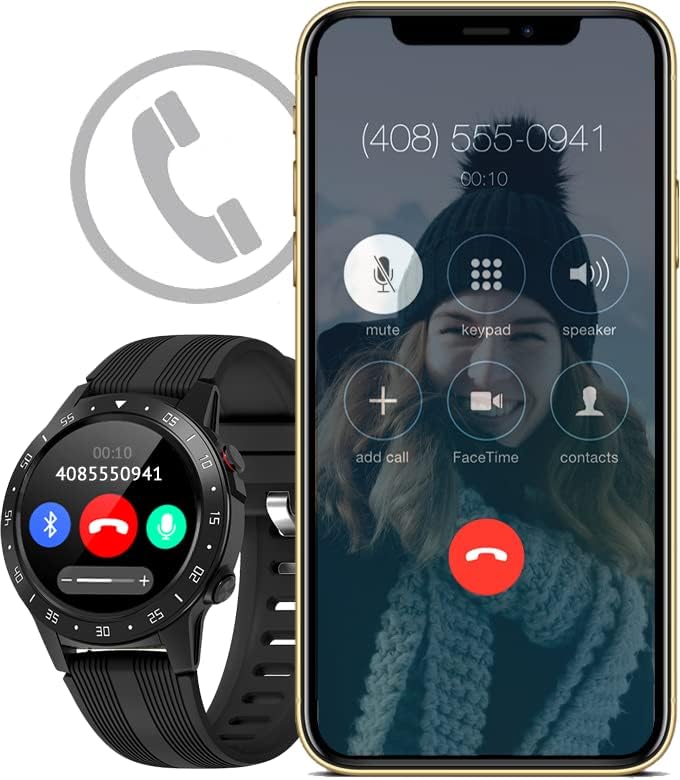
Image: The activity tracker and a smartphone side-by-side, both indicating an incoming call, demonstrating call notification synchronization.
4.3 Керування музикою
Control music playback on your paired smartphone directly from your activity tracker. This feature allows you to play, pause, skip tracks, and adjust volume without needing to access your phone.

Image: The activity tracker and a smartphone displaying synchronized music playback interfaces, allowing remote control of audio.
5. особливості
The Guardo Fit Coach Explore offers a range of features to support your active lifestyle:
- Multisport Tracker: Track various activities such as indoor and outdoor sports, cycling, and climbing.
- Custom Activity Tracking: Monitor specific activities with tailored settings.
- GPS: Built-in GPS for accurate tracking of routes and distances during outdoor activities.
- Монітор серцевого ритму: Постійно контролюйте свій пульс.
- Монітор артеріального тиску: Measure your blood pressure directly from the device.
- Сповіщення: Отримуйте сповіщення про дзвінки, повідомлення та сповіщення додатків.
- Компас: Integrated digital compass for navigation.
- Акселерометр: Measures movement and activity.
- Висотомір: Measures altitude, useful for hiking and climbing.
- Барометр: Measures atmospheric pressure, aiding in weather prediction and altitude accuracy.

Image: The activity tracker's display surrounded by icons symbolizing its diverse functionalities, including communication and utility features.

Image: The activity tracker's screen showing real-time GPS data, such as distance covered, pace, and heart rate, overlaid on a map.
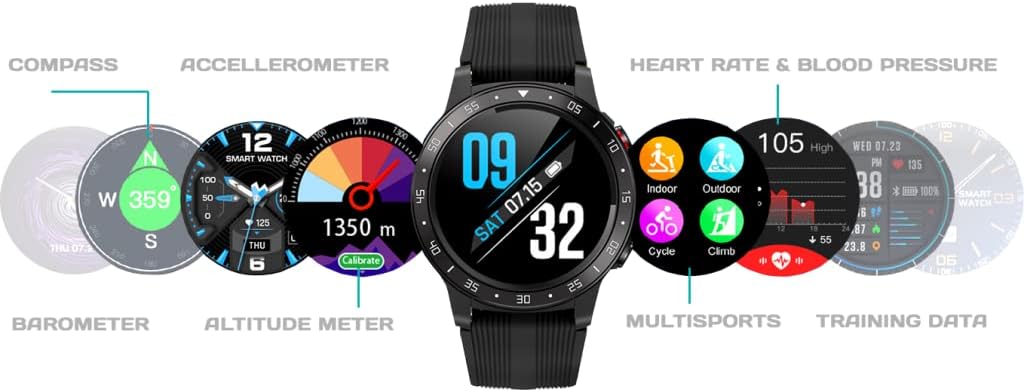
Зображення: Комплексний view of the activity tracker's display, showcasing various data points from its integrated sensors, including environmental and health metrics.
6. Технічне обслуговування
6.1 Очищення
Regularly clean your activity tracker to prevent skin irritation and maintain device functionality. Use a soft, damp, lint-free cloth to wipe the screen and strap. Avoid harsh chemicals or abrasive materials.
6.2 Догляд за акумулятором
Щоб продовжити термін служби акумулятора, уникайте впливу екстремальних температур на пристрій. Регулярно заряджайте пристрій, але не залишайте його повністю зарядженим або повністю розрядженим протягом тривалого часу.
7. Вирішення проблем
7.1 Пристрій не вмикається
- Переконайтеся, що пристрій повністю заряджений. Підключіть його до зарядного пристрою щонайменше на 30 хвилин.
- Press and hold the power button (if applicable) for 10-15 seconds to attempt a forced restart.
7.2 Проблеми зі сполученням
- Переконайтеся, що на вашому смартфоні увімкнено Bluetooth, і пристрій знаходиться в межах досяжності.
- Restart both your smartphone and the activity tracker.
- Forget the device in your smartphone's Bluetooth settings and attempt to pair again through the Guardo Fit Coach app.
- Перевірте, чи програму оновлено до останньої версії.
7.3 Неточні показники
- Переконайтеся, що пристрій щільно прилягає до зап'ястя, приблизно на ширину одного пальця вище зап'ястя.
- Очистіть датчики на задній панелі пристрою.
- For GPS, ensure you are in an open area with a clear view неба.
8. Технічні характеристики
| Особливість | Специфікація |
|---|---|
| Бренд | Гуардо |
| Модель | Досліджуйте |
| Сумісні пристрої | Smartphone (Android OS) |
| Тип дисплея | ЖК |
| Розмір екрана | 40 міліметрів |
| Бездротове підключення | Bluetooth |
| GPS | Вбудований GPS |
| Пристрій введення | Мікрофон, сенсорний екран |
| Акумуляторні батареї в комплекті | так |
| Особливості | Custom activity tracking, Blood pressure monitor, GPS, Notifications, Multisport Tracker |
9. Інформація про безпеку
- Не намагайтеся відкрити або розібрати пристрій.
- Тримайте пристрій подалі від екстремальних температур, прямих сонячних променів та вологи.
- This device is not a medical instrument. The data provided is for reference only and should not be used for medical diagnosis or treatment.
- Consult your doctor before starting any new exercise regimen or if you have any health concerns.
- Утилізуйте пристрій та його батарею відповідно до місцевих правил.


