1. Вступ
This manual provides detailed instructions for the installation, operation, and maintenance of your GAMEMAX Master M905 ATX Full Tower Computer Case. Please read this manual thoroughly before beginning assembly to ensure proper setup and safe usage. This computer case is designed to accommodate ATX motherboards and offers ample space for high-performance components and advanced cooling solutions.
2. Інформація про безпеку
- Always disconnect the power supply from the wall outlet before installing or removing any components to prevent electrical shock.
- Handle internal components with care. Avoid touching circuit boards directly; hold them by their edges.
- Wear an anti-static wrist strap when handling sensitive electronic components to prevent electrostatic discharge (ESD) damage.
- Тримайте дрібні деталі та гвинти подалі від дітей.
- Ensure proper ventilation around the computer case to prevent overheating.
3. Вміст упаковки
Перевірте, чи всі перелічені нижче предмети присутні у вашій упаковці:
- GAMEMAX Master M905 ATX Full Tower Computer Case
- Accessory Box (containing screws, standoffs, cable ties, and user manual)
- Pre-installed cooling fans (quantity may vary by model variant)
4. Ідентифікація компонента
Familiarize yourself with the various parts of the GAMEMAX Master M905 case.

малюнок 4.1: Передній-лівий view of the GAMEMAX Master M905 case, showcasing the tempered glass side panel and the front mesh panel with two illuminated blue fans. The top panel features front I/O ports.

малюнок 4.2: Top-front perspective of the case, showing the top ventilation grille and the front I/O panel which includes USB 2.0 and USB 3.0 ports, audio jacks, and power/reset buttons.
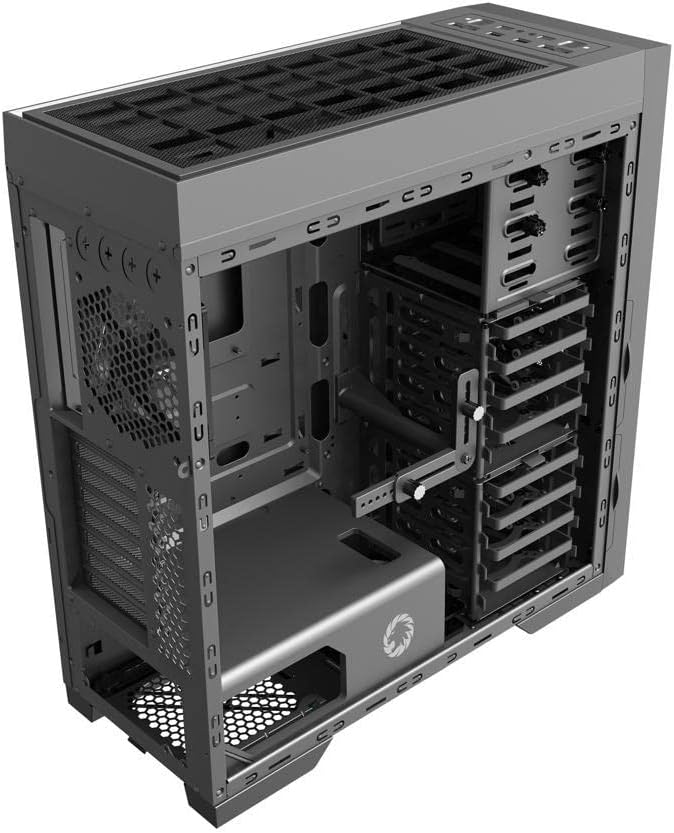
малюнок 4.3: внутрішній view of the case, illustrating the spacious interior with multiple drive bays, the motherboard mounting area, and the dedicated power supply shroud at the bottom.
5. Посібник із встановлення
5.1. Підготовка справи
- Зняти бічні панелі: Locate the thumbscrews on the rear of the case. Unscrew them and carefully slide off the tempered glass side panel and the solid steel side panel. Set them aside on a soft, non-abrasive surface.
- Коробка для аксесуарів: Locate the accessory box inside the case, usually secured in a drive bay. This box contains all necessary screws, standoffs, and cable ties for installation.
5.2. Встановлення материнської плати
- Встановити Standoffs: Identify the correct standoff locations for your ATX motherboard. The Master M905 typically has pre-installed standoffs for ATX. If not, install them using the provided tool.
- Встановлення щитка вводу/виводу: Snap your motherboard's I/O shield into the opening at the rear of the case from the inside. Ensure it is securely seated.
- Кріплення материнської плати: Carefully align your motherboard with the standoffs and the I/O shield. Gently lower the motherboard into place.
- Безпечна материнська плата: Use the provided motherboard screws to secure the motherboard to the standoffs. Do not overtighten.
5.3. Встановлення блоку живлення (БЖ)
- Посада блоку живлення: The Master M905 supports bottom-mounted PSUs. Slide your PSU into the designated compartment at the bottom rear of the case, ensuring the fan faces downwards (if the case has a bottom vent) or upwards.
- Безпечний блок живлення: Align the PSU with the screw holes at the rear of the case. Secure it with the provided PSU screws.
5.4. Встановлення накопичувача (HDD/SSD)
The case supports various drive configurations. Refer to the internal layout for specific bay types.
- 3.5-дюймові жорсткі диски: Typically installed in tool-less drive cages or trays. Slide the HDD into a tray and secure it with clips or screws.
- 2.5-дюймові SSD-накопичувачі: Can be mounted on dedicated SSD brackets behind the motherboard tray or in 3.5" drive trays using adapter screws.
5.5. Встановлення плати розширення (PCIe)
- Зніміть кришки слотів: Unscrew or remove the necessary PCIe slot covers from the rear of the case corresponding to your motherboard's PCIe slots.
- Встановлення карти: Carefully insert your expansion card (e.g., graphics card) into the appropriate PCIe slot on the motherboard until it clicks into place.
- Безпечна картка: Secure the expansion card to the case with the provided screws.
5.6. Front Panel Connector Installation
Connect the front panel cables from the case to the corresponding headers on your motherboard. Consult your motherboard manual for exact header locations.
- USB 2.0/3.0: Підключіть USB-кабелі до USB-роз'ємів материнської плати.
- Аудіо: Connect the HD Audio cable to the motherboard's audio header.
- Power/Reset/LEDs: Connect the small individual cables (Power SW, Reset SW, HDD LED, Power LED) to the front panel header pins on your motherboard. Pay close attention to polarity for LEDs.
5.7. Кабельний менеджмент
Використовуйте вирізи для прокладання кабелів та точки кріплення за лотком материнської плати для їх упорядкування. Це покращує потік повітря та естетику.
6. Операція
6.1. Увімкнення
Once all components are installed and cables are connected, replace the side panels. Connect your monitor, keyboard, mouse, and power cable to the PSU. Press the power button on the front panel to start your system.
6.2. Порти введення/виведення на передній панелі
Передня панель забезпечує зручний доступ до:
- Порти USB 2.0: For connecting peripherals like keyboards, mice, and older USB devices.
- Порти USB 3.0: Для високошвидкісної передачі даних із сумісними пристроями.
- Аудіороз'єми: Для підключення навушників та мікрофонів.
- Кнопка живлення: Щоб увімкнути/вимкнути систему.
- Кнопка скидання: Для перезавантаження системи.
7. Технічне обслуговування
7.1. прибирання
Регулярне очищення допомагає підтримувати оптимальну продуктивність та подовжує термін служби ваших компонентів.
- Зовні: Протріть зовнішні поверхні м’якою, damp тканина. Уникайте агресивних хімікатів.
- Інтер'єр: Use compressed air to remove dust from fans, heatsinks, and other components. Perform this outdoors or in a well-ventilated area.
7.2. Dust Filter Maintenance
The Master M905 case is equipped with dust filters to prevent dust buildup. Regularly clean these filters:
- Locate and remove the dust filters (e.g., front, top, bottom PSU intake).
- Rinse them under running water or use a soft brush to remove accumulated dust.
- Перед повторним встановленням фільтрів переконайтеся, що вони повністю сухі.
8. Вирішення проблем
Якщо у вас виникли проблеми, розгляньте такі основні кроки усунення несправностей:
- Система не вмикається: Check all power connections, including the PSU to the wall, the 24-pin ATX connector, and the 8-pin CPU power connector to the motherboard. Ensure the front panel power switch cable is correctly connected to the motherboard.
- Вентилятори не обертаються: Verify that all fan cables are securely connected to the motherboard fan headers or a fan controller.
- Не працюють USB-порти: Переконайтеся, що USB-кабелі передньої панелі правильно підключені до USB-роз'ємів материнської плати.
- Немає виводу на дисплей: Confirm that your graphics card is properly seated in its PCIe slot and that all necessary power cables are connected to it. Ensure your monitor cable is connected to the graphics card, not the motherboard's integrated graphics ports (unless you are using integrated graphics).
9. Технічні характеристики
| Особливість | Специфікація |
|---|---|
| Бренд | GAMEMAX |
| Модель | Майстер М905 |
| Тип корпусу | Повна вежа |
| Сумісність материнської плати | ATX |
| матеріал | Сталь, Загартоване скло |
| Колір | чорний |
| Розміри продукту (ДxШxВ) | 23.5 x 22.95 x 11.26 дюймів |
| Передні порти вводу-виводу | 2x USB 2.0, 2x USB 3.0, аудіовхід/вихід |
| Слоти розширення | 8 |
| Спосіб охолодження | Повітря, вода |
| Тип кріплення блоку живлення | Tower (Bottom-mounted) |
10. Гарантія та підтримка
For warranty information and technical support, please refer to the official GAMEMAX webсайт або зверніться до місцевого продавця. Зберігайте чек про покупку для гарантійних випадків.


