1. Продукт закінчивсяview
The LYCEBELL LC-1500 is a non-contact infrared thermometer designed for accurate temperature measurement across a wide range. It features dual lasers for precise targeting and an adjustable emissivity for various surfaces. This device is suitable for industrial and daily temperature measurement applications.

Image 1.1: LYCEBELL LC-1500 Infrared Thermometer and included accessories.
Ключові характеристики:
- Діапазон високих температур: Вимірює температуру від -50°C до 1500°C (від -58°F до 2732°F).
- Регульований коефіцієнт випромінювання: Range of 0.1 to 1.0 for improved accuracy on different materials.
- Dual Lasers: Provides precise targeting for accurate measurements.
- Distance Spot Ratio (D:S): 30:1 for safe measurement from a distance.
- Bright Backlit LCD Display: Easy temperature reading in various lighting conditions.
- MAX / HOLD Data Function: Captures maximum readings and holds current data.
- Перемикач блоку: Легко перемикатися між градусами Цельсія (°C) та Фаренгейта (°F).
- Автоматичне вимкнення: Подовжує термін служби батареї.
- Індикатор низької потужності: Сповіщає про низький заряд батареї.
2. Інформація про безпеку
Please read and understand all safety warnings before using this product. Failure to do so may result in injury or damage to the device.
- NOT for Human Use: This thermometer is designed for industrial and general-purpose temperature measurement and is not intended for medical use or measuring human body temperature.
- Лазерна безпека: This device uses a Class II laser with optical power <0.5mW and wavelength 630~670 nm.
- НЕ РОБИТЬ look directly into the laser beam or point it at others. Direct eye exposure can cause eye damage.
- НЕ РОБИТЬ aim the laser at reflective surfaces, as the beam could reflect into your eyes.
- Тримайте пристрій у недоступному для дітей місці.
- Exercise caution when measuring hot surfaces. The thermometer measures surface temperature, and the object may remain very hot even after the reading is taken.
3. Вміст упаковки
- LYCEBELL LC-1500 Infrared Thermometer
- Інструкція з експлуатації
- Карабін (для портативності)
- Акумулятор 9В
- Маленька викрутка
- Сумка для перенесення
4. Ідентифікація частин
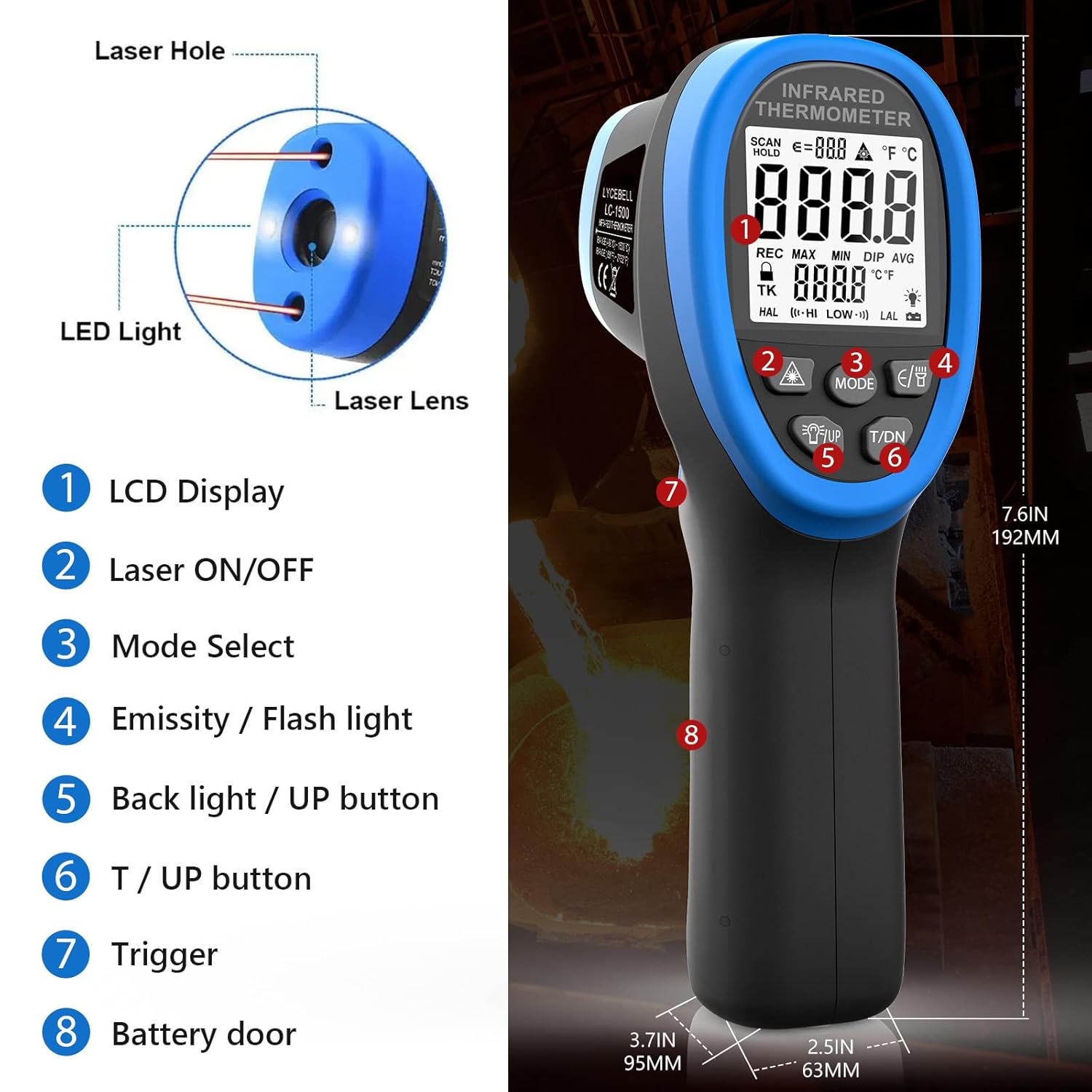
Image 4.1: Key components of the LYCEBELL LC-1500 Infrared Thermometer.
- РК-дисплей
- Кнопка ввімкнення/вимкнення лазера
- Кнопка вибору режиму
- Emissivity / Flashlight Button
- Backlight / UP Button
- T / DN Button (Temperature Unit / Down)
- Тригер
- Дверцята батареї
5. Налаштування
5.1 Встановлення батареї
- Locate the battery compartment on the handle (Part 8 in Image 4.1).
- Use the provided screwdriver to open the battery door.
- Вставте батарейку 9 В, дотримуючись правильної полярності.
- Закрийте кришку батарейного відсіку та закріпіть її гвинтом.
5.2 Кріплення карабіна
A carabiner is included for convenient carrying. Attach it to the designated loop at the base of the handle.

Image 5.1: The thermometer with an attached carabiner for portability.
6. Інструкція з експлуатації
6.1 Основні вимірювання
- Направте термометр на цільову поверхню.
- Press and hold the Trigger (Part 7) to begin measurement. The temperature will be displayed on the LCD.
- Release the Trigger to hold the current reading on the display.
6.2 Перемикання одиниць вимірювання (°C/°F)
While the product is working (after pressing the trigger), directly press the 'T / DN' button (Part 6) to switch between Celsius (°C) and Fahrenheit (°F).

Image 6.1: Display showing temperature readings in both Celsius and Fahrenheit.
6.3 Керування лазерною указкою
Press the Laser ON/OFF button (Part 2) to display the laser symbol on the screen and activate the laser light. Release the trigger to turn off the laser. Press the key again to make the laser symbol and laser disappear from the display.
6.4 Регулювання випромінювальної здатності
Emissivity (ε) is the ability of a material to emit thermal energy. Different materials have different emissivities. For accurate measurements, adjust the emissivity setting to match the target material. While the product is working, press the 'E/B' button (Part 4) to enter Emissivity mode. Use the 'UP' (Part 5) and 'DN' (Part 6) buttons to adjust the value from 0.1 to 1.0.

Image 6.2: The adjustable emissivity feature allows for accurate readings on various materials.
Загальні значення випромінювальної здатності:
| матеріал | Емісійність | матеріал | Емісійність |
|---|---|---|---|
| Асфальт | 0.90 до 0.98 | Текстиль (чорний) | 0.98 |
| Бетон | 0.94 | Шкіра людини | 0.98 |
| Цемент | 0.96 | Мильна бульбашка | 0.75 до 0.80 |
| Пісок | 0.90 | Деревне вугілля (порошок) | 0.96 |
| грунт | 0.92 до 0.96 | лак | 0.80-0.95 |
| вода | 0.92 до 0.96 | Lacquer (reluster) | 0.97 |
| лід | 0.96 до 0.98 | Гума (чорна) | 0.94 |
| сніг | 0.83 | пластик | 0.85-0.95 |
| скло | 0.90 до 0.95 | Пиломатеріали | 0.90 |
| Керамічний | 0.90 до 0.94 | Папір | 0.70-0.94 |
| Мармур | 0.94 | Оксид хрому | 0.81 |
| Гіпс | 0.80 до 0.90 | Оксид міді | 0.78 |
| Compo | 0.89 до 0.98 | Оксид заліза | 0.78 до 0.82 |
| Цегла | 0.93 до 0.96 | Нержавіюча сталь | 0.2-0.3 |
6.5 Mode Functions (MAX, MIN, DIF, AVG, HAL, LAL)
Press the 'MODE' button (Part 3) to cycle through various measurement options:
- МАКС: Measures the maximum temperature detected during a scan.
- ХВ: Measures the minimum temperature detected during a scan.
- DIF: Calculates the difference between the maximum and minimum temperatures.
- СРЕД: Calculates the average temperature of all measurements taken.
- HAL (High Alarm): Sets a high-temperature alarm threshold.
- LAL (Low Alarm): Sets a low-temperature alarm threshold.
6.6 Сигнал високої/низької температури
To set a high or low temperature alarm:
- Press the 'MODE' button (Part 3) until 'HAL' (High Alarm) or 'LAL' (Low Alarm) is displayed.
- Use the 'UP' (Part 5) and 'DN' (Part 6) buttons to adjust the alarm threshold. Long press to accelerate value change.
- When the measured temperature exceeds the 'HAL' setting or falls below the 'LAL' setting, the LCD will display 'HI' or 'LO' respectively, and a buzzer will sound.
6.7 Відеодемонстрація
Video 6.1: Official LYCEBELL demonstration of the LC-1500 Infrared Thermometer, including unboxing, button functions, and temperature testing.
7. Measurement Principles: Distance-to-Spot Ratio (D:S)
The D:S ratio indicates how large an area the thermometer measures from a given distance. For the LC-1500, the D:S ratio is 30:1. This means that at a distance of 30 units from the target, the measurement spot diameter will be 1 unit. A higher D:S ratio allows for more accurate measurements of smaller areas from a greater distance, which is crucial for safety when measuring high temperatures.

Image 7.1: Illustration of the 30:1 Distance-to-Spot ratio.
8. Додатки
The LYCEBELL LC-1500 infrared thermometer is versatile and can be used in various settings, including:
- Testing high temperatures in industrial processes.
- Measuring water temperature.
- HVAC system diagnostics.
- Car repair and engine temperature checks.
- Monitoring temperatures in cooking, such as pizza ovens.
- Metal casting, smelting, and alloy temperature measurement.
9. Технічні характеристики
| Особливість | Значення |
|---|---|
| Діапазон температур | Від -58°F до 2732°F (від -50°C до 1500°C) |
| Регульована коефіцієнт випромінювання | 0.1 до 1.0 |
| Співвідношення відстані до точки (D:S) | 30:1 |
| Рівень лазерної безпеки | Class II, <0.5mW, 630~670 nm |
| Тип дисплея | ЖК |
| Технологія підключення | Інфрачервоний |
| Джерело живлення | Акумулятор 9В |
| Розміри продукту | 9.25 x 6.5 x 3.23 дюймів |
| Вага товару | 14.82 унції |
| Зовнішній матеріал | метал |
10. Технічне обслуговування та догляд
- Прибирання: Wipe the device clean with a soft, dry cloth. Do not use abrasive cleaners or solvents.
- Зберігання: Store the thermometer in its carrying pouch in a cool, dry place when not in use.
- Батарея: Вийміть батарею, якщо пристрій не використовуватиметься протягом тривалого часу, щоб запобігти витіканню.
11. Вирішення проблем
If you encounter issues with your LYCEBELL LC-1500 thermometer, consider the following general troubleshooting steps:
- Немає живлення: Перевірте, чи правильно встановлено акумулятор і чи достатньо заряджено. За потреби замініть акумулятор.
- Неточні показання: Ensure the emissivity setting is appropriate for the material being measured. Verify the target is within the optimal distance-to-spot ratio.
- Проблеми з відображенням: If the display is dim or flickering, replace the battery.
For further assistance, please contact LYCEBELL customer support.
12. Гарантія та підтримка
For information regarding warranty coverage, product support, or service, please refer to the documentation included with your purchase or visit the official LYCEBELL webсайт. Зберігайте чек про покупку як підтвердження покупки.


