1. Вступ
Thank you for choosing the LYCEBELL LC-846A HVAC Anemometer CFM Meter. This device is designed for accurate measurement of wind speed, air flow, and air temperature. It is an essential tool for HVAC professionals, outdoor enthusiasts, and anyone requiring precise air movement data. This manual provides detailed instructions for the proper setup, operation, and maintenance of your anemometer to ensure optimal performance and longevity.
Ключові особливості:
- Accurate wind speed measurement with MAX/MIN/Current readings.
- High precision air flow (CFM) and air temperature measurements.
- Large backlit LCD display for clear readability in various lighting conditions.
- Data hold function and built-in data recorder for up to 600 sets of values.
- Manual/Auto power off feature to conserve battery life.
- Equipped with a dust-proof carrying case for protection and portability.
2. Продукт закінчивсяview
Familiarize yourself with the components and display of your LC-846A Anemometer.
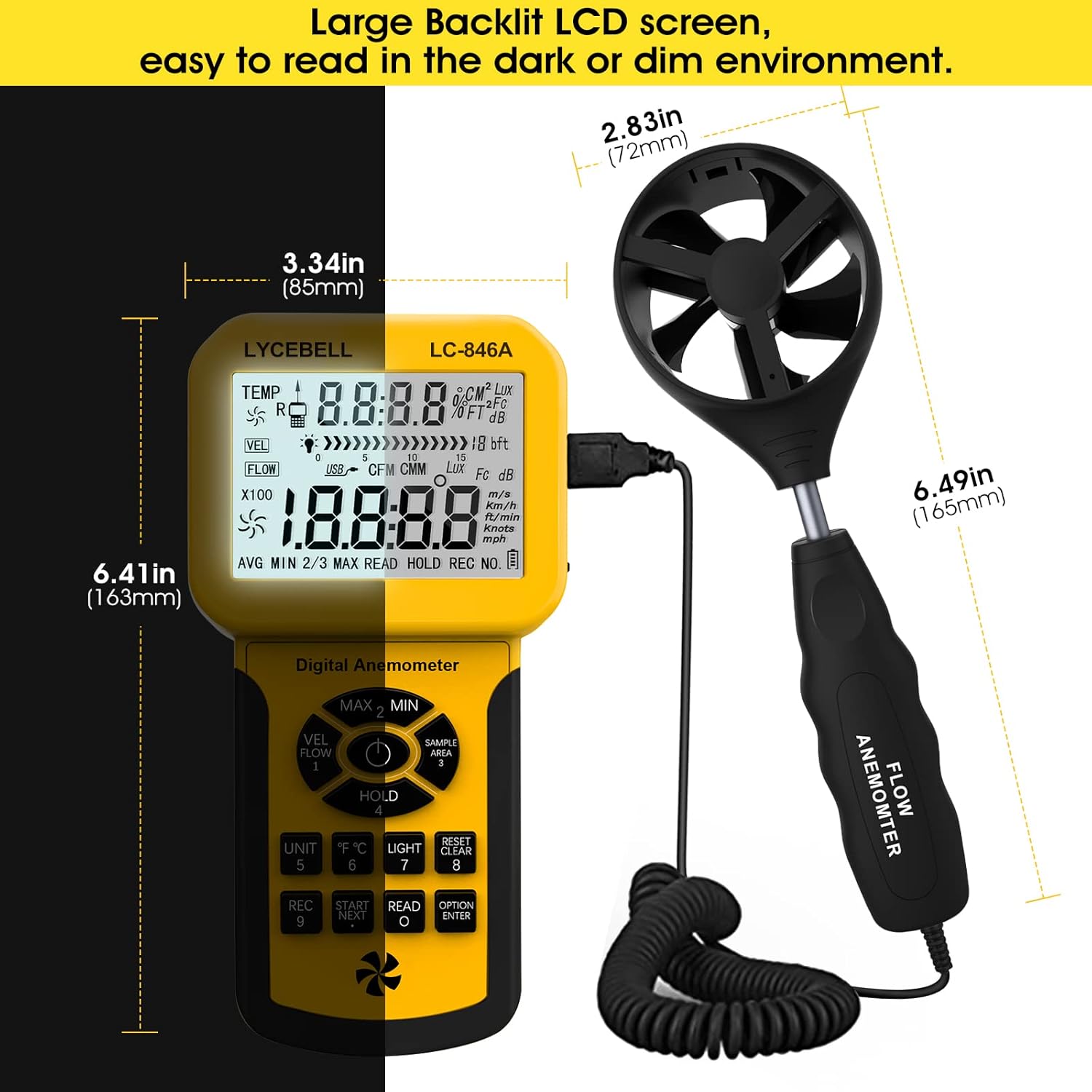
Figure 2.1: LC-846A Anemometer Main Unit and Vane Probe with Dimensions
This image displays the main unit of the LC-846A Anemometer and its detachable vane probe, along with their respective dimensions. The main unit features a large LCD screen and control buttons, while the vane probe is connected via a coiled cable.
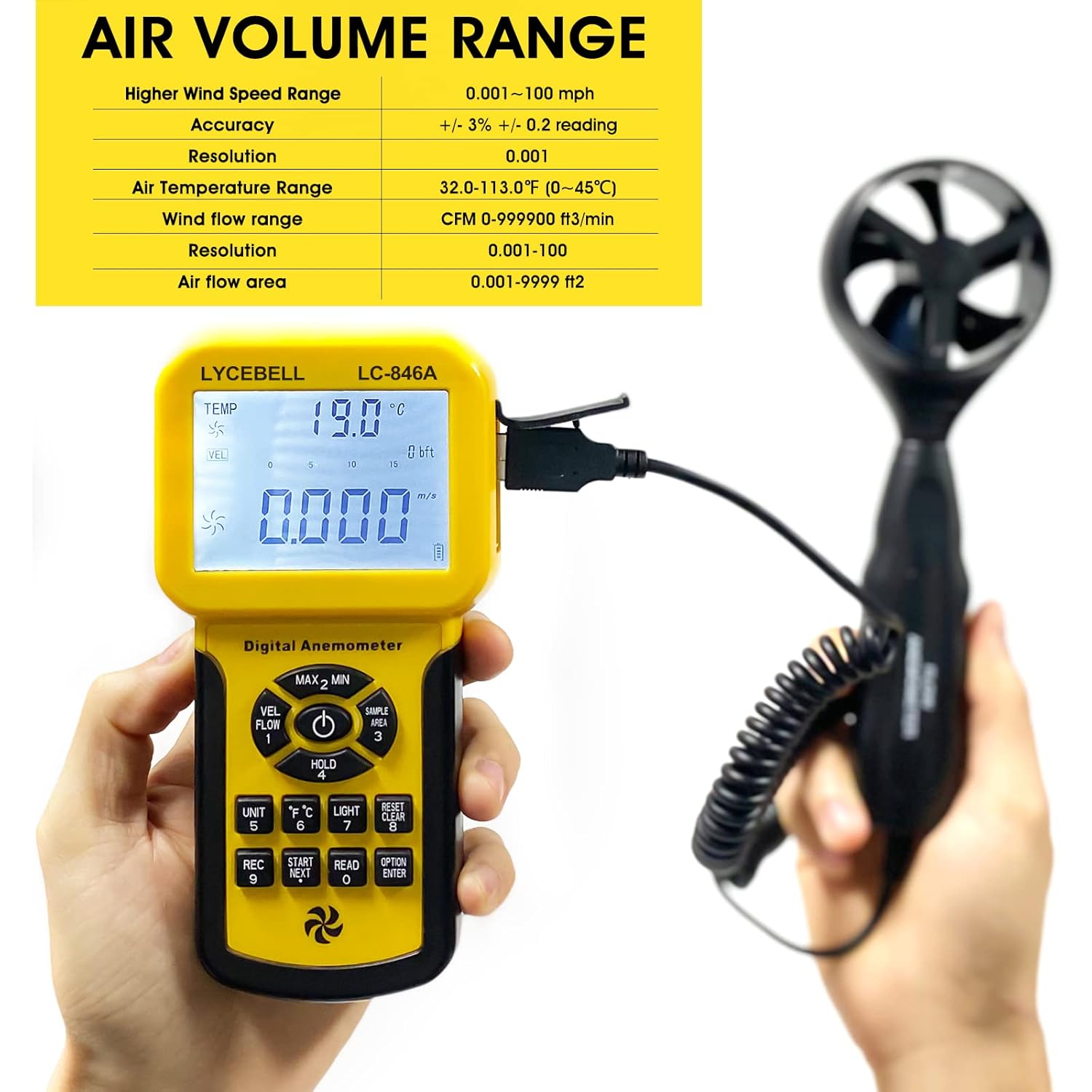
Figure 2.2: Air Volume Range Display
The anemometer's display shows the air volume range and other measurement specifications, highlighting its capability to measure various air parameters.

Рисунок 2.3: Функції кнопок
This image illustrates the various buttons on the LC-846A Anemometer and their corresponding functions, such as backlight control, MAX/MIN mode, unit switching, and data recording.

Figure 2.4: Battery Type and Extendable Wand
The image shows the 9V battery compartment and the extendable wand feature of the wind sensor, allowing for flexible positioning during measurements.
3. Налаштування
- Установка батареї: Open the battery compartment cover on the back of the main unit. Insert one 9V (6F22) battery, ensuring correct polarity. Close the cover securely.
- Connect Vane Probe: Connect the coiled cable from the vane probe to the USB port on the top of the main unit. Ensure the connection is firm.
- Extend Vane Probe (Optional): The vane probe features an extendable wand. Gently pull the probe head away from the handle to extend it for reaching difficult areas. Push it back to retract for storage.
- Увімкнення: Натисніть УВІМКНЕННЯ/ВИМКНЕННЯ ЖИВЛЕННЯ кнопку, щоб увімкнути пристрій. РК-дисплей підсвітиться.
4. Інструкція з експлуатації
This section details the functions and operation of the LC-846A Anemometer.
Video 4.1: LYCEBELL 846A CFM Meter Overview
This video provides a visual guide to the LYCEBELL 846A CFM Meter, demonstrating its components, assembly, and basic functions. It shows how to connect the probe, power on the device, and navigate through some of its settings.
- Увімкнення/вимкнення живлення: Натисніть УВІМКНЕННЯ/ВИМКНЕННЯ ЖИВЛЕННЯ button to turn the device on or off. The device will automatically power off after a period of inactivity to save battery.
- Вибір одиниці: Натисніть ОДИНИЦЯ button to cycle through wind speed units: m/s, km/h, ft/min, knots, mph.
- Вибір одиниці вимірювання температури: Натисніть ° C / ° F button to switch between Celsius and Fahrenheit for temperature readings.
- MAX/MIN/AVG Mode: Натисніть МАКС/МІН кнопку до view maximum, minimum, or average wind speed/air flow readings. Press again to cycle.
- Утримання даних: Натисніть ТРИМАТИ кнопку, щоб зафіксувати поточне значення на дисплеї. Натисніть ще раз, щоб відпустити.
- Контроль підсвічування: Натисніть СВІТЛО кнопку, щоб увімкнути або вимкнути підсвічування РК-дисплея.
- Air Flow Area Setting: To measure CFM, you must first input the duct's cross-sectional area. Press SAMPLE AREA, then use the arrow keys to adjust the value and ENTER для підтвердження.
- Запис даних: Прес REC to start recording data. The device can store up to 600 sets of measured values. Press ПРОЧИТАЙТЕ до view записані дані.
- Wind Speed/Air Volume Toggle: Використовуйте VEL/FLOW button to switch between wind velocity and air volume (CFM) measurements.

Figure 4.1: Anemometer in Use for HVAC and Air Flow
This image demonstrates the LC-846A Anemometer being used in practical applications, such as measuring air flow in an HVAC system and balancing air in a large space.
5. Технічні характеристики
| Специфікація | Значення |
|---|---|
| Бренд | ЛІЦЕБЕЛ |
| Модель | LC-846A |
| Розміри предмета (Д x Ш x В) | 6.41 x 3.34 x 1.36 дюймів |
| Вага товару | 1.93 фунта |
| Діапазон швидкості вітру | 0.001~100 mph (0.3~30 m/s) |
| Точність швидкості вітру | +/- 3% +/- 0.2 reading |
| Роздільна здатність швидкості вітру | 0.001 |
| Air Flow Range (CFM) | 0-999900 XNUMX фут³/хв |
| Площа потоку повітря | 0.001-9999 ft² |
| Діапазон температур повітря | 32.0-113.0 °F (0~45 °C) |
| Зберігання даних | Up to 600 sets of measured values |
| Джерело живлення | 9V (6F22) Battery |
6. Вирішення проблем
- Пристрій не вмикається:
- Check if the 9V battery is installed correctly with proper polarity.
- Замініть батарею, якщо вона розряджена.
- Неточні показники:
- Ensure the vane probe is clean and free from obstructions.
- Verify that the vane probe is securely connected to the main unit.
- Confirm that the correct air flow area is set for CFM measurements.
- Avoid taking measurements in turbulent air conditions.
- Дисплей тьмяний або нечитабельний:
- Activate the backlight by pressing the СВІТЛО кнопку.
- Check battery level; a low battery can cause a dim display. Replace if necessary.
- Data recording issues:
- Ensure there is sufficient memory available for new recordings.
- Follow the data recording steps precisely as outlined in the Operating Instructions.
7. Технічне обслуговування
- Прибирання: Use a soft, dry cloth to clean the device. Do not use abrasive cleaners or solvents. Keep the vane probe free of dust and debris to ensure accurate readings.
- Зберігання: When not in use, store the anemometer in its protective carrying case in a cool, dry place, away from direct sunlight and extreme temperatures. Remove the battery if storing for extended periods to prevent leakage.
- Заміна батареї: Замініть батарейку 9 В, коли на дисплеї з'являється індикатор низького заряду батареї або якщо пристрій не вмикається.

Figure 7.1: Protective Carrying Case
The anemometer comes with a durable, dust-proof carrying case for safe storage and transport, protecting the device from drops and bumps.
8. Гарантія та підтримка
The LYCEBELL LC-846A Anemometer comes with a 12 Months Worry-Free Replacement warranty for any defective product due to the production process. For technical support, warranty claims, or any questions regarding your device, please do not hesitate to contact our friendly support team. Refer to the contact information provided with your purchase or visit the official LYCEBELL webсайт для допомоги.
9. Застосовні сценарії
The LC-846A Anemometer is suitable for a wide range of applications, including:
- Air flow balancing in HVAC systems.
- Testing dust collection systems.
- Environmental monitoring (meteorology).
- Outdoor activities such as sailing, hiking, and kite flying.
- Long-range shooting.
- Cooling diagnostics.


