1. Продукт закінчивсяview
The Hantek HDP135V6 is a single-channel programmable DC power supply designed for various electronic applications. It offers precise control over voltage and current output, with a maximum output of 35V and 6A. Key features include a clear 4-digit display, multiple protection mechanisms, and memory settings for frequently used configurations.
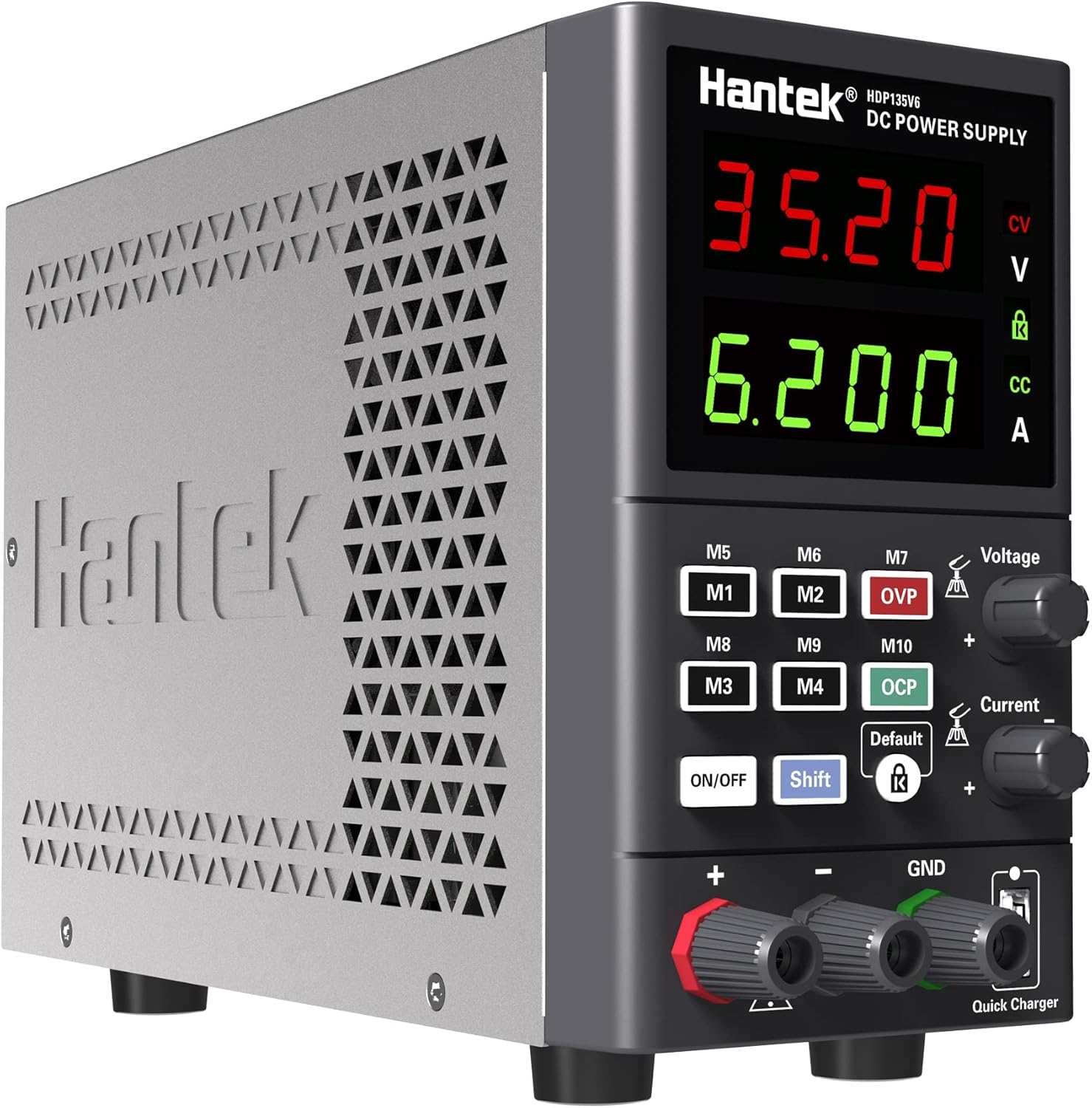
малюнок 1.1: Фронт view of the Hantek HDP135V6 Programmable DC Power Supply, showing the display, control knobs, and output terminals.
Ключові характеристики:
- Easy setup with two separate rapid adjustment knobs for voltagе і струм.
- 4-digit display for voltage and current, with 10mV/1mA resolution.
- Selectable 230V/115V input voltage.
- Maximum output of 35V/6A.
- Standard 5~12V USB quick charge port.
- 10 save/recall memory settings (M1-M10).
- Comprehensive protection features: Over Current (OC), Over Voltage (OV), Overload, Overheat, and Short-circuit protection.
- Key lock function to prevent accidental changes.
- Output ON/OFF switch lock.
- Smart temperature-controlled cooling fan.
- Компактний і легкий дизайн для портативності.
2. Техніка безпеки
To ensure safe operation and prevent damage to the device or connected equipment, please read and follow these safety instructions carefully.
- Джерело живлення: Переконайтеся, що блок живлення підключено до заземленої розетки змінного струму з правильною напругоюtage. Verify the AC selector switch on the rear panel is set to the appropriate voltage (115V or 230V) for your region before connecting the power cord.
- Вентиляція: Do not block the ventilation openings on the device. Ensure adequate airflow around the unit to prevent overheating.
- Середовище: Operate the power supply in a dry, well-ventilated area, away from direct sunlight, high temperatures, humidity, and dust.
- Підключення навантаження: Always connect the load to the output terminals before turning on the output. Ensure the load is within the specified voltage and current limits of the power supply.
- Вихідні клеми: Do not touch the output terminals when the power supply is operating.
- Технічне обслуговування: Refer all servicing to qualified personnel. Do not attempt to open or repair the unit yourself.
- Запобіжник: Replace fuses only with the specified type and rating.
3. Налаштування
3.1 Розпакування та перевірка
Upon receiving your Hantek HDP135V6, carefully unpack the unit and inspect it for any signs of damage during transit. Retain the packaging materials for future transport or storage.
3.2 Підключення живлення
- Locate the AC selector switch on the rear panel of the power supply.
- Встановіть перемикач у відповідне положення гучностіtagдля вашого регіону (115 В або 230 В). Incorrect setting can cause damage to the unit.
- Connect the provided AC power cord to the power input socket on the rear panel and then to a grounded AC outlet.

малюнок 3.1: Задня view of the Hantek HDP135V6, highlighting the AC selector switch, power input, and cooling fan.
3.3 Елементи керування та індикатори передньої панелі
The front panel provides all necessary controls and displays for operating the power supply.
- томtage Дисплей: Shows the set or actual output voltage.
- Поточний дисплей: Shows the set or actual output current.
- томtagРучка регулювання: Використовується для налаштування гучності виходуtage.
- Ручка регулювання струму: Used to set the output current limit.
- Кнопки M1-M10: Memory buttons for saving and recalling settings.
- Кнопка ON/OFF: Toggles the output power.
- Кнопка Shift: Used in combination with other buttons for advanced functions.
- Кнопка блокування: Activates/deactivates the key lock function.
- Вихідні клеми (+, -, GND): Підключіть навантаження сюди.
- Quick Charger USB Port: Provides 5~12V USB output.
4. Інструкція з експлуатації
4.1 Основна операція
- Ensure the power supply is properly connected to AC power.
- Press the main power switch on the rear panel to turn on the unit. The display will illuminate.
- Налаштування Voltage: Обертайте томtage Ручка регулювання щоб встановити потрібну гучність на виходіtage.
- Встановлення обмеження струму: Обертайте Ручка регулювання струму to set the desired maximum output current. This acts as a current limit for your connected load.
- Підключення навантаження: Connect your device or circuit to the output terminals (Red for positive '+', Black for negative '-', Green for Ground 'GND').
- Активація виходу: Натисніть УВІМК./ВИМК button on the front panel to enable the output. The display will show the actual output voltagе і струм.
- Deactivating Output: Натисніть УВІМК./ВИМК button again to disable the output.
4.2 Memory Functions (M1-M10)
The power supply allows you to save and recall up to 10 sets of voltage і поточні налаштування.
- Збереження налаштувань: Встановіть потрібну гучністьtage and current. Press and hold the Shift кнопку, а потім натисніть одну з М1-М10 buttons until the display indicates the setting is saved.
- Відновлення налаштувань: Натисніть потрібний М1-М10 button to recall the saved voltage і поточні налаштування.
4.3 Функції захисту
The HDP135V6 includes several protection features to safeguard the unit and connected devices:
- Захист від перевантаження по струму (OCP): Automatically limits or shuts down output if current exceeds the set limit.
- Над випtage Захист (OVP): Вимикає вихід, якщо гучністьtage exceeds a preset limit.
- Захист від перевантаження: Захищає від надмірного споживання енергії.
- Захист від перегріву: Activates the cooling fan and may shut down if internal temperature is too high.
- Захист від короткого замикання: Immediately cuts off output in case of a short circuit.
4.4 Функція блокування клавіш
To prevent accidental changes to settings during operation, you can activate the key lock function.
- Активувати блокування: Натисніть Замок button. A lock icon will appear on the display.
- Вимкнути блокування: Натисніть Замок кнопку ще раз. Значок замка зникне.
4.5 USB Quick Charge
The front panel features a USB port for quick charging compatible devices. This port provides a variable output from 5V to 12V, depending on the connected device's charging protocol.
5. Технічне обслуговування
5.1 Очищення
To clean the exterior of the power supply, use a soft, damp cloth. Do not use abrasive cleaners or solvents. Ensure the unit is powered off and disconnected from the AC supply before cleaning.
5.2 Заміна запобіжника
If the power supply fails to power on, the fuse may need replacement. The fuse holder is located on the rear panel, integrated with the AC input socket.
- Disconnect the power supply from the AC outlet.
- Using a small flat-head screwdriver, gently pry open the fuse compartment within the AC input socket.
- Remove the old fuse and replace it with a new fuse of the same type and rating (e.g., 5.0AT/250V for 110V/115V input, or 3.15AT/250V for 220V/230V input). Refer to the rating label on the rear panel.
- Надійно закрийте відсік запобіжників.
6. Вирішення проблем
If you encounter issues with your Hantek HDP135V6, refer to the following common problems and solutions:
| проблема | Можлива причина | Рішення |
|---|---|---|
| Пристрій не вмикається. | No AC power, faulty power cord, blown fuse, incorrect AC selector setting. | Check AC power connection. Verify AC selector switch is correct. Replace fuse if blown (refer to Section 5.2). |
| Вихідний об'єм відсутнійtagе/струм. | Output is OFF, OCP/OVP activated, short circuit in load. | Press the ON/OFF button to enable output. Check for OCP/OVP indicators. Disconnect load and check for short circuits. |
| Вихід обtage/current is unstable or incorrect. | Loose connections, faulty load, internal issue. | Check all connections. Test with a different load. If problem persists, contact support. |
| Агрегат перегрівається. | Заблокована вентиляція, надмірне навантаження. | Ensure ventilation openings are clear. Reduce load or operate in a cooler environment. |
| Unexpected voltage spikes on output activation. | Characteristic of power supply design, especially with very light or no load. | Always connect a suitable load before activating output. Monitor output carefully, especially with sensitive devices. If critical, consider adding a dummy load or using a power supply with soft-start features. |
7. Технічні характеристики
| Параметр | Значення |
|---|---|
| Модель | HDP135V6 |
| Вихідний випtage | 0-35В |
| Вихідний струм | 0-6A |
| томtage Роздільна здатність | 10mV |
| Поточна резолюція | 1 мА |
| Вхідний об'ємtage | 115V/230V AC (Switchable) |
| Вихідна ватtage | 210 Вт |
| USB-вихід швидкої зарядки | 5~12В |
| Розміри продукту (Д x Ш x В) | 5.91 x 3.35 x 9.06 дюйма (150 x 85 x 230 мм) |
| Вага товару | 4.44 фунта (2.01 кг) |
| Виробник | Qingdao Hantek Electronic Co., Ltd. |
8. Гарантія та підтримка
8.1 Інформація про гарантію
Hantek products are typically covered by a manufacturer's warranty against defects in materials and workmanship. Please refer to the warranty card included with your product or contact Hantek customer service for specific warranty terms and conditions.
8.2 Підтримка клієнтів
For technical assistance, troubleshooting, or service inquiries, please contact Hantek customer support. Contact information can usually be found on the manufacturer's official webсайті або на упаковці продукту.


