1. Вступ
Дякуємо за покупкуasing the Top Tech Audio Spike-4 Bluetooth Speaker. This manual provides important information regarding the setup, operation, maintenance, and troubleshooting of your new speaker. Please read this manual thoroughly before using the product to ensure proper and safe operation.
2. Інформація про безпеку
Важливі інструкції з безпеки:
- Не піддавайте динамік впливу екстремальних температур, вологості або прямих сонячних променів.
- Do not immerse the speaker in water or other liquids. This product is not waterproof.
- Не намагайтеся розбирати, ремонтувати або модифікувати динамік. Звертайтеся до кваліфікованого персоналу для проведення будь-яких технічних робіт.
- Use only the power cord supplied with the speaker.
- Тримайте динамік подалі від джерел тепла, таких як радіатори, обігрівачі, печі чи інші прилади (включаючи ampліфікатори), які виробляють тепло.
- Чистіть тільки сухою ганчіркою.
- Забезпечте належну вентиляцію та не блокуйте вентиляційні отвори.
- Уникайте прослуховування на високій гучності протягом тривалого часу, щоб запобігти пошкодженню слуху.
3. Вміст упаковки
Будь ласка, перевірте вміст упаковки, щоб переконатися, що всі елементи присутні:
- 1 x AL-802 Party Speaker (Top Tech Audio Spike-4 Bluetooth Speaker)
- 1 х мікрофон
- 1 x шнур живлення
4. Продукт закінчивсяview і особливості
The Top Tech Audio Spike-4 is a portable Bluetooth speaker designed to deliver powerful sound with dynamic light displays, suitable for both indoor and outdoor use.
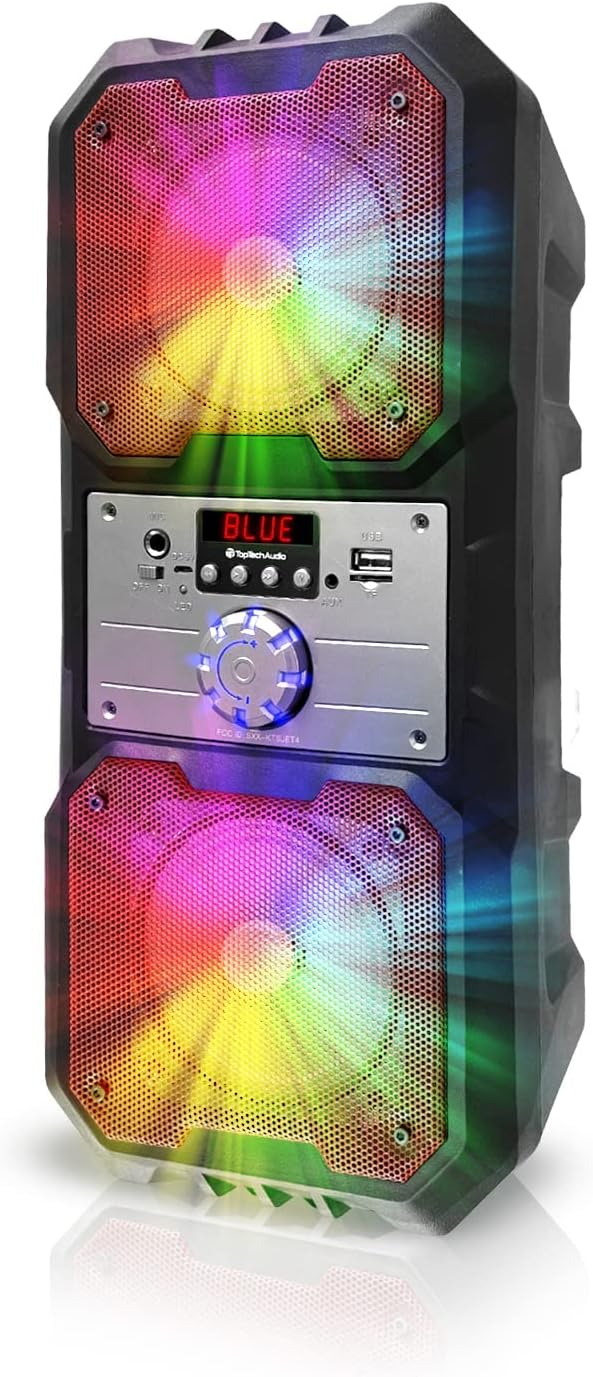
малюнок 4.1: Фронт view of the Top Tech Audio Spike-4 speaker, showcasing its dual 4-inch woofers with vibrant, multi-color LED lighting effects. The central control panel is visible between the two speaker grilles.

малюнок 4.2: закінченоview of the speaker's connectivity options and features, including Easy Portable design, USB Port, TF Card Port, Mic Port, AUX Port, and Bluetooth Wireless capability. These features are indicated by clear icons around the speaker.

малюнок 4.3: Illustration of the speaker's dynamic lighting features, including Multicolor Gradation where lights move with the rhythm, and Reactive Color Show where colors change and rotate slowly, enhancing the audio experience.
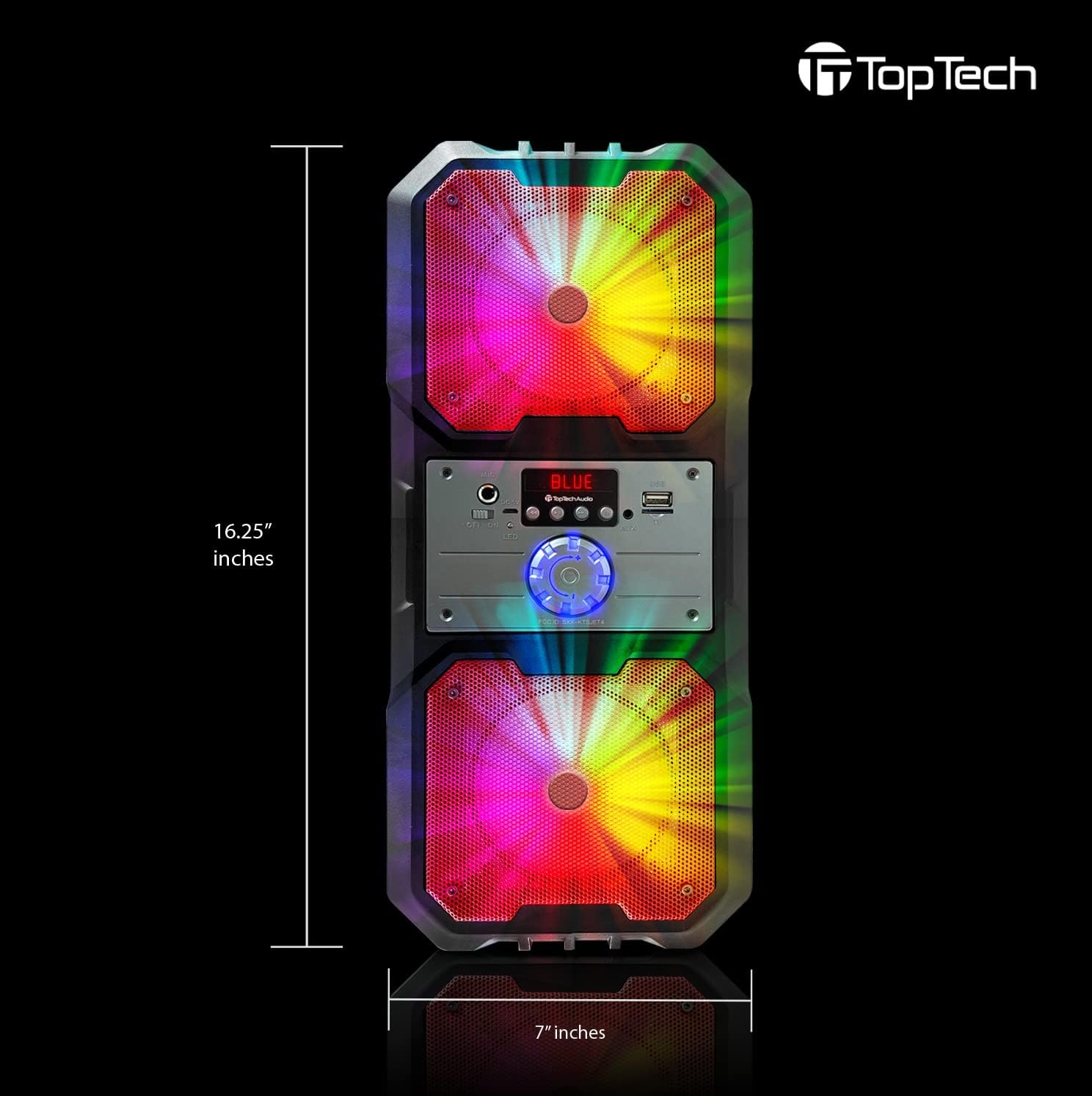
малюнок 4.4: Dimensions of the Top Tech Audio Spike-4 speaker, showing a height of 16.25 inches and a width of 7 inches, emphasizing its compact yet powerful design.
Ключові характеристики:
- Потужний звук: Dual 4-inch woofers deliver full-range audio with deep bass and vibrant highs.
- Rhythmic Disco Lights: Built-in LED lighting effects synchronize with your music for a dynamic visual experience.
- Бездротова потокова передача Bluetooth: Easily connect your smartphone or tablet with up to 33ft (10 meters) wireless range.
- Кілька режимів відтворення: Supports USB, TF card, AUX input, and FM radio for versatile listening options.
- Built-in Karaoke Function: Includes a microphone input and a microphone for sing-alongs and parties.
- Портативний дизайн: Оснащений ручкою для зручного транспортування.
5. Налаштування
5.1 Початкове заряджання
Before first use, fully charge the speaker. Connect the supplied power cord to the speaker's charging port and plug the other end into a standard wall outlet. The charging indicator light will illuminate. Once fully charged, the light may change color or turn off, depending on the model.
5.2 Увімкнення/вимкнення
To power on the speaker, locate the power button, usually on the control panel, and press and hold it for a few seconds until you hear an audible prompt or see the display light up. To power off, repeat the process.
5.3 Створення пари Bluetooth
- Ensure the speaker is powered on and in Bluetooth mode. If not, press the "Mode" button to switch to Bluetooth. The display will show "BLUE" or a similar indicator, and you may hear a pairing prompt.
- На мобільному пристрої (смартфоні, планшеті тощо) увімкніть Bluetooth та виконайте пошук доступних пристроїв.
- Select "Spike-4" or "TOPTECH" from the list of found devices.
- Once paired, the speaker will indicate a successful connection, usually with an audible tone.
- Тепер ви можете відтворювати аудіо з вашого пристрою через динамік.
5.4 Connecting Other Audio Sources
- Вхід AUX: Connect an external audio device (e.g., MP3 player, computer) to the speaker's AUX port using a 3.5mm audio cable (not included). Press the "Mode" button to switch to AUX mode.
- Відтворення через USB: Вставте флеш-накопичувач USB, що містить аудіофайли у форматі MP3 fileв порт USB. Гучномовець автоматично перейде в режим USB і почне відтворення.
- Відтворення TF карти: Вставте карту TF (microSD), що містить аудіофайли у форматі MP3 files into the TF card slot. The speaker will automatically switch to TF card mode and begin playing.
5.5 Підключення мікрофона
Plug the supplied microphone into the speaker's microphone input port. The microphone is ready for use in any mode, allowing for karaoke or public address functions.
6. Інструкція з експлуатації
6.1 Регулювання гучності
Adjust the master volume using the large rotary knob on the control panel. Turn clockwise to increase volume, counter-clockwise to decrease.
6.2 Вибір режиму
Press the "Mode" button repeatedly to cycle through available input modes: Bluetooth, FM Radio, AUX, USB, and TF Card. The current mode will be indicated on the display.
6.3 світлових режимів
The speaker features dynamic LED lights. There may be a dedicated button (e.g., "Light" or "LED") to cycle through different light patterns or to turn the lights on/off. Refer to the control panel for specific button functions.
6.4 Робота FM-радіо
- Switch the speaker to FM Radio mode using the "Mode" button.
- Press the "Play/Pause" button (often labeled with a play symbol) to initiate an automatic scan for available FM stations. The speaker will save detected stations.
- Use the "Previous/Next Track" buttons (often labeled with arrow symbols) to navigate between saved stations.
6.5 Функція караоке
With the microphone connected, simply speak or sing into the microphone. The speaker will amplify your voice. Adjust the microphone volume (if available) and echo effects (if available) using dedicated knobs or buttons on the control panel.
7. Технічне обслуговування
7.1 Очищення
Протріть зовнішню частину динаміка м’якою сухою тканиною. Не використовуйте абразивні засоби для чищення, віск або розчинники. Переконайтеся, що рідини не потрапляють у отвори динаміка.
7.2 Зберігання
When not in use for extended periods, store the speaker in a cool, dry place, away from direct sunlight and extreme temperatures. It is recommended to partially charge the battery before storing to prolong its lifespan.
7.3 Догляд за акумулятором
The speaker contains a rechargeable battery. To maximize battery life:
- Уникайте частого повного розряджання акумулятора.
- Регулярно заряджайте динамік, навіть якщо він використовується нечасто.
- Do not expose the speaker to temperatures above 45°C (113°F) or below 0°C (32°F).
8. Вирішення проблем
| проблема | Можлива причина | Рішення |
|---|---|---|
| Динамік не вмикається. | Акумулятор розрядився. | Connect the speaker to a power source and charge it. |
| Немає звуку з динаміка. | Volume is too low; Incorrect mode selected; Device not connected properly. | Increase volume; Ensure correct input mode (Bluetooth, AUX, USB, TF); Reconnect device. |
| Не вдається з'єднати Bluetooth. | Динамік не в режимі сполучення; Bluetooth пристрою вимкнено; Занадто далеко від динаміка. | Ensure speaker is in Bluetooth pairing mode; Turn on Bluetooth on your device; Move device closer to speaker (within 10 meters). |
| Мікрофон не працює. | Мікрофон неправильно підключено; гучність мікрофона занадто низька. | Ensure microphone is fully inserted into the mic port; Adjust microphone volume knob if available. |
| FM radio static. | Слабкий сигнал; Перешкоди. | Relocate the speaker to an area with better reception; Perform an auto-scan again. |
9. Технічні характеристики
| Особливість | Деталь |
|---|---|
| Назва моделі | Spike-4 |
| Бренд | ТОПТЕХ |
| Тип динаміка | Outdoor / Portable |
| Розмір динаміка | Dual 4 Inches (Woofers) |
| Технологія підключення | Bluetooth, USB, AUX |
| Технологія бездротового зв'язку | Bluetooth |
| Діапазон Bluetooth | 10 метрів (33 фути) |
| Джерело живлення | Працює від батареї |
| Термін служби батареї | До 5 годин |
| Включені компоненти | AL-802 Party Speaker, Microphone, Power Cord |
| Колір | чорний |
| UPC | 752574407043 |
| Розміри (прибл.) | 16.25 inches (Height) x 7 inches (Width) |
10. Гарантія та підтримка
The Top Tech Audio Spike-4 Bluetooth Speaker comes with a Limited Warranty. Please retain your proof of purchase for warranty claims.
For technical support, warranty inquiries, or replacement parts, please contact Top Tech Audio customer service. Refer to the contact information provided with your product packaging or visit the official Top Tech Audio webсайт.
Виробник: Top Tech Audio


