1. Вступ
Дякуємо за покупкуasing the Muse MT-106 BT Stereo Turntable. This manual provides essential information for the safe and efficient operation of your new device. Please read it thoroughly before use and retain it for future reference.
The Muse MT-106 BT is a versatile 3-speed (33/45/78 RPM) stereo turntable featuring a Bluetooth receiver, a USB port for playback and encoding, and two integrated speakers. It is designed to play vinyl records and can also stream music from any Bluetooth-compatible device such as a tablet, smartphone, or laptop.
2. Техніка безпеки
- Джерело живлення: Переконайтеся, що блок живлення обtage matches the rating indicated on the unit.
- Вода і вологість: Do not expose the unit to rain, moisture, or dripping water. Do not place objects filled with liquids, such as vases, on the unit.
- Вентиляція: Забезпечте належну вентиляцію. Не блокуйте вентиляційні отвори.
- Тепло: Тримайте пристрій подалі від джерел тепла, таких як радіатори, обігрівачі, печі або інші прилади, що виробляють тепло.
- Прибирання: Перед чищенням від’єднайте пристрій від розетки. Використовуйте м’яку суху тканину. Не використовуйте рідкі або аерозольні засоби для чищення.
- Обслуговування: Не намагайтеся самостійно обслуговувати цей виріб. Зверніть усі послуги до кваліфікованого обслуговуючого персоналу.
- Розміщення: Розмістіть пристрій на стійкій, рівній поверхні, щоб запобігти його падінню та пошкодженню.
3. Вміст упаковки
Будь ласка, перевірте, чи входять до вашої упаковки такі предмети:
- Muse MT-106 BT Stereo Turntable
- Посібник користувача
- Адаптер живлення
- Адаптер на 45 об / хв
4. Продукт закінчивсяview
Familiarize yourself with the components and controls of your Muse MT-106 BT Turntable.

Рисунок 4.1: Загалом view of the Muse MT-106 BT Stereo Turntable. This image displays the turntable from an angled perspective, with its transparent dust cover lifted. The wooden base and integrated speakers are visible, along with the black platter, tonearm, and control knobs on the right side.
4.1 Front and Top Components
- Пилозахисний чохол: Захищає диск та тонарм від пилу.
- Блюдо: Обертова платформа, на якій розміщуються записи.
- Шпиндель: Утримує платівку на місці на тарілці.
- 45 RPM адаптер: Used for playing 7-inch records with large center holes.
- Тонеарм: Утримує стилус та відстежує канавки платівки.
- Стилус (голка): The part that reads the record grooves.
- Кий важіль: Піднімає та опускає тонарм.
- Перемикач швидкості: Перемикання для вибору 33, 45 або 78 об/хв.
- Інтегровані динаміки: Вбудовані динаміки для аудіовиведення.

Рисунок 4.2: Панель керування. Це зображення надає детальне view of the control panel located on the right side of the turntable. It shows three rotary knobs for volume and function selection, along with several buttons for playback control and mode switching.
4.2 Панель керування
- Ручка живлення/гучності: Вмикає/вимикає пристрій та регулює гучність.
- Ручка вибору функцій: Switches between Phono, Bluetooth, USB, and Aux-in modes.
- Кнопки керування відтворенням: Play/Pause, Skip Forward, Skip Backward (for USB mode).
- Автоматичний вимикач зупинки: Enables or disables the automatic stop function for vinyl playback.
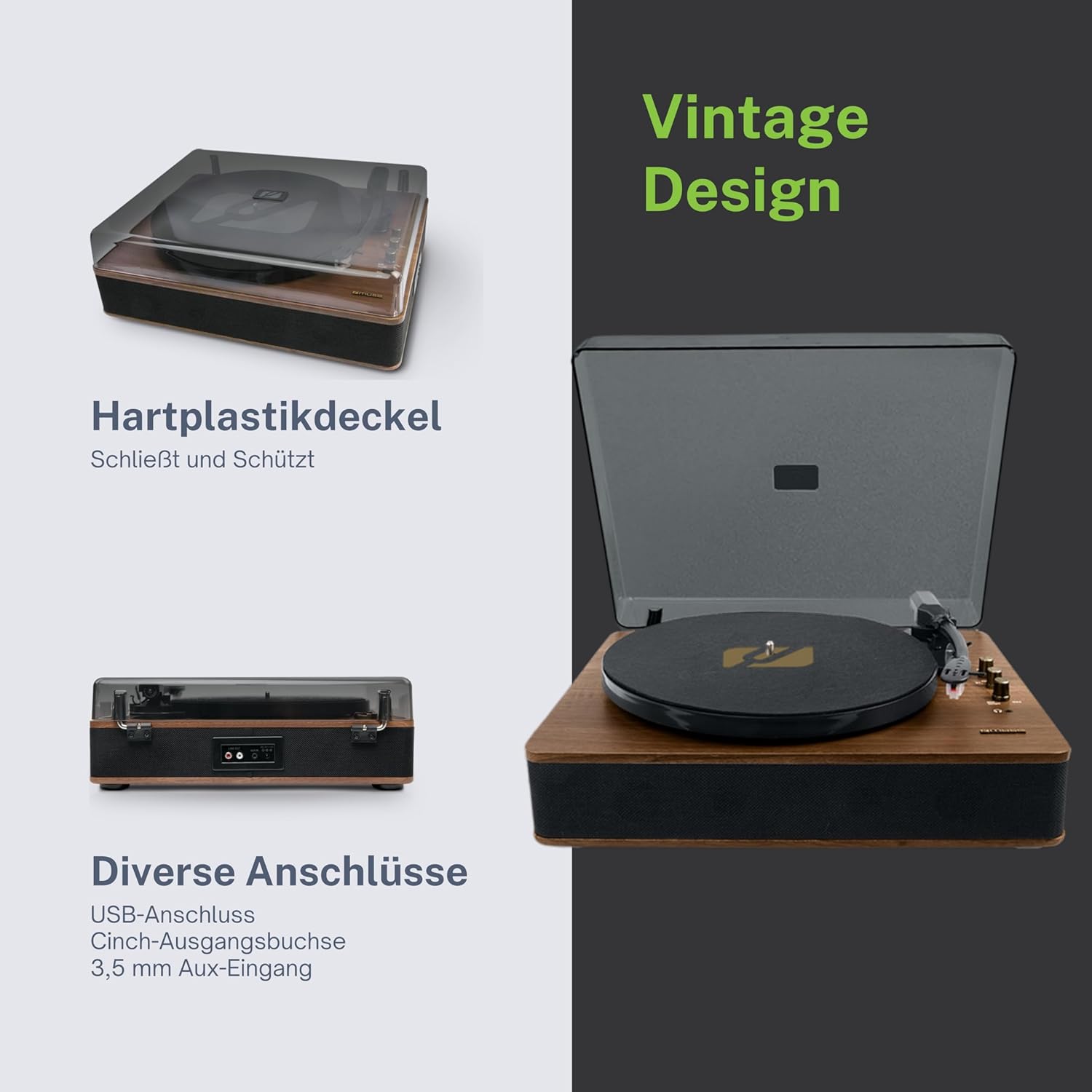
Figure 4.3: Rear Connections. The rear panel of the turntable is shown, featuring various connection ports including RCA audio outputs, a USB port, and an auxiliary input jack, allowing connection to external audio systems or devices.
4.3 Задні та бічні підключення
- RCA Output Jacks (L/R): Підключіться до зовнішнього amplifier або активні колонки.
- Порт USB: Для відтворення MP3 files from a USB drive or encoding vinyl to USB.
- Роз'єм AUX IN (3.5 мм): Підключіть зовнішні аудіопристрої.
- Гніздо DC IN: Підключіть адаптер живлення.
- Гніздо для навушників (3.5 мм): Для приватного прослуховування.

Figure 4.4: Key Functions Overview. An illustrative graphic highlighting the key functions and connectivity options of the turntable. Icons represent features such as USB encoding, MP3 playback via USB, RCA output, auto-stop, integrated speakers, headphone jack, auxiliary input, and AC power input.
5. Налаштування
5.1 Розпакування
- Обережно вийміть пристрій з упаковки.
- Видаліть усі пакувальні матеріали та захисні плівки.
- Keep the packaging for future transport or storage.
5.2 Розміщення
- Place the turntable on a flat, stable, and level surface.
- Avoid placing it near strong magnetic fields, direct sunlight, or heat sources.
- Переконайтеся, що навколо пристрою достатньо місця для належної вентиляції.
5.3 Підключення живлення
- Connect the supplied power adapter to the DC IN jack on the rear of the turntable.
- Підключіть адаптер живлення до відповідної розетки.
5.4 Встановлення пилозахисної кришки
- Carefully attach the dust cover to the hinges on the back of the turntable.
- The dust cover protects the unit when not in use. Remove it or lift it fully when playing records.
6. Інструкція з експлуатації
6.1 Відтворення вінілових платівок
- Підніміть пилозахисну кришку.
- Rotate the Power/Volume knob clockwise to turn on the unit.
- Set the Function Selector knob to 'Phono'.
- Place a record on the platter. If playing a 45 RPM single, place the 45 RPM adapter on the spindle first.
- Select the correct speed (33, 45, or 78 RPM) using the Speed Selector switch.
- Зніміть із стилуса захисний кожух стилуса.
- Lift the tonearm using the cue lever.
- Move the tonearm over the desired starting point of the record.
- Gently lower the tonearm onto the record using the cue lever. The music will begin to play.
- Відрегулюйте гучність за допомогою ручки живлення/гучності.
- At the end of the record, if the Auto Stop switch is ON, the platter will stop rotating. If OFF, the platter will continue to rotate. Manually lift the tonearm and return it to its rest.
6.2 Режим Bluetooth
- Rotate the Power/Volume knob clockwise to turn on the unit.
- Set the Function Selector knob to 'BT' (Bluetooth). The Bluetooth indicator will flash, indicating pairing mode.
- Увімкніть Bluetooth на зовнішньому пристрої (смартфоні, планшеті тощо) та здійсніть пошук доступних пристроїв.
- Select 'MUSE MT-106 BT' from the list of devices. Once connected, the Bluetooth indicator will stop flashing and remain solid.
- You can now play music from your external device through the turntable's speakers. Adjust volume using both the turntable's knob and your external device.
6.3 USB Playback and Encoding
6.3.1 Відтворення з USB
- Rotate the Power/Volume knob clockwise to turn on the unit.
- Set the Function Selector knob to 'USB'.
- Insert a USB flash drive into the USB port. The unit will automatically detect and begin playing MP3 files.
- Use the Playback Control Buttons (Play/Pause, Skip Forward, Skip Backward) to navigate tracks.
6.3.2 USB Encoding (Recording Vinyl to USB)
The MT-106 BT allows you to convert your vinyl records into digital MP3 fileна USB-накопичувачі.
- Переконайтеся, що флеш-накопичувач USB вставлено в порт USB.
- Set the Function Selector knob to 'Phono'.
- Start playing your vinyl record as described in section 6.1.
- Press the 'Record' button (refer to Figure 4.2 for button location, typically indicated by a circle or 'REC' label). The recording indicator will illuminate.
- To stop recording, press the 'Record' button again. The recording indicator will turn off.
- The recorded audio will be saved as an MP3 file на вашому USB-накопичувачі.
6.4 Допоміжний вхід (AUX IN)
- Rotate the Power/Volume knob clockwise to turn on the unit.
- Set the Function Selector knob to 'AUX'.
- Connect an external audio device (e.g., MP3 player, CD player) to the AUX IN jack (3.5mm) on the rear of the turntable using an audio cable (not supplied).
- Play audio from your external device. The sound will be output through the turntable's speakers.
6.5 Вихід RCA
To connect your turntable to an external amplifier or powered speakers:
- Ensure the turntable and the external audio system are turned off.
- Connect an RCA audio cable (not supplied) from the RCA Output Jacks (L/R) on the rear of the turntable to the corresponding audio input jacks on your amplifier або активні колонки.
- Turn on both the turntable and your external audio system.
- Select the appropriate input on your external audio system.
7. Технічне обслуговування
7.1 Очищення стилуса
- Use a soft brush, specifically designed for stylus cleaning, to gently brush the stylus from back to front.
- Do not use excessive force or brush from side to side, as this can damage the stylus.
- Замінюйте стилус приблизно кожні 300-500 годин відтворення або якщо ви помітили погіршення якості звуку.
7.2 Очищення пристрою
- Wipe the exterior of the turntable with a soft, dry, lint-free cloth.
- Не використовуйте абразивні засоби для чищення, віск або розчинники, оскільки вони можуть пошкодити покриття.
- Для пилозахисної кришки використовуйте м’яку тканину та за потреби м’який неабразивний засіб для чищення.
8. Вирішення проблем
Якщо у вас виникли проблеми з програвачем, будь ласка, ознайомтеся з наступною таблицею, перш ніж звертатися до служби підтримки.
| проблема | Можлива причина | Рішення |
|---|---|---|
| Немає живлення | Адаптер живлення не підключений або несправна розетка. | Переконайтеся, що адаптер живлення надійно підключений, а розетка справна. |
| Ні звуку | Volume too low; incorrect function mode; external speakers not connected/powered. | Increase volume; select correct function (Phono, BT, USB, AUX); check external speaker connections and power. |
| Poor sound quality (vinyl) | Dirty or worn stylus; dirty record; incorrect speed selected. | Clean or replace stylus; clean record; select correct RPM. |
| Bluetooth не підключається | Turntable not in pairing mode; device too far; already connected to another device. | Ensure turntable is in BT mode and flashing; move device closer; disconnect from other devices. |
| Відтворення через USB не працює | USB-накопичувач неправильно вставлено; не підтримується file формат; USB-накопичувач несправний. | Reinsert USB drive; ensure files are MP3 format; try a different USB drive. |
9. Технічні характеристики
| Бренд | МУЗА |
| Назва моделі | МТ-106 БТ |
| Колір | Деревина |
| матеріал | Деревина |
| Вага товару | 4.3 кілограма |
| Швидкості обертання | 33, 45, 78 об/хв |
| Підключення | Bluetooth, USB, RCA Output, 3.5mm AUX Input, 3.5mm Headphone Jack |
| Особливості | Integrated Speaker, Dust Protection, Adjustable Speed, USB Encoding |
| Сумісні пристрої | Смартфон, планшет |
| Джерело живлення | AC Adapter (1 AAAA battery required for unspecified function, likely remote or internal clock) |
| Країна походження | Китай |
10. Гарантія та підтримка
This product is covered by a manufacturer's warranty. Please refer to the warranty card included with your purchase or visit the official MUSE webсайт для отримання детальних гарантійних умов.
For technical support, troubleshooting assistance, or inquiries regarding spare parts, please contact MUSE customer service through their official channels. Information regarding spare parts availability is currently not available.


