вступ
The Arcade1Up Super PAC-MAN Partycade is a portable and versatile arcade machine designed for easy setup and enjoyment in various environments. It comes fully assembled and offers multiple display options, including tabletop, door hanging, and wall mounting. This Partycade features a 17-inch color LCD display and authentic controls, providing a classic arcade experience. It includes 10 iconic games: PAC-MAN, PAC-LAND, PAC-MANIA, DIG DUG, DIG DUG II, MAPPY, ROMPERS, ROLLING THUNDER, and NEW RALLY-X.

Малюнок 1: Спереду view of the Arcade1Up Super PAC-MAN Partycade.
Ключові характеристики
- Класичні ігри 10: Enjoy a collection of 10 pre-installed arcade games, including Super PAC-MAN, PAC-MAN, PAC-LAND, MAPPY, DIG DUG, DIG DUG II, ROMPERS, ROLLING THUNDER, and NEW RALLY-X.
- Light-Up Marquee: Features an illuminated marquee displaying the "Super PAC-MAN" logo, enhancing the authentic arcade aesthetic.
- Універсальні варіанти монтажу: Includes hardware for door hanging, wall mounting, and detachable legs for tabletop play, offering flexible placement.
- Clear Deck Protector: A durable clear protector covers the control panel, safeguarding the joystick and buttons from wear.
- Компактний дизайн: With dimensions of 19.45” D x 14.49” W x 28.74” H, the Partycade is designed to fit easily in various spaces.

Малюнок 2: Збільшений план view of the control panel and light-up marquee.
Налаштування
Варіанти монтажу
The Arcade1Up Partycade offers three primary setup configurations:
- Tabletop Play: Attach the included detachable legs to the base of the unit for stable placement on any flat surface, such as a table or counter.
- Door Hanging: Utilize the provided door hanging hardware to suspend the Partycade securely over a standard door. Ensure the door frame is sturdy enough to support the unit's weight (approximately 32.4 pounds).
- Настінне кріплення: For a more permanent installation, use the wall mounting hardware to affix the Partycade directly to a wall. It is crucial to mount the unit into wall studs for maximum stability and safety. Consult a professional if unsure about wall mounting procedures.

Figure 3: The Partycade unit displayed in a wall-mounted configuration.
Початкове включення
Once the unit is securely placed or mounted, connect the power adapter to the designated port on the back of the Partycade and plug it into a standard electrical outlet. Locate the ON/OFF switch on the control panel and toggle it to the 'ON' position. The screen will illuminate, and the Arcade1Up logo will appear, indicating the unit is powering on.
Інструкція з експлуатації
Вибір гри
Upon powering on, the main game selection menu will be displayed. Use the joystick to navigate through the list of 10 available games. Press the 'A' button (typically the primary action button) to select your desired game. To return to the main menu from a game, hold the 'A' button for 5 seconds.
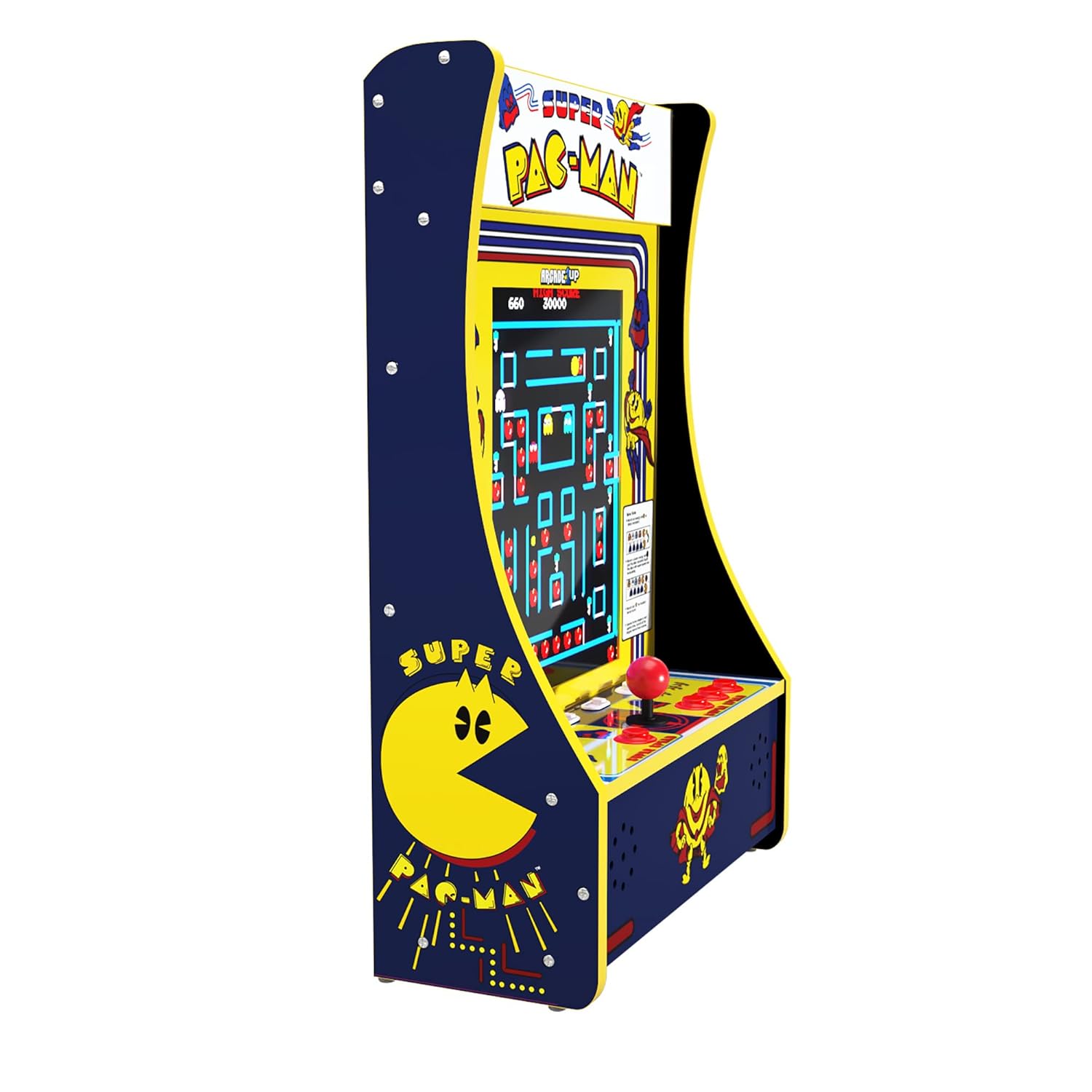
Figure 4: The game selection screen showing the 10 available titles.
Геймплей
Each game utilizes the joystick for directional input and the various buttons for actions such as firing, jumping, or special abilities. Refer to the on-screen instructions or in-game tutorials for specific controls for each title. The unit supports both single-player and two-player modes, depending on the selected game. Press the 'Player 1' or 'Player 2' buttons to initiate a game.
Елементи керування
The control panel features a classic arcade joystick for directional input and multiple action buttons. The layout is designed to replicate the feel of original arcade machines. A clear deck protector is installed over the control panel to ensure longevity and protect the components during intense gameplay.

Малюнок 5: Детально view of the joystick and action buttons on the control panel.
Регулювання гучності
The volume can be adjusted using the dedicated volume buttons located on the control panel, typically labeled 'VOL+' and 'VOL-'. Adjust the volume to a comfortable level for your playing environment.
Технічне обслуговування
To ensure the longevity and optimal performance of your Arcade1Up Partycade, follow these simple maintenance guidelines:
- Прибирання: Use a soft, dry cloth to wipe down the exterior surfaces, including the screen and control panel. For stubborn smudges, a slightly damp cloth with mild, non-abrasive cleaner can be used, ensuring no liquid seeps into the unit.
- Захист від пилу: Keep the unit in a clean, dust-free environment. Regularly dust the vents and openings to prevent accumulation that could affect performance.
- Зберігання: Якщо пристрій зберігатиметься протягом тривалого часу, від’єднайте його від живлення та зберігайте в прохолодному, сухому місці, подалі від прямих сонячних променів та екстремальних температур.
Усунення несправностей
No Power / Screen Blank
If the unit does not power on or the screen remains blank after turning it on:
- Переконайтеся, що адаптер живлення надійно підключений як до пристрою, так і до справної електричної розетки.
- Verify that the power outlet is active by testing it with another device.
- Check the ON/OFF switch on the control panel to ensure it is fully engaged.
Joystick or Button Unresponsive
If the joystick or buttons are not responding correctly during gameplay:
- Restart the unit by turning it off and then on again.
- Ensure the control panel is clean and free of debris that might obstruct button movement.
- While rare, if a joystick feels loose, it may require tightening. This typically involves removing the clear deck protector and gently tightening the base of the joystick. If uncomfortable performing this, contact customer support.
Гра зависає або аварійно завершує роботу
If a game freezes or the unit becomes unresponsive:
- Hold the 'Player 1' button for 5 seconds to reset the current game.
- If the issue persists, power cycle the unit by turning it off, waiting 10 seconds, and then turning it back on.
Технічні характеристики
| Особливість | Деталь |
|---|---|
| Бренд | ARCADE1UP |
| Номер моделі | PAC-D-10182 |
| Платформа | Не залежить від машини |
| Тип контролера | Джойстик, керування кнопками |
| Розмір екрана | 17 дюймів |
| Апаратний інтерфейс | Блискавка |
| Розміри продукту (Д x Ш x В) | 19.45 x 14.49 x 28.74 дюймів |
| Вага товару | 32.4 фунта |
| матеріал | пластик |
| Тип дисплея | ЖК |
Гарантія та підтримка
For detailed warranty information, product registration, or technical support, please refer to the official Arcade1Up webсайт або зверніться до їхнього відділу обслуговування клієнтів. Зберігайте чек про покупку для будь-яких гарантійних претензій.
Щоб отримати додаткові ресурси та відповіді на поширені запитання, відвідайте ARCADE1UP Store on Amazon.


