1. Вступ
This manual provides detailed instructions for the LFF DAB Plus Digital FM Radio. It covers setup, operation, maintenance, and troubleshooting to ensure optimal performance and user experience. Please read this manual thoroughly before using the device.

Фронт view of the LFF DAB Plus Digital FM Radio, showing the speaker grille, color display, and extended antenna.
2. Вміст упаковки
Будь ласка, перевірте упаковку на наявність наступних предметів:
- 1 x LFF DAB Plus Digital FM Radio
- 1 х адаптер змінного струму
- 1 x Короткий посібник
3. Продукт закінчивсяview
Ознайомтеся з компонентами та елементами керування радіоприймача.
3.1 Основні характеристики

This diagram illustrates the radio's key functions: DAB+ radio, 60 station presets, FM radio, sleep timer, headphone jack, Bluetooth connectivity, full-color screen, and dual alarm capability.
3.2 Елементи керування та порти

Зверху і збоку view of the radio, showing control buttons and knobs on the top panel, and the 3.5mm headphone jack located on the side.
Refer to the diagram above for the location of the following:
- Кнопка живлення: Вмикає/вимикає радіо.
- Кнопка режиму: Перемикання між режимами DAB+, FM та Bluetooth.
- Ручка налаштування/вибору: Rotates to tune stations or navigate menus, press to select.
- Регулятор гучності: Регулює гучність звуку.
- Попередні кнопки: Для збереження та виклику улюблених станцій.
- Alarm/Sleep Timer Button: Доступ до налаштувань будильника та таймера сну.
- Кольоровий дисплей: Відображає інформацію про станцію, час та пункти меню.
- Гніздо для навушників (3.5 мм): Для приватного прослуховування.
- Порт DC IN: Для підключення адаптера змінного струму.
- Телескопічна антена: Для покращення прийому радіосигналу.
4. Налаштування
4.1 Увімкнення
The radio can be powered by the included AC adapter or by batteries.
- Живлення змінного струму: Connect the AC power adapter to the DC IN port on the back of the radio and plug it into a wall outlet.
- Потужність батареї: Open the battery compartment on the back of the radio and insert 4 x 1.5V AA (LR6) batteries, ensuring correct polarity.
Назад view of the radio, detailing the battery compartment for 4x AA batteries, the AC adapter input (5V/1000mA), and the 360° rotatable antenna. Product dimensions are also indicated.
4.2 Регулювання антени
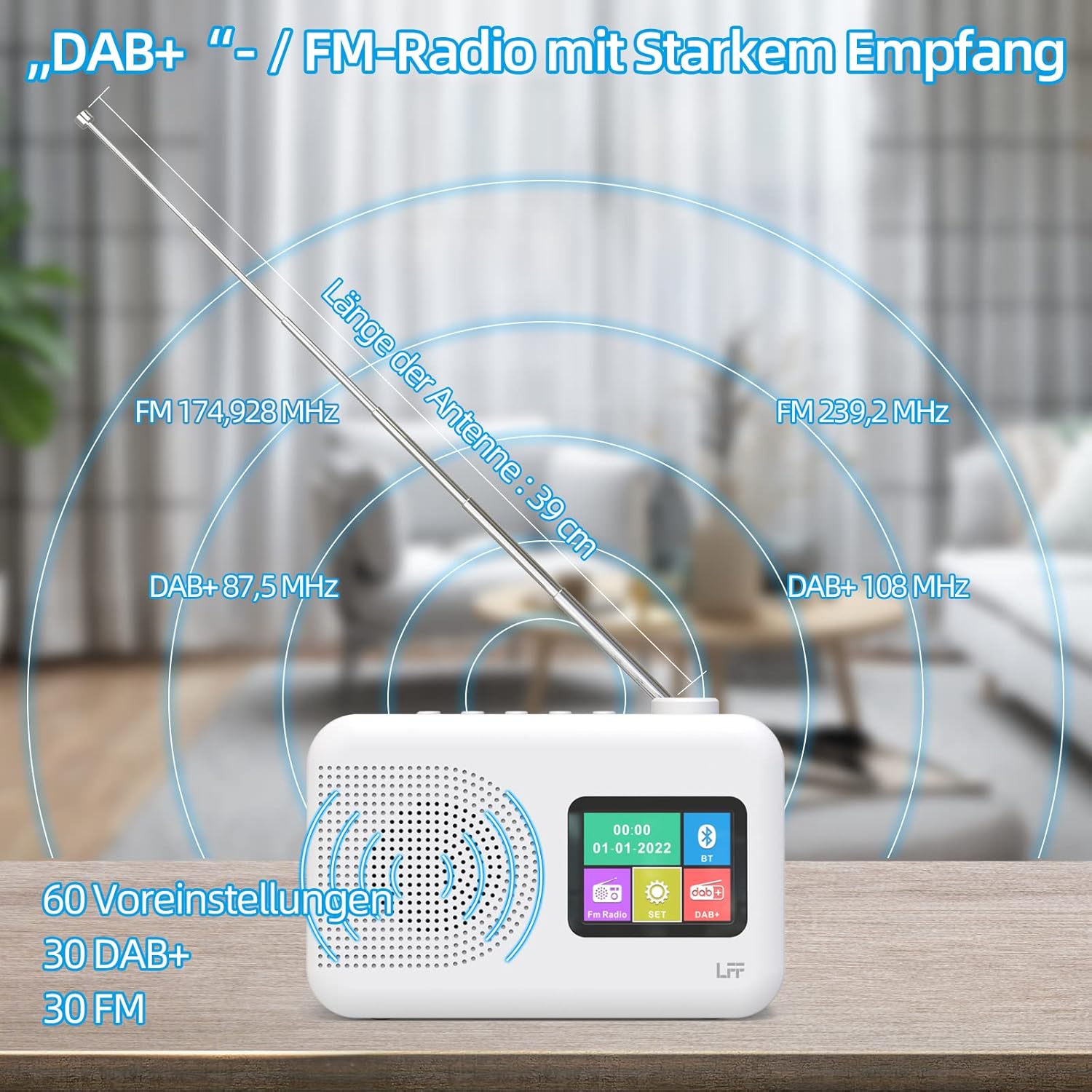
Extend the telescopic antenna fully (approximately 39 cm) and adjust its angle for optimal reception, especially for DAB+ and FM stations.

This diagram illustrates the radio's strong DAB+ and FM reception capabilities with the fully extended 39cm antenna, showing frequency ranges and the capacity for 60 total presets (30 DAB+, 30 FM).
4.3 Початкове сканування (DAB+)
- Увімкніть радіо.
- Ensure the mode is set to DAB+. If not, press the Режим кнопку для перемикання.
- The radio will automatically perform a full scan for available DAB+ stations. This may take a few minutes.
- Once the scan is complete, the radio will display a list of found stations.
5. Інструкція з експлуатації
5.1 DAB+ Radio Mode
- Натисніть Режим кнопку, щоб вибрати режим DAB+.
- Обертайте Налаштувати/Вибрати knob to browse through the available stations.
- Натисніть Налаштувати/Вибрати ручку, щоб вибрати станцію.
- Збереження пресетів: To save a station, press and hold a Попереднє налаштування button until the display confirms. To recall, briefly press the corresponding Попереднє налаштування button. Up to 30 DAB+ stations can be saved.
5.2 Режим FM-радіо
- Натисніть Режим щоб вибрати режим FM.
- Обертайте Налаштувати/Вибрати ручку для ручного налаштування частоти.
- Натисніть і утримуйте Налаштувати/Вибрати knob for a few seconds to auto-scan for the next available station.
- Збереження пресетів: Similar to DAB+ mode, press and hold a Попереднє налаштування button to save, and briefly press to recall. Up to 30 FM stations can be saved.
5.3 Режим Bluetooth

This diagram illustrates the three primary playback options for the radio: through its internal speaker, via Bluetooth connection to an external device, or using headphones connected to the headphone jack.
- Натисніть Режим button to select Bluetooth mode. The display will show "Bluetooth Pairing" or similar.
- На зовнішньому пристрої (наприклад, смартфоні) увімкніть Bluetooth та здійсніть пошук доступних пристроїв.
- Select "LFF Radio" (or similar name) from the list to pair.
- Once paired, you can play audio from your device through the radio's speaker.
- Примітка: This radio acts as a Bluetooth receiver. It does not support connecting to Bluetooth headphones or other Bluetooth speakers.
5.4 Таймер сну
Таймер сну дозволяє радіо автоматично вимикатися після встановленого періоду часу.

This image depicts the sleep timer function, offering selectable durations of 15, 30, 45, 60, 90, and 120 minutes before the radio automatically powers off.
- Натисніть Alarm/Sleep Timer button repeatedly to cycle through sleep timer options (15 min, 30 min, 45 min, 60 min, 90 min, 120 min, OFF).
- Select your desired duration. The radio will turn off automatically after this time.
5.5 Будильник
The radio features a dual alarm function.
- Натисніть і утримуйте Alarm/Sleep Timer кнопку для входу в налаштування будильника.
- Використовуйте Налаштувати/Вибрати knob to set the alarm time, alarm source (DAB+, FM, or buzzer), and volume.
- Натисніть Налаштувати/Вибрати ручку для підтвердження кожного налаштування.
- Repeat the process for the second alarm if needed.
5.6 Використання навушників
Plug 3.5mm headphones into the headphone jack on the side of the radio for private listening. The internal speaker will automatically mute.
6. Технічне обслуговування
6.1 Очищення
- Wipe the radio's surface with a soft, dry cloth.
- Не використовуйте абразивні засоби для чищення, віск або розчинники, оскільки вони можуть пошкодити покриття.
6.2 Заміна батареї
When using battery power, replace all four AA batteries when the low battery indicator appears on the display or when performance degrades.
- Ensure the radio is turned off and disconnected from AC power.
- Відкрийте кришку батарейного відсіку на задній панелі.
- Вийміть старі батареї та утилізуйте їх належним чином.
- Insert new 4 x 1.5V AA (LR6) batteries, observing correct polarity (+/-).
- Надійно закрийте кришку батарейного відсіку.
6.3 Захисна плівка для екрана
The radio's display comes with a transparent protective film. For optimal clarity, gently peel off this film before first use.
7. Вирішення проблем
Якщо у вас виникли проблеми, зверніться до наступних поширених проблем та способів їх вирішення:
| проблема | Можлива причина | Рішення |
|---|---|---|
| Немає живлення | AC adapter not connected, batteries depleted or incorrectly inserted. | Check AC adapter connection. Replace batteries or ensure correct polarity. |
| Поганий радіоприйом | Antenna not extended, weak signal area, interference. | Fully extend and adjust the telescopic antenna. Move the radio to a different location. Avoid sources of interference. |
| Bluetooth не підключається | Radio not in Bluetooth mode, device too far, already paired with another device. | Ensure radio is in Bluetooth mode. Keep devices within range. Disconnect from other devices. |
| Ні звуку | Гучність занадто низька, підключено навушники, увімкнено вимкнення звуку. | Increase volume. Disconnect headphones. Check if mute is active. |
8. Технічні характеристики
- Бренд: Розширення LFF
- модель: DAB Plus Digital FM Radio
- колір: Білий
- Технологія підключення: Bluetooth
- Розміри (Д x Ш x В): 16.1 см х 5.9 см х 10.9 см
- Технологія налаштування: DAB
- Джерело живлення: AC Adapter (5V/1000mA) or 4 x 1.5V AA (LR6) Batteries
- Підтримувані радіодіапазони: DAB+, FM
- Діапазон частот DAB+: 174.928 - 239.2 МГц
- Діапазон частот FM: 87.5 - 108 МГц
- Пресети: 30 DAB+, 30 FM
- Довжина антени: 39 cm (extendable)
- Особливості: DAB Plus Radio, Sleep Timer, Dual Alarm, Headphone Jack, Color Display
- Включені компоненти: DAB Digital Radio, AC Power Adapter, Quick Start Guide
9. Гарантія та підтримка
For any quality-related issues or technical support, please contact the seller directly. We are committed to resolving any problems you may encounter with your LFF DAB Plus Digital FM Radio.


