1. Вступ
This manual provides comprehensive instructions for the setup, operation, and maintenance of your Sharkoon V1000 RGB PC Case. Please read this manual carefully before beginning installation to ensure proper assembly and optimal performance.

малюнок 1.1: The Sharkoon V1000 RGB PC Case, showcasing its front mesh panel and pre-installed RGB fans.
2. Ключові характеристики
- Компактний дизайн: Mini-tower form factor suitable for Micro ATX motherboards.
- Підсвічування RGB: Pre-installed RGB fans for vibrant lighting effects.
- Бічна панель із загартованого скла: Демонструє внутрішні компоненти.
- Оптимізований потік повітря: Mesh front panel and support for multiple cooling fans.
- Універсальна сумісність: Supports graphics cards up to 40 cm, air cooling systems, and standard power supplies.
- Зручне підключення: Front I/O panel with USB 3.0 ports.
3. Налаштування та встановлення
3.1. Розпакування та перевірка
Carefully remove the PC case from its packaging. Inspect for any signs of damage during transit. Retain the packaging for future transport or storage.
3.2. Встановлення компонентівview
The Sharkoon V1000 RGB is designed for easy installation of your PC components. Follow the steps below for a typical build process.
- Підготуйте справу: Remove the tempered glass side panel and the rear metal side panel to access the interior.
- Встановити материнську плату: Secure your Micro ATX motherboard onto the pre-installed standoffs. Ensure all screws are tightened appropriately.
- Встановлення блоку живлення (БЖ): The PSU mounts at the rear bottom of the case. Slide the PSU into the dedicated shroud area and secure it with screws from the rear.
- Встановлення накопичувачів: Utilize the drive bays for 2.5-inch SSDs or 3.5-inch HDDs. Refer to the case's internal structure for specific mounting points.
- Встановити відеокарту: Insert your graphics card into the appropriate PCIe slot on the motherboard and secure it with the retention clip and screw. The case supports cards up to 40 cm in length.
- Підключення кабелів передньої панелі: Connect the front panel I/O cables (USB, audio, power, reset, LED) to their respective headers on the motherboard.
- Управління кабелем: Використовуйте вирізи для прокладання кабелів та точки кріплення за лотком материнської плати, щоб акуратно упорядкувати кабелі. Це покращує потік повітря та естетику.
- Reattach Panels: Після встановлення всіх компонентів та прокладання кабелів, знову прикріпіть бічні панелі.

малюнок 3.1: Internal layout of the V1000 RGB, highlighting the motherboard tray and PSU shroud.
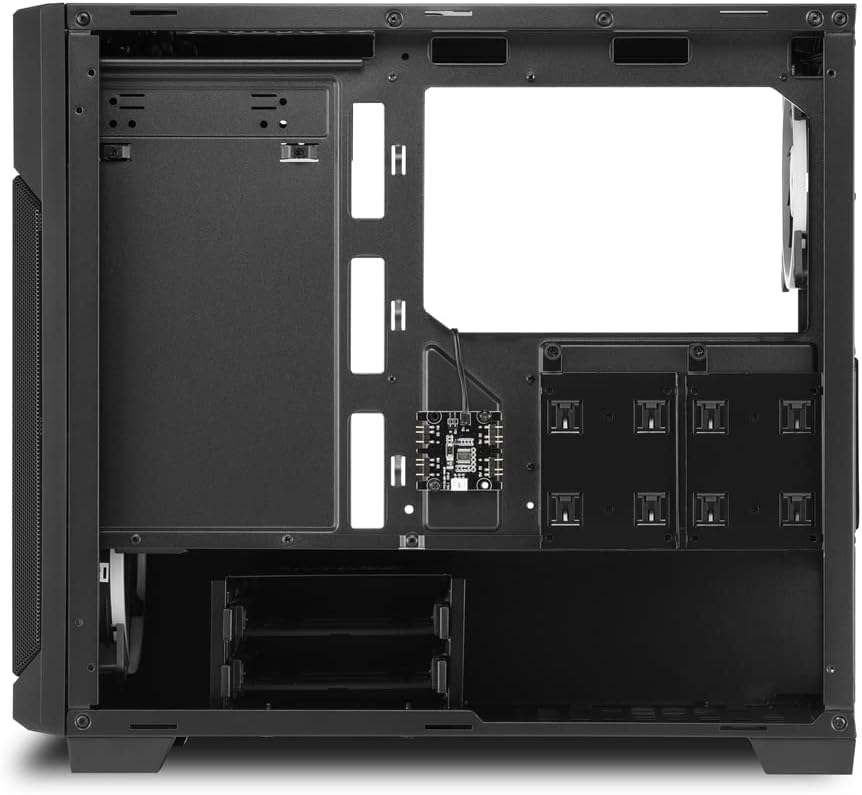
малюнок 3.2: Задній салон view, illustrating cable routing options and drive bay locations.
4. Експлуатація корпусу ПК
4.1. Увімкнення
After connecting all external peripherals and the power cable to your PSU, press the power button located on the top front panel of the case to turn on your system.
4.2. Керування RGB-підсвічуванням
The pre-installed RGB fans are typically controlled via your motherboard's RGB software (if compatible) or a dedicated RGB controller if included with your specific model. Refer to your motherboard or controller manual for detailed instructions on changing lighting modes and colors.
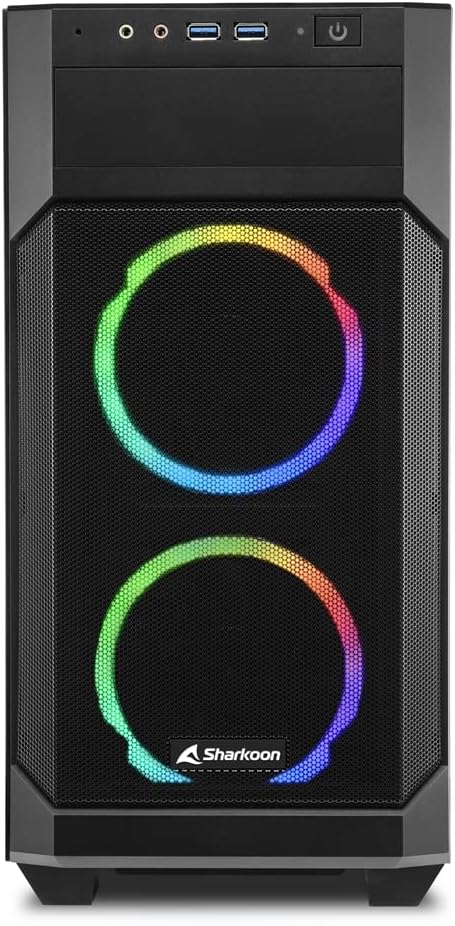
малюнок 4.1: Фронт view of the V1000 RGB, showcasing the vibrant RGB fan illumination.
5. Технічне обслуговування
5.1. Очищення пилового фільтра
The Sharkoon V1000 RGB features magnetic dust filters on the top and front panels to prevent dust accumulation inside the case. Regularly clean these filters to maintain optimal airflow and cooling performance.
- Верхній фільтр: Gently lift the magnetic filter from the top panel.
- Передній фільтр: The front mesh panel can be partially opened or removed for access to the front fans and filter.
- Use a soft brush or compressed air to remove dust from the filters. Rinse with water if necessary, and ensure they are completely dry before reattaching.

малюнок 5.1: Magnetic dust filter on the top panel, easily removable for cleaning.

малюнок 5.2: The front panel can be opened for easy access to the front fans and dust filter.
5.2. Генеральне прибирання
Протріть зовнішню частину корпусу м’якою тканиноюamp тканиною. Уникайте абразивних засобів для чищення або розчинників, які можуть пошкодити покриття або загартоване скло.
6. Вирішення проблем
| проблема | Можлива причина | Рішення |
|---|---|---|
| ПК не вмикається. | Loose power connections (PSU, motherboard, front panel). | Check all power cables are securely connected. Ensure front panel power switch cable is correctly attached to the motherboard. |
| RGB-вентилятори не світяться. | RGB cables not connected or incorrect software settings. | Verify RGB cables are properly connected to the motherboard or controller. Check motherboard's RGB software settings. |
| Poor airflow/overheating. | Dusty filters or obstructed fan vents. | Clean dust filters. Ensure no cables or components are blocking fan airflow. |
| Front USB ports not working. | Front panel USB cable not connected to motherboard. | Ensure the USB 3.0 header cable from the front panel is securely connected to the motherboard's USB 3.0 header. |
7. Технічні характеристики
- Назва моделі: Sharkoon V1000 RGB
- Номер моделі: 4044951035052
- Тип корпусу: Міні-вежа
- Сумісність материнської плати: Micro ATX
- матеріал: Сталь, загартоване скло, пластик
- колір: Multicolored (Black with RGB elements)
- Спосіб охолодження: повітря
- Попередньо встановлені вентилятори: RGB fans (quantity not specified, but images show 3)
- Макс. Довжина відеокарти: 40 см
- PSU Mounting: Заднє дно
- Передній вхід / вивід: 2 x USB 3.0, Audio In/Out, Power Button, Reset Button
- Особливості: RGB Lighting, Tempered Glass Side Panel, Removable Dust Filters
8. Гарантія та підтримка
Sharkoon products are manufactured with high-quality standards. In the unlikely event of a defect, please contact your local retailer or Sharkoon customer support.
- Наявність запчастин: Spare parts are generally available for 2 years from the date of purchase.
- For technical assistance or warranty claims, please visit the official Sharkoon webсайт або зверніться до їхніх каналів підтримки.


